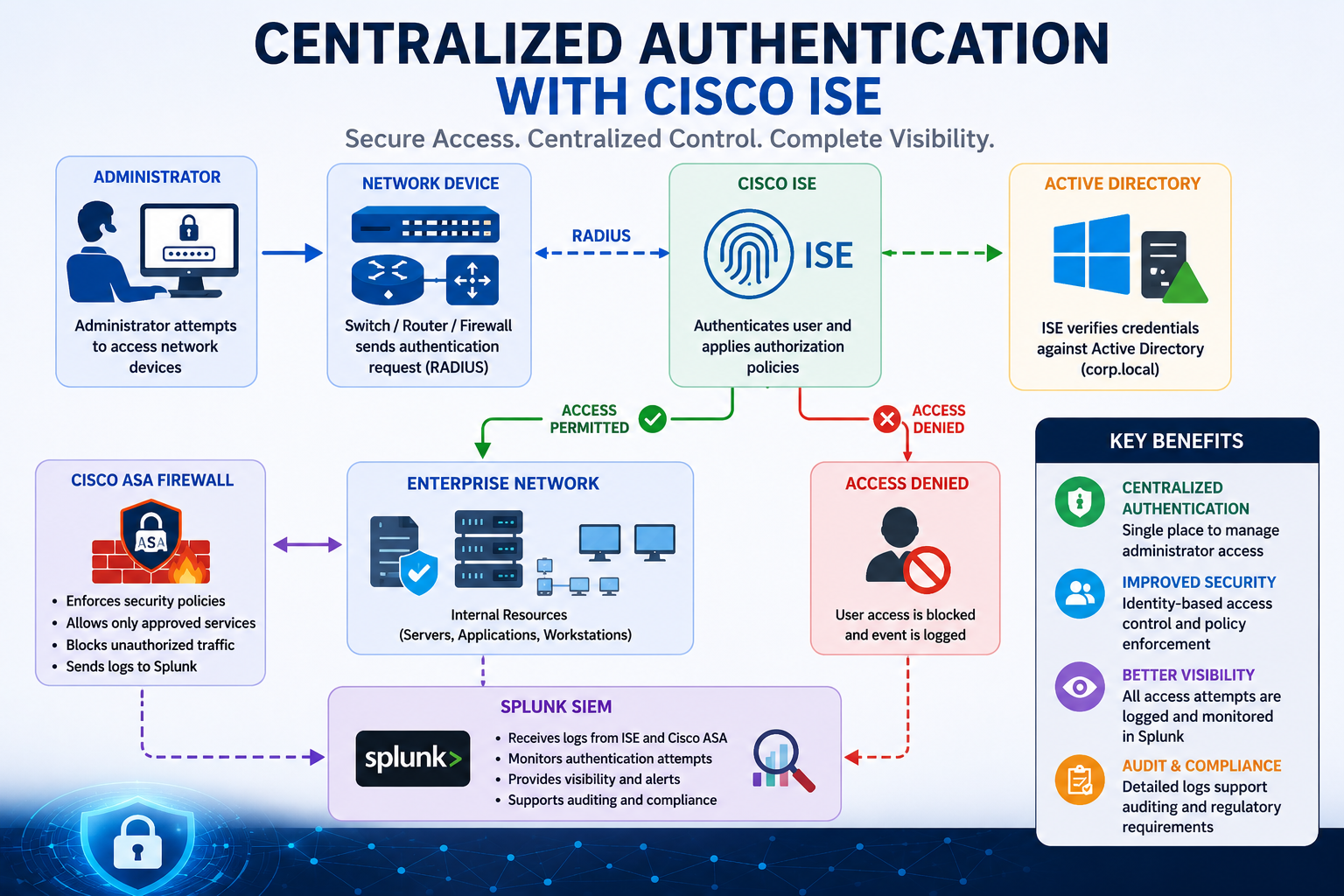
If your network engineers still keep a local username and password on every switch, your operations are one resignation away from a security incident. Centralized authentication with Cisco Identity Services Engine (ISE) solves that, plus a stack of related problems: who logged in where, which device tried to join the network last Tuesday, why an admin’s account works on some routers but not others. This guide walks through how ISE actually works, where each piece fits, the deployment patterns, and the pitfalls that catch most teams.
The short version. Cisco ISE is the AAA and policy engine of a Cisco-centric network. Network devices (switches, routers, wireless controllers, firewalls) forward authentication requests to ISE via RADIUS or TACACS+. ISE validates the user against Active Directory or another identity store, applies an authorization policy, and returns either Access-Accept with the right access profile or Access-Reject. Logs flow to Splunk or another SIEM for audit. Three things make this hard in practice: AD integration, scaling beyond a single ISE node, and the protocols themselves.
What Cisco ISE actually does
Cisco ISE serves three primary functions in a typical enterprise. Network Access Control (NAC) for endpoints joining the corporate network, wired and wireless. This is 802.1X with ISE deciding the right VLAN, dACL, or SGT based on user, device type, and posture. Device Administration for engineers logging into network gear. This is TACACS+ with ISE controlling per-command authorization and full session logging. Guest and BYOD for visitors and personal devices, including self-registration portals, sponsor approval, and time-bound credentials.
The same ISE deployment usually handles all three. The license is separate per function (Essentials, Advantage, Premier) but the appliances and AD integration are shared.
RADIUS vs TACACS+, in one paragraph
Both are AAA protocols. Both work with ISE. Use the right one for the job. RADIUS (UDP 1812 for auth, 1813 for accounting) is for endpoints joining the network: laptops, phones, printers, IoT. It is fast, well-supported by every vendor, and integrates with 802.1X. TACACS+ (TCP 49) is for administrators logging into network devices. It separates authentication, authorization, and accounting, supports per-command authorization (deny “configure terminal” for level-5 users, allow show commands), and logs every command issued. Run both. RADIUS for users and devices on the data plane, TACACS+ for engineers on the management plane.
How the RADIUS flow actually works
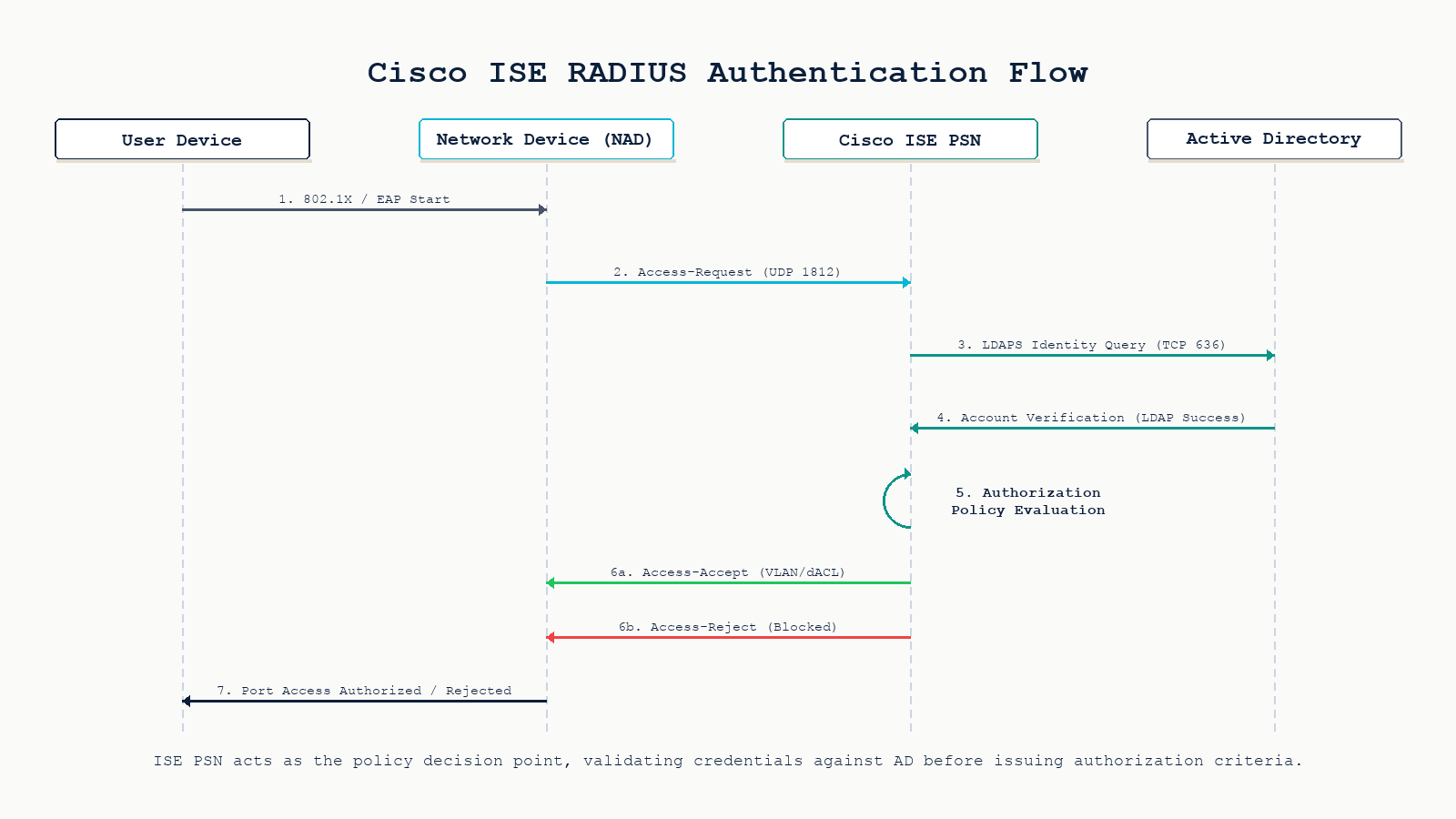
Walk through what happens when a user plugs a laptop into a switch port configured for 802.1X with ISE as the RADIUS server.
Step 1. The laptop’s supplicant sends EAPOL to the switch. The switch (acting as the Network Access Device, or NAD) wraps the EAP message in a RADIUS Access-Request and sends it to ISE on UDP 1812. The shared secret authenticates the NAD-to-ISE relationship.
Step 2. ISE looks up the user identity. If using Active Directory, ISE sends an LDAPS query (TCP 636) to a domain controller, retrieves the user object, and reads group memberships. ISE also looks up the device through endpoint profiling if dot1x with MAB fallback is configured.
Step 3. ISE evaluates the authorization policy. Policies are ordered rules: “if user in AD group Engineers AND device profile is corporate-laptop AND posture is compliant, then permit with VLAN 10 and dACL Engineers-Full”. Order matters. The first matching rule wins.
Step 4. ISE returns either an Access-Accept with RADIUS attributes (VLAN, dACL, SGT, session timeout) or an Access-Reject. The switch applies the VLAN and dACL to the port, the laptop gets a DHCP lease, and traffic flows. Or it does not, and the user calls the helpdesk.
Step 5. Accounting starts. ISE logs the session start, periodic interim updates, and the session stop when the user disconnects. The accounting data flows to Splunk or your SIEM for audit.
Active Directory integration is where most pain lives
ISE joins AD as a computer account (or set of accounts, one per PSN). The join creates a Kerberos trust between ISE and the domain. Once joined, ISE can resolve users, query group memberships, and authenticate via Kerberos, NTLM, or PAP depending on the protocol.
Three things break this in production. Time skew. Kerberos requires the ISE clock and the DC clock to be within 5 minutes of each other. NTP must be configured and working on both. DNS resolution. ISE must be able to resolve the AD domain and the DCs by name. A reverse DNS gap will make Kerberos fail silently. Account lockout policy. If your AD policy locks accounts after 5 failed attempts, a misconfigured supplicant on a single laptop can lock the user out within seconds. Use a dedicated ISE service account with lockout disabled or set very high.
Deployment patterns
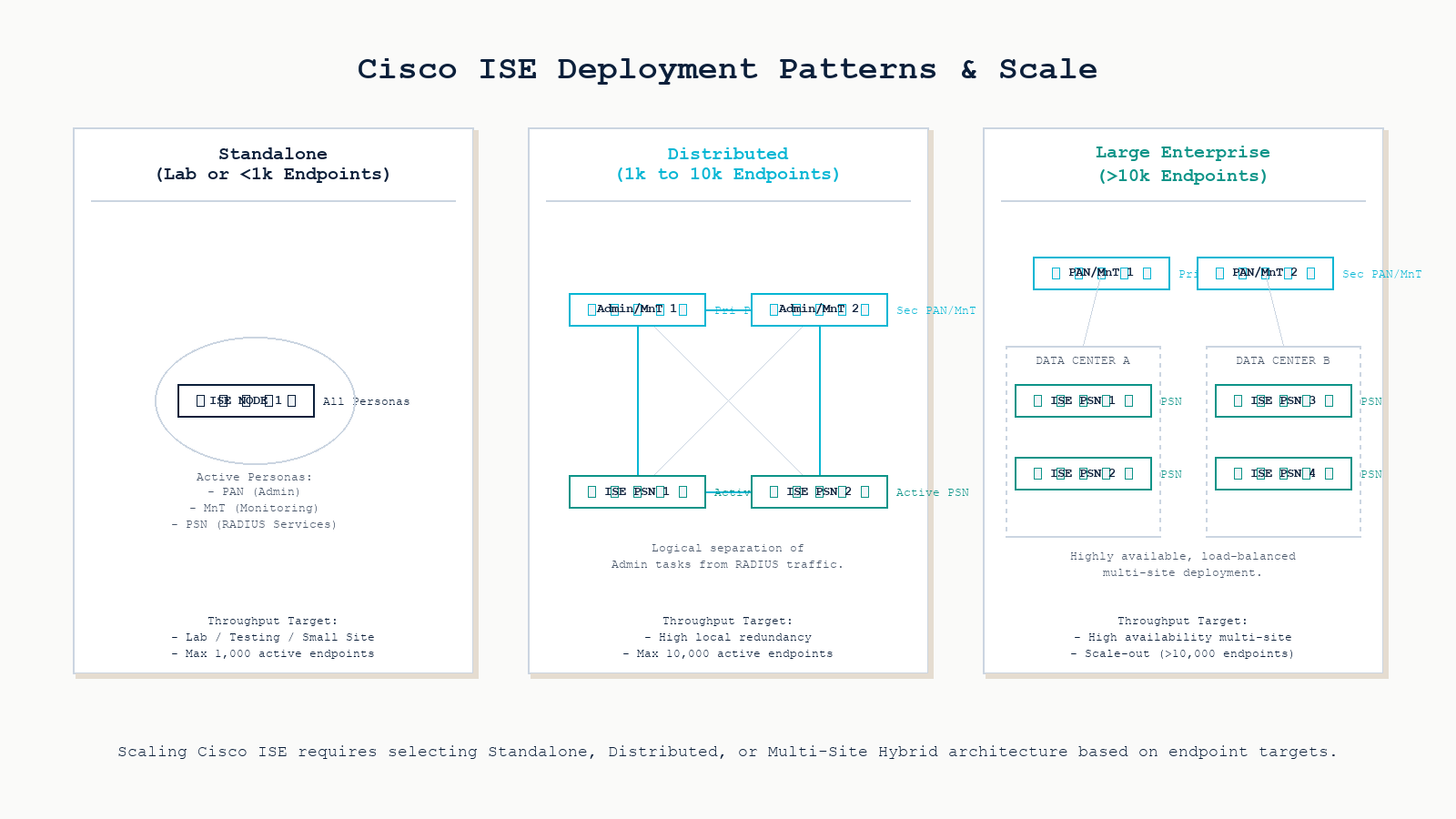
ISE supports three node personas: PAN (Policy Administration Node, the management plane), MnT (Monitoring and Troubleshooting), and PSN (Policy Service Node, the runtime that handles RADIUS and TACACS+ requests). The deployment shape depends on size and resilience requirements.
Standalone. All three personas on one appliance or VM. Fine for labs and small offices under 100 endpoints. No redundancy. Lose the node, lose authentication.
Small-to-medium distributed. Two PAN/MnT nodes (primary and secondary), two PSN nodes for runtime. Handles 1,000 to 10,000 endpoints comfortably. Survives single node failure.
Large enterprise. Two PAN/MnT nodes in different data centers, four to forty PSN nodes spread by region or site. Some deployments dedicate PSNs by function (one set for wired NAC, another for TACACS+ device admin, another for guest). Latency from NAD to PSN matters. RADIUS round-trips under 50ms are the target.
Common deployment pitfalls
Shared secret mismatch. The single most common ISE problem on day one. The switch config has one shared secret, the ISE network device config has another. Symptom: every Access-Request times out, ISE shows no logs because it never sees the request as valid. Always copy-paste, never re-type.
Authorization policy order. A more specific rule placed below a more general one will never fire. If your “Permit Engineers” rule sits below a “Default Permit Domain Users” catch-all, engineers get the default profile, not the engineering one. Reorder rules from specific to general.
Forgetting MAB fallback. Printers, IP phones, and badge readers do not speak 802.1X. Without MAC Authentication Bypass (MAB) as a fallback after dot1x times out, every non-supplicant device is denied. Configure both methods on every access port, with dot1x preferred and MAB as fallback.
PSN sizing. Each PSN has a documented RADIUS request-per-second ceiling. Exceeding it during a morning login storm causes timeouts and users falling back to authentication failure. Right-size the PSN cluster for your peak, not your average.
Certificate management. EAP-TLS, the strongest 802.1X method, requires certificates on every endpoint and on ISE. Forgetting to renew the ISE EAP cert before expiration breaks all 802.1X sessions cluster-wide. Calendar the renewal a month in advance.
Wiring in the firewall and SIEM
A Cisco ASA (or any modern NGFW) sits between authenticated segments and uses ISE-supplied Security Group Tags (SGTs) or RADIUS attributes to make its own policy decisions. The firewall enforces only what ISE has already classified. Combined with Splunk receiving authentication logs from ISE and traffic logs from the ASA, the SIEM has a complete picture: who tried to access what, from which device, at what time, and whether the firewall allowed or denied the resulting traffic.
This is the visibility argument for centralized auth. Local accounts on every switch produce log fragments scattered across fifty devices. ISE plus Splunk produces a single auditable timeline.
Why centralize at all?
- Single place to manage administrator access. Disable a leaving engineer’s AD account once and they lose access to every router, switch, firewall, and wireless controller in the same minute.
- Identity-based policy. Permissions follow the user, not the IP address or VLAN. Same user, same access from any port or any Wi-Fi SSID.
- Complete visibility. Every authentication attempt logged, every command an engineer issued logged, every endpoint joining the network classified.
- Audit and compliance. PCI-DSS, SOC 2, and HIPAA all require centralized authentication and audit trails for privileged access. ISE plus a SIEM satisfies the technical control directly.
FAQ
Do I need ISE if I only use RADIUS for Wi-Fi?
Not necessarily. For wireless-only RADIUS against AD, Windows Network Policy Server (NPS) is free and works. ISE becomes the right answer when you also need wired 802.1X with profiling, TACACS+ for device administration, posture assessment, guest portals, or SGT-based segmentation. If any two of those apply, ISE saves complexity overall.
Can ISE work with Azure AD or Entra ID instead of on-prem AD?
Yes, via Azure AD Domain Services or by using ISE’s SAML/REST integrations. Direct LDAPS to Entra ID is not supported the way on-prem AD is. Most hybrid deployments still join ISE to an on-prem AD that syncs to Entra via Azure AD Connect.
What is the latency budget for RADIUS round-trips?
Under 50 ms NAD-to-PSN is the comfortable target. Up to 100 ms works for most users. Above 200 ms, supplicants start timing out during morning login storms. For multi-site deployments, place a PSN at each major site rather than backhauling RADIUS across a WAN.
How do I survive an ISE outage?
Configure backup RADIUS servers on every NAD (a secondary PSN, plus an emergency local fallback). Use the switch’s aaa authentication login default group radius local command so engineers can still log in with a local break-glass account when ISE is unreachable. Document the break-glass credentials in your vault and rotate them quarterly.
Is ISE worth the licensing cost?
For Cisco-centric networks with 1,000 or more endpoints and compliance requirements, yes. The audit trail and centralized policy savings outweigh the license cost. For mixed-vendor environments or smaller networks, alternatives like Aruba ClearPass, FreeRADIUS plus a SIEM, or Microsoft NPS may be more practical.
Related posts
Designing or operating centralized authentication
Centralized authentication is one of those investments that looks expensive on day one and pays back every time someone leaves the company, every audit, every incident review. Our network security practice has designed and operated ISE deployments for organizations across Western Canada, plus alternative AAA stacks (ClearPass, FreeRADIUS) for non-Cisco environments. If you are evaluating ISE or trying to fix one that is not behaving, we will help you make the right call.
Last verified May 2026 by the aaanetworkx network security practice.
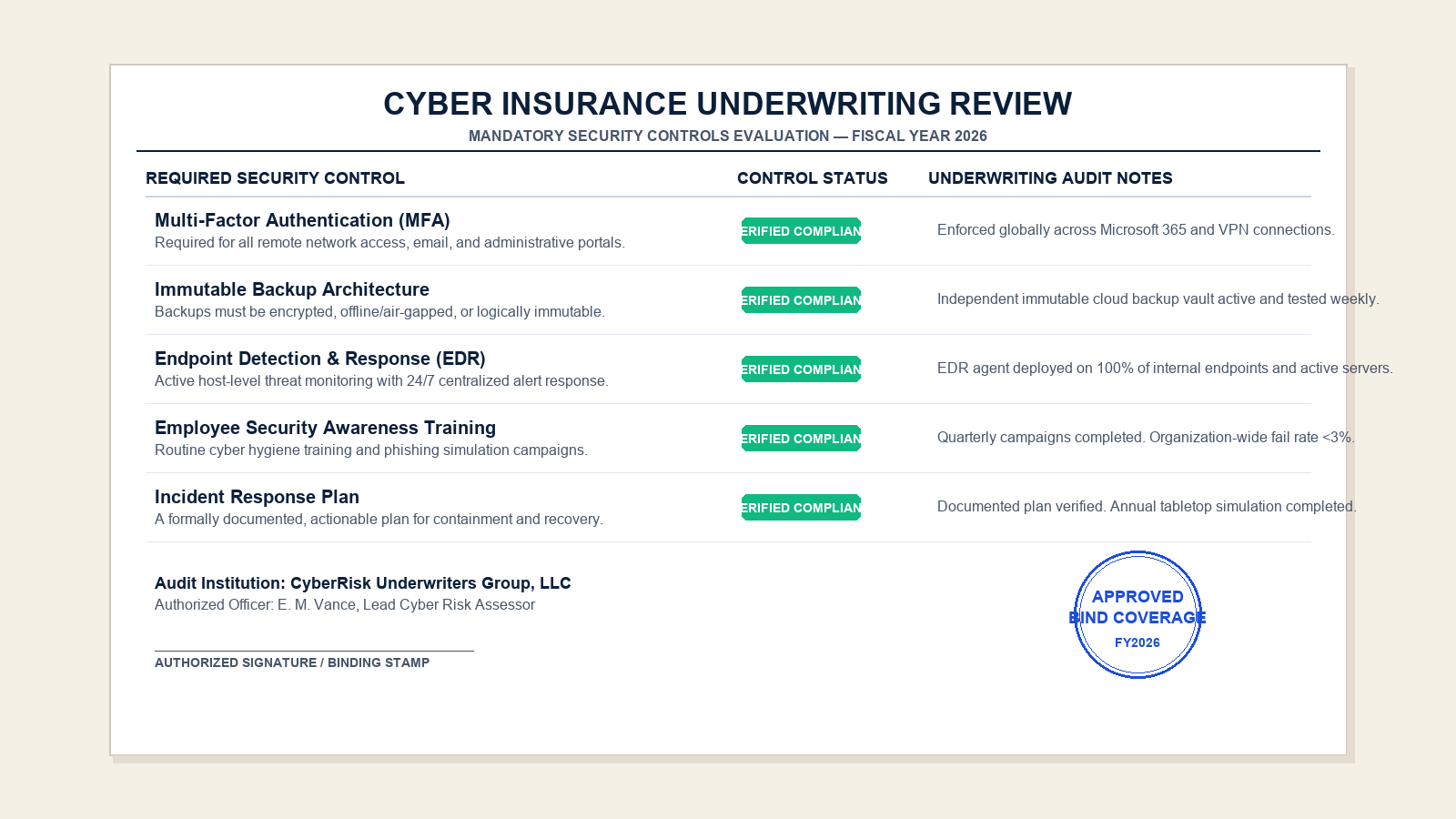
Cyber insurance requirements in 2026 are no longer a back-office formality. Carriers now verify specific controls before binding coverage, and missing controls increasingly result in higher premiums, narrower coverage, or claim denial.
Most small and mid-sized businesses in Edmonton encounter cyber insurance the same way: a renewal questionnaire arrives from the broker, the IT team scrambles to answer it, and the policy either binds at a premium higher than last year or comes back with new exclusions. The pattern is predictable because the underwriting model has changed. After several years of large ransomware loss ratios, carriers tightened standards. Today the questionnaire is not a formality. It is the underwriting decision.
This guide walks through what cyber insurers actually verify in 2026, the 12 controls that show up on almost every questionnaire, how those controls affect premium and insurability, the questions worth pre-answering before the broker calls, and what triggers claim denial after an incident.
Why cyber insurance changed
For most of the last decade, cyber insurance was easy to buy and inexpensive. The market then absorbed several years of catastrophic ransomware losses and reinsurance support tightened. Carriers responded by raising premiums, narrowing coverage, adding exclusions, and most importantly, verifying the security controls of the insured before binding.
The practical effect for a small business is that the answers on the renewal questionnaire are no longer self-reported with no follow-up. Carriers now perform external attack-surface scans, request screenshots and configuration evidence, and in some cases run automated control attestation through partner platforms. Misrepresentation on the questionnaire, intentional or not, is now a known basis for claim denial.
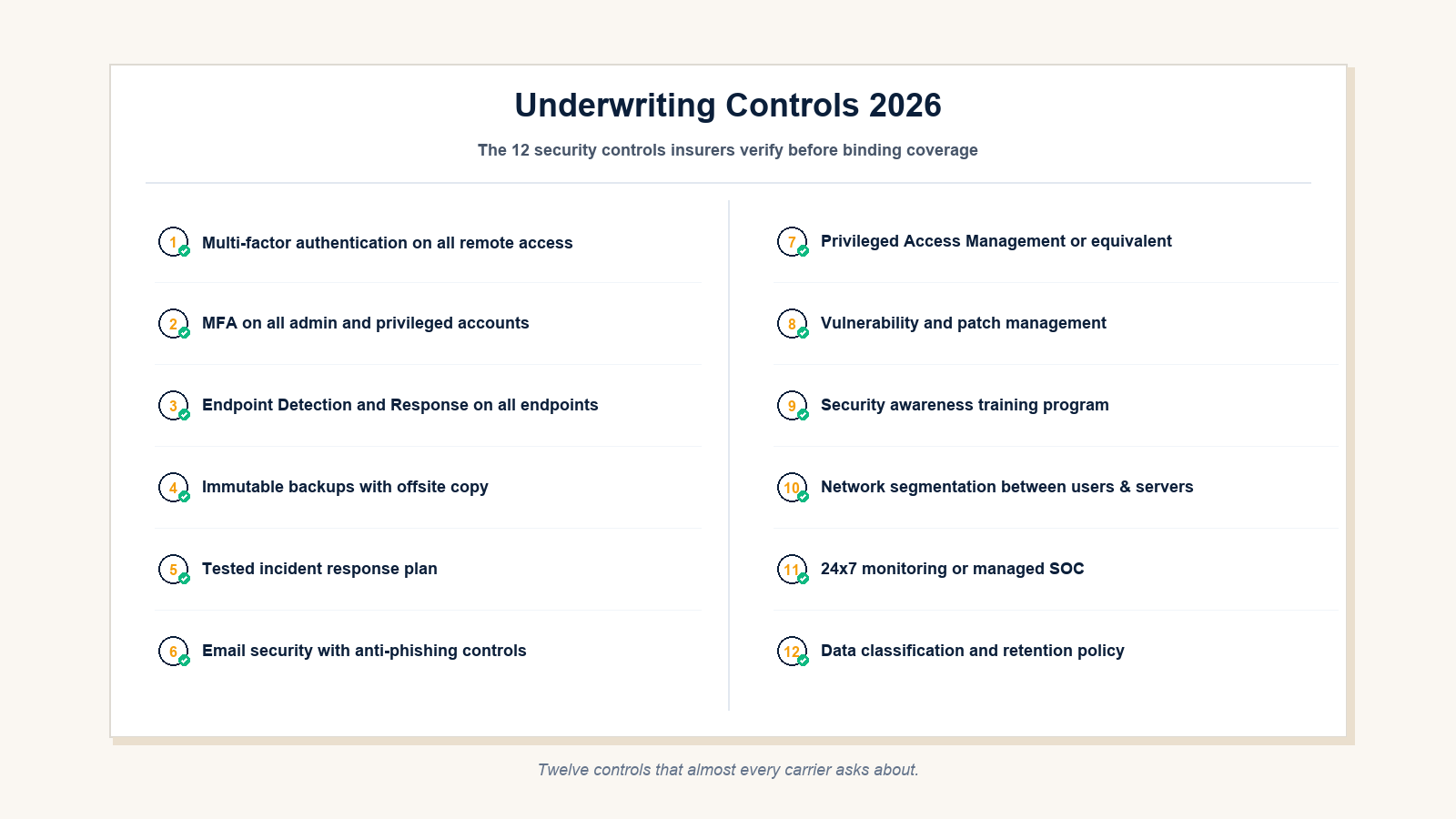
The 12 controls insurers actually verify
Questionnaires vary by carrier, but the underlying expectations have converged. The following 12 controls appear, with minor wording differences, on almost every 2026 questionnaire.
1. MFA on all remote access
Every remote access path must require multi-factor authentication. This includes VPN, RDP gateways, Citrix, ZTNA portals, web-based admin consoles, and any third-party remote support tooling. A single exception path with password-only access typically results in a coverage exclusion or denial.
2. MFA on all administrative and privileged accounts
Domain admins, Microsoft 365 global admins, hypervisor administrators, backup administrators, and firewall administrators all require MFA. Service accounts that cannot use MFA require compensating controls: vaulting, just-in-time elevation, or strict network restrictions.
3. EDR on all endpoints and servers
Antivirus alone is no longer accepted by most carriers. Endpoint Detection and Response with behavioral analysis, isolation capability, and centralized visibility is now baseline. Microsoft Defender for Endpoint, CrowdStrike Falcon, SentinelOne, and Sophos Intercept X are common picks. Coverage must extend to servers, not just workstations.
4. Immutable backups with offsite copy
Backups must be immutable for a defined retention window, stored offsite, and demonstrably tested. The 3-2-1 rule has been updated in practical underwriting to 3-2-1-1-0: three copies, two media types, one offsite, one immutable, zero unverified restores. Carriers increasingly ask for the date of the last successful restore test.
5. Tested incident response plan
A documented incident response plan with named roles and a tabletop exercise within the last 12 months. The plan must include cyber insurance notification timelines and the carrier’s incident response hotline.
6. Email security with anti-phishing controls
Spam filtering, attachment sandboxing, URL rewriting, DMARC enforcement, and inbound impersonation protection. For Microsoft 365 environments, Defender for Office 365 Plan 2 or an equivalent third-party product is now baseline.
7. Privileged Access Management
Some form of credential vault, just-in-time elevation, or session brokering for highly privileged accounts. For small businesses, this often means a lightweight PAM tool or, at minimum, isolated admin workstations and tier-zero account separation.
8. Vulnerability and patch management
Operating system and third-party patches applied within a defined SLA, edge appliance firmware kept current, and vulnerability scanning in place. Carriers now perform external scans during quoting and questions about known unpatched CVEs at the perimeter come up directly.
9. Security awareness training
An annual or quarterly training program for all employees, with phishing simulation tracking. Carriers do not usually verify content quality, but they do ask for completion rates and program cadence.
10. Network segmentation
Separation between user networks, server networks, guest WiFi, IoT, and management networks. Flat networks are a frequent finding in claim denials for ransomware events because they amplify blast radius. Even basic VLAN segmentation, properly enforced, materially changes underwriting.
11. 24×7 monitoring or managed SOC
Either an internal SOC or a managed detection and response service. For most SMBs in Alberta this is delivered through a managed SOC partner. Carriers ask for the provider name and the response SLA.
12. Data classification and retention policy
Documented data classification, retention requirements, and disposal procedures aligned to regulatory obligations. This control is the one most frequently weak in small business environments because it requires written policy, not just technical configuration.
How controls affect premium and insurability
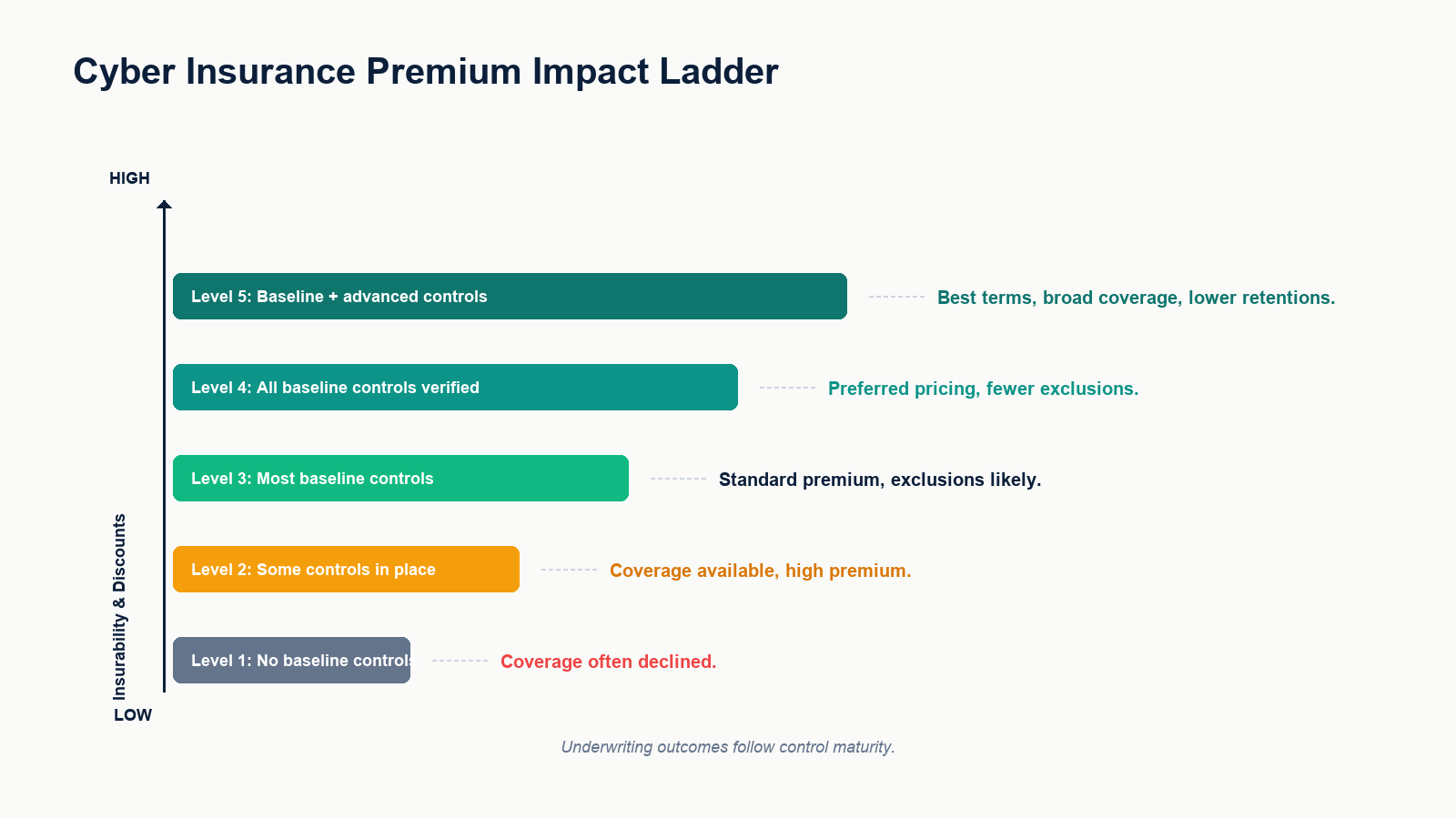
Underwriting outcomes follow control maturity. Businesses without baseline controls often have coverage declined outright, especially for ransomware. Businesses with partial controls usually receive coverage at higher premiums with exclusions, most commonly for ransomware extortion payments, business interruption, and dependent-business losses. Businesses with all baseline controls verified typically receive standard pricing with fewer exclusions. Businesses with baseline plus advanced controls (PAM, segmentation, managed detection and response) receive preferred pricing with broader coverage and lower retentions.
The premium spread between weak and strong control posture for a small business in Edmonton can be material. Equally important is that strong control posture often means a policy actually pays in a covered event, where a weak posture risks the claim being challenged for misrepresentation.
What triggers claim denial
Three patterns drive claim denial in our experience.
The first is misrepresentation on the questionnaire. The questionnaire claimed MFA on all remote access, the incident investigation reveals one VPN account without MFA. The carrier disputes coverage on the basis of misrepresentation, not because the missing MFA caused the incident, but because the application was inaccurate.
The second is failure to maintain a stated control. The questionnaire reported EDR deployed, but at the time of the incident a meaningful number of endpoints had the agent uninstalled, never installed, or in a non-reporting state. Carriers increasingly require the insured to maintain controls, not just have them at policy inception.
The third is late notification. Policies typically require notification within a specific window after the insured knew or should have known about an incident. Delays driven by internal politics or hope-it-resolves-itself often jeopardize coverage. The carrier’s hotline should be the first call, before legal and before customers.
Preparing for the renewal questionnaire
The pre-renewal sequence that works for small business is short.
- Request a copy of last year’s submitted questionnaire and current policy from the broker.
- Walk every answer against the current environment. Verify, do not assume.
- Identify any control that has degraded since last submission (an MFA exception added, an EDR agent uninstalled on a server, a backup that has not been restore-tested in 18 months).
- Document the evidence the carrier will likely ask for: tenant configuration screenshots, EDR coverage reports, last restore test date, last tabletop exercise date.
- Fix or formally accept any remaining gaps before submission, with a written remediation plan if a fix cannot be done in time.
Done early, this sequence typically lowers the premium quote, expands coverage, and dramatically reduces the risk of claim dispute. Done at the last minute, it usually does the opposite.
FAQ
Do small businesses really need cyber insurance?
In 2026, for most businesses with customer data, regulated information, or material operational dependence on IT, yes. The cost of a single covered event commonly exceeds annual policy cost by orders of magnitude.
Can a managed service provider improve our insurability?
A capable provider can. The provider delivers and maintains the baseline controls carriers verify, documents evidence required for the questionnaire, and provides the 24×7 monitoring component many carriers now require.
What is the single most common reason for coverage refusal?
Incomplete MFA coverage, almost always on a legacy remote access path that everyone forgot existed.
Does cyber insurance cover ransom payments?
Some policies do, with conditions and sublimits. Many policies in 2026 carry ransomware-specific sublimits, retention increases, and conditions including approval by the carrier before any payment. Several jurisdictions are also moving toward restrictions on ransom payment, which the policy will reflect.
How long before renewal should we start preparing?
For a clean renewal, 60 to 90 days. For a business that needs to implement controls before renewal, 4 to 6 months is more realistic, especially if EDR, backup, or identity work is needed.
If you are renewing or applying for cyber insurance
Most small businesses approach the questionnaire reactively. The teams that get the best premium and broadest coverage approach it proactively, with control evidence ready and gaps fixed in advance. The work is finite and translates directly to lower premium, better coverage, and lower claim-denial risk.
Our team helps Edmonton businesses prepare for cyber insurance underwriting, close control gaps before renewal, and produce the evidence carriers actually verify. Book a cyber insurance readiness assessment. We will walk your environment against current underwriting expectations, identify gaps that will affect your renewal, and provide a remediation plan you can act on with or without us.
Related posts
- Ransomware Recovery Plan for Small Business
- Zero Trust Network Access for Small Business
- Microsoft 365 Backup Strategy
Zero Trust Network Access for small business is no longer an enterprise-only conversation. The economics have changed, the tooling has matured, and traditional VPN is increasingly the single weakest link in a small business security stack.
Most small and mid-sized businesses in Edmonton still secure remote access the way they did in 2018: a corporate VPN that, once authenticated, grants users broad network access. That model worked when offices had a clear perimeter, when laptops mostly stayed inside the building, and when ransomware was not specifically targeting VPN portals. Today none of those assumptions hold. Cyber insurance carriers are starting to ask explicit questions about identity-aware access. Microsoft, Google, Cloudflare, Cisco, Fortinet, and a wave of cloud-native vendors have made ZTNA deployable inside small business budgets.
This guide walks through what Zero Trust Network Access actually means, why it is replacing VPN for small business in 2026, what a realistic deployment looks like, the rollout sequence that does not break the business, and what it usually costs.
What Zero Trust Network Access actually is
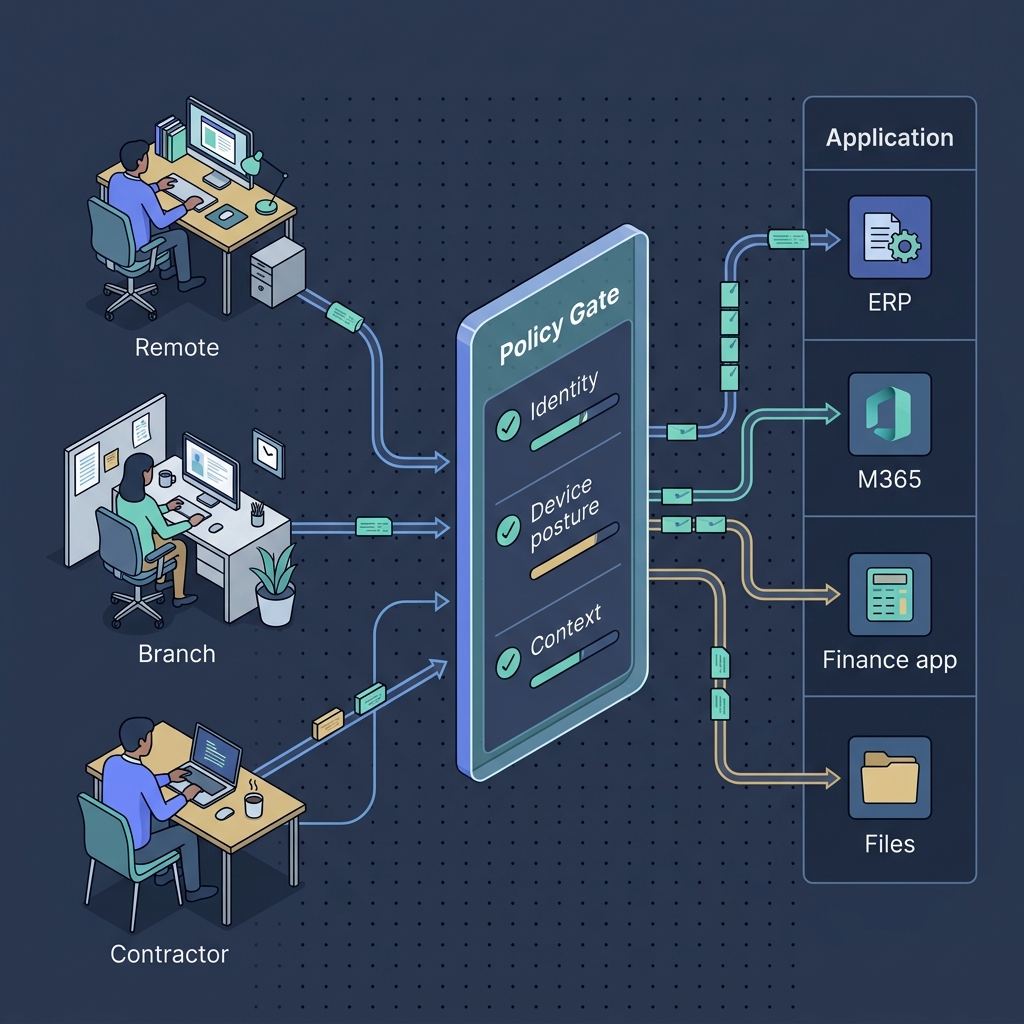
Zero Trust is a security model. ZTNA is the implementation that controls remote application access according to that model. The defining idea is short: never trust, always verify, and verify per request, not per session.
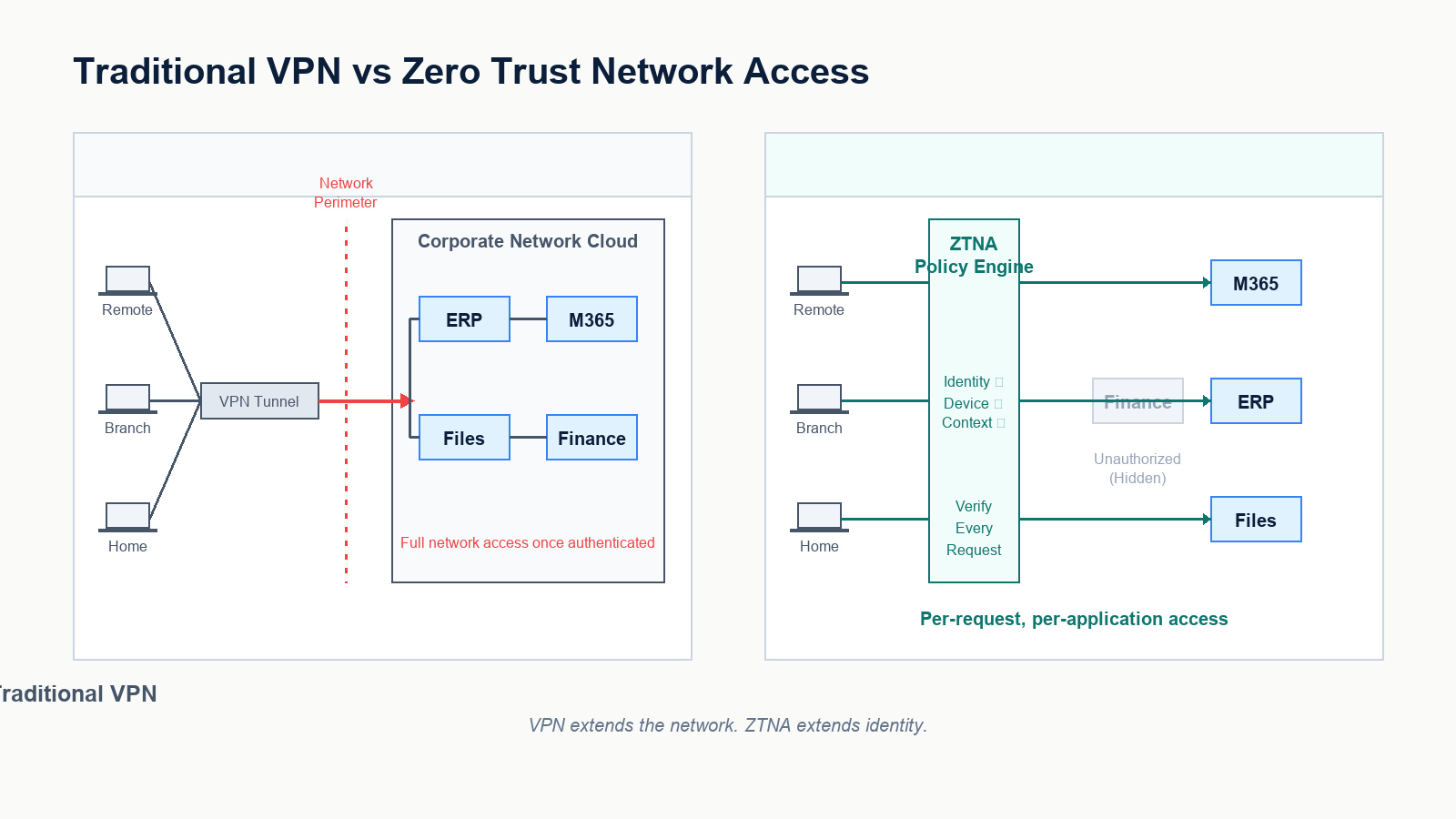
In practice, a ZTNA system has three properties. First, every access request is authenticated and authorized individually, based on identity, device posture, and context. Second, users only see the specific applications they are entitled to, never the underlying network. Third, the system continuously evaluates trust, so a session that becomes risky mid-stream (a posture check fails, an impossible-travel pattern appears, a new sensitive resource is requested) can be challenged or revoked.
This is materially different from VPN. A VPN authenticates a user once, then drops them onto the corporate network. A ZTNA platform brokers each application connection individually, with identity and posture in the loop every time.
Why VPN is not enough anymore
VPN is not broken in the sense that it does not work. It is broken in the sense that it does not match how attackers actually compromise small businesses today. Three patterns drive the shift.
VPN portals are a primary attack target
SSL VPN appliances from every major vendor have been the subject of repeated remote-code-execution disclosures over the last several years. Many ransomware events we respond to traced initial access to an unpatched VPN appliance or an exposed portal that lacked MFA on local accounts. ZTNA reduces this surface by removing the publicly addressable network entry point entirely. Applications are reachable only through an outbound-initiated broker.
Lateral movement after VPN authentication is too easy
Once a VPN user is on the corporate network, they typically can reach far more than they need. If their endpoint is compromised, so is everything they can route to. ZTNA enforces per-application access, so a compromised endpoint can only attempt to reach the specific applications the user is entitled to, not the entire flat network.
Hybrid work and contractors broke the perimeter
Small businesses now routinely have remote employees, branch staff, contractors, third-party developers, and bring-your-own-device users. The VPN model treats all of these as either “on the network” or “off the network.” ZTNA treats each access request individually, which matches how the workforce actually operates.
What a small business ZTNA deployment actually includes
A working ZTNA deployment has four components, none of them exotic.
- Identity provider: usually Microsoft Entra ID for businesses already on Microsoft 365. The identity provider is the source of truth for who is who and what groups they belong to.
- Device trust signal: Intune, Jamf, or the ZTNA vendor’s posture agent, providing real-time signals about whether the device is patched, encrypted, and free of obvious compromise.
- ZTNA broker: the platform that mediates application access based on identity and posture. Cloudflare Zero Trust, Zscaler Private Access, Microsoft Entra Private Access, Fortinet Universal ZTNA, Cisco Secure Access, and Twingate are common picks for SMB.
- Connector at the application edge: a small outbound-only agent that exposes specific internal applications to the broker without opening any inbound firewall ports.
For a business already running Microsoft 365 Business Premium with Intune and Entra ID Conditional Access, a meaningful share of the building blocks are already paid for. The remaining work is connecting applications, defining policy, and rolling users over.
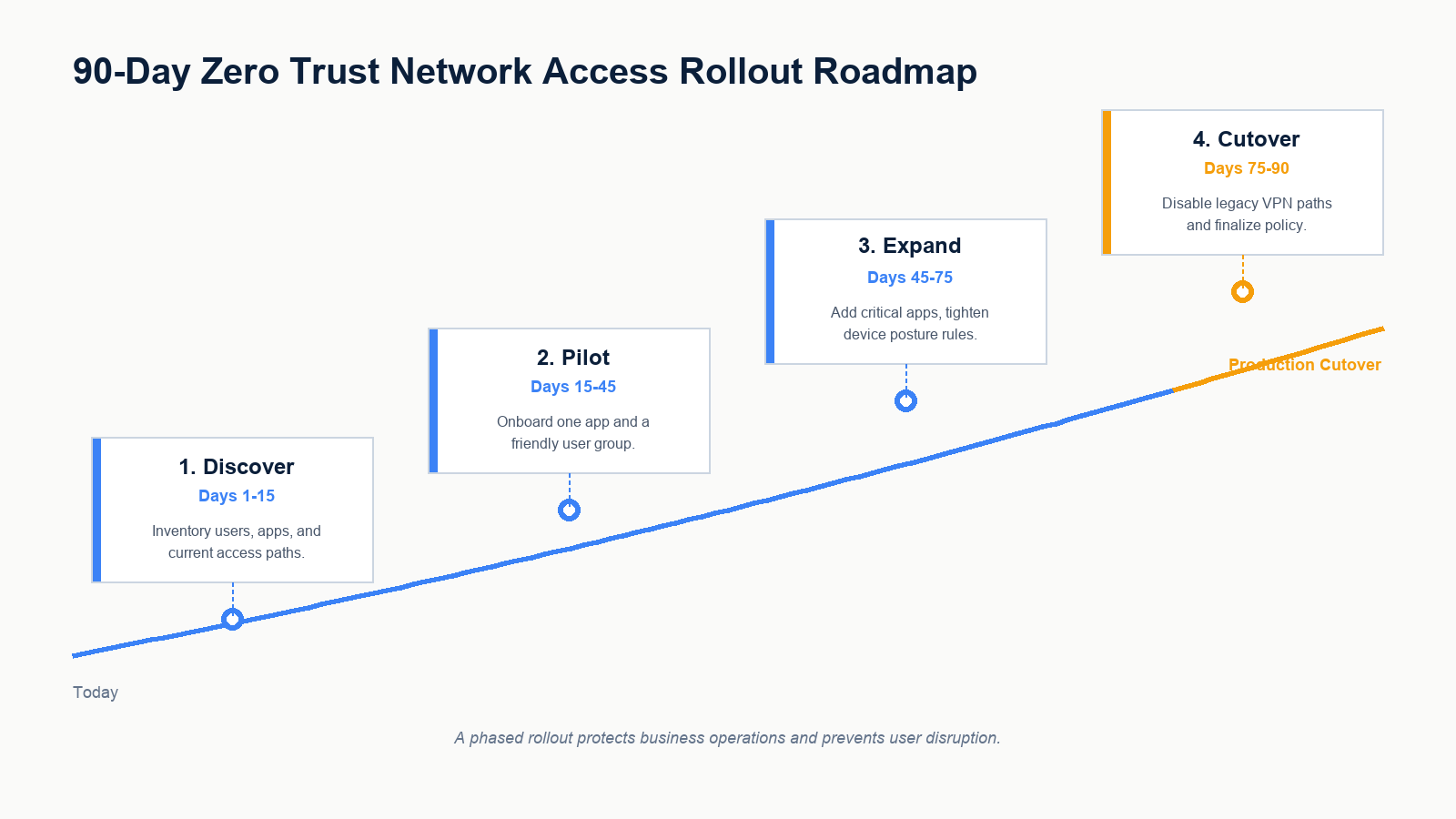
A 90-day rollout that does not break the business
The single biggest mistake in ZTNA projects is treating it as a flag-day cutover. The pattern that works is a phased rollout that runs ZTNA alongside the existing VPN until the new path is proven, then deprecates the VPN.
Days 1 to 15, discover
Inventory remote access paths in the current environment. Document who connects to what, with which credentials, from which devices. Identify which applications are reached over VPN today, which are already accessed directly as SaaS, and which sit behind legacy network shares. Map identity groups in Entra ID against actual application entitlement. This phase usually surfaces several access paths that no one currently owns, which becomes the cleanup list.
Days 15 to 45, pilot
Pick one internal application and one cooperative user group, ideally IT itself. Deploy the ZTNA connector at the application edge. Configure the policy: who can reach it, from what device posture, with what conditions. Validate end-to-end with the pilot group. Keep VPN access in parallel during the pilot so users have a fallback.
Days 45 to 75, expand
Onboard the next group of critical applications. Tighten device posture rules. Add break-glass paths for legitimate exception cases. Start measuring user experience: average time to access, MFA prompt frequency, helpdesk tickets. Adjust policy based on real friction, not theoretical ideals.
Days 75 to 90, cutover
Migrate the remaining user groups. Communicate a clear date for VPN deprecation. Decommission VPN portals or, in environments that still need a thin VPN for legacy reasons, reduce its scope so it no longer provides broad network access. Update incident response runbooks to reflect the new access model.
What it usually costs
ZTNA pricing is mostly per-user per-month. For an SMB, list pricing tends to land in a low single-digit to low double-digit dollar range per user per month, depending on the vendor, the feature tier, and whether ZTNA is bundled with other SASE components like secure web gateway or CASB.
For a 50-person firm, total platform cost is typically several thousand dollars per year. Implementation cost depends on how much of the identity, device, and policy foundation already exists. Firms that already operate Entra ID Conditional Access and Intune properly tend to deploy ZTNA quickly. Firms that do not usually need to fix identity and device management as part of the same project, which lengthens the timeline but is necessary work in any case.
The cost comparison that matters is not “ZTNA versus free VPN appliance.” It is “ZTNA versus the eventual cost of a ransomware event that started at a VPN portal.” The expected value math favours ZTNA at almost any SMB scale today.
What businesses get wrong
Three patterns appear repeatedly when ZTNA projects stall or fail in small business environments.
The first is treating ZTNA as a product, not a model. The vendor’s tooling is the engine, but the model is the policy. If group definitions in Entra ID are inaccurate, ZTNA enforces incorrect access correctly. Clean identity is a prerequisite, not a side project.
The second is keeping the old VPN running indefinitely “for safety.” A parallel VPN that never gets deprecated cancels out most of the security benefit. The plan must include a real cutover date.
The third is over-restricting on day one and creating user revolt. The right starting policy is similar to existing VPN access scope, with continuous verification added. Tightening to least privilege happens incrementally as data flows are understood, not on a flag day.
FAQ
Is Zero Trust only for large enterprises?
No. ZTNA platforms now have small-business pricing and packaging. The deciding factor is the maturity of identity and device management, not company size.
Can we run VPN and ZTNA at the same time?
Yes, and during a rollout you should. The goal is a clear cutover date after which VPN is deprecated or scoped down to a narrow exception use case.
Does ZTNA work for on-premises applications?
Yes. That is one of its core use cases. A lightweight connector at the application edge exposes the application to the ZTNA broker without opening any inbound firewall ports.
Does ZTNA replace MFA?
No. ZTNA uses MFA as one of its trust signals. MFA stays in place. ZTNA adds device posture, context, and per-application enforcement on top.
What if a user is on a personal device?
ZTNA policy can allow personal devices with restricted access (e.g., browser-only access to specific web apps) and deny access to higher-sensitivity resources unless the device is enrolled and compliant. This is one of the practical advantages over a binary VPN model.
If you are evaluating ZTNA
Most small businesses considering ZTNA do not need a complete network redesign. They need a focused readiness assessment that confirms identity, device, and policy foundations are in place, identifies which applications go first, and lays out a rollout that does not interrupt operations.
Our team works with Edmonton businesses planning ZTNA deployments, evaluating vendors, and migrating remote access off legacy VPN safely. Book a Zero Trust readiness assessment. We will review your identity, device, and current remote access setup, recommend a vendor fit that matches your environment, and propose a phased rollout you can execute with or without us.
Related posts
- Cisco Meraki for Businesses
- Ransomware Recovery Plan for Small Business
- Hidden Risks of Co-Managed Microsoft 365

Cybersecurity for Edmonton construction companies is no longer a back-office problem. Bid data, project files, jobsite connectivity, and payment workflows are now actively targeted, and the construction sector sits among the most attacked verticals in Canada.
Most construction firms in Edmonton historically ran lean IT. A small head office, a handful of estimators and project managers, a few servers, and a lot of laptops bouncing between trailers, vehicles, and the office. That model worked when threats focused on financial services and healthcare. It does not work in 2026. General contractors are starting to require cybersecurity attestations from subs. Owners and sureties are starting to ask about controls during pre-qualification. Cyber insurance brokers are starting to refuse coverage for unprotected construction firms after several public ransomware events in the sector.
This guide walks through what cybersecurity for a construction company in Edmonton actually involves in 2026, the threats that target the industry specifically, where the real exposures sit (head office, project trailers, BIM and PM platforms, payment workflows), and what a workable security posture costs for a typical 50-person firm.
Why construction is different
Construction has a distinctive IT footprint relative to other small businesses of similar size. Five characteristics drive the threat profile.
- High-value transactional workflows: tender submissions, change orders, progress draws, supplier payments. Each one is a potential fraud target.
- Distributed work environment: jobsite trailers, vehicle laptops, contractor BYOD, and head office, all sharing data.
- Heavy reliance on third-party platforms: Sage, Procore, Acumatica, Autodesk Construction Cloud, Bluebeam, Plan Grid. Each is an external account surface.
- Long project timelines: a compromised supplier identity can persist for months across a project before being caught.
- Lean internal IT: many firms run with one or two internal IT staff supporting the entire operation, often part-time.
The combination of high-value transactions, distributed devices, lots of external accounts, and lean internal IT is the same profile that drives high ransomware and fraud incidence in the sector.
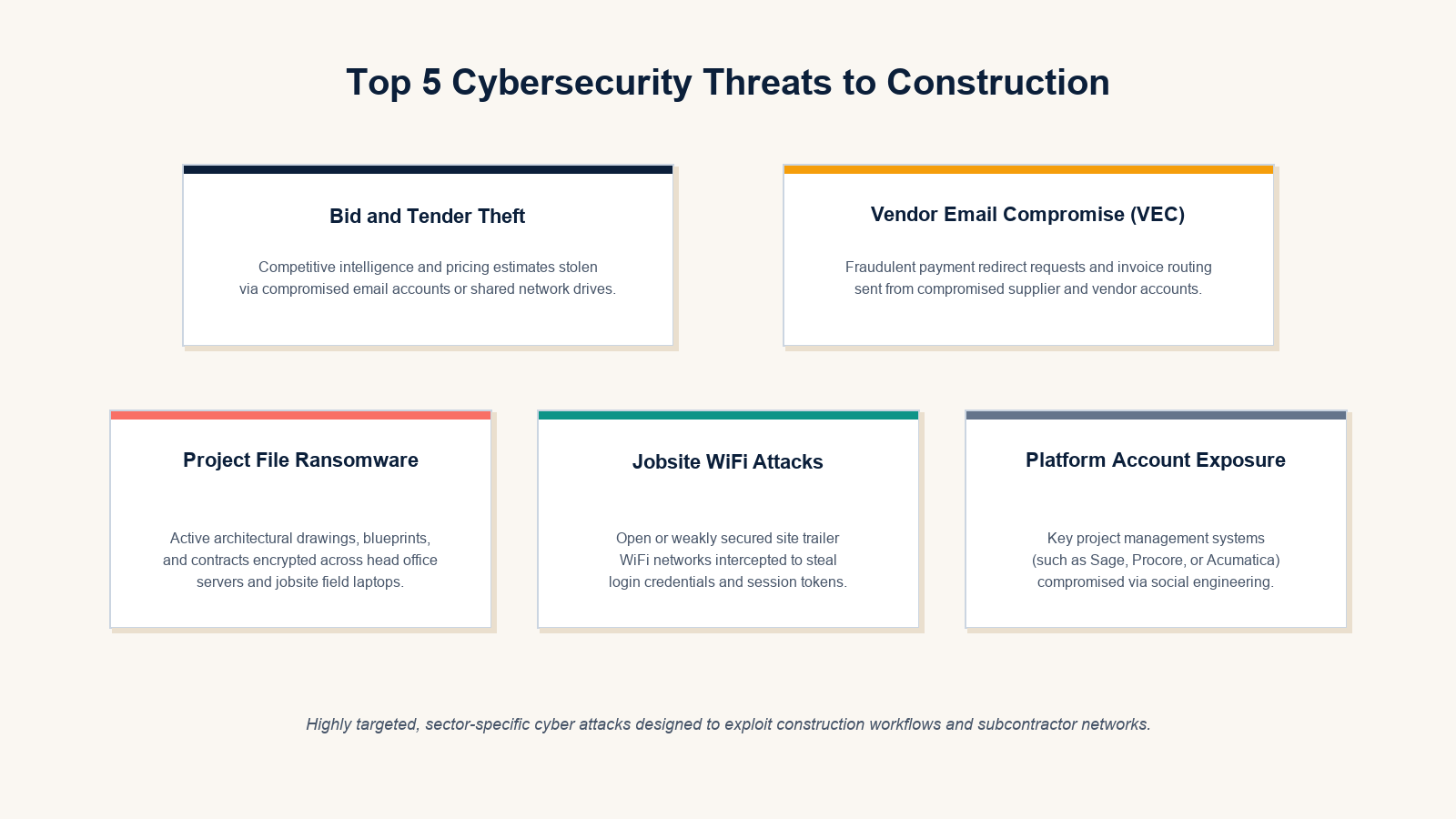
The threats that target construction specifically
Bid and tender theft
Competitive bid data is valuable. Attackers who gain access to an estimator’s mailbox or a shared bid folder can sell or use the information directly. Losses are often not detected until a pattern of lost bids on tight margins emerges.
Vendor email compromise and payment redirect fraud
A supplier’s email is compromised. The attacker waits for an invoice cycle, then sends a payment instruction change from the supplier’s real domain. The construction firm wires the next progress payment to the attacker’s account. Losses in the six-figure range are not uncommon in this scenario. Controls are non-technical as much as technical: out-of-band verification of payment changes, supplier portal use over email instructions, and finance team training.
Project file ransomware
Drawings, contracts, change orders, project schedules. All encrypted at once. Operations stall because no one can pull the current revision of a drawing, schedule, or contract. The dependency on shared file repositories means even small construction firms can lose a week or more of operational capacity to a single ransomware event.
Jobsite WiFi attacks
Site trailers often run open or weakly secured WiFi, sometimes consumer-grade routers handed over by a previous project, sometimes a contractor’s hotspot. Devices that connect to head office over those networks bring traffic into the corporate environment. Where head office and jobsite WiFi share credentials or VPN paths, the exposure compounds.
Project management platform exposure
Procore, Sage, Acumatica, Autodesk Construction Cloud accounts are targeted with phishing, OAuth consent abuse, and credential reuse. Once inside, attackers can exfiltrate contracts, modify documents, or redirect notifications. Many small firms enable MFA on Microsoft 365 but never tighten the configuration of the construction platforms themselves.
What a workable posture looks like
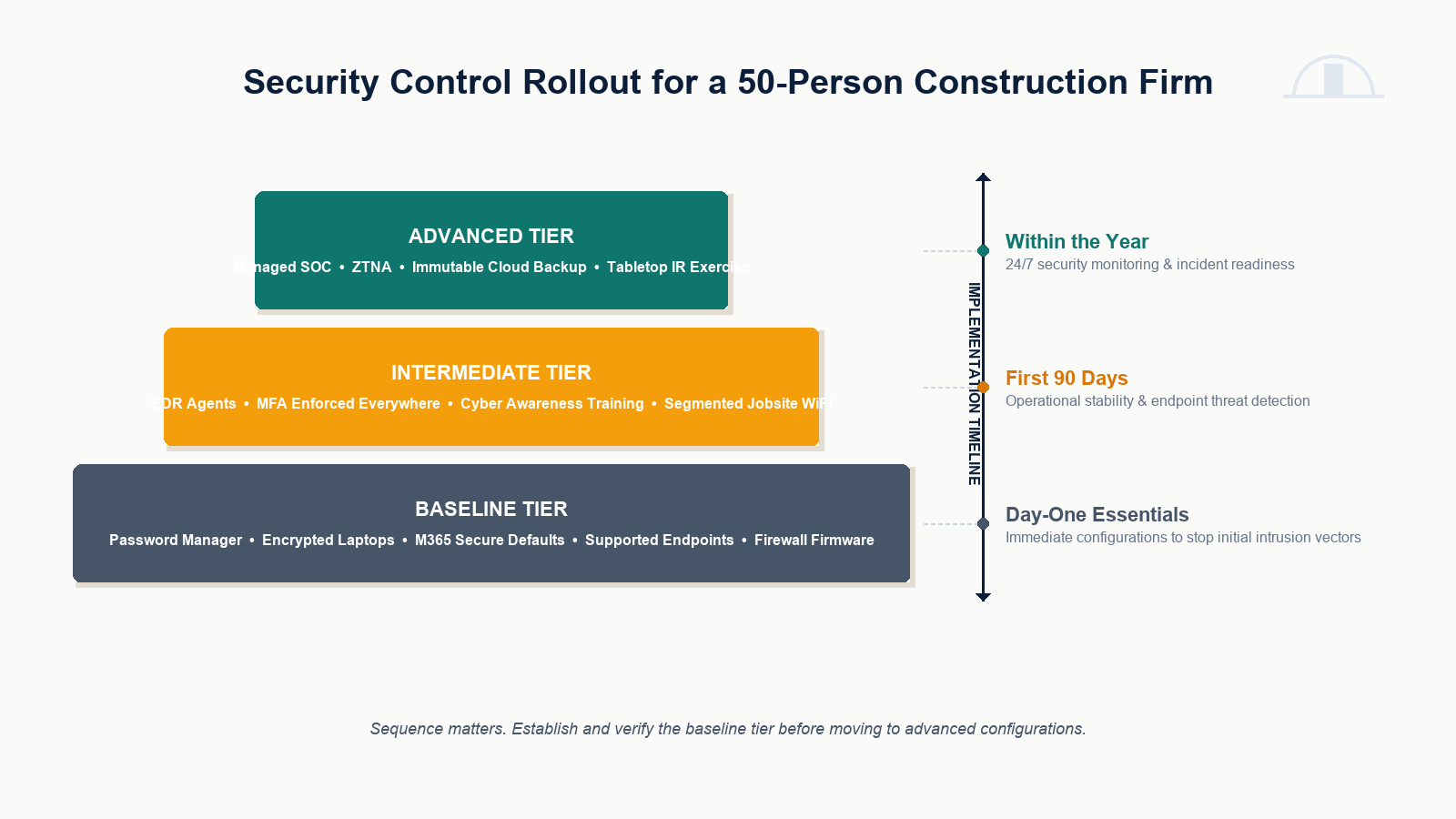
A working cybersecurity posture for a typical 50-person Edmonton construction firm has three tiers, sequenced over the first year.
Baseline (day-one essentials)
Password manager rolled out to all staff. Full-disk encryption on every laptop. Microsoft 365 secure defaults enabled. All endpoints on supported operating systems and patch SLAs. Current firmware on the head office firewall. Documented offboarding procedure that disables accounts and revokes platform access on the day of separation.
Intermediate (first 90 days)
EDR deployed on every workstation, laptop, and server. MFA enforced everywhere, including the construction platforms and not just M365. Security awareness training program with phishing simulation, with focus on payment redirect fraud scenarios for finance and PMs. Jobsite WiFi standardized: a managed access point per trailer with a separate SSID for site staff, a guest SSID isolated from the company VPN, and no shared credentials with head office.
Advanced (within the year)
Managed SOC or MDR providing 24×7 monitoring and response. Zero Trust Network Access replacing or supplementing VPN for remote access. Immutable cloud backup for Microsoft 365, file shares, and key construction platforms (where the platform supports export). Annual tabletop exercise with the leadership team in the room, including a vendor-email-compromise scenario.
What it usually costs
For a 50-person construction firm in Edmonton, the baseline tier is typically a small share of overall IT spend, often well within an existing managed services arrangement. The intermediate tier adds modest per-user monthly cost for EDR, training, and improved jobsite WiFi. The advanced tier adds managed SOC pricing (per-endpoint or per-user monthly), ZTNA platform cost, and immutable backup cost.
The total typically lands well below the cost of a single significant incident. The framing that lands with most construction owners is straightforward: this is roughly the cost of one mid-sized progress payment per year, in exchange for materially reducing the chance of losing several to fraud or ransomware.
What construction firms usually get wrong
Three patterns appear repeatedly in our assessments of Edmonton construction firms.
The first is treating jobsite WiFi as a separate problem from corporate security. Once a head-office laptop joins a weakly secured site network, the site has become part of the corporate attack surface. Jobsite WiFi has to be designed deliberately, not improvised per project.
The second is securing Microsoft 365 thoroughly and leaving the construction platforms alone. Procore, Sage, Acumatica, and Autodesk accounts are valuable in their own right and frequently lack MFA, conditional access, or session monitoring even in firms where M365 is well configured.
The third is no out-of-band payment verification process. Wire transfer changes, supplier banking updates, and large invoice approvals all need a documented out-of-band verification step. This single non-technical control prevents most vendor-email-compromise fraud cases regardless of the technical posture around it.
FAQ
Why is construction such a frequent target?
High-value transactions, distributed workforce, third-party platform reliance, and historically lean IT staffing. The risk-to-reward ratio for attackers is favourable, which drives focus on the sector.
Do we need to secure jobsite WiFi if we have a VPN?
Yes. A VPN protects the traffic destined for head office. It does not protect the device itself from attacks on the local network, and it does not prevent devices from interacting with whatever else is on the open trailer WiFi.
Are GCs really starting to require cybersecurity attestations?
Increasingly yes, particularly on public sector and large institutional projects. Pre-qualification questionnaires now include cybersecurity controls more often than they did even two years ago.
What about BYOD on site?
Personal devices that access corporate data should be enrolled in management with at minimum a containerized work profile, MFA enforcement, encryption, and remote wipe. Otherwise access should be restricted to browser-only with no corporate data leaving the session.
What is the single highest-leverage control for a construction firm?
MFA enforced across every account that matters, including the construction platforms, paired with a written out-of-band payment verification process. Those two together address the largest categories of construction-sector loss.
If you are reviewing your security posture
Most construction firms in Edmonton already know where their weakest spots are: that one trailer with the old router, the supplier who keeps changing payment details by email, the estimator whose mailbox never had MFA enforced, the file share everyone touches with no backup discipline. A focused construction-sector assessment usually surfaces a short list of fixes that materially change the risk picture without disrupting projects in flight.
Our team works with Edmonton construction firms on jobsite WiFi standardization, construction platform security, payment fraud controls, and managed cybersecurity for distributed operations. Book a construction cybersecurity assessment for your firm. We will review your head office, your active jobsites, and your project platform footprint, and provide a prioritized roadmap you can execute through the construction season without slowing projects down.
Related posts
- Cyber Insurance Requirements 2026
- Ransomware Recovery Plan for Small Business
- Cisco Meraki for Businesses

A ransomware recovery plan for small business is not a binder on a shelf. It is a short, tested sequence of actions that decides whether your business reopens on Monday morning or spends three weeks negotiating with attackers.
Most small and mid-sized businesses in Edmonton and Alberta still treat ransomware as something that happens to hospitals and pipelines. The data does not support that view. The majority of ransomware incidents we respond to involve organizations with fewer than 200 employees, no dedicated security staff, and a backup strategy that turns out to be incomplete the moment it matters. The good news: a workable recovery plan does not require a million-dollar SOC. It requires the right structure, the right tested controls, and a clear sequence of actions that the team can execute under pressure.
This guide walks through what a realistic ransomware recovery plan looks like for a small business in 2026, what the first 60 minutes should actually look like, how to set RTO and RPO targets you can defend to insurance and leadership, and the post-incident steps most businesses skip.
What a ransomware recovery plan actually has to do
A useful recovery plan answers five questions in writing, before the incident:
- Who declares an incident, and on what evidence
- Who has authority to disconnect production systems
- How clean backups are verified before restoration begins
- Who talks to the cyber insurer, legal counsel, and regulators
- How the business operates manually while systems are down
If the plan does not answer those five questions, it is documentation, not a plan. Most businesses can write the first version of this in an afternoon. Almost no one does until after their first incident.
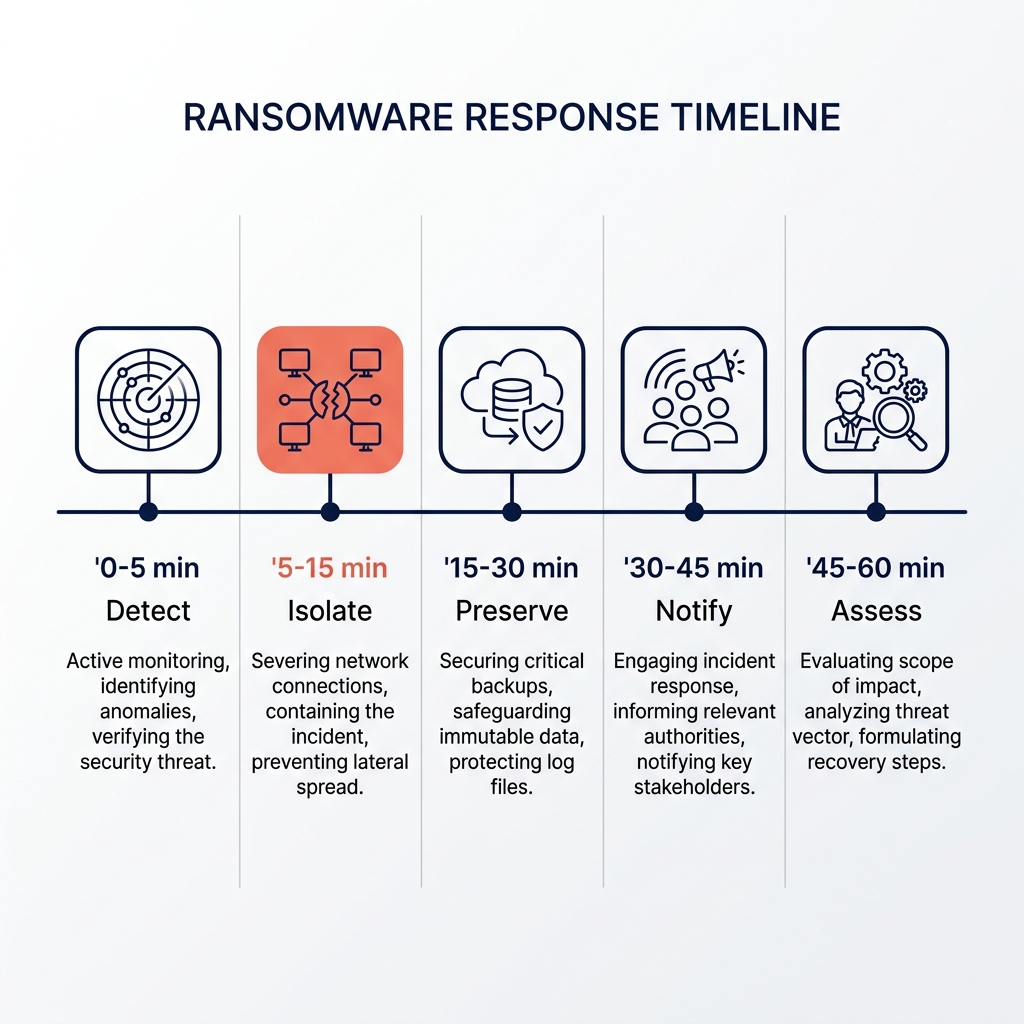
The first 60 minutes are decisive
Almost every ransomware recovery we see succeed shares one pattern: the first hour was organized, not chaotic. Almost every recovery we see drag into weeks shares the opposite pattern, with conflicting actions, evidence being overwritten, and backups being touched before they were validated.
0 to 5 minutes, detect and declare
Someone notices an indicator: files being renamed with an unusual extension, a ransom note on a desktop, EDR alerts firing in clusters, or a help-desk spike. One person declares the incident out loud and starts a written timeline. From this point on, every action gets a timestamp.
5 to 15 minutes, isolate
The goal is to stop lateral spread without losing forensic evidence. Disconnect affected endpoints from the network at the switch or wireless controller. Do not power them off, since memory-resident artifacts may matter later. Disable affected user accounts in Active Directory and Microsoft 365. Block internet egress for the affected subnet at the firewall if the network design supports it.
15 to 30 minutes, preserve
Take a snapshot of affected virtual machines if the hypervisor still has clean access. Pull firewall, DNS, EDR, and authentication logs to an offline location, because attackers often clear them. Take photos of ransom notes and any unusual on-screen messages. Note the file extension being used by the encryptor, since it is often the fastest way to identify the strain.
30 to 45 minutes, notify
Call the cyber insurance carrier first. Most policies require notification within hours, and they often dictate which forensics firm can be used. Notify legal counsel. Notify the leadership team. Do not notify customers, partners, or the public yet, because language used in the first 24 hours often becomes the basis for later regulatory and contractual exposure.
45 to 60 minutes, assess
Identify the blast radius. Which systems are encrypted, which are touched but not encrypted, and which appear clean. Check whether backup repositories are reachable from the affected network segment, because modern ransomware specifically targets backup infrastructure. If the backup system was on the same domain or the same network with the same credentials, assume it is compromised until proven otherwise.
Setting realistic RTO and RPO targets
Recovery Time Objective is how long the business can survive without a given system. Recovery Point Objective is how much data the business can lose. These numbers should be set by the business owner with the IT team, not by IT alone, because they directly determine cost.
A clinic that cannot see patients without its EMR has an RTO of hours. An accounting firm during tax season has a different tolerance in March than in July. A construction company can usually work from paper for a day if it has to. These are business decisions disguised as technical ones.
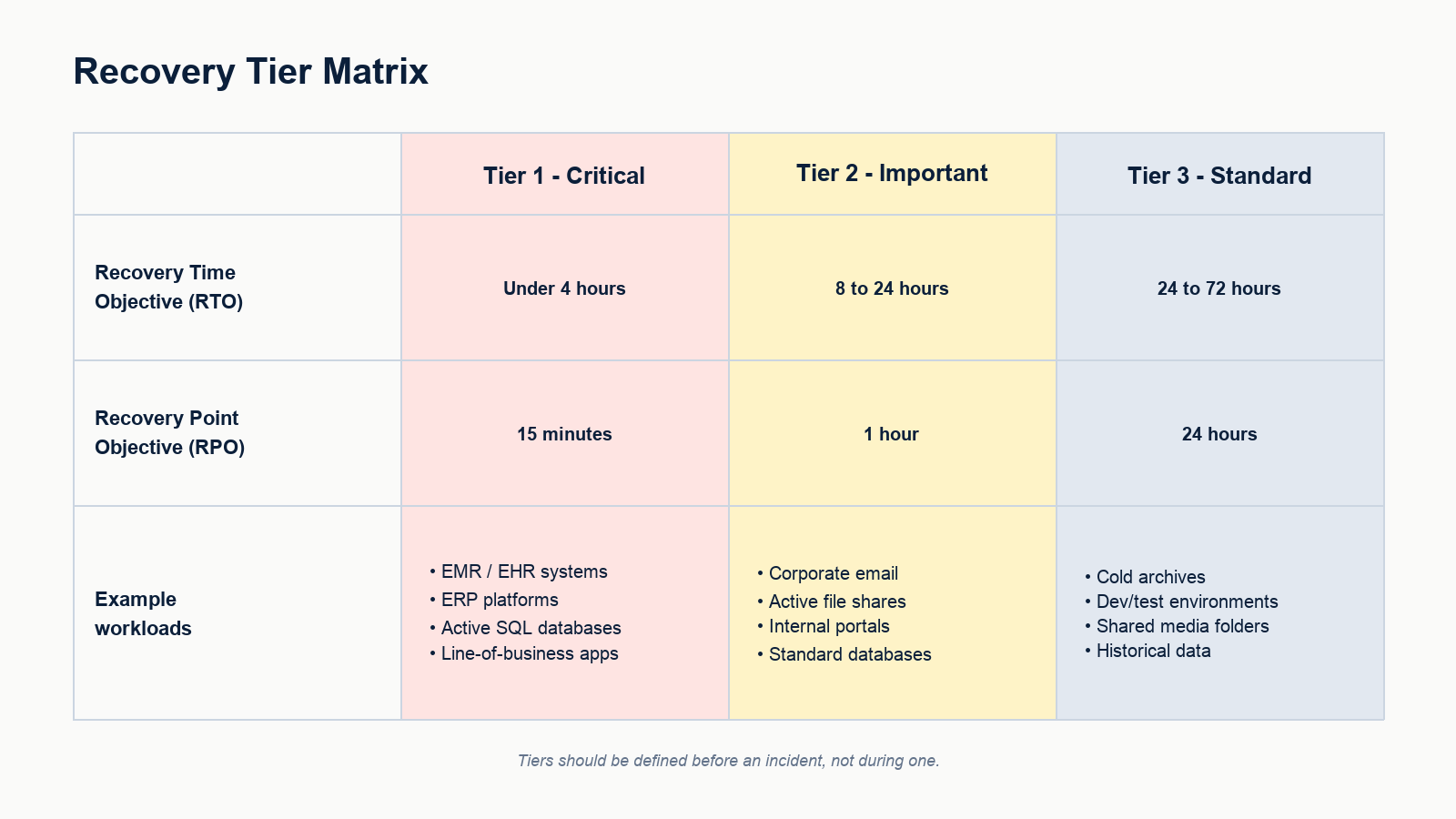
A practical tiering looks like this. Tier 1 critical workloads with RTO under 4 hours and RPO of 15 minutes. Tier 2 important workloads with RTO of 8 to 24 hours and RPO of 1 hour. Tier 3 standard workloads with RTO of 24 to 72 hours and RPO of 24 hours. Tier 1 is small and expensive. Tier 3 is large and cheap. Get the tiering wrong and you either overpay or under-recover.
Backups that survive an actual attack
Most ransomware events we respond to have a working backup product installed. Almost none of them survive the attack with their backups intact, because the backups were reachable from the same domain that the attacker took over.
A backup that survives ransomware has three properties. It is immutable, meaning it cannot be deleted or modified within a defined retention window, even by an administrator. It is isolated, meaning the backup repository does not share credentials, network, or directory with production. It is tested, meaning a full restore of a critical workload has been performed inside the last 90 days and timed.
If any of those three is missing, the backup is decoration. Most small business backup setups in Alberta fail at least one of them.
What recovery actually looks like, hour by hour
Once the incident is contained and the insurer has authorized recovery, the sequence is roughly the following.
- Hour 1 to 4: confirm backups are clean, scan backup images for known indicators of compromise, document the recovery plan
- Hour 4 to 12: stand up a clean recovery environment, isolated from the production network, with new credentials and fresh domain controllers
- Hour 12 to 24: restore Tier 1 workloads, validate against business owners, bring up identity and email last
- Day 2 to 3: restore Tier 2 workloads, begin staged user re-onboarding with forced password resets and re-enrolled MFA
- Day 3 to 7: restore Tier 3, decommission the compromised environment, finalize forensic timeline for insurer
- Week 2 to 4: post-incident review, control improvements, regulatory disclosures if required, customer communication
This sequence assumes the recovery is being run by a team that has practiced it. The first time a business runs this sequence live, it usually doubles in length. That is why the tabletop exercise matters more than the binder.
The tabletop exercise no one wants to run
A two-hour tabletop exercise once a year is the single highest-leverage thing a small business can do for ransomware readiness. Pick a scenario, walk through it with the leadership team and the IT team in the same room, and watch where the plan breaks.
Typical findings in a first tabletop: no one knows the cyber insurance phone number, the backup administrator is on vacation and no one else has the credentials, the off-site backup is on the same Microsoft 365 tenant as production, the incident-response retainer expired last year, and the owner does not know what authority the IT manager has to disconnect systems. Every one of those is cheap to fix on a Tuesday afternoon and very expensive to discover at 2 a.m.
What this looks like for an Edmonton small business
For a typical 20 to 100 employee firm in Edmonton, a realistic ransomware recovery posture in 2026 includes immutable cloud backups with at least 30 days of retention isolated from the production identity provider, endpoint detection and response on every workstation and server, multi-factor authentication enforced on every remote access and admin account, a documented incident response plan with named roles, a current cyber insurance policy with the carrier’s incident response hotline in the plan, and an annual tabletop exercise with the leadership team in the room.
None of that is exotic. All of it is achievable inside a small IT budget if the work is sequenced properly. The reason most businesses still do not have it is not cost, it is that no one owns the project end to end.
FAQ
Should a small business ever pay the ransom?
That decision belongs to the business owner, legal counsel, and the cyber insurer together. There are scenarios where payment is the only viable path, and there are scenarios where payment buys nothing because the decryptor does not work or the data has already been exfiltrated and will be leaked anyway. The decision is rarely as simple as either extreme makes it sound.
How long does a typical small business ransomware recovery take?
For a small business with tested backups and a practiced plan, core operations are usually restored within 3 to 7 days. For a small business without either, the same recovery commonly takes 3 to 6 weeks and a meaningful percentage of customer loss.
Does cyber insurance cover ransomware recovery?
In most current policies, yes, with conditions. Carriers typically require MFA on all remote access, EDR on endpoints, immutable backups, and timely incident notification. Policies are increasingly explicit that failing to meet those baseline controls can void coverage. Read the policy before the incident.
What is the most common cause of ransomware in small business?
The leading initial access vectors are phishing leading to credential theft, exposed remote access portals without MFA, and unpatched edge appliances. None of the three is exotic, and all three are addressable by a focused control project.
Can we test our backup without restoring everything?
Yes. A scoped restore of a single critical workload into an isolated environment is usually enough to validate that the backup actually works and that the recovery time matches expectations. It should be done at least quarterly.
If you are putting a plan together
Most small businesses know they are exposed. The hard part is sequencing the work so the budget gets spent on the controls that actually change the outcome. A focused ransomware readiness review usually identifies the three or four gaps that matter most, which is a much smaller project than rebuilding the entire security stack.
Our team helps Edmonton businesses build and test ransomware recovery plans, validate backups against current attacker behavior, and run leadership-level tabletop exercises that surface the gaps before an incident does. Book a ransomware readiness review for your business. We will assess your current backups, identity controls, and response plan, and give you a prioritized list of fixes you can act on with or without us.
Related posts
- Cost of Managed SOC for a 200-Employee Firm
- Cybersecurity for Edmonton Law Firms
- Cybersecurity for Edmonton Accounting Firms
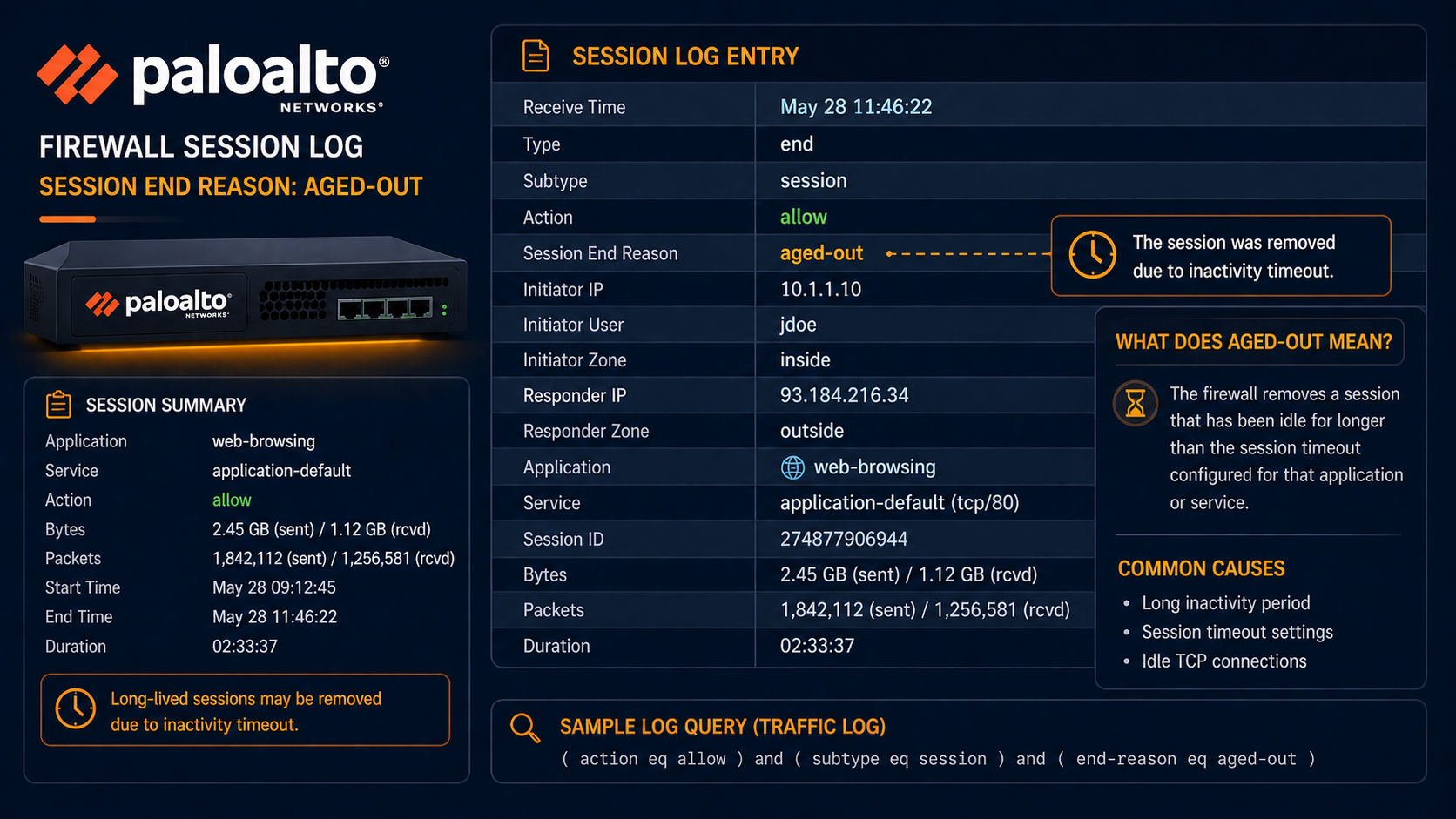
Palo Alto session end aged-out means a session was closed by an idle timeout, but rarely the timeout you think is firing.
Your Palo Alto firewall is logging session end reason aged-out for sessions that should be staying up. Users complain that long running sessions to specific applications keep dropping. This post walks through the four real causes of aged-out sessions on Palo Alto, ranked by frequency, and the configuration changes that fix each.
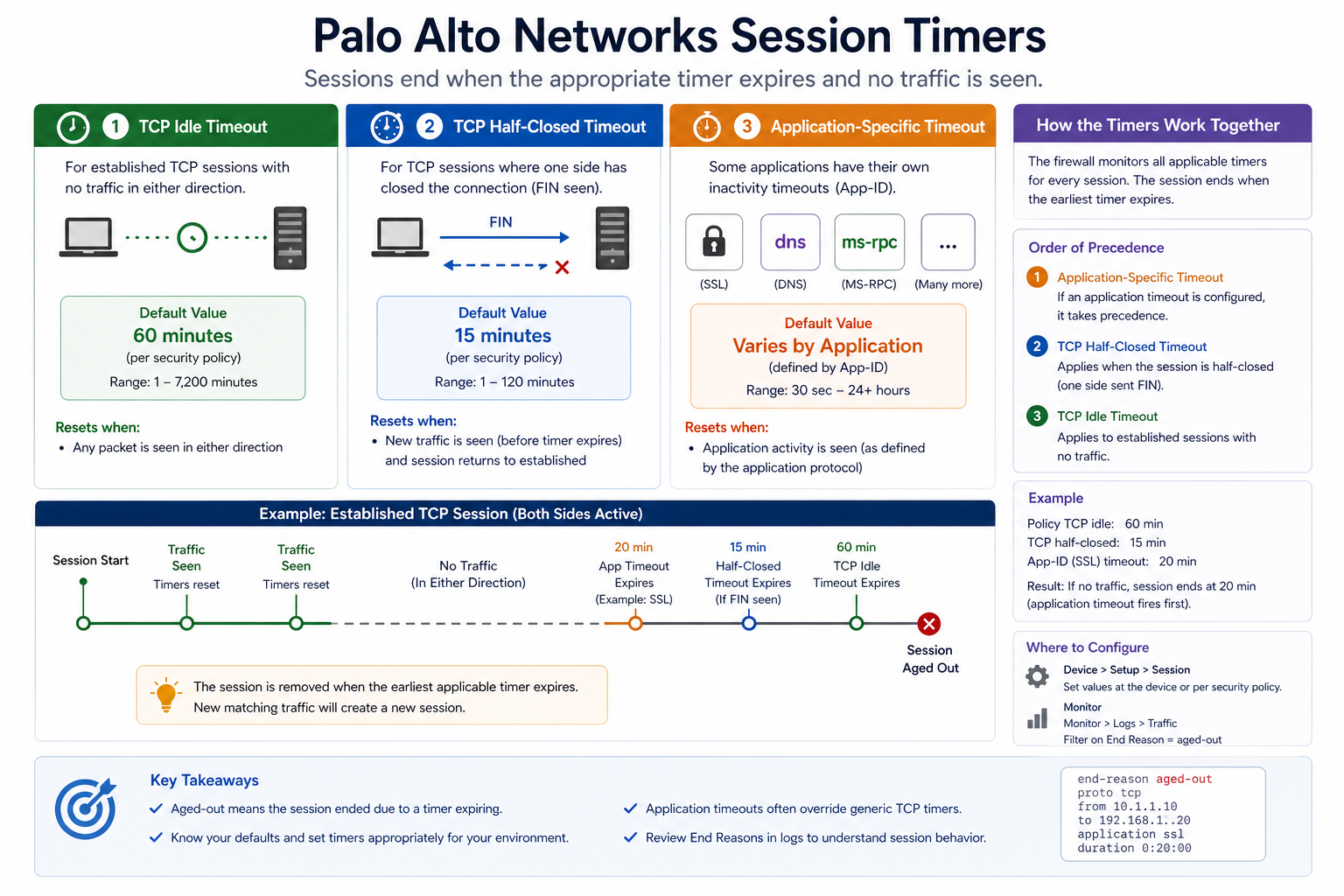
The short version. Aged-out means the session was closed because no traffic crossed it within the configured idle timeout. Default TCP idle timeout on Palo Alto is 3600 seconds (one hour). Many enterprise applications keep sessions logically open without sending data for longer than that, especially older ERP, terminal server, and database systems. The fix is rarely raising the global TCP timeout, which is too blunt. The fix is application-specific timeout overrides that only affect the relevant traffic, without weakening the firewall’s session table behavior overall.
What this end reason means
Palo Alto’s session table tracks every connection through the firewall. Each session has a timer, and when the timer expires without traffic, the session is removed and logged with end reason aged-out. The default timers are intentionally aggressive to keep the session table from filling up with stale connections. Specific applications need different timer values to match how they actually behave, and Palo Alto provides per-application override mechanisms for exactly this purpose.
You will see this in Monitor → Logs → Traffic, where each session log includes the end reason field. Filter for “session-end-reason eq aged-out” to find affected sessions. The application field on the log tells you which app is most affected, which guides the explicit application override.
Verified against current PAN-OS 11.x documentation, accessed April 2026.
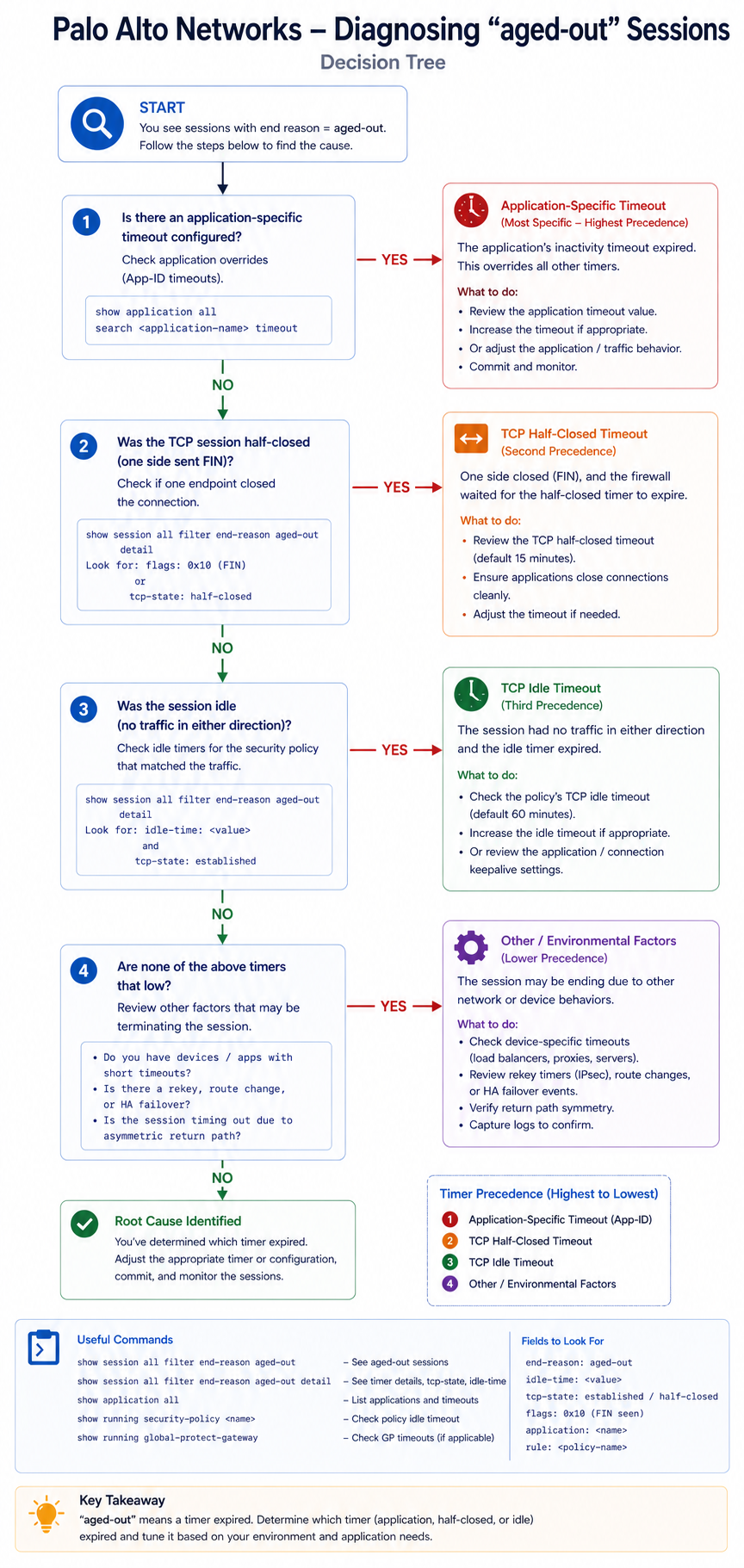
The four causes, ranked
Cause one, application keep-alive interval longer than firewall timeout, around 50 percent
The application sends keep-alive packets every 90 minutes (or has no keep-alive at all and relies on user activity), but the firewall idle timeout is 60 minutes. The session ages out between keep-alives.
Verify by checking the application’s documentation or capturing traffic to see actual keep-alive intervals. Fix by setting an application-specific timeout in Objects → Applications → [app] → Timeout that exceeds the keep-alive interval.
Cause two, asymmetric routing causing missed packets, around 25 percent
The session is active on both ends, but return packets take a different path that does not go through the firewall. From the firewall’s perspective, the session is idle, so it ages out.
Verify by tracing the routing on both sides. Fix by either making the routing symmetric or, as a workaround, configuring zone protection profiles that allow asymmetric flow handling. Asymmetric routing should be fixed at the routing layer, not worked around on the firewall.
Cause three, NAT hairpin or out-of-state packets, around 15 percent
Internal client connects to a public IP that NATs back to an internal server through the firewall. The session state gets confused and times out unexpectedly.
Verify by checking session detail and confirming the packet flow. Fix by routing internal-to-internal traffic directly without going through the firewall, or by configuring U-turn NAT correctly.
Cause four, intentional, working as designed, around 10 percent
The session legitimately went idle for an hour and the firewall correctly aged it out. The user reconnects and it works again. This is normal behavior and only worth investigating if it is causing user pain.
Verify by asking the user about their workflow. If a one hour idle is normal in their business, no fix needed. If they expected the session to stay up, address with one of the other three causes.
What the official documentation does not mention
Palo Alto’s docs cover application timeout configuration but rarely emphasize that raising the global TCP idle timeout is almost always the wrong fix. It works in the short term but enlarges the session table, increases memory pressure on the firewall, and weakens stateful protection. Always prefer application-specific overrides, and if you find yourself raising the global timeout, ask why. There is almost always a better targeted fix.
The architectural fix
Firewalls that rarely produce user pain from aged-out sessions share three traits. First, applications with known long-lived behavior (ERP, terminal server, legacy DB protocols) have explicit application timeout overrides documented and applied. Second, asymmetric routing is fixed at the routing layer rather than worked around on the firewall. Third, monitoring tracks session table utilization and average session age so capacity issues are caught before they cause dropouts. Skip these and aged-out sessions become a recurring helpdesk theme.
FAQ
Should I raise the global TCP timeout?
Almost never. Use application-specific overrides instead. Raising the global timeout enlarges the session table and weakens protection.
Is aged-out the same as discard or unknown?
No. Discard means policy denied the session. Aged-out means the session was active but timed out. Unknown means the firewall could not classify the application. Different causes, different fixes.
Will enabling application keep-alive on the client help?
Sometimes, yes. If the client OS supports configurable TCP keep-alive intervals, lowering them below the firewall idle timeout works. But this is a per-OS or per-application setting and may not be controllable centrally.
Related posts
Sessions dropping during business hours
Recurring aged-out issues for specific applications mean the firewall is not aligned to the application behavior. Our team can audit your firewall configuration against your actual application portfolio. Tell us about the application and we will help you tune correctly.
Last verified April 2026 by the aaanetworkx security practice.