A ransomware recovery plan for small business is not a binder on a shelf. It is a short, tested sequence of actions that decides whether your business reopens on Monday morning or spends three weeks negotiating with attackers.
Most small and mid-sized businesses in Edmonton and Alberta still treat ransomware as something that happens to hospitals and pipelines. The data does not support that view. The majority of ransomware incidents we respond to involve organizations with fewer than 200 employees, no dedicated security staff, and a backup strategy that turns out to be incomplete the moment it matters. The good news: a workable recovery plan does not require a million-dollar SOC. It requires the right structure, the right tested controls, and a clear sequence of actions that the team can execute under pressure.
This guide walks through what a realistic ransomware recovery plan looks like for a small business in 2026, what the first 60 minutes should actually look like, how to set RTO and RPO targets you can defend to insurance and leadership, and the post-incident steps most businesses skip.
What a ransomware recovery plan actually has to do
A useful recovery plan answers five questions in writing, before the incident:
- Who declares an incident, and on what evidence
- Who has authority to disconnect production systems
- How clean backups are verified before restoration begins
- Who talks to the cyber insurer, legal counsel, and regulators
- How the business operates manually while systems are down
If the plan does not answer those five questions, it is documentation, not a plan. Most businesses can write the first version of this in an afternoon. Almost no one does until after their first incident.
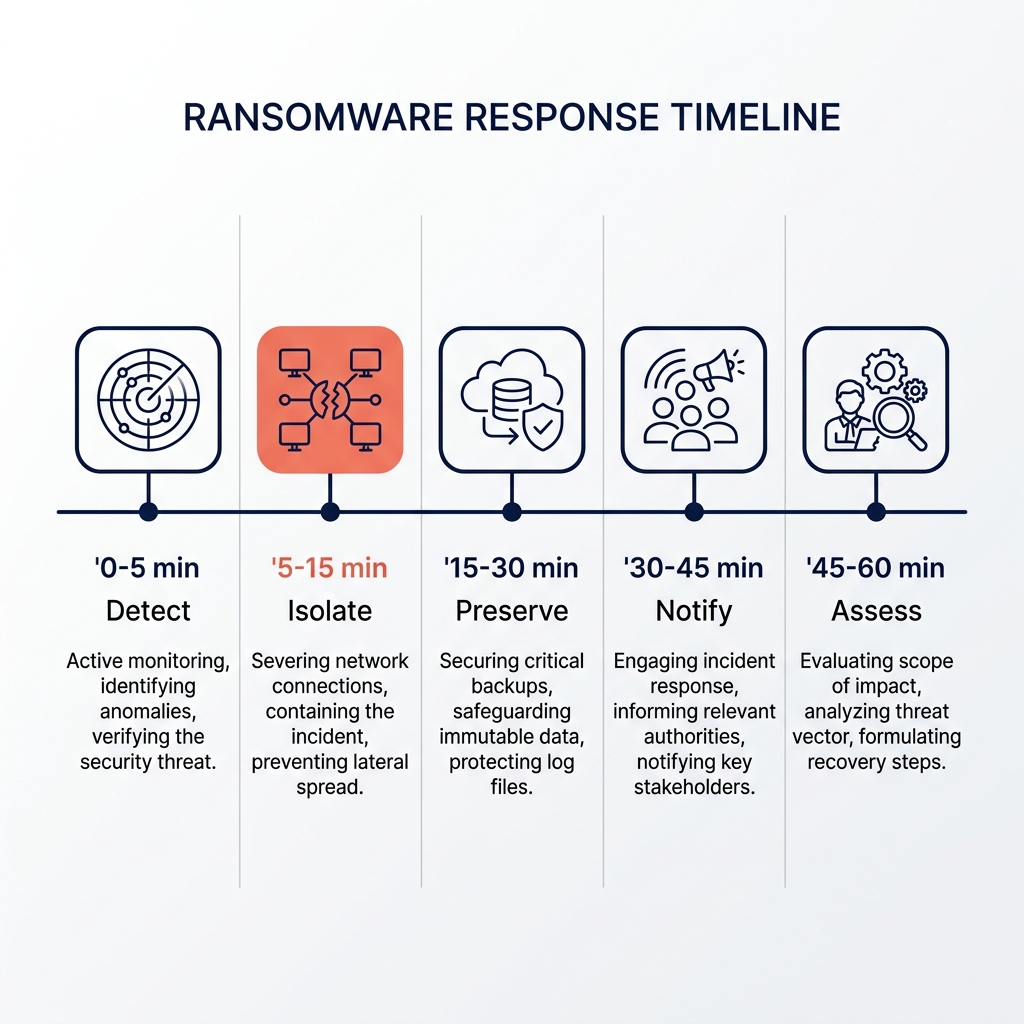
The first 60 minutes are decisive
Almost every ransomware recovery we see succeed shares one pattern: the first hour was organized, not chaotic. Almost every recovery we see drag into weeks shares the opposite pattern, with conflicting actions, evidence being overwritten, and backups being touched before they were validated.
0 to 5 minutes, detect and declare
Someone notices an indicator: files being renamed with an unusual extension, a ransom note on a desktop, EDR alerts firing in clusters, or a help-desk spike. One person declares the incident out loud and starts a written timeline. From this point on, every action gets a timestamp.
5 to 15 minutes, isolate
The goal is to stop lateral spread without losing forensic evidence. Disconnect affected endpoints from the network at the switch or wireless controller. Do not power them off, since memory-resident artifacts may matter later. Disable affected user accounts in Active Directory and Microsoft 365. Block internet egress for the affected subnet at the firewall if the network design supports it.
15 to 30 minutes, preserve
Take a snapshot of affected virtual machines if the hypervisor still has clean access. Pull firewall, DNS, EDR, and authentication logs to an offline location, because attackers often clear them. Take photos of ransom notes and any unusual on-screen messages. Note the file extension being used by the encryptor, since it is often the fastest way to identify the strain.
30 to 45 minutes, notify
Call the cyber insurance carrier first. Most policies require notification within hours, and they often dictate which forensics firm can be used. Notify legal counsel. Notify the leadership team. Do not notify customers, partners, or the public yet, because language used in the first 24 hours often becomes the basis for later regulatory and contractual exposure.
45 to 60 minutes, assess
Identify the blast radius. Which systems are encrypted, which are touched but not encrypted, and which appear clean. Check whether backup repositories are reachable from the affected network segment, because modern ransomware specifically targets backup infrastructure. If the backup system was on the same domain or the same network with the same credentials, assume it is compromised until proven otherwise.
Setting realistic RTO and RPO targets
Recovery Time Objective is how long the business can survive without a given system. Recovery Point Objective is how much data the business can lose. These numbers should be set by the business owner with the IT team, not by IT alone, because they directly determine cost.
A clinic that cannot see patients without its EMR has an RTO of hours. An accounting firm during tax season has a different tolerance in March than in July. A construction company can usually work from paper for a day if it has to. These are business decisions disguised as technical ones.
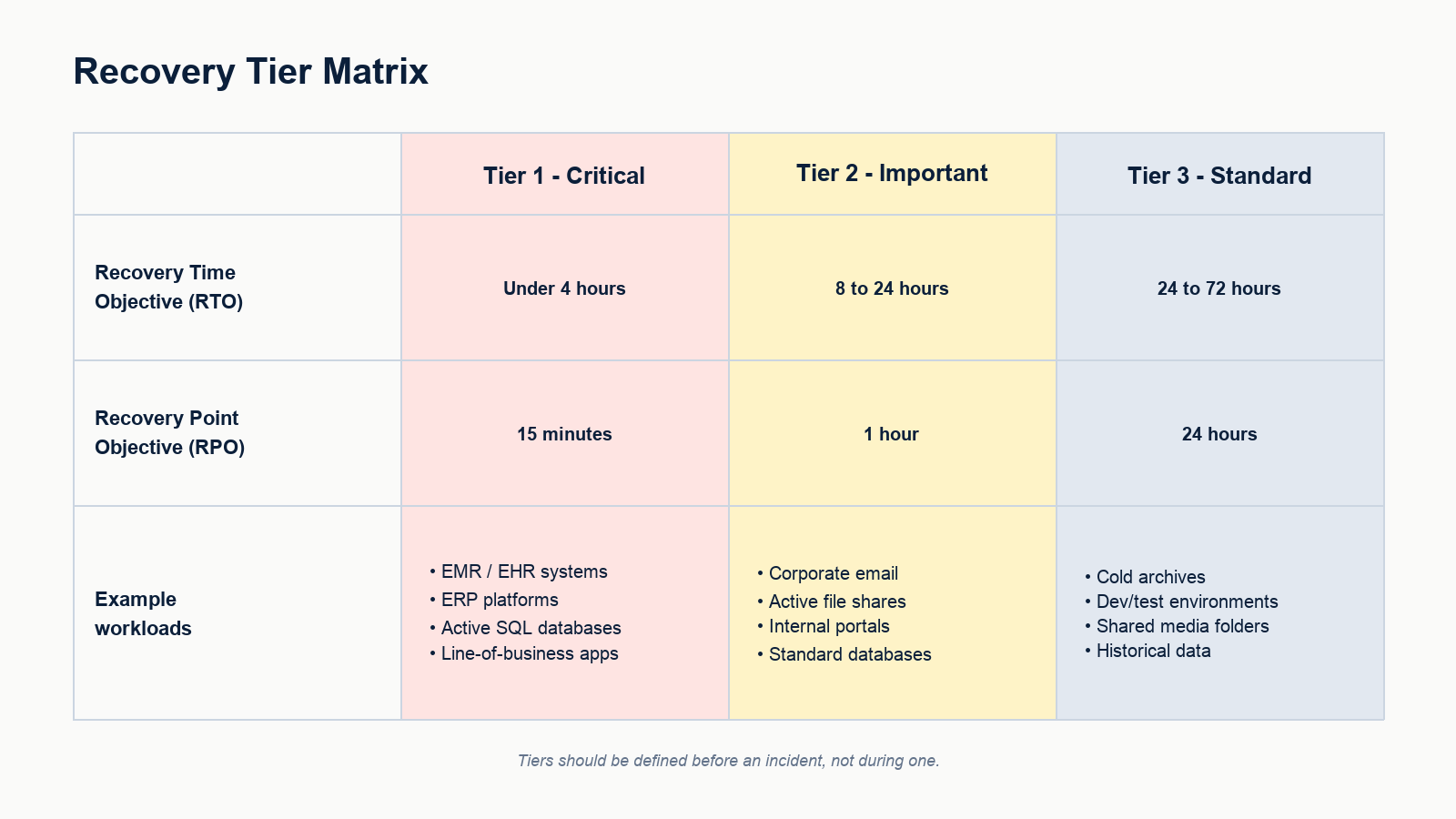
A practical tiering looks like this. Tier 1 critical workloads with RTO under 4 hours and RPO of 15 minutes. Tier 2 important workloads with RTO of 8 to 24 hours and RPO of 1 hour. Tier 3 standard workloads with RTO of 24 to 72 hours and RPO of 24 hours. Tier 1 is small and expensive. Tier 3 is large and cheap. Get the tiering wrong and you either overpay or under-recover.
Backups that survive an actual attack
Most ransomware events we respond to have a working backup product installed. Almost none of them survive the attack with their backups intact, because the backups were reachable from the same domain that the attacker took over.
A backup that survives ransomware has three properties. It is immutable, meaning it cannot be deleted or modified within a defined retention window, even by an administrator. It is isolated, meaning the backup repository does not share credentials, network, or directory with production. It is tested, meaning a full restore of a critical workload has been performed inside the last 90 days and timed.
If any of those three is missing, the backup is decoration. Most small business backup setups in Alberta fail at least one of them.
What recovery actually looks like, hour by hour
Once the incident is contained and the insurer has authorized recovery, the sequence is roughly the following.
- Hour 1 to 4: confirm backups are clean, scan backup images for known indicators of compromise, document the recovery plan
- Hour 4 to 12: stand up a clean recovery environment, isolated from the production network, with new credentials and fresh domain controllers
- Hour 12 to 24: restore Tier 1 workloads, validate against business owners, bring up identity and email last
- Day 2 to 3: restore Tier 2 workloads, begin staged user re-onboarding with forced password resets and re-enrolled MFA
- Day 3 to 7: restore Tier 3, decommission the compromised environment, finalize forensic timeline for insurer
- Week 2 to 4: post-incident review, control improvements, regulatory disclosures if required, customer communication
This sequence assumes the recovery is being run by a team that has practiced it. The first time a business runs this sequence live, it usually doubles in length. That is why the tabletop exercise matters more than the binder.
The tabletop exercise no one wants to run
A two-hour tabletop exercise once a year is the single highest-leverage thing a small business can do for ransomware readiness. Pick a scenario, walk through it with the leadership team and the IT team in the same room, and watch where the plan breaks.
Typical findings in a first tabletop: no one knows the cyber insurance phone number, the backup administrator is on vacation and no one else has the credentials, the off-site backup is on the same Microsoft 365 tenant as production, the incident-response retainer expired last year, and the owner does not know what authority the IT manager has to disconnect systems. Every one of those is cheap to fix on a Tuesday afternoon and very expensive to discover at 2 a.m.
What this looks like for an Edmonton small business
For a typical 20 to 100 employee firm in Edmonton, a realistic ransomware recovery posture in 2026 includes immutable cloud backups with at least 30 days of retention isolated from the production identity provider, endpoint detection and response on every workstation and server, multi-factor authentication enforced on every remote access and admin account, a documented incident response plan with named roles, a current cyber insurance policy with the carrier’s incident response hotline in the plan, and an annual tabletop exercise with the leadership team in the room.
None of that is exotic. All of it is achievable inside a small IT budget if the work is sequenced properly. The reason most businesses still do not have it is not cost, it is that no one owns the project end to end.
FAQ
Should a small business ever pay the ransom?
That decision belongs to the business owner, legal counsel, and the cyber insurer together. There are scenarios where payment is the only viable path, and there are scenarios where payment buys nothing because the decryptor does not work or the data has already been exfiltrated and will be leaked anyway. The decision is rarely as simple as either extreme makes it sound.
How long does a typical small business ransomware recovery take?
For a small business with tested backups and a practiced plan, core operations are usually restored within 3 to 7 days. For a small business without either, the same recovery commonly takes 3 to 6 weeks and a meaningful percentage of customer loss.
Does cyber insurance cover ransomware recovery?
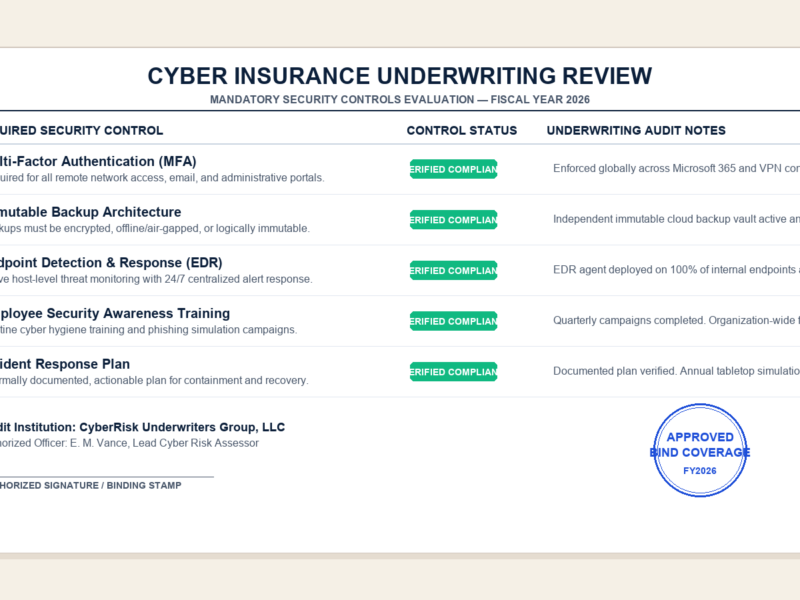
In most current policies, yes, with conditions. Carriers typically require MFA on all remote access, EDR on endpoints, immutable backups, and timely incident notification. Policies are increasingly explicit that failing to meet those baseline controls can void coverage. Read the policy before the incident.
What is the most common cause of ransomware in small business?
The leading initial access vectors are phishing leading to credential theft, exposed remote access portals without MFA, and unpatched edge appliances. None of the three is exotic, and all three are addressable by a focused control project.
Can we test our backup without restoring everything?
Yes. A scoped restore of a single critical workload into an isolated environment is usually enough to validate that the backup actually works and that the recovery time matches expectations. It should be done at least quarterly.
If you are putting a plan together
Most small businesses know they are exposed. The hard part is sequencing the work so the budget gets spent on the controls that actually change the outcome. A focused ransomware readiness review usually identifies the three or four gaps that matter most, which is a much smaller project than rebuilding the entire security stack.
Our team helps Edmonton businesses build and test ransomware recovery plans, validate backups against current attacker behavior, and run leadership-level tabletop exercises that surface the gaps before an incident does. Book a ransomware readiness review for your business. We will assess your current backups, identity controls, and response plan, and give you a prioritized list of fixes you can act on with or without us.