Zero Trust Network Access for small business is no longer an enterprise-only conversation. The economics have changed, the tooling has matured, and traditional VPN is increasingly the single weakest link in a small business security stack.
Most small and mid-sized businesses in Edmonton still secure remote access the way they did in 2018: a corporate VPN that, once authenticated, grants users broad network access. That model worked when offices had a clear perimeter, when laptops mostly stayed inside the building, and when ransomware was not specifically targeting VPN portals. Today none of those assumptions hold. Cyber insurance carriers are starting to ask explicit questions about identity-aware access. Microsoft, Google, Cloudflare, Cisco, Fortinet, and a wave of cloud-native vendors have made ZTNA deployable inside small business budgets.
This guide walks through what Zero Trust Network Access actually means, why it is replacing VPN for small business in 2026, what a realistic deployment looks like, the rollout sequence that does not break the business, and what it usually costs.
What Zero Trust Network Access actually is
Zero Trust is a security model. ZTNA is the implementation that controls remote application access according to that model. The defining idea is short: never trust, always verify, and verify per request, not per session.
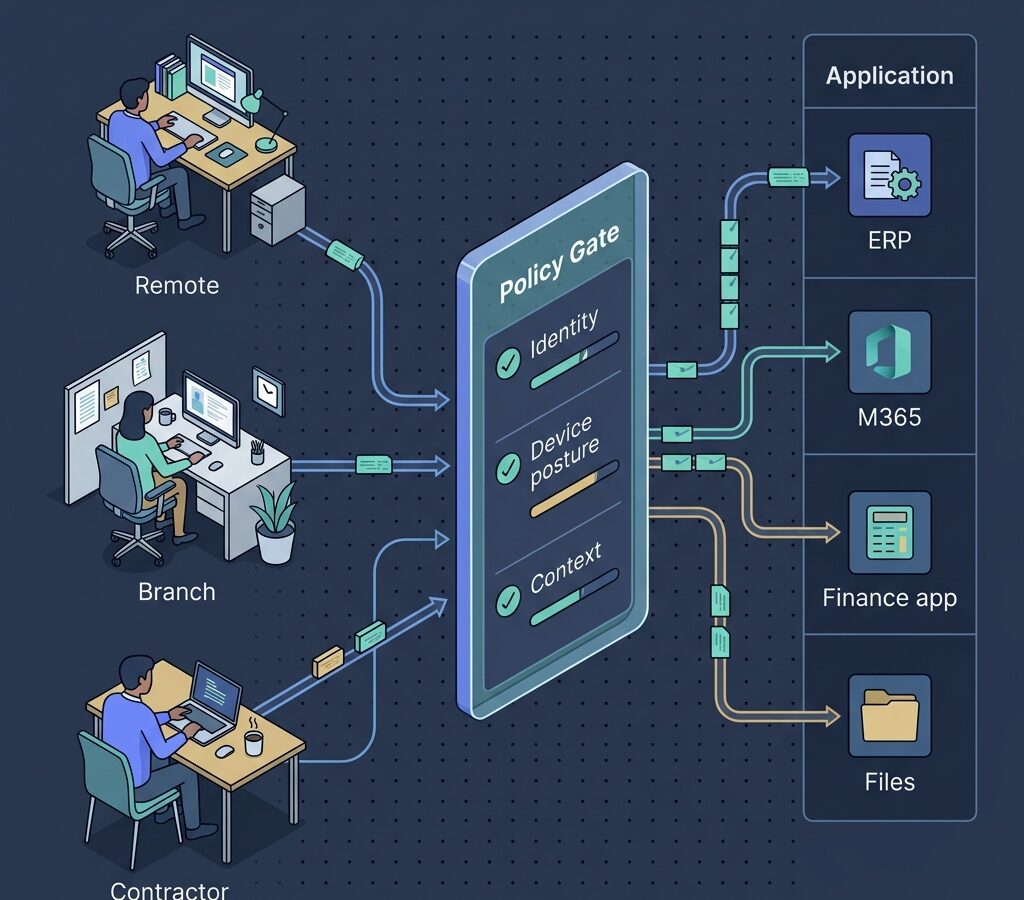
In practice, a ZTNA system has three properties. First, every access request is authenticated and authorized individually, based on identity, device posture, and context. Second, users only see the specific applications they are entitled to, never the underlying network. Third, the system continuously evaluates trust, so a session that becomes risky mid-stream (a posture check fails, an impossible-travel pattern appears, a new sensitive resource is requested) can be challenged or revoked.
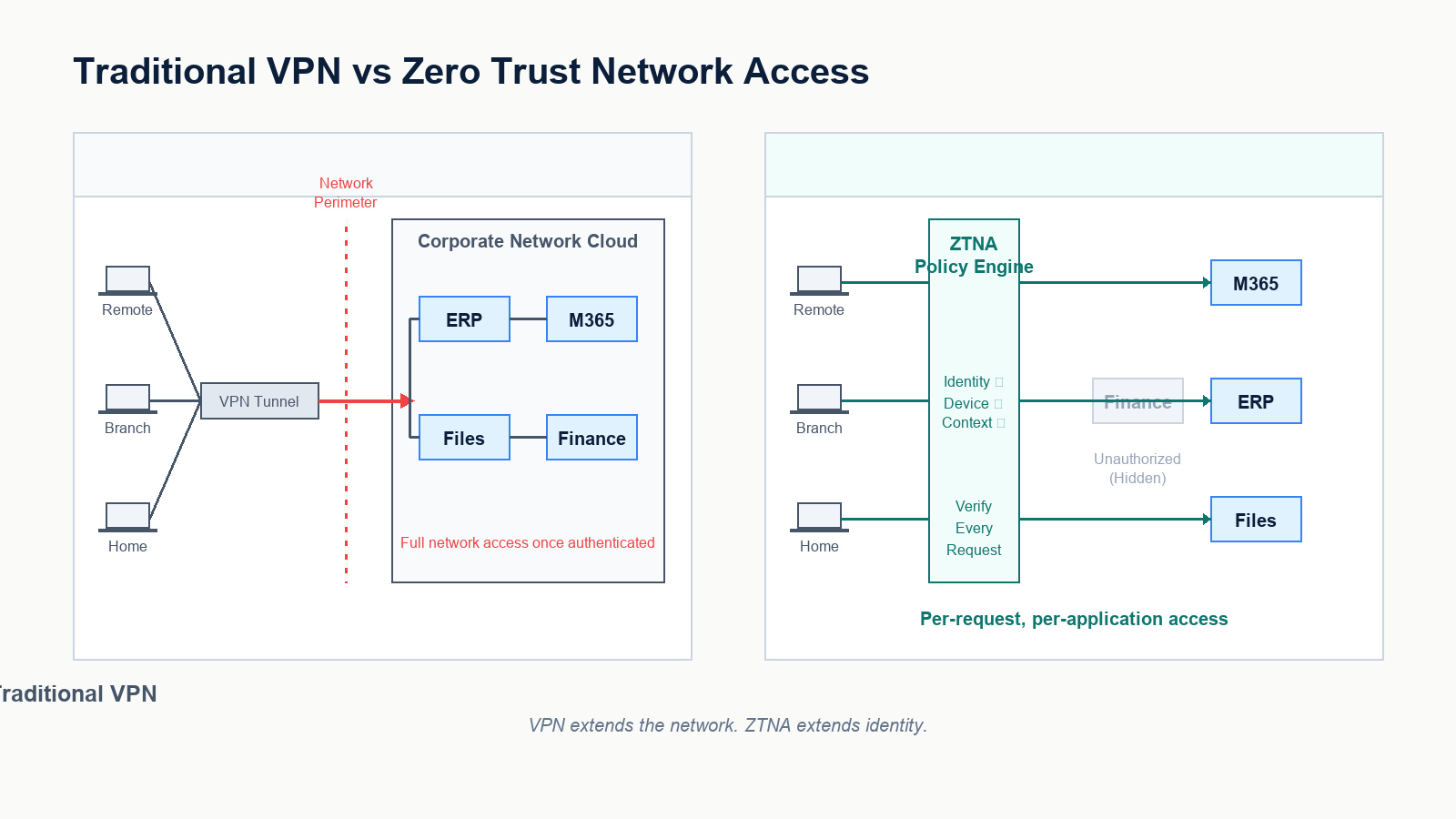
This is materially different from VPN. A VPN authenticates a user once, then drops them onto the corporate network. A ZTNA platform brokers each application connection individually, with identity and posture in the loop every time.
Why VPN is not enough anymore
VPN is not broken in the sense that it does not work. It is broken in the sense that it does not match how attackers actually compromise small businesses today. Three patterns drive the shift.
VPN portals are a primary attack target
SSL VPN appliances from every major vendor have been the subject of repeated remote-code-execution disclosures over the last several years. Many ransomware events we respond to traced initial access to an unpatched VPN appliance or an exposed portal that lacked MFA on local accounts. ZTNA reduces this surface by removing the publicly addressable network entry point entirely. Applications are reachable only through an outbound-initiated broker.
Lateral movement after VPN authentication is too easy
Once a VPN user is on the corporate network, they typically can reach far more than they need. If their endpoint is compromised, so is everything they can route to. ZTNA enforces per-application access, so a compromised endpoint can only attempt to reach the specific applications the user is entitled to, not the entire flat network.
Hybrid work and contractors broke the perimeter
Small businesses now routinely have remote employees, branch staff, contractors, third-party developers, and bring-your-own-device users. The VPN model treats all of these as either “on the network” or “off the network.” ZTNA treats each access request individually, which matches how the workforce actually operates.
What a small business ZTNA deployment actually includes
A working ZTNA deployment has four components, none of them exotic.
- Identity provider: usually Microsoft Entra ID for businesses already on Microsoft 365. The identity provider is the source of truth for who is who and what groups they belong to.
- Device trust signal: Intune, Jamf, or the ZTNA vendor’s posture agent, providing real-time signals about whether the device is patched, encrypted, and free of obvious compromise.
- ZTNA broker: the platform that mediates application access based on identity and posture. Cloudflare Zero Trust, Zscaler Private Access, Microsoft Entra Private Access, Fortinet Universal ZTNA, Cisco Secure Access, and Twingate are common picks for SMB.
- Connector at the application edge: a small outbound-only agent that exposes specific internal applications to the broker without opening any inbound firewall ports.
For a business already running Microsoft 365 Business Premium with Intune and Entra ID Conditional Access, a meaningful share of the building blocks are already paid for. The remaining work is connecting applications, defining policy, and rolling users over.
A 90-day rollout that does not break the business
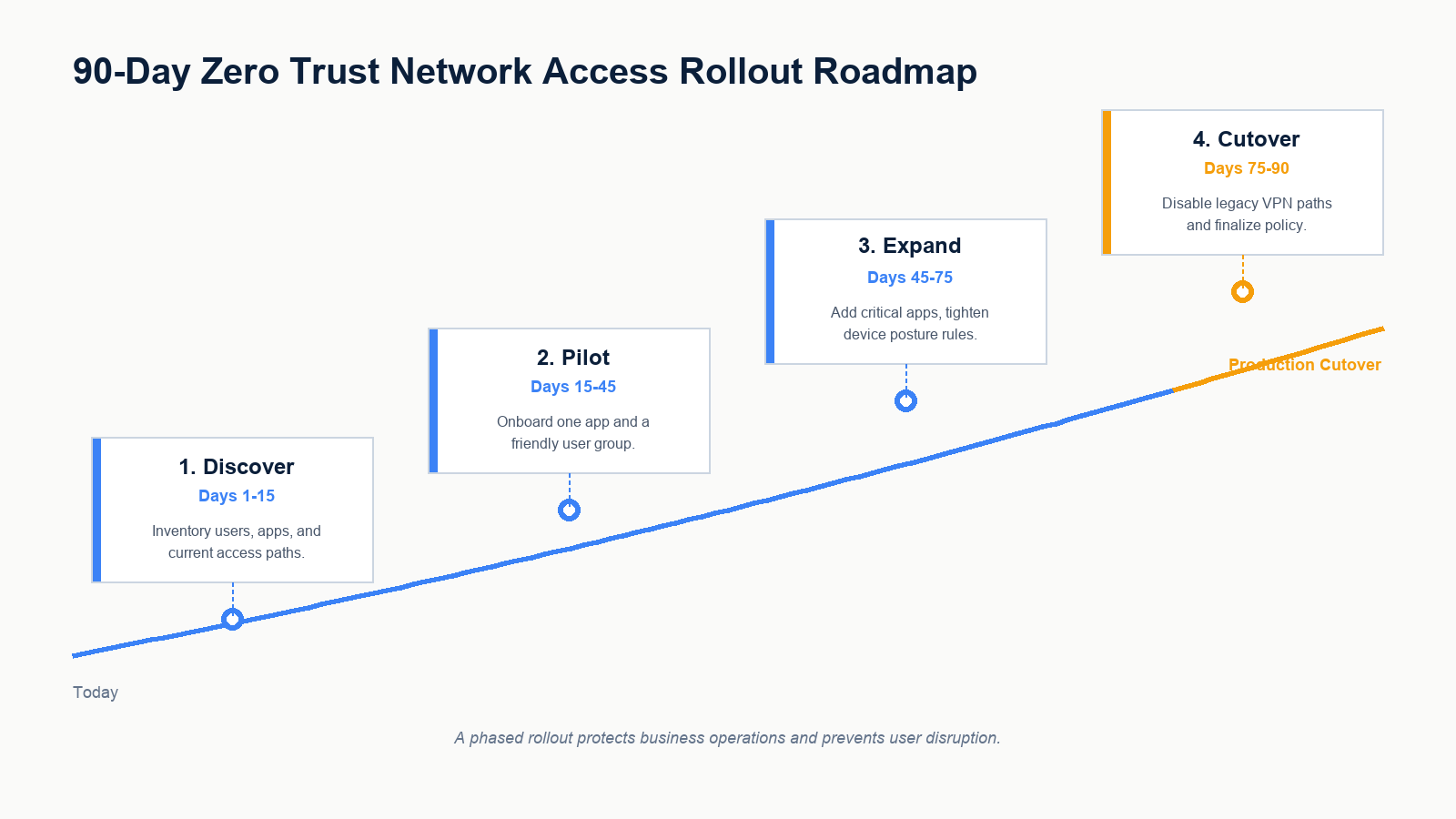
The single biggest mistake in ZTNA projects is treating it as a flag-day cutover. The pattern that works is a phased rollout that runs ZTNA alongside the existing VPN until the new path is proven, then deprecates the VPN.
Days 1 to 15, discover
Inventory remote access paths in the current environment. Document who connects to what, with which credentials, from which devices. Identify which applications are reached over VPN today, which are already accessed directly as SaaS, and which sit behind legacy network shares. Map identity groups in Entra ID against actual application entitlement. This phase usually surfaces several access paths that no one currently owns, which becomes the cleanup list.
Days 15 to 45, pilot
Pick one internal application and one cooperative user group, ideally IT itself. Deploy the ZTNA connector at the application edge. Configure the policy: who can reach it, from what device posture, with what conditions. Validate end-to-end with the pilot group. Keep VPN access in parallel during the pilot so users have a fallback.
Days 45 to 75, expand
Onboard the next group of critical applications. Tighten device posture rules. Add break-glass paths for legitimate exception cases. Start measuring user experience: average time to access, MFA prompt frequency, helpdesk tickets. Adjust policy based on real friction, not theoretical ideals.
Days 75 to 90, cutover
Migrate the remaining user groups. Communicate a clear date for VPN deprecation. Decommission VPN portals or, in environments that still need a thin VPN for legacy reasons, reduce its scope so it no longer provides broad network access. Update incident response runbooks to reflect the new access model.
What it usually costs
ZTNA pricing is mostly per-user per-month. For an SMB, list pricing tends to land in a low single-digit to low double-digit dollar range per user per month, depending on the vendor, the feature tier, and whether ZTNA is bundled with other SASE components like secure web gateway or CASB.
For a 50-person firm, total platform cost is typically several thousand dollars per year. Implementation cost depends on how much of the identity, device, and policy foundation already exists. Firms that already operate Entra ID Conditional Access and Intune properly tend to deploy ZTNA quickly. Firms that do not usually need to fix identity and device management as part of the same project, which lengthens the timeline but is necessary work in any case.
The cost comparison that matters is not “ZTNA versus free VPN appliance.” It is “ZTNA versus the eventual cost of a ransomware event that started at a VPN portal.” The expected value math favours ZTNA at almost any SMB scale today.
What businesses get wrong
Three patterns appear repeatedly when ZTNA projects stall or fail in small business environments.
The first is treating ZTNA as a product, not a model. The vendor’s tooling is the engine, but the model is the policy. If group definitions in Entra ID are inaccurate, ZTNA enforces incorrect access correctly. Clean identity is a prerequisite, not a side project.
The second is keeping the old VPN running indefinitely “for safety.” A parallel VPN that never gets deprecated cancels out most of the security benefit. The plan must include a real cutover date.
The third is over-restricting on day one and creating user revolt. The right starting policy is similar to existing VPN access scope, with continuous verification added. Tightening to least privilege happens incrementally as data flows are understood, not on a flag day.
FAQ
Is Zero Trust only for large enterprises?
No. ZTNA platforms now have small-business pricing and packaging. The deciding factor is the maturity of identity and device management, not company size.
Can we run VPN and ZTNA at the same time?
Yes, and during a rollout you should. The goal is a clear cutover date after which VPN is deprecated or scoped down to a narrow exception use case.
Does ZTNA work for on-premises applications?
Yes. That is one of its core use cases. A lightweight connector at the application edge exposes the application to the ZTNA broker without opening any inbound firewall ports.
Does ZTNA replace MFA?
No. ZTNA uses MFA as one of its trust signals. MFA stays in place. ZTNA adds device posture, context, and per-application enforcement on top.
What if a user is on a personal device?
ZTNA policy can allow personal devices with restricted access (e.g., browser-only access to specific web apps) and deny access to higher-sensitivity resources unless the device is enrolled and compliant. This is one of the practical advantages over a binary VPN model.
If you are evaluating ZTNA
Most small businesses considering ZTNA do not need a complete network redesign. They need a focused readiness assessment that confirms identity, device, and policy foundations are in place, identifies which applications go first, and lays out a rollout that does not interrupt operations.
Our team works with Edmonton businesses planning ZTNA deployments, evaluating vendors, and migrating remote access off legacy VPN safely. Book a Zero Trust readiness assessment. We will review your identity, device, and current remote access setup, recommend a vendor fit that matches your environment, and propose a phased rollout you can execute with or without us.