Cisco ASA deny tcp src messages flood your logs the moment something stops working, and they are the easiest log line on the firewall to misread.
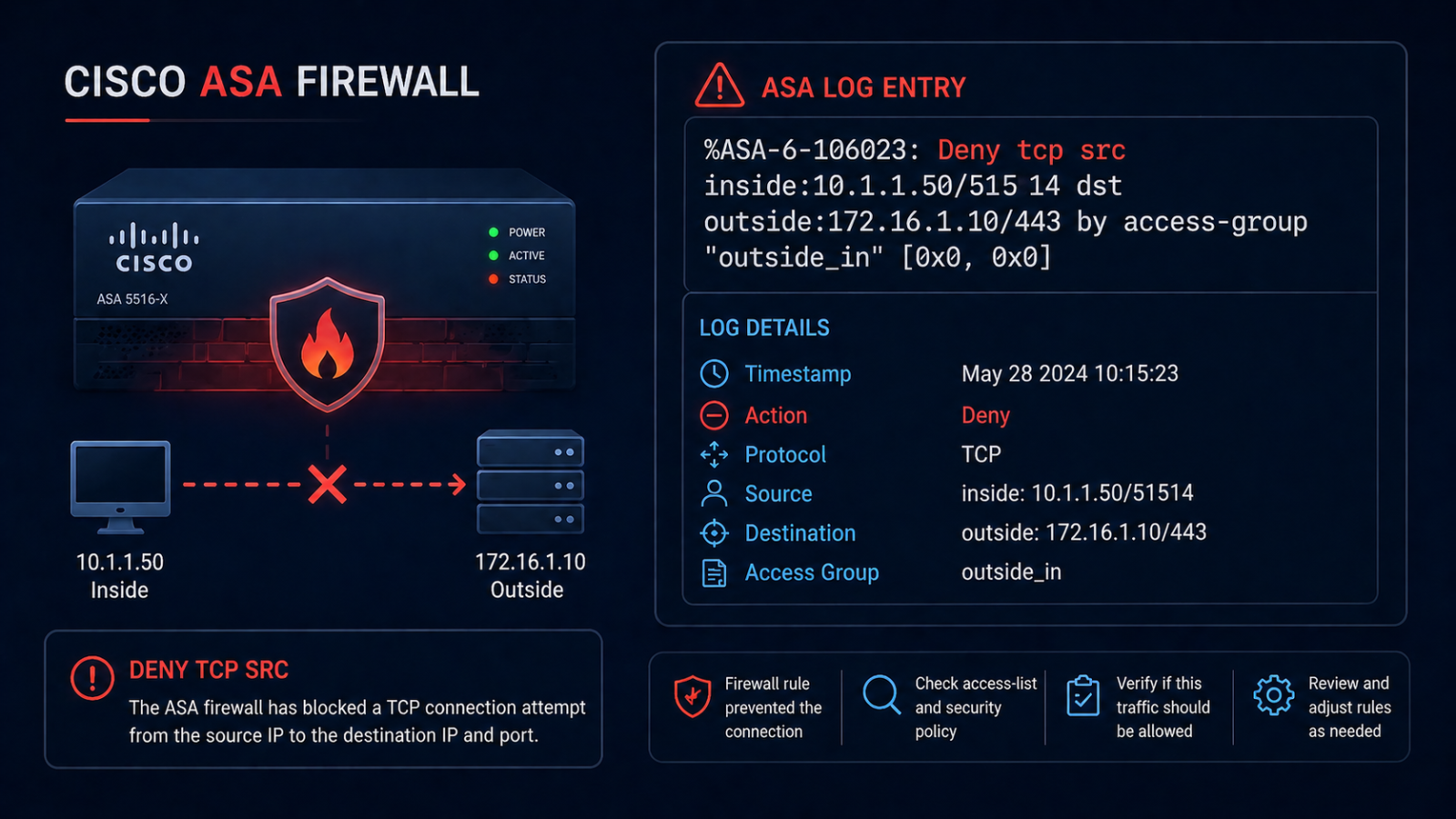
Your Cisco ASA is logging “Deny tcp src outside:1.2.3.4/45678 dst inside:10.0.0.5/443” by the thousand and you need to figure out whether it is intentional, a misconfiguration, or actually under attack. This post walks through how to read these messages, where to look in the configuration, and how to act on what you find.
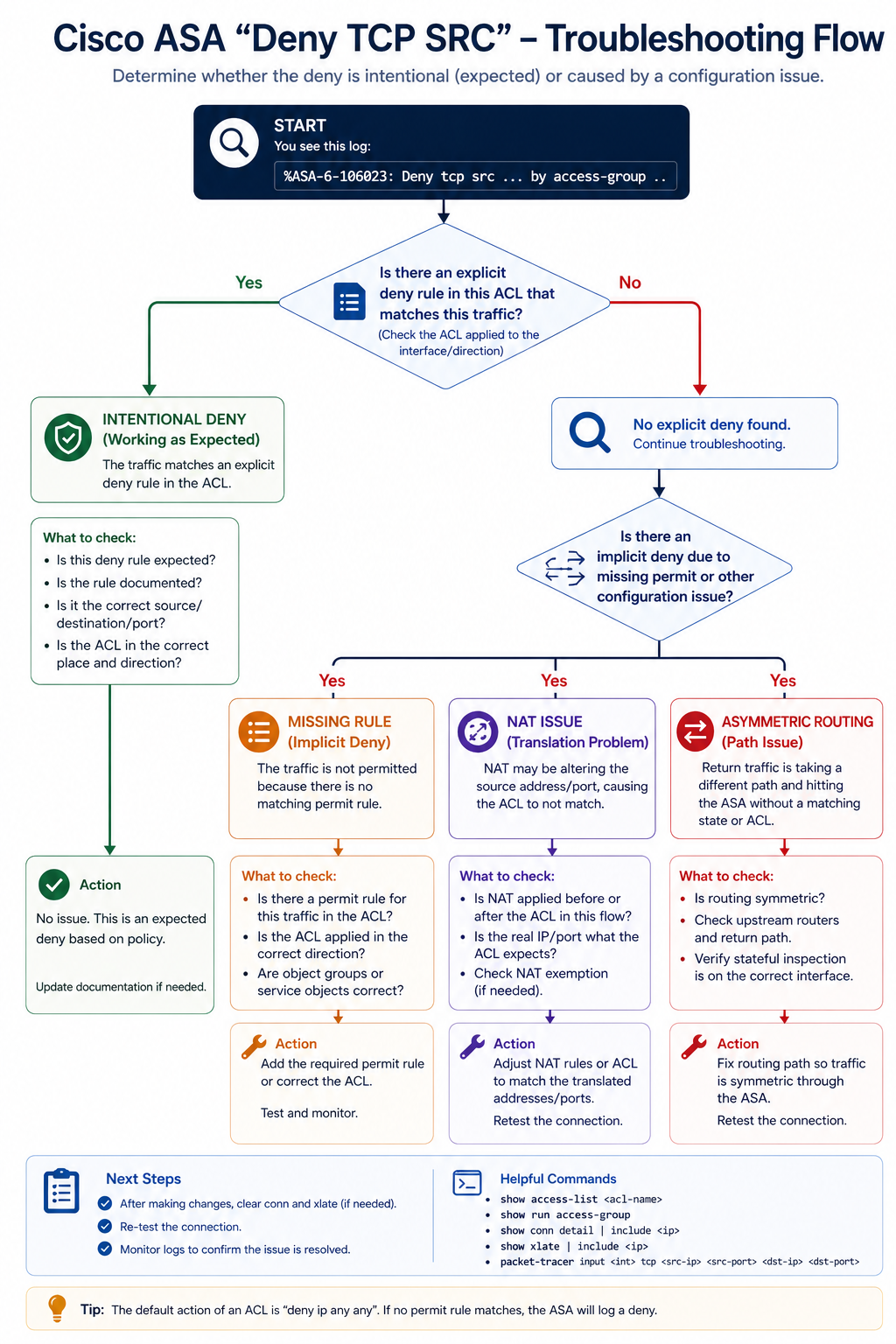
The short version. Deny messages on the ASA come in a standard format that includes the action, protocol, source zone and IP/port, destination zone and IP/port, and the ACL or implicit rule that matched. Once you can decode the message and find the matching ACL, you can decide whether the rule is correct and the source is malicious, or the rule is wrong and a legitimate flow is being blocked. Most flood incidents we see are one of three patterns.
What this message means
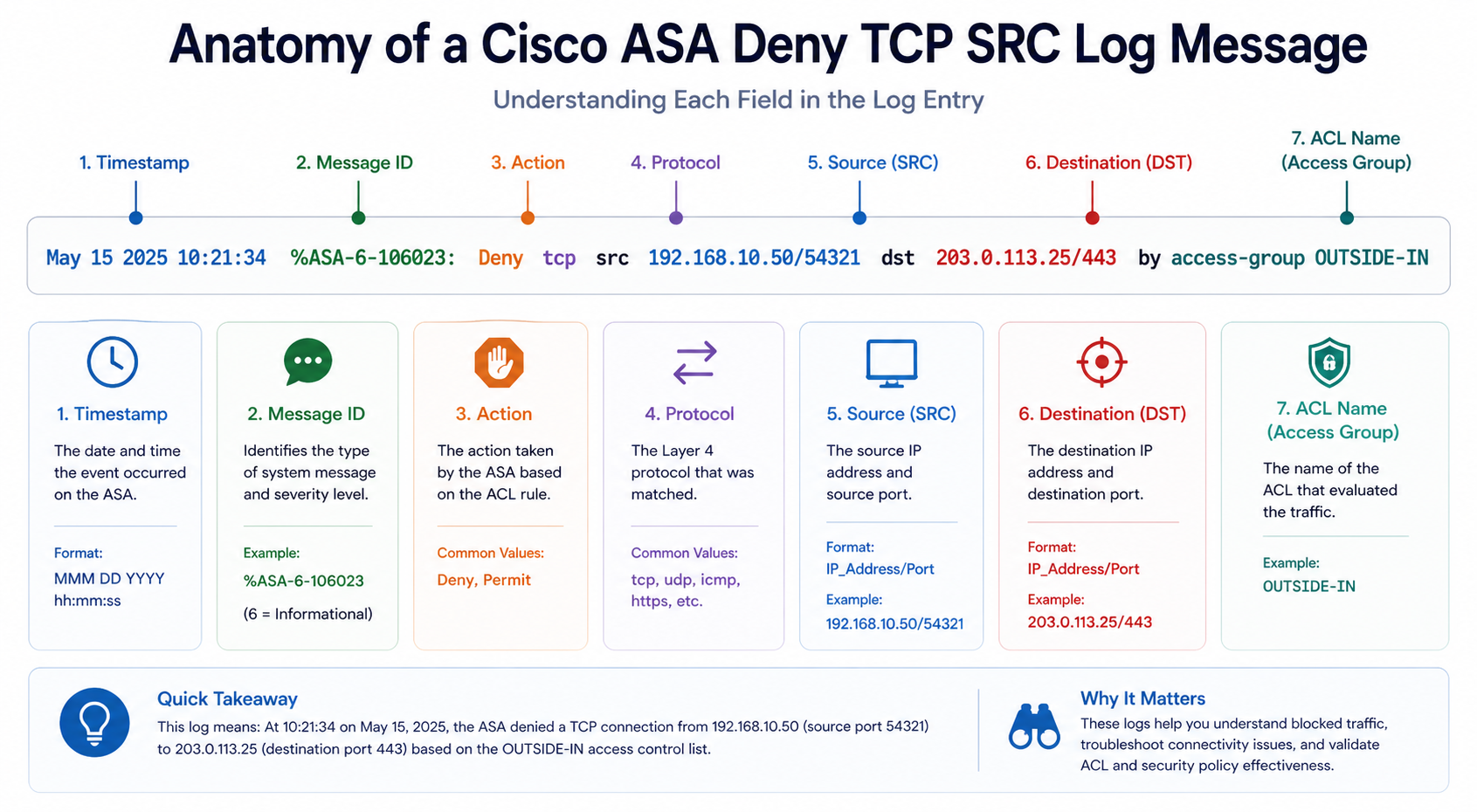
The default message ID for ACL denies on the ASA is 106023. The format is:
%ASA-4-106023: Deny [protocol] src [interface]:[ip]/[port] dst [interface]:[ip]/[port] by access-group "[ACL name]"
Each field tells you something specific. The source interface (e.g., outside) tells you where the traffic came from. The source IP tells you who. The destination interface and IP tell you what they were trying to reach. The ACL name at the end tells you which rule matched, which is your starting point for fixing or confirming the deny.
You will see this in the ASA syslog output, in your SIEM if you forward logs there, or live with show logging on the ASA itself. Specific values matter.
Verified against current Cisco ASA documentation, accessed April 2026.
Common causes
Cause one, intentional deny working as designed, around 50 percent of cases
The deny is exactly what the firewall should be doing. Internet scanners hitting your public IP, malware probing for open ports, normal background noise. The log volume is high because the firewall is doing its job.
Verify by inspecting the source IP. Reverse DNS, GeoIP, and threat intelligence checks tell you whether it is a known scanner, a residential IP, or a known-malicious source. If it is normal background noise, you have two options: ignore it (filter the message at the SIEM level), or block the source range at an upstream provider if it is sustained.
Cause two, missing or incorrect ACL rule, around 25 percent of cases
The deny is blocking legitimate traffic that should be allowed. The user reports something is broken, and the ASA log confirms the deny. Common after a network change, application migration, or new service deployment.
Verify by reviewing the named ACL with show access-list [name]. Compare to what the application requires. Add the missing allow rule above the implicit deny, and apply it.
Cause three, NAT issue surfacing as a deny, around 15 percent of cases
The ACL allows the traffic, but NAT is not translating correctly, so the ASA sees an unexpected source/destination combination and falls through to the implicit deny. Often happens with manual NAT rules that have been recently changed.
Verify with show nat and trace the flow. If NAT is mistranslating, fix the NAT rule rather than the ACL.
Cause four, asymmetric routing, around 10 percent of cases
Traffic is coming in one ASA interface and trying to leave another, but the return traffic comes back through a different path. The ASA’s stateful inspection drops the asymmetric flow because it does not match an existing connection.
Verify by tracing the routing on both sides. Fix by either making the routing symmetric, or by configuring TCP state bypass on the ASA for the specific flows (use TCP state bypass sparingly, it weakens stateful protection).
What the official documentation does not mention
Cisco’s docs explain the message format but rarely emphasize that 106023 messages are normal background traffic on any internet-facing firewall. A flood of these is not necessarily a problem. The signal is when patterns change, the same source IP hitting many destinations, the same destination port being probed from many sources, or a sudden jump in volume from a previously quiet source. Tune your alerts on the patterns, not the raw volume.
The architectural fix
Firewalls that produce useful logs (instead of noise) share three traits. First, they have explicit deny rules with custom messages so you can distinguish “deny because no rule matched” from “deny because explicit policy.” Second, they forward logs to a SIEM that can correlate patterns rather than alerting on every single deny. Third, they are reviewed quarterly to remove stale ACL rules that no longer reflect application traffic. Skip any of these and your firewall logs become noise that masks real signals.
FAQ
Should I block all of these source IPs at my edge?
Most are benign internet noise and not worth blocking individually. Use threat intel feeds to block known-bad sources, but do not try to block every random source.
Should I disable 106023 logging to reduce noise?
No. You lose visibility into actual attacks. Filter at the SIEM level instead, where you can keep the data but suppress noisy patterns.
Is this similar to FTD or Firepower deny logs?
The format differs but the troubleshooting approach is similar. Find the rule that matched, decide if it is correct, fix or accept.
Related posts
Firewall logs that are mostly noise
If your ASA logs are 90 percent noise and 10 percent signal, the problem is rarely the ASA. It is the rule set and the SIEM tuning. Our team can audit the configuration and the log pipeline and tell you what to keep, what to suppress, and what to investigate. Send us a sample of your log volume and we will tell you what is actionable.
Last verified April 2026 by the aaanetworkx security practice.