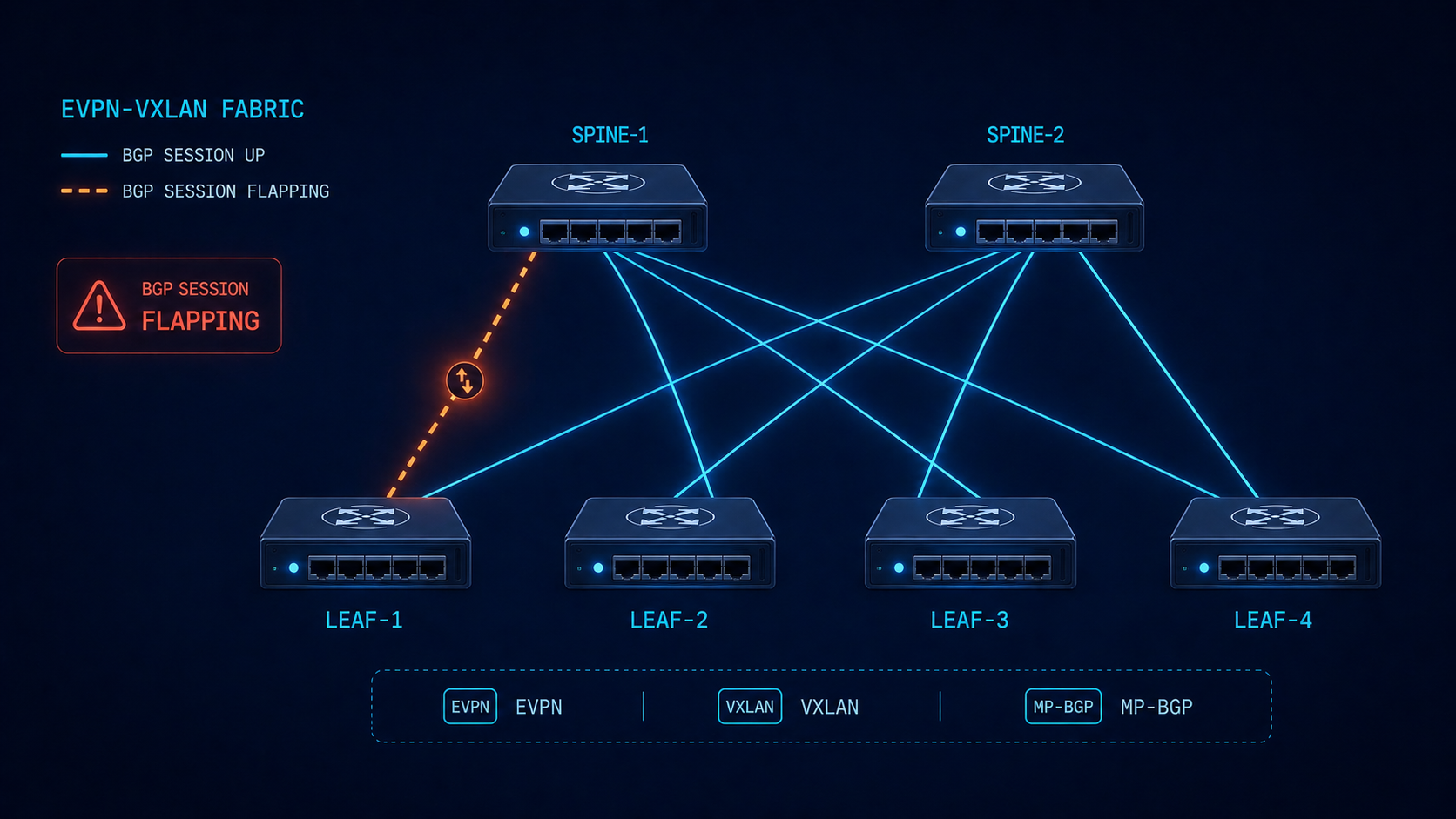
Troubleshoot BGP flapping EVPN fabrics by separating the underlay BGP from the overlay BGP first, because the symptoms look identical at the CLI.
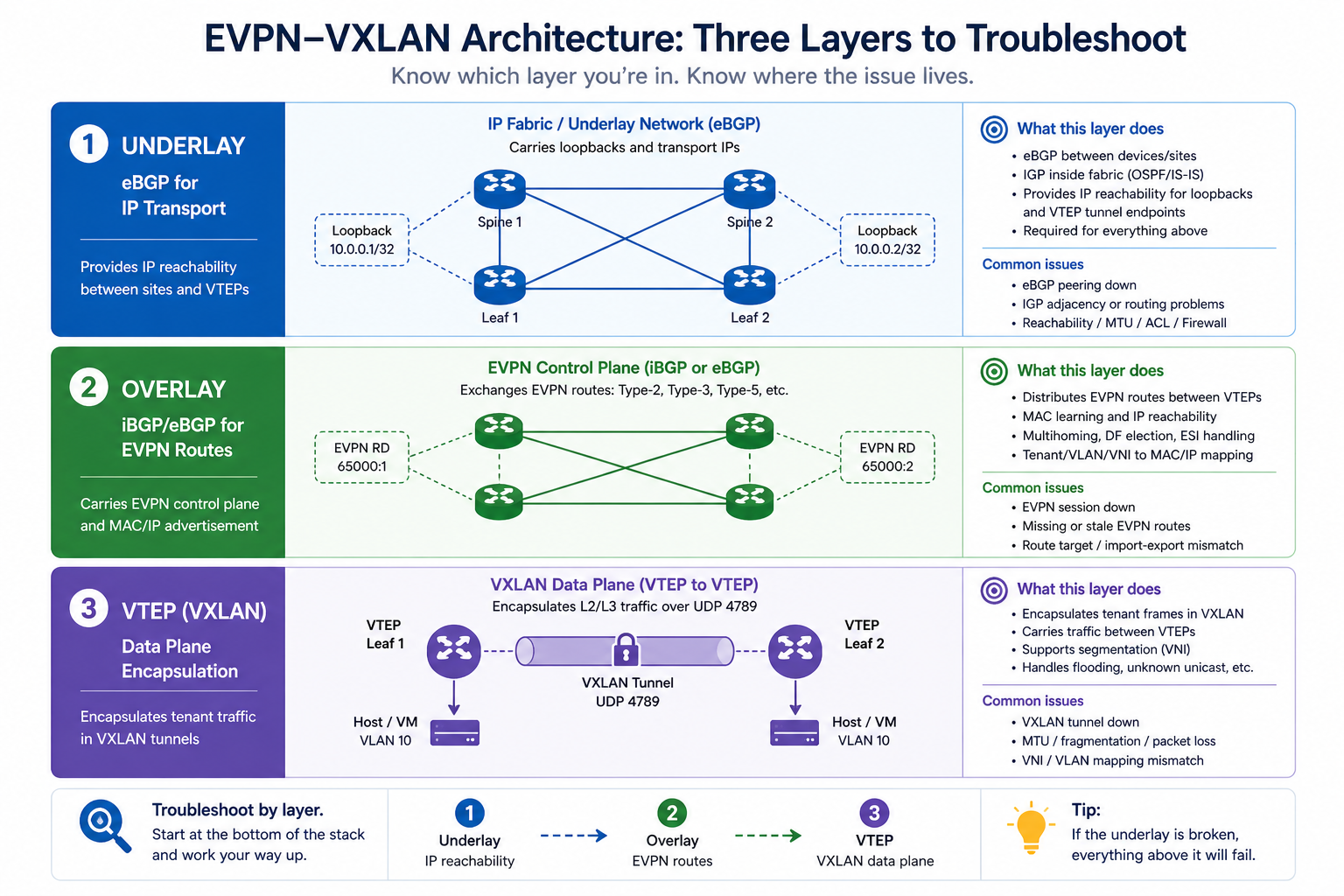
BGP in an EVPN-VXLAN fabric is doing two jobs at once. The underlay BGP carries IP reachability between VTEPs. The overlay BGP carries EVPN routes (MAC-IP, EAD, IMET, prefix routes) that build the actual virtual networks. When BGP flaps in this kind of environment, the cause might be in either layer, and the diagnostic approach is different from troubleshooting BGP on a single-layer network. This post walks through the diagnostic order we use in production fabrics to isolate the issue fast.
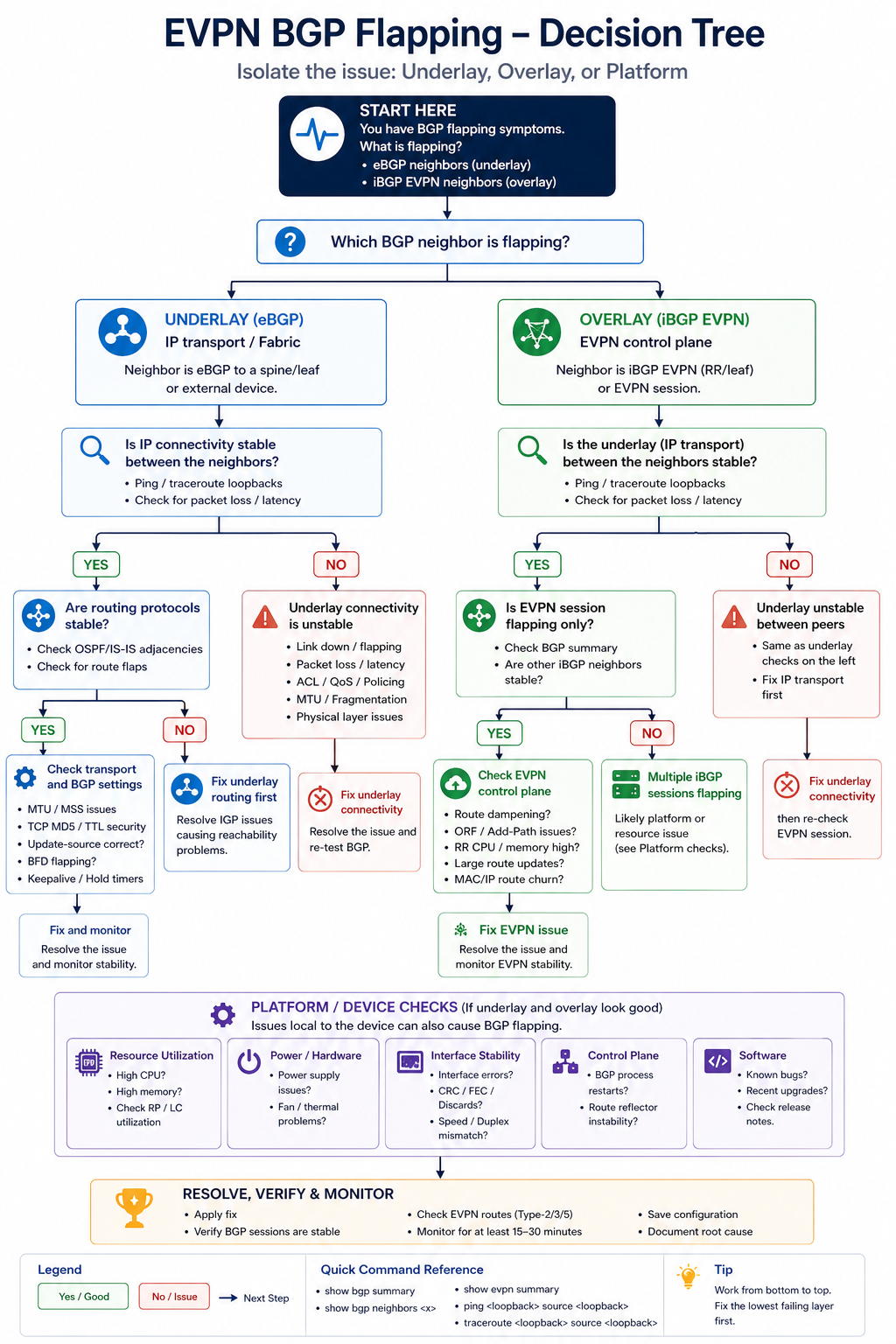
The short version. Always isolate underlay first. If the underlay BGP session between leaf and spine is unstable, the overlay sessions ride on top of that and look unstable too, but the root cause is one layer down. Spending an hour debugging EVPN AFI before you have confirmed the underlay is solid is one of the most common time-wasters in fabric operations. Walk the layers from physical, to underlay, to overlay, in that order, every time.
The two BGP sessions, briefly
In a typical EVPN-VXLAN fabric, every leaf has at least two BGP sessions to each spine. The first runs in the IPv4 unicast AFI (or IPv6) and carries the underlay reachability. The second runs in the L2VPN EVPN AFI and carries the overlay routes. The two sessions are independent at the protocol level but they ride on the same underlying TCP transport and physical interface. So a flap on the physical layer affects both.
The trick is that some causes affect only the underlay (a faulty interface), some affect only the overlay (an EVPN AFI configuration issue or an EVPN route-import policy that drops everything), and some affect both. Knowing which layer is unstable narrows the search space dramatically. The output of show bgp summary by AFI tells you instantly where the issue lives.
Diagnostic order
Step 1, physical and interface health
Before BGP, check the physical link. Interface error counters, CRC, input drops, optical light levels on the SFP. A spine-leaf link with marginal optics will produce BGP flaps that look like a routing issue but are actually a layer 1 issue. show interface counters errors on both sides. If anything is non-zero and growing, fix the physical layer first.
Step 2, underlay BGP session state
Run show bgp ipv4 unicast summary on the leaf and confirm the session to each spine is Established with a stable uptime. If uptime is short or oscillating, the underlay is unstable. Common causes: BGP timer mismatch, ACL blocking BGP TCP 179, MTU issue affecting BGP UPDATE messages.
Step 3, overlay (EVPN AFI) session state
Run show bgp l2vpn evpn summary. If the underlay is solid but EVPN is unstable, the issue is in the overlay layer. Possible causes: route-target import policies that conflict, EVPN-specific platform bugs, or excessive overlay route churn from an external trigger (e.g., MAC moves cascading from a dual-homed host).
Step 4, EVPN route table churn
Even with stable BGP sessions, EVPN can show symptoms of instability if specific routes are flapping rapidly. show bgp l2vpn evpn route-type 2 and look for MAC-IP routes that are constantly being withdrawn and re-advertised. This often points to a host that is moving rapidly between VTEPs (a misconfigured load balancer, a multi-homed host with poor LACP), or to a duplicate MAC somewhere in the fabric.
Step 5, MAC mobility events
EVPN’s MAC mobility extended community tracks how often a MAC has moved. show evpn mac route-type 2 detail and look for elevated mobility sequence numbers. If the same MAC is at sequence 50 after a few minutes, you have a host or device that is constantly being attributed to different VTEPs.
Step 6, platform CPU and process health
If everything above looks healthy and BGP still flaps, check leaf and spine CPU. Aggressive churn from another protocol, a flapping interface elsewhere, or a misbehaving streaming telemetry export can starve BGP of CPU and trigger keepalive misses. show processes cpu sorted and look at history.
Common patterns we see in production
Three patterns dominate in real fabrics. First, a single dual-homed host with bad LACP causes MAC mobility events that ripple through the EVPN AFI and create the appearance of fabric-wide flapping. Find the host, fix the LACP. Second, an MTU mismatch on a single spine-leaf link drops some BGP UPDATEs but not others, causing intermittent EVPN route disagreement between leaves. Third, a route-target import policy with a typo causes one leaf to fail to import EVPN routes from a specific tenant, which surfaces as black-holing in that tenant’s traffic but not as a BGP session flap. The third pattern is particularly insidious because show bgp summary looks fine.
What the vendor documentation does not tell you
Cisco, Arista, Juniper, and Nokia each implement EVPN with slight differences in how they handle MAC mobility, ESI labels, and route-target auto-derivation. Multi-vendor fabrics can produce flap-like behavior simply because different vendors interpret a corner case slightly differently. If you run a multi-vendor fabric, document the specific quirks of each vendor’s EVPN implementation in your runbook before the next incident.
Also, BFD is widely deployed for fast failure detection in fabrics, and BFD running too aggressively will declare a session down on a momentary CPU dip. If BGP is flapping with very fast hold-down times, check whether BFD configuration is more aggressive than the underlying platform can sustain.
The architectural fix
Stable EVPN fabrics share four traits. They use route reflectors or route servers to bound the BGP mesh complexity. They monitor underlay and overlay separately, with distinct dashboards and alert thresholds. They have a documented multi-vendor quirks file that captures every interop decision made during deployment. And they do not over-tune BFD or BGP timers without testing under load. Most fabric instability we encounter traces back to skipping one of these.
FAQ
Should I check underlay or overlay first?
Underlay first, always. Overlay sits on top of underlay TCP, so any underlay instability surfaces in overlay too. Confirming underlay is healthy isolates the search.
Is it ever the spines and not the leaves?
Sometimes, especially when one spine has a different software version or hardware generation than the other. Spine asymmetry is rare but real, and it causes very confusing flap patterns.
Will BGP graceful restart help?
For planned events like software upgrades, yes. For actual instability, no.
Related posts
Need help with a fabric incident
EVPN fabrics are unforgiving when something is off. Our data center practice operates and audits EVPN-VXLAN fabrics at scale and we are comfortable jumping into an active incident. Send us the topology and a sample of show output and we will help isolate.
Last verified April 2026 by the aaanetworkx data center practice.
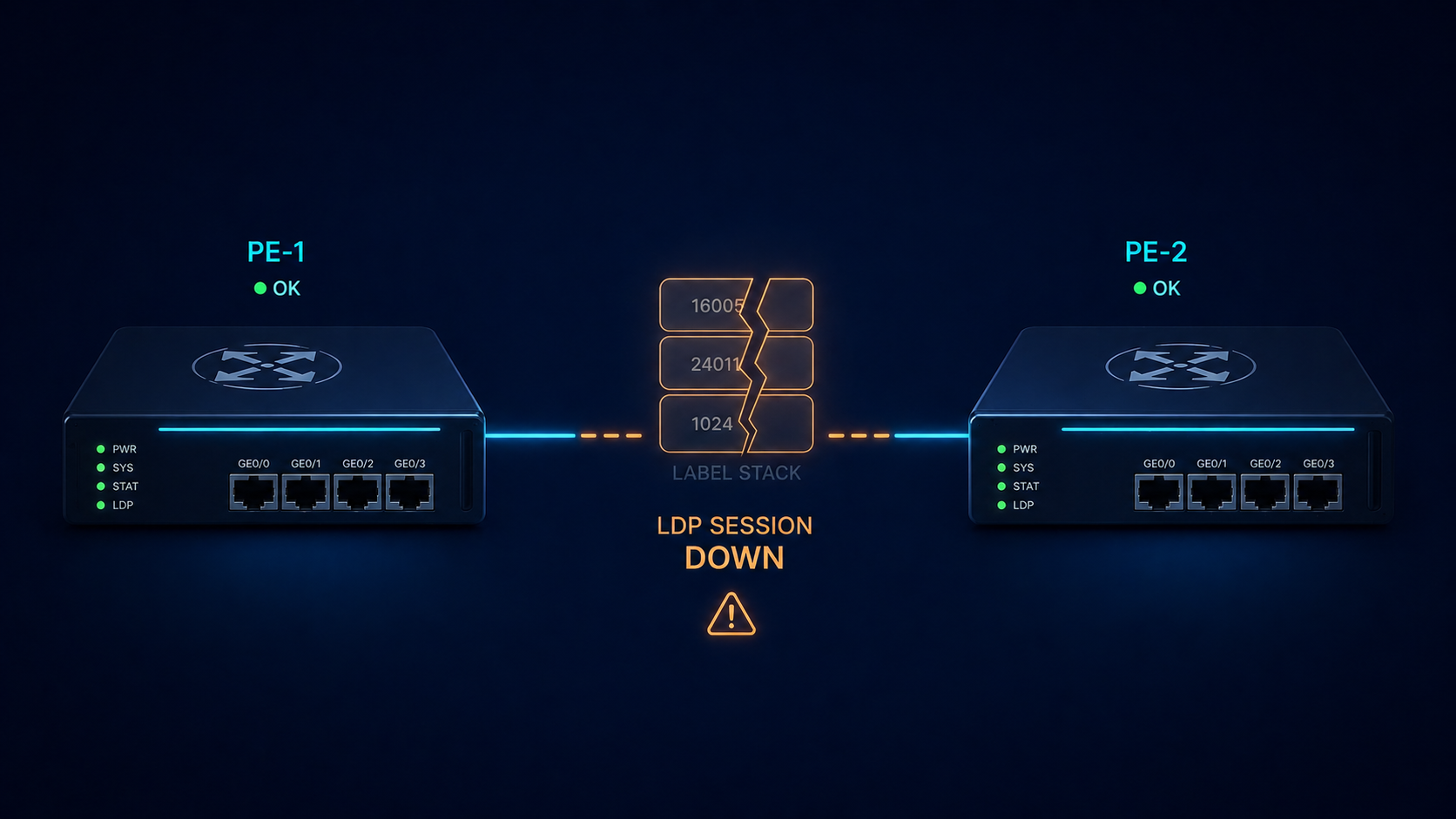
MPLS LDP neighbor down means the label distribution session between two routers has failed and forwarding is broken between them.
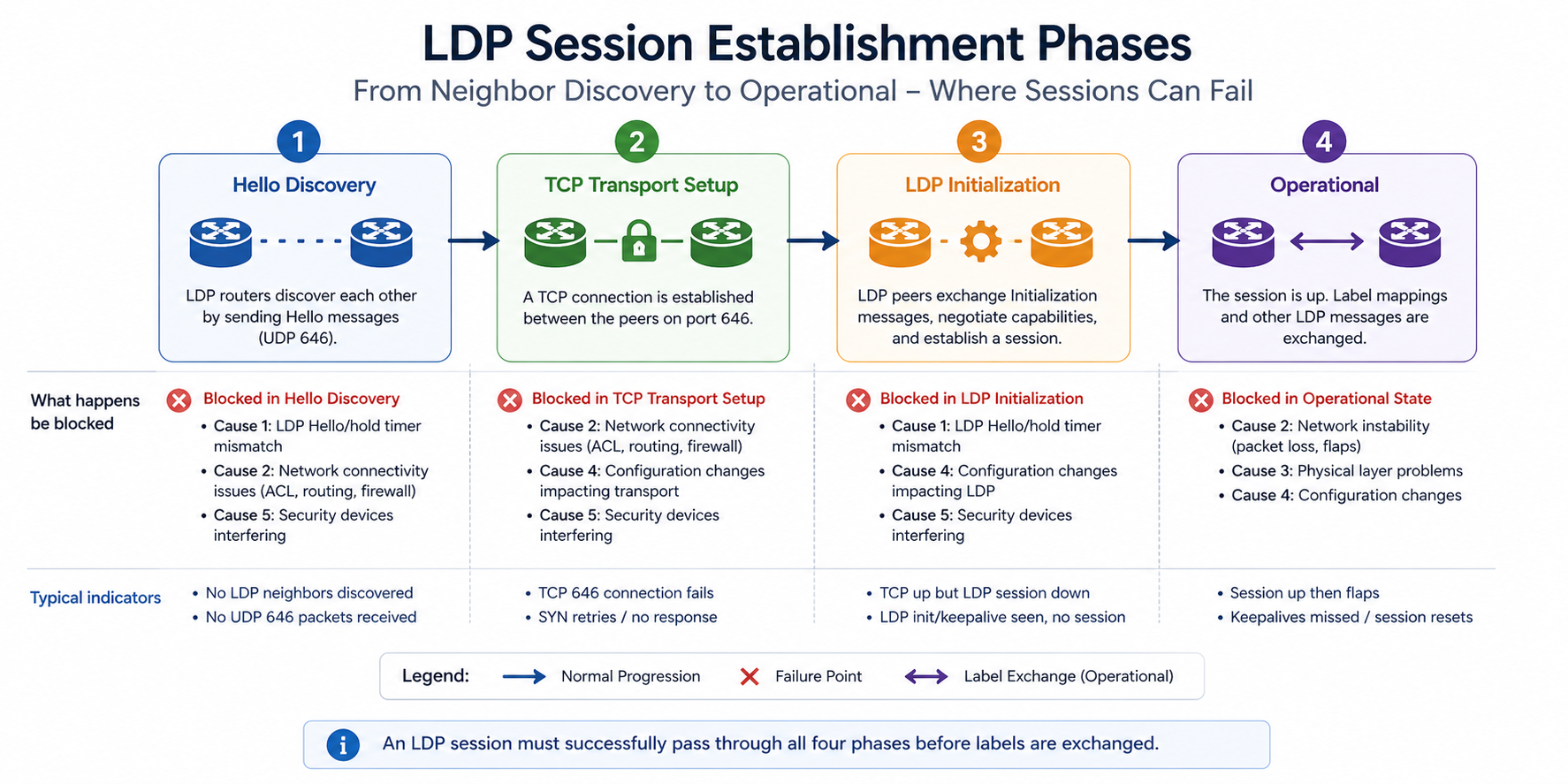
MPLS LDP is the protocol that distributes labels between routers in your MPLS network. When the session goes down, MPLS forwarding stops working between those two routers, and any service that depends on that path (L3VPN, L2VPN, traffic engineering) goes with it. This post walks through the five real causes of LDP neighbor down ranked by frequency, the diagnostic order, and the architectural fix that stops it from recurring.
The short version. About 30 percent of LDP down incidents are TCP transport address misconfiguration, where the LDP session cannot establish even though the hello adjacency works. Another 25 percent are IGP convergence issues that interrupt the route to the LDP transport address. The rest split across ACL/firewall blocking TCP 646, MTU mismatch on the link, and authentication drift. Diagnostic order matters. Check IGP first, transport address second, TCP reachability third, before any labels are exchanged.
What LDP down actually means
LDP runs in two phases. The hello phase uses UDP 646 between directly connected interfaces to discover potential LDP peers. The session phase uses TCP 646 between the two routers’ transport addresses (typically loopback addresses) to establish the actual LDP session that exchanges labels. If hello succeeds but TCP session fails, the neighbor shows in the hello adjacency table but not in the operational session table.
You will see this in three places. show mpls ldp neighbor shows no operational neighbor or shows it in a transient state. show mpls ldp discovery shows the hello adjacency. debug mpls ldp transport shows TCP connection failures. Your monitoring system flags affected MPLS services as down.
Verified against current Cisco IOS-XR and Juniper Junos LDP documentation, accessed April 2026.
The five causes, ranked
Cause one, transport address misconfiguration, around 30 percent
The LDP transport address (the address LDP uses to establish the TCP session) is configured to a loopback that does not exist, is shut down, or is not advertised by the IGP. Hello adjacency works because it uses interface addresses, but TCP session fails because the transport address is unreachable.
Verify with show mpls ldp parameters on both sides. The router-id and transport-address should be loopback addresses that are up, configured, and reachable across the IGP. Fix any mismatch.
Cause two, IGP route to transport address missing, around 25 percent
The transport address is correctly configured but the IGP is not advertising it, or convergence has temporarily removed the route. LDP cannot bring up the session because TCP cannot reach the destination.
Verify with show ip route x.x.x.x for the neighbor’s transport address. If no route exists or the route flaps, fix the underlying IGP issue first. LDP will recover automatically once the route stabilizes.
Cause three, ACL or firewall blocking TCP 646, around 20 percent
An ACL on a transit router or a security policy on a firewall is blocking TCP 646 between the two transport addresses. Often happens after a security audit tightens default rules.
Verify with telnet x.x.x.x 646 from one router to the other. If TCP connection fails, trace the path and find the offending filter.
Cause four, MTU mismatch on the link, around 15 percent
MPLS adds 4 bytes per label. If the underlying interface MTU is not big enough to carry IP plus the maximum label stack, large LDP messages or labeled traffic gets dropped. LDP session can establish then drop after initialization.
Verify with interface MTU on both sides and confirm it accommodates the full label stack you expect to push (4 bytes per label, plus IP plus L2 framing).
Cause five, authentication drift, around 10 percent
If LDP TCP authentication is configured (MD5 or TCP-AO), a key mismatch on one side causes the TCP session to never establish. Hello succeeds, TCP handshake fails.
Verify with show mpls ldp neighbor detail and check authentication settings on both sides. Fix the mismatch.
What the official documentation does not mention
Vendor docs walk through the LDP states but rarely explain that LDP session establishment depends on TCP, which depends on IGP, which depends on the underlying interface. So when LDP fails, the cause is often two or three layers below LDP itself. Always start at the bottom of the stack and work up. A flapping interface produces an LDP error message that looks like an LDP problem but is actually a physical layer issue.
Also, when migrating from LDP to Segment Routing, both can run simultaneously and produce confusing log messages as labels overlap during transition. Plan migrations with explicit LDP/SR coexistence in mind.
The architectural fix
Networks that rarely see LDP issues do four things. First, every router uses its loopback as the LDP transport address consistently, with the loopback advertised by the IGP. Second, ACLs at internal boundaries explicitly permit TCP 646 with documented justification. Third, MTU is standardized network-wide with margin for the maximum label stack. Fourth, monitoring alerts on LDP neighbor state changes alongside IGP route changes so the correlation is obvious. Skip any of these and LDP becomes the symptom of an underlying issue rather than its own well-managed protocol.
FAQ
Will LDP session re-establish on its own?
Yes, once the underlying issue clears (route restored, ACL fixed, MTU aligned). LDP retries every 15 seconds by default.
Should I migrate to Segment Routing?
That is a strategic decision, not an LDP fix. Segment Routing eliminates the need for LDP but requires platform support and operational change.
Does LDP graceful restart help?
Yes for planned events like software upgrades, no for actual link or configuration issues.
Related posts
Need a second opinion on an MPLS issue
MPLS issues touch IGP, LDP, BGP, and the underlying physical layer all at once. Our routing practice has helped service providers across Western Canada untangle LDP issues that turned out to be IGP or transport problems. Send us the topology and the symptom and we will help you isolate it.
Last verified April 2026 by the aaanetworkx routing practice.
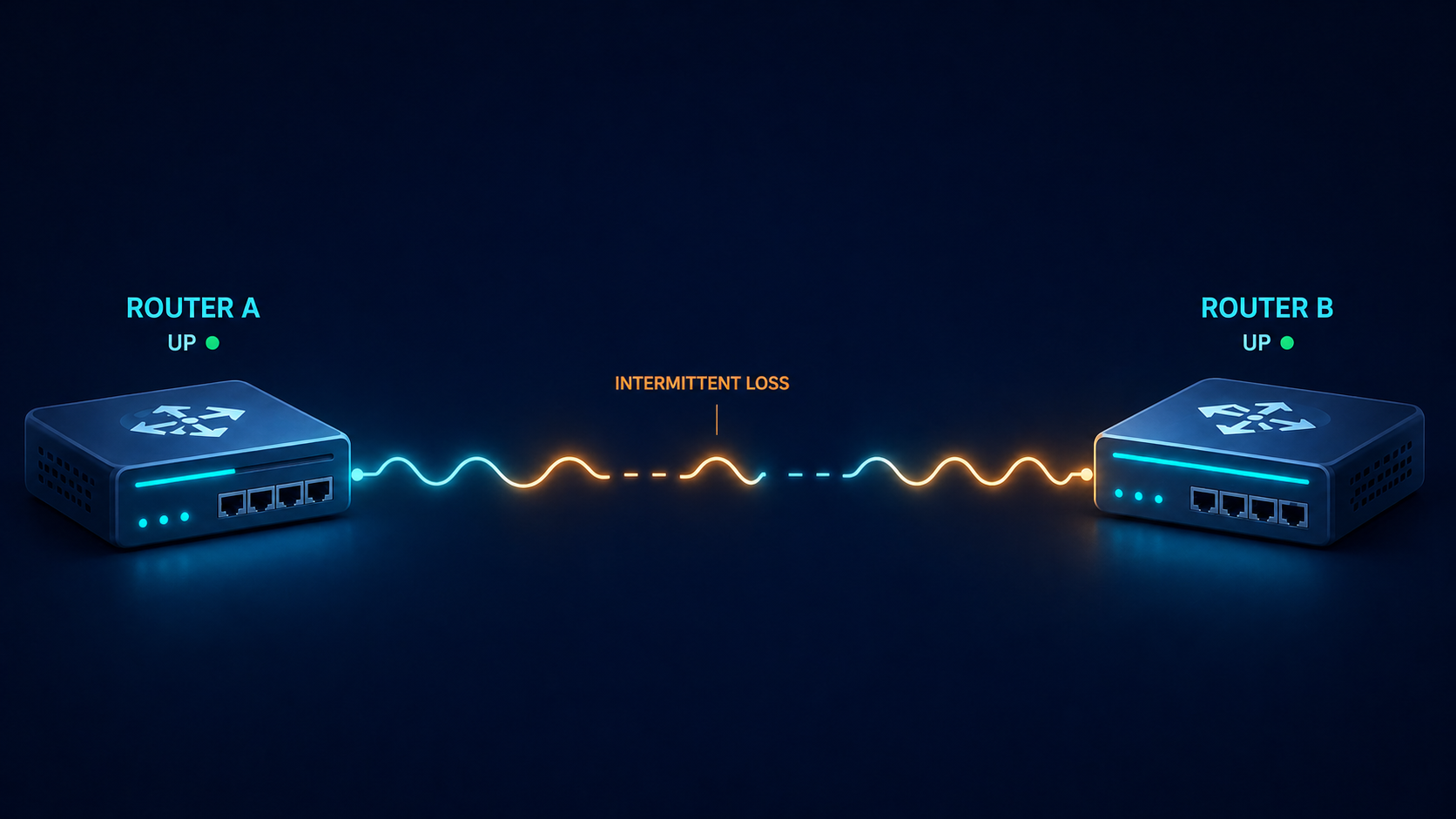
EIGRP is supposed to converge fast and stay quiet. When you see neighbor flapping in the log, something on the underlying link or in the configuration has changed, and EIGRP is the messenger telling you about it. This post walks through the five real causes of EIGRP neighbor flapping ranked by what we actually see in production, and how to stop the same flap from coming back next week.
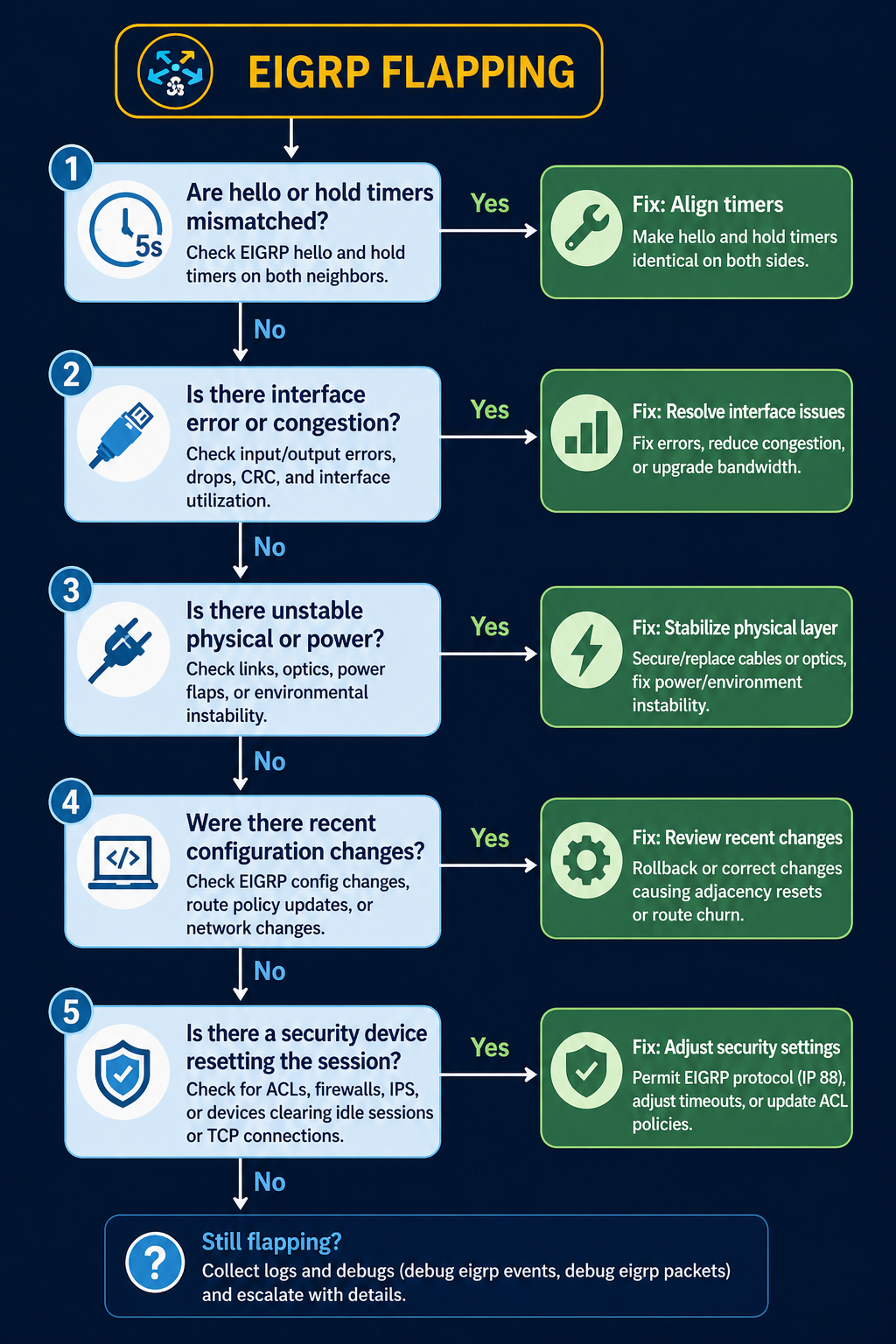
The short version. About 35 percent of EIGRP flap incidents come down to hold timer expiration on a link that has marginal performance, not a true outage. Another 25 percent are MTU mismatch on the link. The remaining 40 percent split across k-values mismatch, authentication drift, and platform-specific behavior. The fix order matters, because checking k-values before checking the link itself wastes time on the wrong layer.
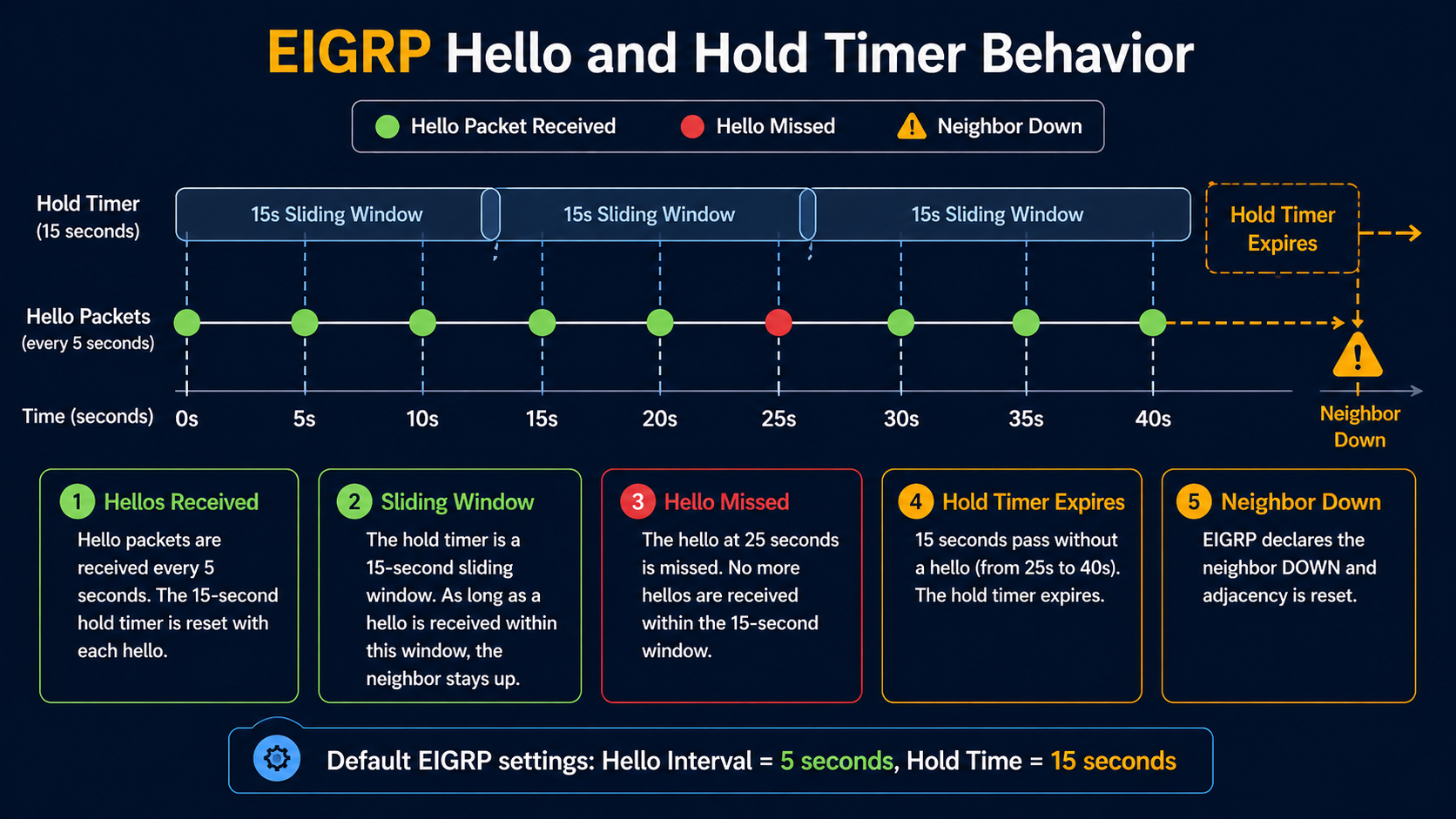
EIGRP has a tight relationship between its hello timer (5 seconds default on LAN, 60 seconds on slow WAN) and its hold timer (3x hello). If the link drops two consecutive hellos, the neighbor goes down. The flap window is narrow, so any link with intermittent issues will show up in EIGRP logs first, before any other monitoring catches it. Which means EIGRP flapping is often a symptom of something else, not a problem in itself, if any one of them drifts.
What flapping actually means
EIGRP neighbor flapping shows up as repeated log entries like %DUAL-5-NBRCHANGE: EIGRP-IPv4 1: Neighbor x.x.x.x is down: holding time expired followed shortly by Neighbor x.x.x.x is up: new adjacency. The pattern repeats. Each flap triggers a SIA (Stuck in Active) recalculation if a route depended on that neighbor, which in turn can stress the rest of the network if the flap is bad enough.
You will see the flap in three places. The router log shows the neighbor change events. The output of show ip eigrp neighbor shows a recently established adjacency with the uptime counter near zero. Your monitoring system shows route flaps and possibly traffic blackholes during the recovery window.
Verified against current Cisco IOS-XE documentation, accessed April 2026.
The five causes, ranked by what we actually see
Cause one, hold timer expiration on a marginal link, around 35 percent of cases
The link is up but periodically dropping packets. Two consecutive lost hellos and EIGRP declares the neighbor dead. Verify with interface error counters, CRC counts, and input drops on both sides. A link that shows even small CRC counts at sub-1-percent level is enough to flap EIGRP.
Fix the link. Replace the SFP, swap the patch, check for fiber issues, or address the wireless backhaul. Increasing the hold timer to mask the flap is not a fix, it just delays the symptom while the underlying link continues to degrade.
Cause two, MTU mismatch on the link, around 25 percent of cases
EIGRP hellos are small enough to pass even with MTU mismatch, but EIGRP update packets carrying topology changes can exceed a smaller-than-expected MTU and get dropped. The neighbor periodically loses sync, the adjacency resets, and you see flapping that correlates with route changes elsewhere in the network.
Verify with show interfaces | i MTU on both sides. Match them. EIGRP does not have an mtu-ignore equivalent the way OSPF does, so the actual MTU has to be aligned.
Cause three, k-values mismatch, around 15 percent of cases
EIGRP uses k-values to weight its composite metric. The default is k1=1, k3=1, others=0, which uses bandwidth and delay only. If someone has tuned k-values on one router but not its neighbor, the adjacency will form initially but become unstable when topology changes propagate. Less common than the first two but easy to miss.
Verify with show ip protocols on both sides. The K values line should match exactly. If it does not, fix the side that drifted.
Cause four, authentication drift, around 15 percent of cases
If MD5 authentication keys have rotated on one side but not the other, hellos still pass briefly during the rollover window and then start failing. The adjacency forms then drops within minutes.
Verify with show ip eigrp interface detail and check the authentication mode and key chain. Both sides need to use the same active key during the same time window. Key rotation should always overlap, never hand off cleanly.
Cause five, platform-specific bug or stuck-in-active behavior, around 10 percent of cases
Specific Cisco IOS-XE releases have had bugs around EIGRP neighbor maintenance, especially on platforms with high control plane load. Stuck-in-active conditions can also escalate to flapping if the network is poorly summarized and queries propagate too far.
Suspect this only after causes one through four are eliminated. Check release notes for EIGRP-related bug fixes on the platform code in use.
What the official documentation does not mention
EIGRP flapping on a stable physical link sometimes correlates with high CPU on the router, not link issues. If hello processing falls behind because of a control plane spike (a large policy change, a flapping interface elsewhere, an aggressive netflow export), hellos are not transmitted on schedule and the neighbor times out. Check CPU history (show processes cpu sorted history) when EIGRP flaps with no obvious link cause.
Also, summary routes can mask flap behavior in a way that makes diagnosis harder. If your hub router is summarizing branch prefixes, a flap of a single branch only shows up at the hub, not on adjacent routers, which means a flap that propagates as a route withdraw can look like it originated at the hub when it actually came from a remote site.
The architectural fix
Networks that see EIGRP flap more than rarely have one of three gaps. They are not summarizing aggressively enough, so query scope is too wide and SIA cascades amplify. They have inconsistent k-values across the network, usually because someone tuned one segment without documentation. Or they monitor on EIGRP neighbor state alone and never see the underlying link errors that drive most flaps. Address all three. Standardize k-values, summarize at the boundary of every routing domain, and add interface error monitoring with a threshold low enough to alert before EIGRP starts flapping.
FAQ
Should I increase the hold timer to stop the flap?
No. Increasing hold timer hides the symptom and delays detection of real outages. Fix the underlying cause instead.
Does GR (Graceful Restart) help?
Only if the flap is caused by a planned event like a software upgrade. GR does nothing for actual link instability or configuration drift.
Is migrating from EIGRP to OSPF a fix?
Not a fix for the underlying cause, no. Both protocols flap when the link is bad. Migration is a longer term decision based on whether you need vendor neutrality, not flap mitigation.
Related posts
Need a routing audit
If EIGRP is flapping in your network often enough that you have noticed, the underlying issue is usually three or four small things, not one big one. Our routing practice does targeted EIGRP and OSPF audits for enterprises that are tired of unexplained route flaps. Send us a sample of your flap log and we will tell you what to look at first.
Last verified April 2026 by the aaanetworkx routing practice.
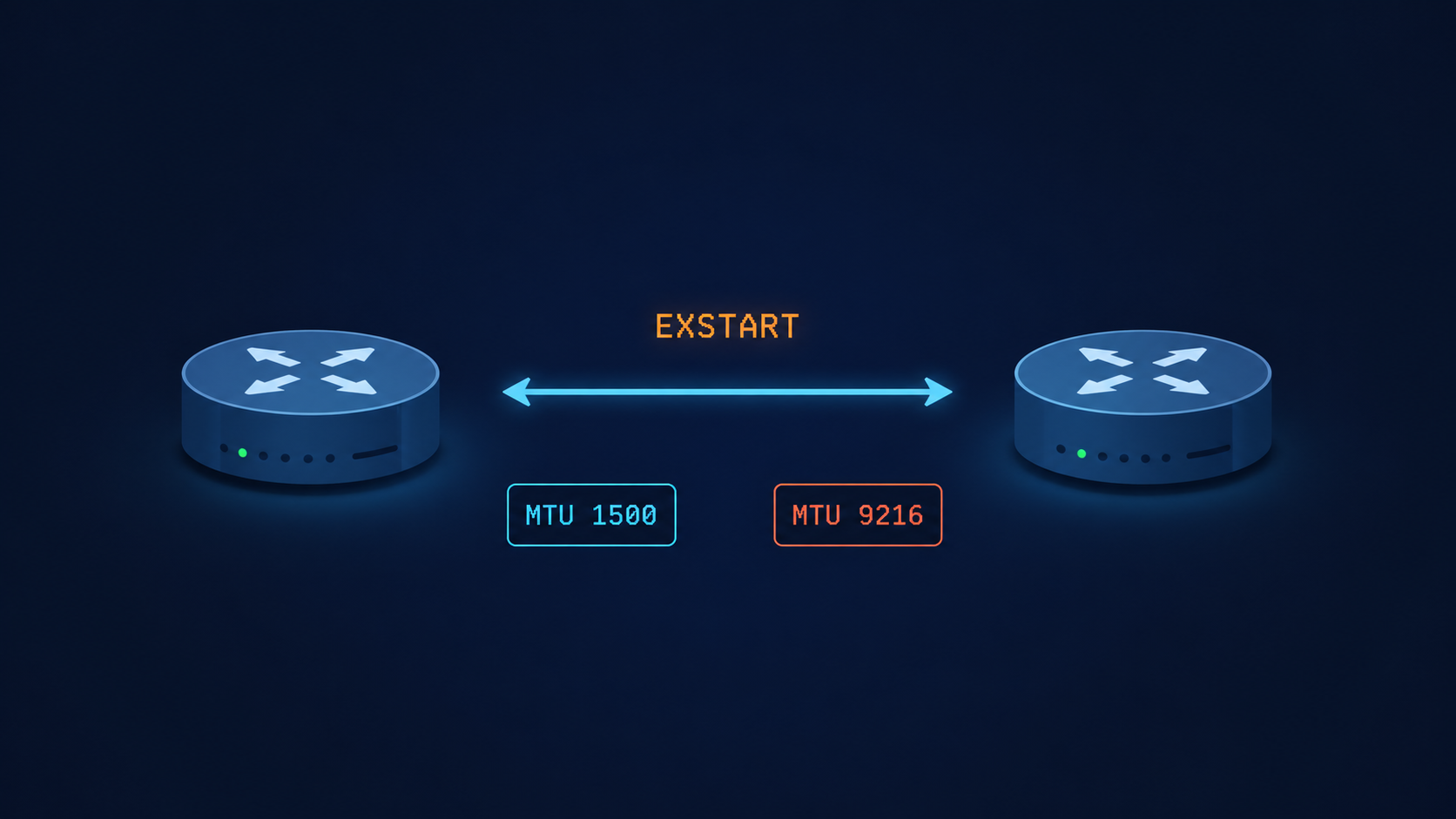
OSPF neighbor stuck in EXSTART means the adjacency stalled while exchanging database descriptions, and the cause is almost always one of five specific things.
You typed show ip ospf neighbor, expected to see Full, and got EXSTART instead. The link is up, ping works, the interfaces are even talking to each other a little because you can see the neighbor in the table. But OSPF will not finish forming the adjacency. After 60 seconds the state flips to EXCHANGE, then back to EXSTART, then again, in a loop. This post walks through the five real causes of OSPF stuck in EXSTART, ranked by what we actually see in production, and the verified fix for each.
The short version, before you scroll. EXSTART is the state where two OSPF routers are negotiating who gets to be master in the upcoming database description exchange. To do that, each side sends a DBD packet. If the sending router cannot send a packet that the receiver can accept, the negotiation never completes and both sides stay locked in EXSTART. The most common reason that DBD packet gets rejected is an MTU mismatch. About 60 percent of the time, that is exactly what is happening. Match the MTUs and you are usually done in under five minutes.
The other 40 percent of cases come from a small set of less obvious causes that this post covers in order, so you do not waste an hour rechecking MTU when the real issue is somewhere else.
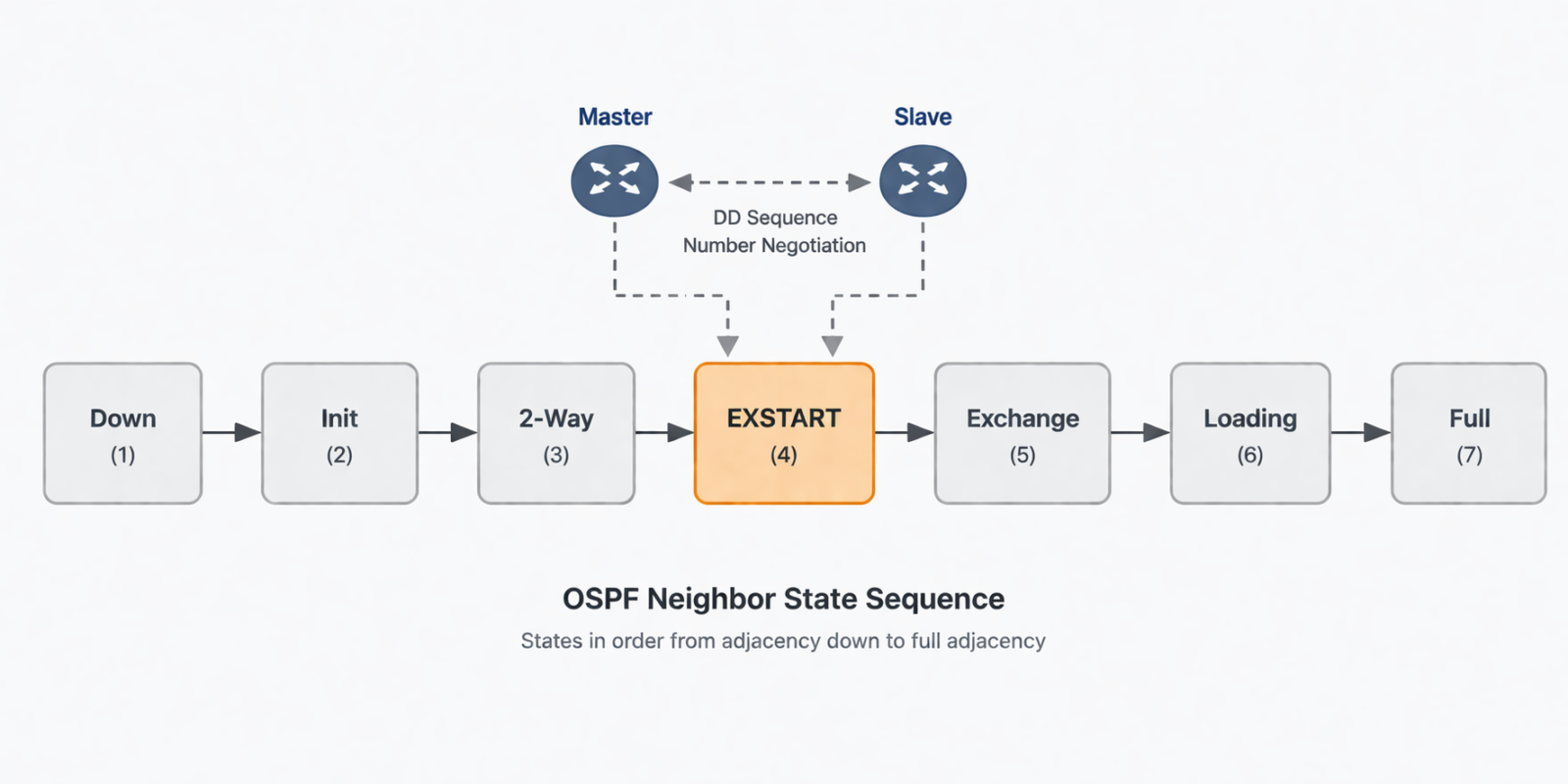
What this state actually means
EXSTART is one of the seven OSPF neighbor states, and it sits between Two-Way and Exchange. After two routers have agreed they can hear each other (Two-Way), they need to elect a master and a slave for the upcoming database synchronization. The master is the one with the higher router ID. To kick off this election, each router sends a DBD packet with the I, M, and MS bits set. If both DBD packets arrive successfully, the routers settle on master and slave and progress to Exchange. If either DBD packet is dropped, malformed, or rejected, no election finishes and the state stays at EXSTART.
You will see this in three places. The output of show ip ospf neighbor shows the neighbor in EXSTART instead of Full. The output of debug ip ospf adj shows DBD packets being sent but never acknowledged, or being rejected with an MTU mismatch warning. And your network monitoring system flags a flapping OSPF adjacency or a missing OSPF route in the routing table.
Verified against RFC 2328 (OSPF v2) and current Cisco IOS-XR and Juniper Junos documentation, accessed April 2026.
The five causes, ranked by what we actually see
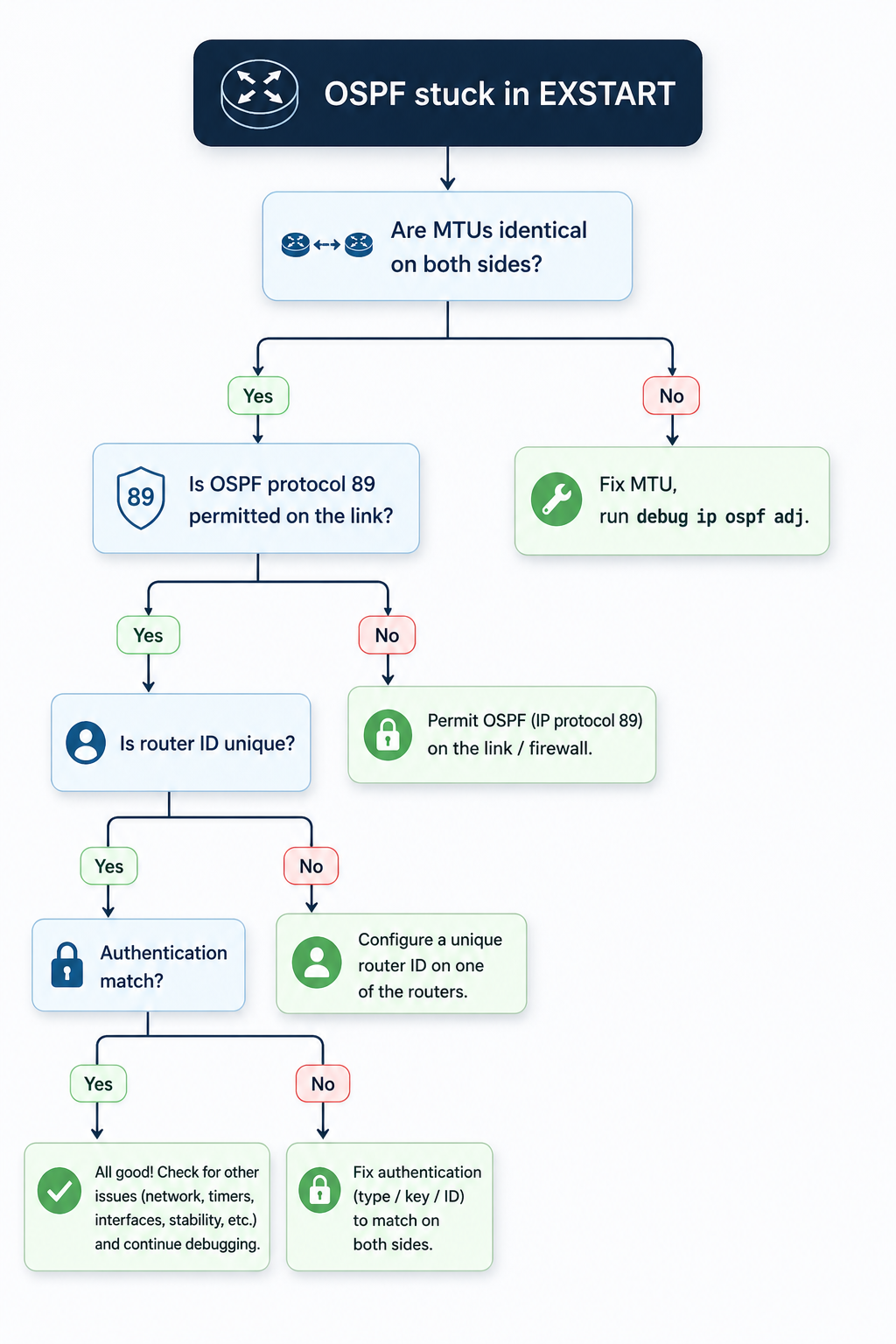
Cause one, MTU mismatch on the link, around 60 percent of cases
By far the most common cause. OSPF DBD packets contain the sending router’s interface MTU. If that value does not match the receiver’s interface MTU, the receiver silently discards the DBD packet and the adjacency stalls. This usually happens after someone enables jumbo frames on one side of a peering but forgets the other side, or after a hardware swap where the new platform defaults to a different MTU.
Verify with show interfaces | i MTU on Cisco or show interfaces extensive on Juniper, on both sides. The values must match exactly. If they do not, fix the smaller one to match the larger, or set both to a known baseline like 1500 for non-jumbo links and 9216 for jumbo links.
If you absolutely cannot fix the MTU on one side (vendor lockout, customer-managed CPE, etc.), Cisco lets you bypass the MTU check on a per-interface basis with ip ospf mtu-ignore. Use this as a last resort, not a default, because the underlying mismatch can still cause problems for any OSPF packet larger than the MTU.
Cause two, OSPF protocol packets being filtered, around 15 percent of cases
Less obvious. An ACL, firewall, or transit security policy is permitting initial OSPF Hellos (which are small) but dropping the larger DBD packets that follow in EXSTART. Common on transit links that pass through a security appliance, or on virtual networks where the underlying infrastructure has a hidden MTU limit.
Verify by sourcing a large ICMP packet from one router to the other with the do-not-fragment bit set, sized just below the configured MTU. If the ICMP fails but Hellos succeed, you have a mid-path filter or fragmentation issue. Trace the path and identify the offender.
Cause three, duplicate OSPF router ID, around 10 percent of cases
Two routers in the same OSPF area with the same router ID will fail to elect a master, because the master selection is based on router ID. The state can hang at EXSTART rather than fail outright. This usually happens after a config copy gone wrong, or when a loopback was provisioned with a default address.
Verify with show ip ospf | i Router ID on both sides. If they match, change one to a unique value (typically the loopback address of that specific router) and reset OSPF on that interface.
Cause four, OSPF authentication mismatch, around 10 percent of cases
OSPF Hellos can pass with simple key validation but DBD packets fail because of a different authentication method or key ID. This shows up especially in multi-area designs where some interfaces use MD5 and some use null authentication, and the configuration drifted on one side.
Verify with show ip ospf interface [int] and look for the authentication line. Both sides must use the same authentication type and the same key ID. Fix the side that drifted, or if you cannot determine which is correct, take both back to null authentication temporarily to confirm the link works, then re-add MD5 with matching keys.
Cause five, software defect on one platform, around 5 percent of cases
Rare but real. Specific Cisco IOS-XE and Junos releases have had bugs where DBD packets are formed incorrectly during master/slave negotiation, especially when one side runs an older release. The fix is a code upgrade on the affected platform, after vendor TAC confirms the bug ID.
Suspect this only after causes one through four are eliminated. Check release notes for the platform code on both sides for recently fixed OSPF adjacency bugs.
What the official documentation does not mention
Cisco and Juniper count MTU differently. Cisco’s MTU value reported by show interfaces is the L3 MTU, which excludes Layer 2 framing. Juniper’s show interfaces extensive shows the full physical MTU including framing. Comparing the two side by side without converting can make MTUs look mismatched when they are actually identical, or look identical when they are mismatched. Always confirm with a packet capture if you are mixing vendors.
Also, EXSTART can briefly appear during normal OSPF convergence even on a healthy link, especially after a reboot or interface flap. If you see EXSTART for fewer than 30 seconds and then the adjacency goes to Full, that is normal. EXSTART persisting beyond a minute is when you start troubleshooting.
The architectural fix
Most networks that see EXSTART more than once a year have no MTU baseline. Define one for every link type in your network (1500 for default Ethernet, 1546 for tagged Ethernet, 9216 for jumbo) and enforce it through configuration management. Add an automated weekly check that compares MTUs across every OSPF adjacency in the network and emails the team on any mismatch. Most production networks I review have at least one silent MTU mismatch sitting on a link that has not converged correctly for months, hidden because OSPF still works for hellos and small packets.
Pair this with OSPF authentication standardized across the network. Inconsistent authentication is the second silent killer of routing reliability and is just as easy to drift on.
When to escalate
Engage your platform vendor TAC if you have eliminated MTU, ACL/path filter, router ID, and authentication, the link still flaps in EXSTART, and the issue follows a specific code release. Bring the output of debug ip ospf adj from both sides, the relevant interface configurations, and a clear timeline of when the problem started.
FAQ
Will the adjacency form if I just enable mtu-ignore?
Often yes, but you are masking the underlying mismatch. The adjacency forms because OSPF stops checking the MTU during DBD exchange, but any OSPF packet larger than the smaller side’s MTU may still drop in production traffic. Use mtu-ignore as a temporary workaround only, never as a permanent fix.
Does point to point versus broadcast network type matter?
Yes. On broadcast networks, the DR/BDR election can also stall in EXSTART if there is no agreement on who is the DR. On point-to-point networks, this is not a factor. If you are seeing EXSTART on a broadcast network, also verify the network type is set the same on both sides.
Can a hardware fault cause this?
Rarely, but yes. A failing transceiver or line card that drops large packets but passes small ones can mimic an MTU issue. Check for interface errors and CRC counts, and try the same OSPF peering on a different interface or platform to isolate.
Related posts
Stuck on EXSTART after trying everything
If your team has been chasing this for more than an hour and rechecked MTU, ACLs, router ID, and authentication, the issue is usually one rung deeper, in the path or the platform. Our routing practice handles OSPF and BGP for service providers and large enterprises and we treat stuck adjacencies as service-affecting from minute one. Tell us about the topology and we will help you isolate it.
Last verified April 2026 by the aaanetworkx routing practice.
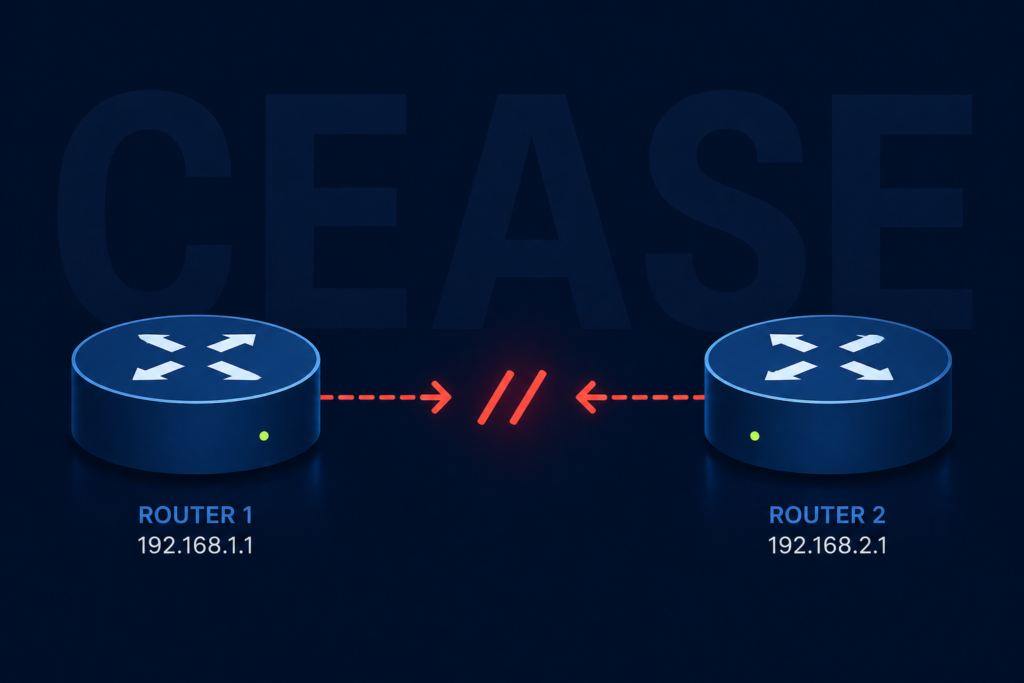
The first time I saw a BGP notification with the cease code, I assumed the peer router had crashed. It had not. A junior engineer on the other side had typed clear ip bgp neighbor and walked off to lunch. That experience, repeated in slightly different forms across hundreds of customer networks since, taught me that the word “cease” in BGP is doing a lot of heavy lifting and almost always points to a human or automated decision rather than a hardware fault.
If you are staring at a log line that looks something like %BGP-3-NOTIFICATION: sent to neighbor x.x.x.x 6/4 (Administrative Reset), this post walks through what each subcode means, what most likely caused it in your environment, and how to make sure it does not happen at three in the morning to the one peer that actually matters.
What the cease notification actually means
In the BGP protocol, error code 6 is reserved for cease, which the RFC defines as a notification sent when a peer wants to terminate the session for any reason that is not a protocol error. It is not the router saying “you broke BGP.” It is the router saying “I have decided to stop talking to you, here is the polite reason why.”
The reason is encoded in the subcode, a number from one to nine. The subcode is the entire story. Without it, troubleshooting is guesswork. With it, you usually have your answer in under a minute.
You will see the notification in three places. The router that sent it logs an outbound notification. The router that received it logs an inbound notification with the same subcode. And your network monitoring system, if it is decoding BGP traps, raises an alert with the human readable name of the subcode.
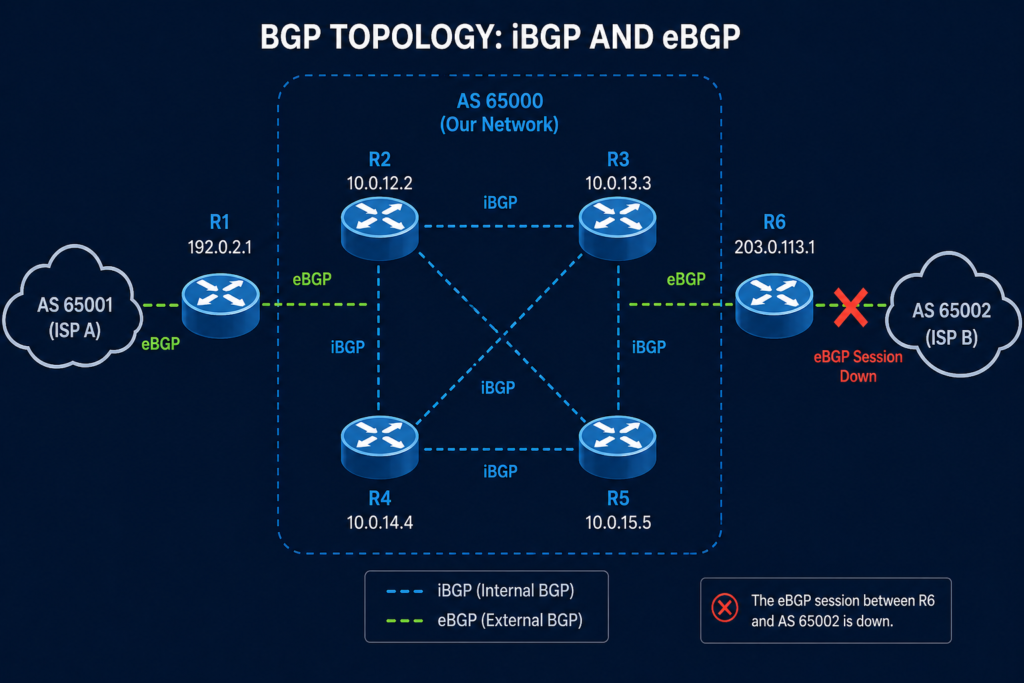
Verified against RFC 4486 (Subcodes for BGP Cease Notification Message), accessed April 2026.
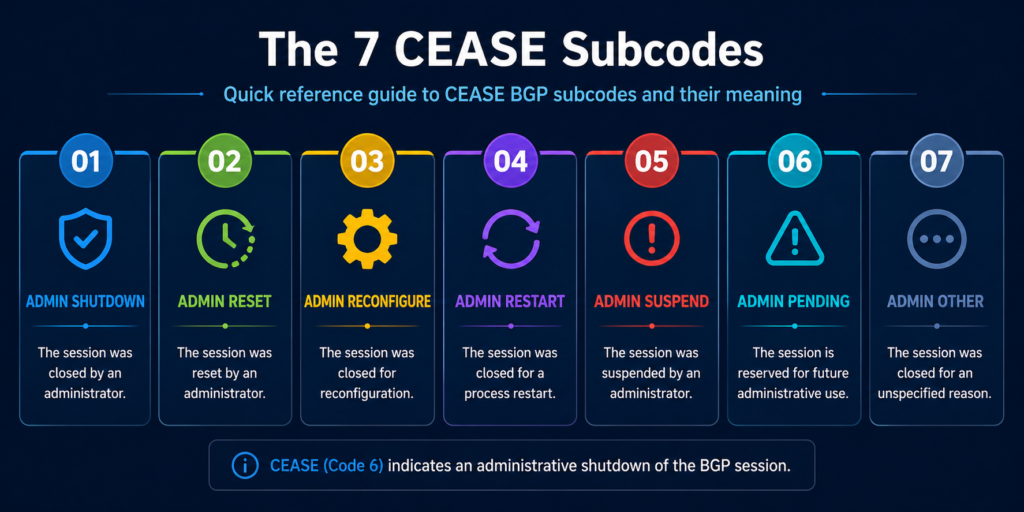
The seven subcodes and what they really mean in production
Subcode 1, maximum number of prefixes reached
The receiving peer hit the configured prefix limit and tore the session down to protect itself. This one is almost always a configuration mismatch, where one side increased their prefix advertisements without telling the other side to raise the limit. Check the maximum-prefix configuration on the receiving peer, agree on a new ceiling, and reset.
Subcode 2, administrative shutdown
Someone typed shutdown under the neighbor configuration. That someone is either you, your colleague, or a change automation script. Check your change management log first. If nothing was scheduled, check who has SSH access to the device and pull the access log.
Subcode 3, peer deconfigured
The peer is no longer in the configuration at all. This typically appears during cutover work where a peering arrangement is being moved to a new device. If you did not plan a cutover, find out who did.
Subcode 4, administrative reset
Someone issued a clear ip bgp neighbor command. This is the lunch break scenario from the opening of this post. Harmless if intentional, alarming if not. Same audit trail as subcode 2.
Subcode 5, connection rejected
The peer received a TCP connection attempt and refused it, usually because the source IP did not match the configured neighbor address. Common after a router reload that brought up a different interface first. Check the update-source configuration.
Subcode 6, other configuration change
A configuration change was applied that required a reset to take effect. Examples include changing the AS number, updating an inbound route map, or modifying authentication. Look for a recent configuration commit on the peer.
Subcode 7, connection collision resolution
Both peers tried to open a session at the same time and the protocol picked one to keep. This is normally invisible and self healing. If you see it repeatedly, you have a routing flap somewhere causing both ends to retry simultaneously.
Subcode 8, out of resources
The peer ran out of memory, CPU, or another internal resource and tore down the session to protect itself. This is the only cease subcode that points to a real platform problem rather than a configuration or human action.
Subcode 9, hard reset
Used in the context of graceful restart, this indicates the peer is unwilling or unable to preserve forwarding state. Investigate the graceful restart configuration on both sides.
What the vendor documentation does not tell you
Cisco, Juniper, Arista, and Nokia all decode the subcode slightly differently in their log strings, and a few of them collapse subcodes 2 and 4 into the same human readable label, which makes log parsing fragile. Do not match on the human readable name. Match on the numeric subcode. We have seen monitoring systems miss a subcode 8 (out of resources) because the log string read “Administrative Reset” on one platform and “Cease, code 6 subcode 8” on another.
Also, the cease notification is sent at the moment of teardown. If your peer device crashes outright, you will not receive a notification at all, you will receive a hold timer expiration. So the absence of a cease notification when a session goes down is itself a clue, it points you toward a hardware or path failure rather than a deliberate teardown.
The architectural fix
If you are seeing cease notifications more than once a quarter on the same peering, the issue is not the protocol. It is your change management discipline on either your side or the peer’s side. Three controls eliminate almost all of these in production. First, prefix limits configured symmetrically on both sides, with a warning threshold set well below the hard limit so you get an alert before a teardown. Second, an automated daily diff of your BGP configuration that emails the network team when anything under the neighbor stanza changes. Third, a peering contact list updated quarterly so when you do receive an unexpected reset, you can reach the right human at the other end in minutes rather than hours.
When to escalate
Engage your platform vendor TAC for any subcode 8 event, since that points to a software or hardware resource problem you cannot fix from the configuration. Engage the peer operator for any subcode 1 or 6 event you did not initiate, since the change happened on their side. For subcodes 2, 3, or 4 that you did not initiate, the conversation is internal, not external.
FAQ
Is a cease notification an error?
Technically no. It is the protocol’s polite way of saying the session is going down. Whether it represents a problem depends entirely on the subcode and whether the teardown was expected.
Will the session come back automatically?
It depends on the subcode and your configuration. Subcodes 2 and 3 require manual intervention on the originating side. Subcodes 1, 4, 6, 7, and 9 will retry on the standard BGP timer. Subcode 8 will retry but is likely to fail again until the resource issue is resolved.
Does cease appear during normal BGP operation?
It can, particularly subcode 7 during convergence events. Occasional subcode 7 with no service impact is normal. Anything else warrants investigation.
When the resets keep coming
If your routing team is chasing cease notifications more than they would like, the underlying problem is usually that nobody owns the peering relationships end to end. Our routing practice manages BGP peerings for service providers and large enterprises and treats every cease subcode as a signal worth a phone call. Tell us about your peering setup and we will show you what we would monitor.
Last verified April 2026 by the aaanetworkx routing practice.