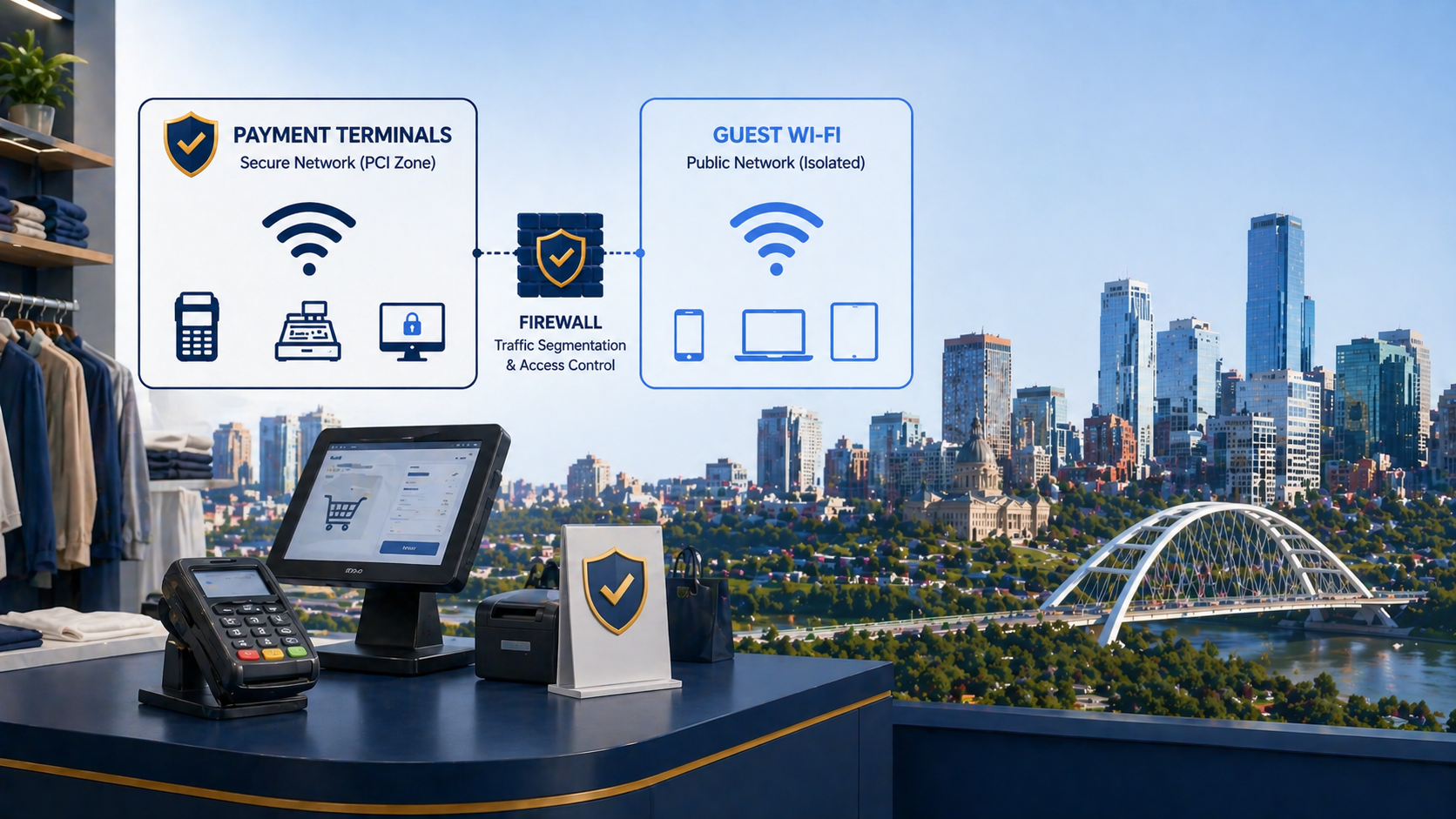
If you run retail in Edmonton with payment terminals on Wi-Fi or with any wireless network in proximity to your point-of-sale environment, PCI-DSS applies to you. The standard has specific requirements for wireless that are stricter than the wired equivalent because wireless leaks beyond your physical premises. This post walks through PCI-DSS Edmonton retail WiFi requirements, what auditors actually check at Edmonton locations, and what we see retailers get wrong.
The short version. PCI-DSS requires you to (1) inventory and authorize every wireless access point in or near your CDE, (2) scan quarterly for rogue access points, (3) isolate any wireless that touches the CDE from guest and corporate Wi-Fi with firewall enforcement, (4) use strong encryption (WPA2-Enterprise minimum, WPA3 preferred), and (5) monitor wireless intrusion attempts. None of this is exotic. The challenge is doing it consistently across multiple retail locations.
Why retail Wi-Fi is different from corporate Wi-Fi
Three things make retail wireless uniquely scrutinized under PCI. First, payment terminals are often connected wirelessly for layout flexibility, which puts the wireless network directly in scope of the cardholder data environment (CDE). Second, retail locations have public spaces, so any wireless signal could be captured from a parking lot or the storefront across the street. Third, retail staff turnover is high, which creates ongoing access management challenges.
The PCI Wireless Guideline document is explicit. Wireless that carries cardholder data, or that is connected to the network where cardholder data lives, must meet the same baseline controls as the wired CDE plus additional wireless-specific controls. The cardholder data environment.
What auditors actually check
From PCI assessments we have supported at Edmonton retail clients, the consistent themes are these.
An inventory of every wireless access point at every location, with documentation of who authorized it. Quarterly rogue AP scans documented with date, scope, and findings. Network diagrams showing the CDE Wi-Fi isolated from guest Wi-Fi with firewall enforcement. Wireless encryption configured to WPA2-Enterprise minimum (with 802.1X authentication, not pre-shared keys) for any network in scope. Logs from wireless controllers retained for at least 90 days. Evidence that the segmentation has been tested by attempting to reach the CDE from guest Wi-Fi and being blocked.
Auditors do not require any specific brand of wireless or any specific commercial product. They require evidence that the controls actually work as documented.
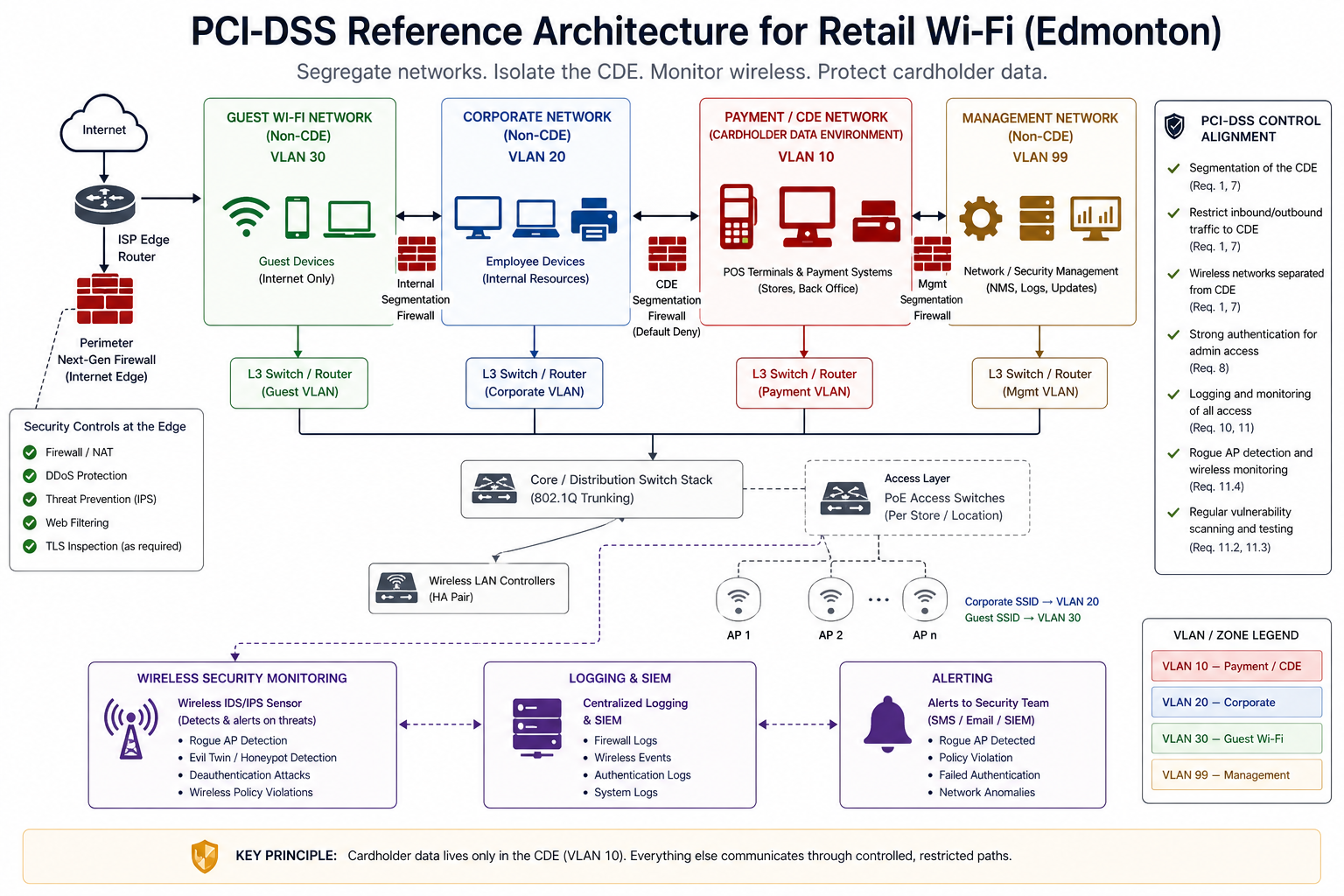
A reasonable baseline for an Edmonton retail location
1. Inventory and authorize every AP
Document every wireless access point at every location. SSID, channel, MAC, location within the store, who authorized it, when. Update whenever a new AP is added.
2. Separate guest, corporate, and CDE Wi-Fi
Three SSIDs minimum, on three separate VLANs, with firewall enforcement between them. Guest Wi-Fi has internet only, no access to corporate or payment networks. Corporate Wi-Fi has access to internal systems but not the CDE. CDE Wi-Fi is restricted to authorized payment terminals only.
3. Use WPA2-Enterprise (or WPA3) for any in-scope network
Pre-shared keys (PSK) do not pass PCI for in-scope networks because shared keys cannot be revoked when staff leave. Use 802.1X with RADIUS so each device or user has its own credential. WPA3 is acceptable and increasingly the default on new equipment.
4. Quarterly rogue AP scanning
At each location, scan for unauthorized APs every quarter. Most enterprise wireless controllers do this automatically. For smaller installations, a handheld wireless analyzer (Ekahau, NetSpot, or similar) used during a routine site visit is enough. Document each scan.
5. Wireless intrusion monitoring
Wireless IDS/IPS that alerts on attempts to associate with the CDE Wi-Fi from unauthorized devices, or attempts to spoof your SSIDs. Most enterprise wireless controllers include this functionality.
6. Documentation and annual test
Network diagrams kept current. Annual penetration test that specifically attempts to reach the CDE from non-CDE wireless. Evidence retained for the audit.
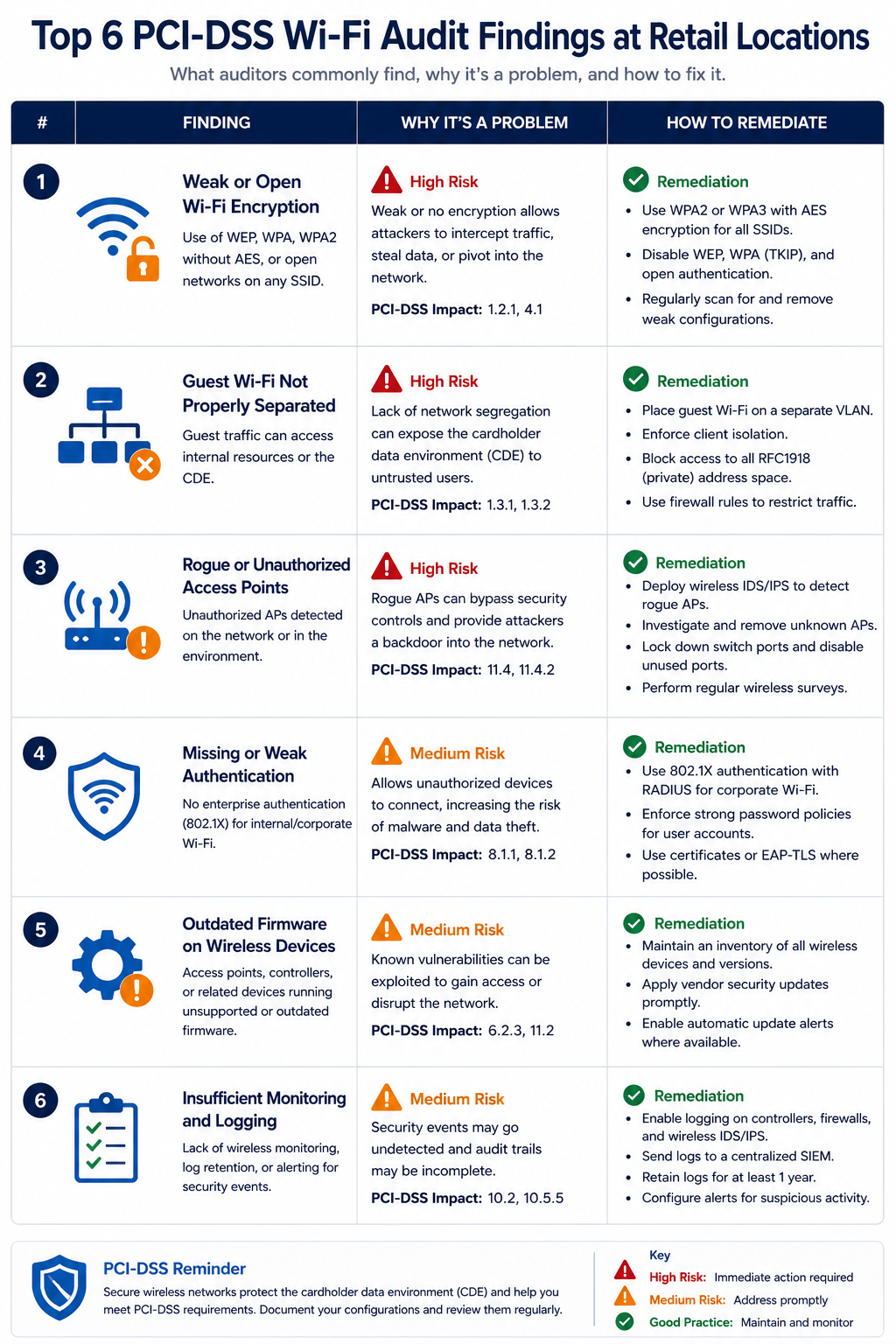
Common audit findings at retail locations
From assessments we have seen, six findings repeat. First, single SSID with PSK shared across all staff for both POS and personal device use. Second, guest Wi-Fi on the same VLAN as POS terminals because the consumer-grade router from years ago could not segment. Third, no rogue AP scanning, often because nobody owns the function in a multi-location retail operation. Fourth, wireless controllers not retained logs long enough, often defaulting to 30 days when 90 is required. Fifth, no documented inventory of APs across locations, so a recently added franchise location’s wireless is invisible to compliance. Sixth, payment terminals using outdated wireless protocols (WEP, WPA-PSK) that fail PCI on encryption strength alone.
What the official guidance does not emphasize
PCI Wireless Guideline tells you to scan for rogue APs but rarely emphasizes that rogue APs at retail locations are often introduced by well-meaning staff (a personal hotspot, a consumer router brought in to extend coverage). The fix is not just scanning. It is also a clear staff policy that no personal wireless devices may be brought into the back office, and ideally a wireless intrusion system that alerts on new SSIDs appearing in the location’s RF space.
Also, PCI-DSS 4.0 (effective in 2025 for new compliance cycles) raises the bar on multi-factor authentication for system component access. If your wireless management is accessed from outside the CDE, MFA on the controller is now expected.
FAQ
Does PCI apply if we use a third-party POS that handles payment?
It depends on the deployment. If the POS handles cardholder data on your network, even temporarily, PCI applies. If the POS is a fully outsourced cloud service that processes cards via the cloud and never touches your network, scope reduces. Get this scope documented explicitly.
Can I share one wireless controller across CDE and guest Wi-Fi?
Yes, as long as VLAN separation and access controls are enforced. The controller itself is not the issue, the configuration is.
Is captive portal enough for guest Wi-Fi?
Captive portal handles user agreement, but the security comes from VLAN isolation and firewall enforcement. Captive portal alone does not satisfy PCI segmentation requirements.
Related posts
- HIPAA Network Segmentation Requirements
- Cybersecurity for Edmonton Accounting Firms
- Cybersecurity for Edmonton Law Firms
Audit coming up at your retail location
If you have a PCI assessment scheduled and you operate retail Wi-Fi at one or more Edmonton locations, our team does focused PCI Wi-Fi readiness assessments that produce a per-location gap report. Tell us your locations and we will scope a quick readiness review.
Last verified April 2026 by the aaanetworkx compliance practice.
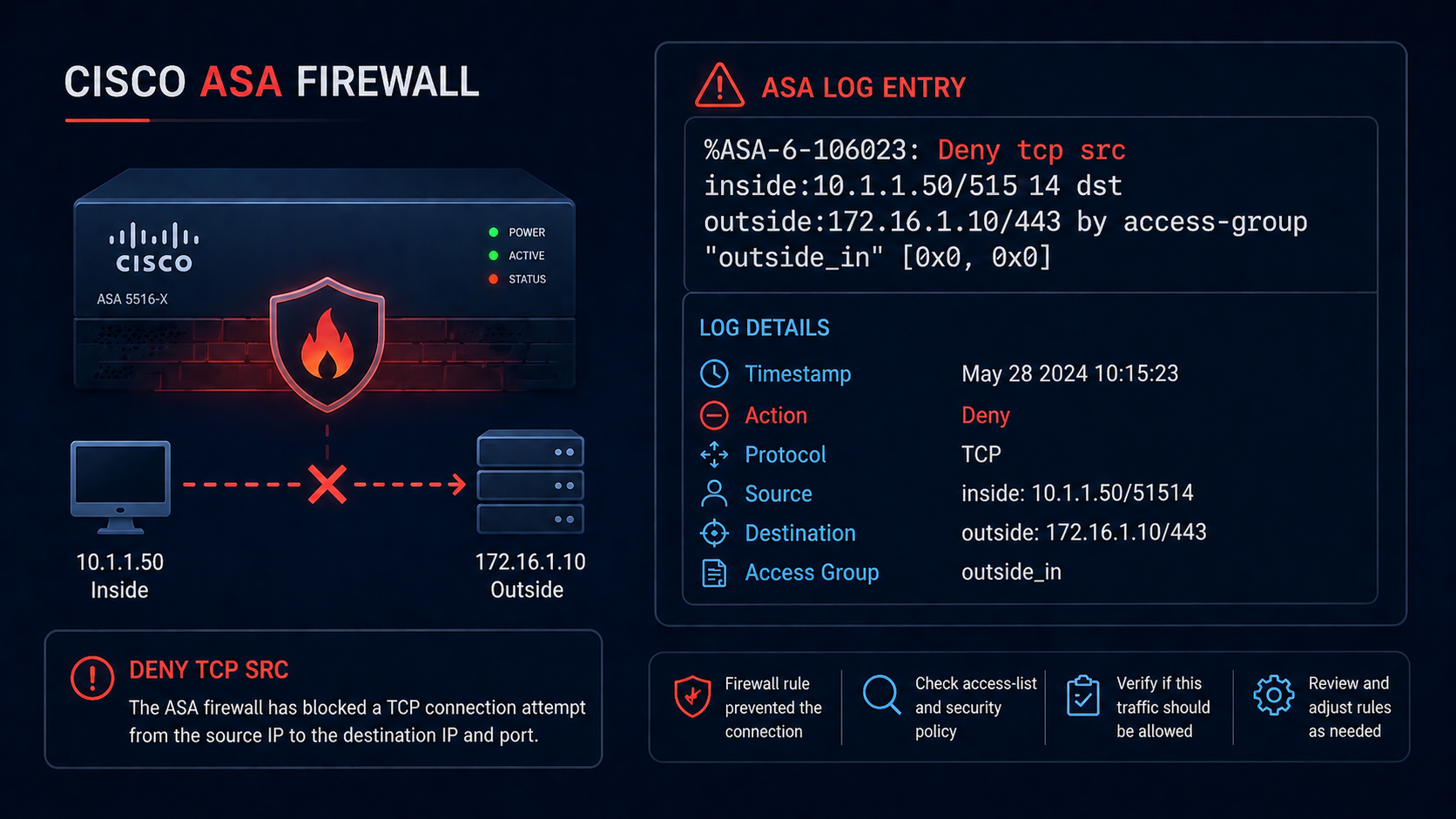
Cisco ASA deny tcp src messages flood your logs the moment something stops working, and they are the easiest log line on the firewall to misread.
Your Cisco ASA is logging “Deny tcp src outside:1.2.3.4/45678 dst inside:10.0.0.5/443” by the thousand and you need to figure out whether it is intentional, a misconfiguration, or actually under attack. This post walks through how to read these messages, where to look in the configuration, and how to act on what you find.
The short version. Deny messages on the ASA come in a standard format that includes the action, protocol, source zone and IP/port, destination zone and IP/port, and the ACL or implicit rule that matched. Once you can decode the message and find the matching ACL, you can decide whether the rule is correct and the source is malicious, or the rule is wrong and a legitimate flow is being blocked. Most flood incidents we see are one of three patterns.
What this message means
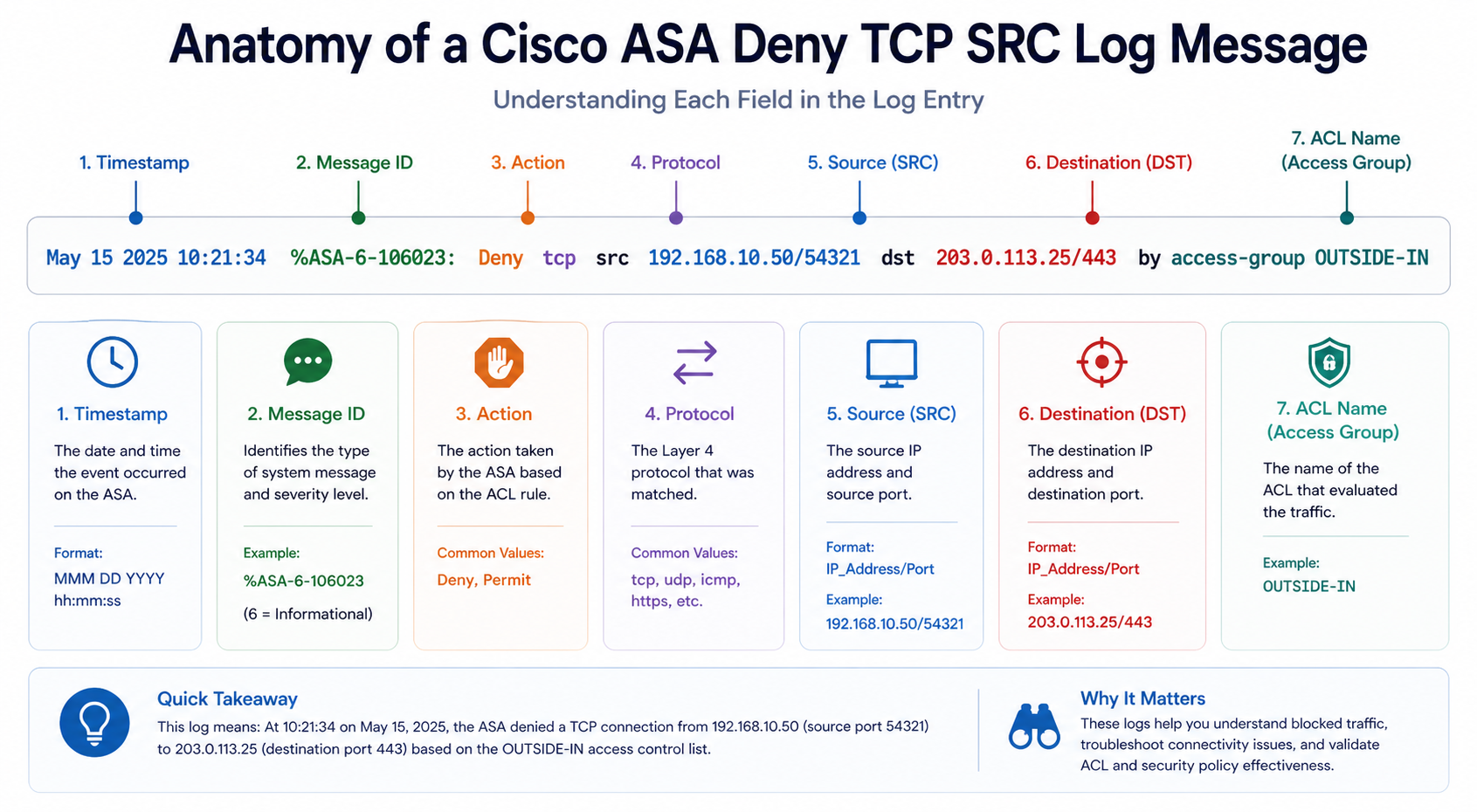
The default message ID for ACL denies on the ASA is 106023. The format is:
%ASA-4-106023: Deny [protocol] src [interface]:[ip]/[port] dst [interface]:[ip]/[port] by access-group "[ACL name]"
Each field tells you something specific. The source interface (e.g., outside) tells you where the traffic came from. The source IP tells you who. The destination interface and IP tell you what they were trying to reach. The ACL name at the end tells you which rule matched, which is your starting point for fixing or confirming the deny.
You will see this in the ASA syslog output, in your SIEM if you forward logs there, or live with show logging on the ASA itself. Specific values matter.
Verified against current Cisco ASA documentation, accessed April 2026.
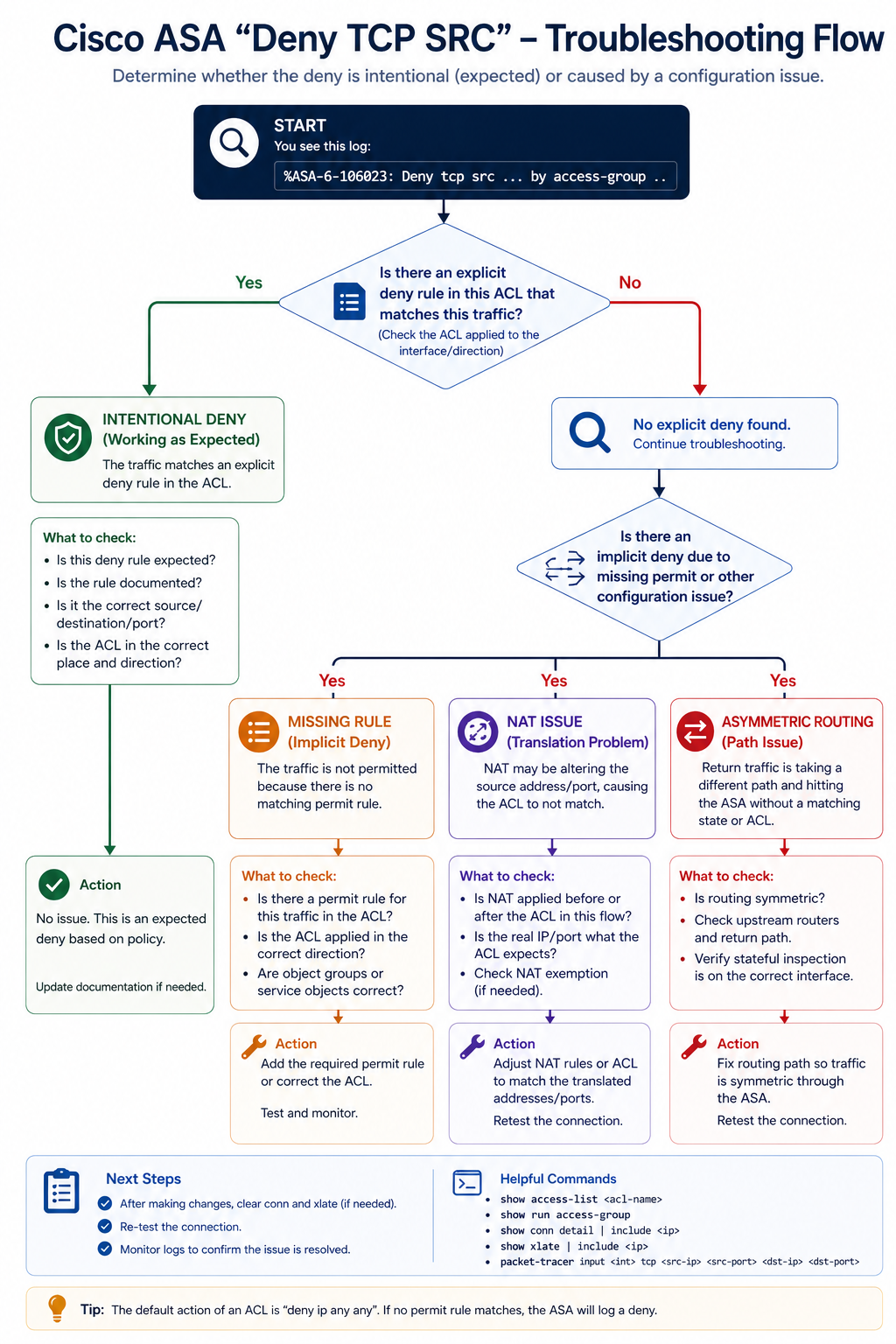
Common causes
Cause one, intentional deny working as designed, around 50 percent of cases
The deny is exactly what the firewall should be doing. Internet scanners hitting your public IP, malware probing for open ports, normal background noise. The log volume is high because the firewall is doing its job.
Verify by inspecting the source IP. Reverse DNS, GeoIP, and threat intelligence checks tell you whether it is a known scanner, a residential IP, or a known-malicious source. If it is normal background noise, you have two options: ignore it (filter the message at the SIEM level), or block the source range at an upstream provider if it is sustained.
Cause two, missing or incorrect ACL rule, around 25 percent of cases
The deny is blocking legitimate traffic that should be allowed. The user reports something is broken, and the ASA log confirms the deny. Common after a network change, application migration, or new service deployment.
Verify by reviewing the named ACL with show access-list [name]. Compare to what the application requires. Add the missing allow rule above the implicit deny, and apply it.
Cause three, NAT issue surfacing as a deny, around 15 percent of cases
The ACL allows the traffic, but NAT is not translating correctly, so the ASA sees an unexpected source/destination combination and falls through to the implicit deny. Often happens with manual NAT rules that have been recently changed.
Verify with show nat and trace the flow. If NAT is mistranslating, fix the NAT rule rather than the ACL.
Cause four, asymmetric routing, around 10 percent of cases
Traffic is coming in one ASA interface and trying to leave another, but the return traffic comes back through a different path. The ASA’s stateful inspection drops the asymmetric flow because it does not match an existing connection.
Verify by tracing the routing on both sides. Fix by either making the routing symmetric, or by configuring TCP state bypass on the ASA for the specific flows (use TCP state bypass sparingly, it weakens stateful protection).
What the official documentation does not mention
Cisco’s docs explain the message format but rarely emphasize that 106023 messages are normal background traffic on any internet-facing firewall. A flood of these is not necessarily a problem. The signal is when patterns change, the same source IP hitting many destinations, the same destination port being probed from many sources, or a sudden jump in volume from a previously quiet source. Tune your alerts on the patterns, not the raw volume.
The architectural fix
Firewalls that produce useful logs (instead of noise) share three traits. First, they have explicit deny rules with custom messages so you can distinguish “deny because no rule matched” from “deny because explicit policy.” Second, they forward logs to a SIEM that can correlate patterns rather than alerting on every single deny. Third, they are reviewed quarterly to remove stale ACL rules that no longer reflect application traffic. Skip any of these and your firewall logs become noise that masks real signals.
FAQ
Should I block all of these source IPs at my edge?
Most are benign internet noise and not worth blocking individually. Use threat intel feeds to block known-bad sources, but do not try to block every random source.
Should I disable 106023 logging to reduce noise?
No. You lose visibility into actual attacks. Filter at the SIEM level instead, where you can keep the data but suppress noisy patterns.
Is this similar to FTD or Firepower deny logs?
The format differs but the troubleshooting approach is similar. Find the rule that matched, decide if it is correct, fix or accept.
Related posts
Firewall logs that are mostly noise
If your ASA logs are 90 percent noise and 10 percent signal, the problem is rarely the ASA. It is the rule set and the SIEM tuning. Our team can audit the configuration and the log pipeline and tell you what to keep, what to suppress, and what to investigate. Send us a sample of your log volume and we will tell you what is actionable.
Last verified April 2026 by the aaanetworkx security practice.
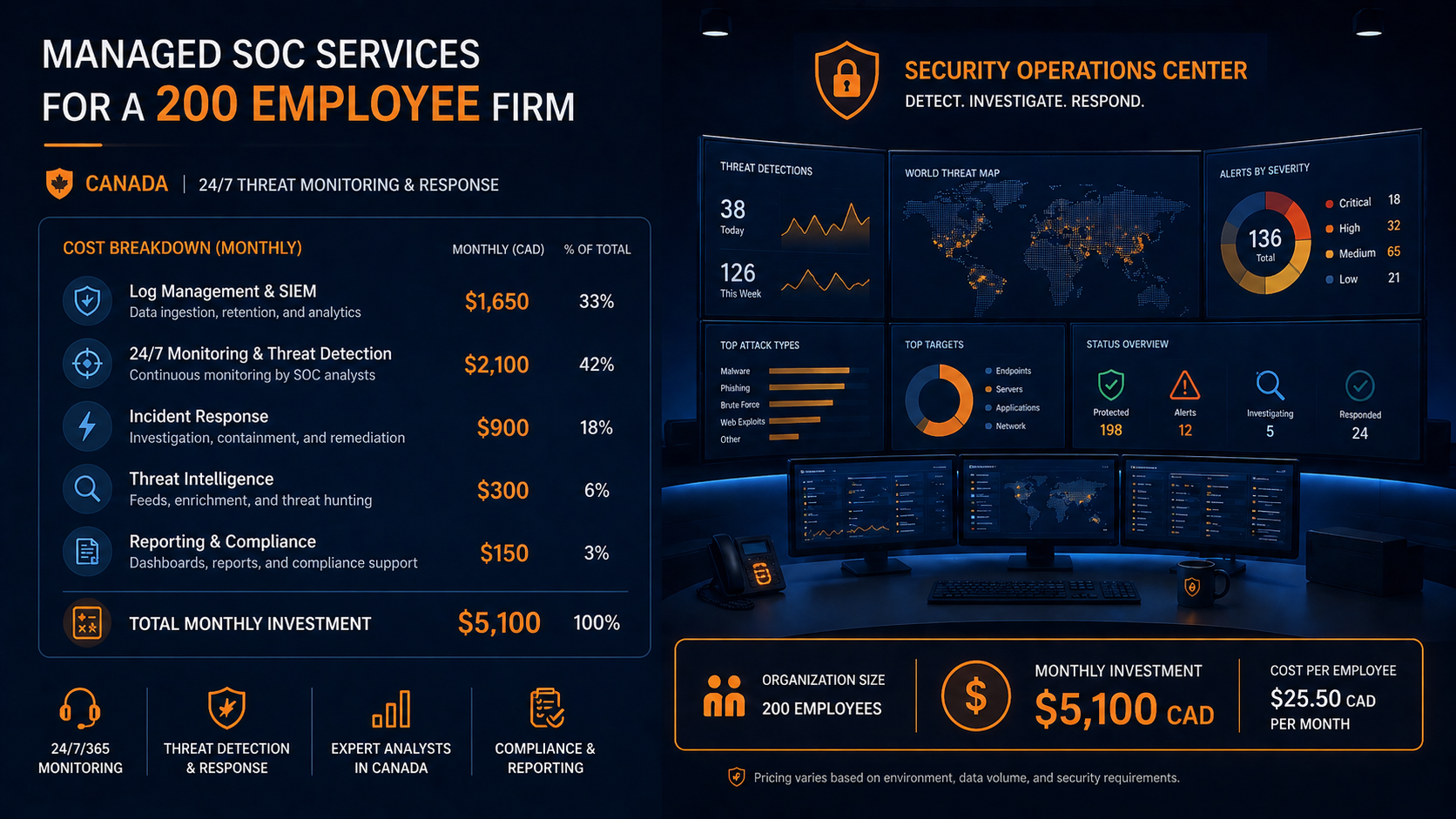
If you run security at a 200 employee firm in Canada, you have probably been asked to either build a SOC or buy one. The math on building one in-house in 2026 rarely works at this size, but managed SOC pricing varies wildly across providers and the components included differ substantially. This post breaks down managed SOC cost 200 employee firm benchmarks in Canada for 2026, what is included at different price points, and how to evaluate quotes.
The short version. Managed SOC services for a 200 employee firm in Canada in 2026 typically run between $4,500 and $14,000 CAD per month, depending on what is included. The wide range reflects real differences in scope. The low end is alert triage only, often called managed detection and response (MDR). The high end includes proactive threat hunting, incident response retainer, executive reporting, and integration with your existing tooling. The middle, around $7,000 to $9,000 CAD per month, is where most firms in your size range land for a comprehensive offering.
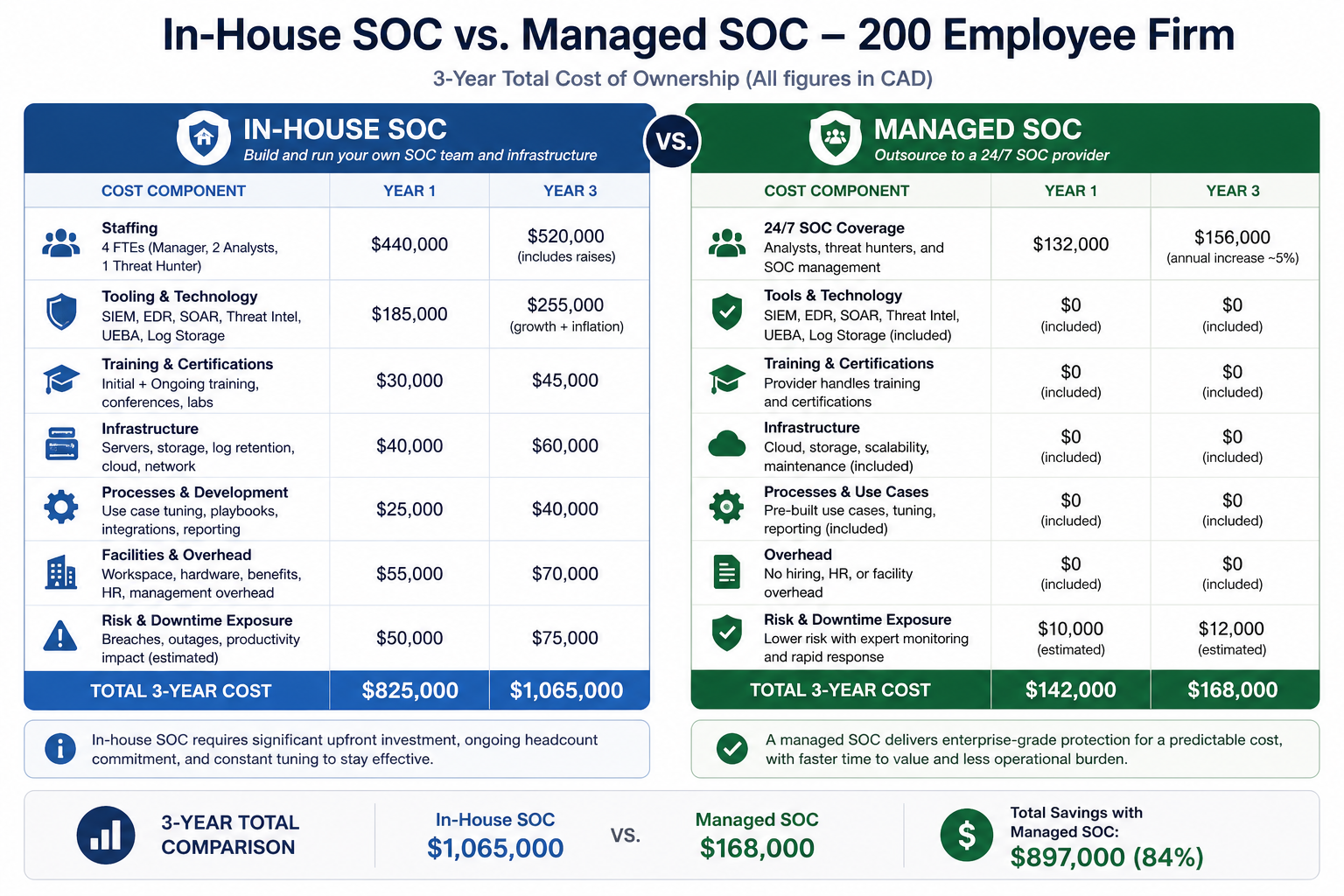
Building the equivalent in-house starts at roughly $700,000 CAD per year for the staffing alone (three SOC analysts plus a manager) and that does not include tooling, infrastructure, or 24/7 coverage. The math is rarely close.
What a managed SOC actually includes
Always included
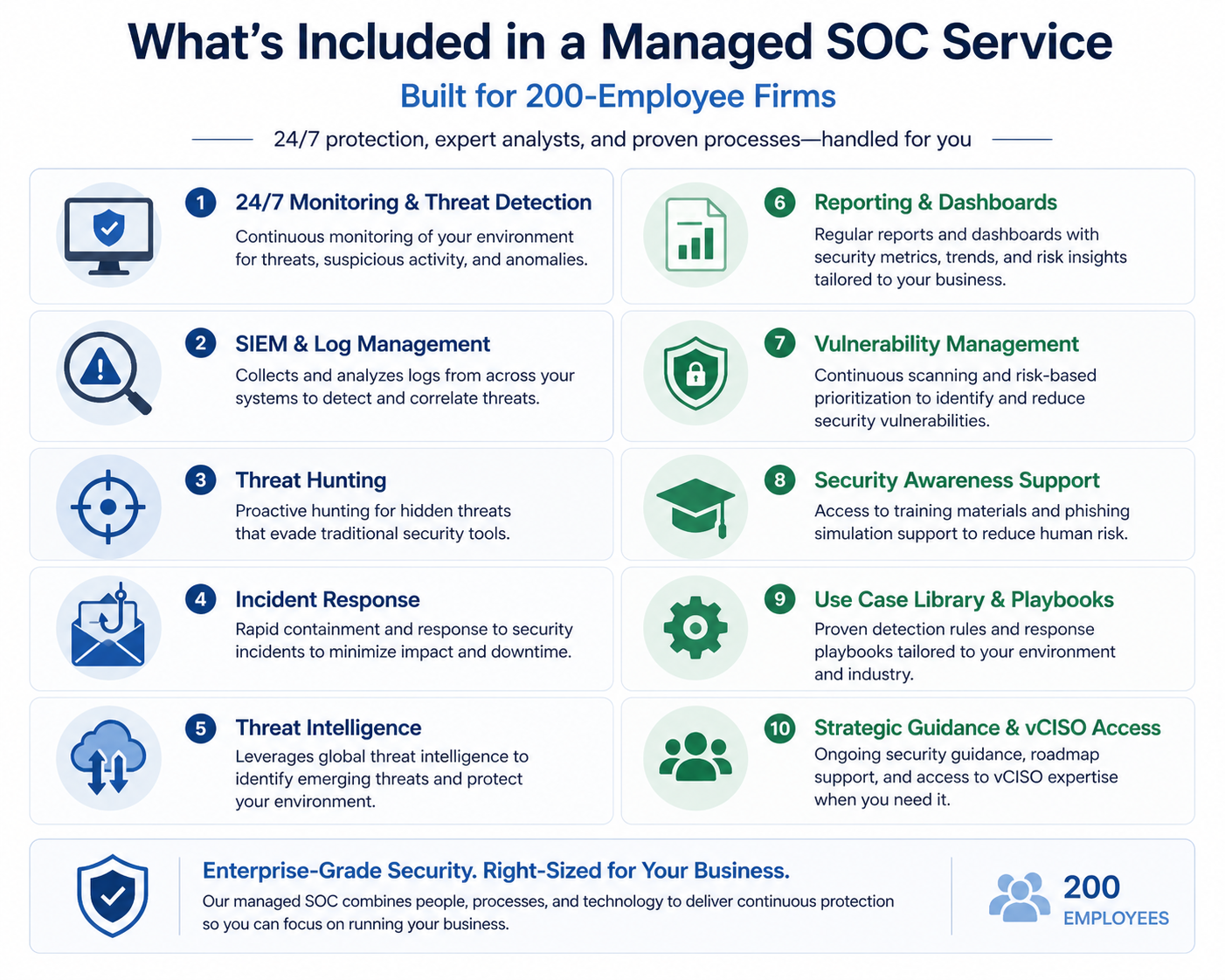
24/7 monitoring of telemetry from your endpoints (EDR), email security, identity (M365/Entra ID logs), and at least one network source (firewall logs or NDR). Alert triage by trained analysts. Incident notification within a defined SLA (typically 15 minutes for high severity). A monthly summary report.
Often included at mid range
Proactive threat hunting based on threat intelligence feeds. Quarterly tuning of detection rules to your environment. Integration with your SIEM if you have one, or a managed SIEM if you do not. Vulnerability scanning. Phishing simulation. A named SOC manager who knows your environment.
Premium add-ons
Incident response retainer with on-site or remote IR team available within hours, not days. Tabletop exercise facilitation. Compliance evidence packaging for SOC 2, ISO 27001, or sector-specific frameworks. Custom dashboards for executive reporting. Threat actor attribution. Most premium services add $2,000 to $5,000 CAD per month on top of the core.
The cost breakdown
For a 200 employee firm in Canada with reasonably standard infrastructure (Microsoft 365, hybrid AD, on-prem servers, cloud workloads on Azure or AWS, a few thousand endpoints across staff and contractors), the cost breaks down approximately as follows.
Tier 1, alert triage only (MDR), $4,500 to $6,500 CAD/month. EDR-focused monitoring, email security alerts, basic identity events. Notifications when something serious happens. No threat hunting, no tuning, no IR retainer. Suitable for firms that already have an internal incident handler and just need eyes on alerts overnight.
Tier 2, comprehensive managed SOC, $7,000 to $9,500 CAD/month. Everything in Tier 1 plus threat hunting, network telemetry monitoring, tuning, monthly executive reporting, and a 60 minute monthly review with the SOC team. Suitable for most firms in the 200 employee range without a dedicated security team.
Tier 3, comprehensive plus IR and compliance, $11,000 to $14,000 CAD/month. Everything in Tier 2 plus IR retainer, tabletop exercises, compliance evidence support, and quarterly tuning. Suitable for firms in regulated industries or those targeting SOC 2 / ISO certification.
In-house comparison
Building an in-house SOC for 24/7 coverage at a 200 employee firm requires a minimum of three security analysts (to cover three shifts) plus a SOC manager. In Canada, fully loaded compensation for SOC analysts in 2026 is roughly $90,000 to $130,000 CAD each, and a SOC manager is $140,000 to $180,000 CAD. That is roughly $440,000 to $570,000 CAD in salaries alone, before tooling.
Add SIEM licensing ($60,000 to $120,000 per year for a firm of this size), threat intelligence feeds ($30,000 to $60,000), training and certifications ($15,000 per analyst per year), and you are at roughly $700,000 to $900,000 CAD per year, plus turnover costs because SOC analysts are hard to retain.
Tier 2 managed SOC at $7,000 to $9,500 per month is $84,000 to $114,000 per year. The in-house option is 7 to 10 times more expensive at this size, and the managed option typically delivers more analyst experience because providers see threats across hundreds of clients.
What to evaluate when comparing quotes
Quotes from MSSPs vary because they are pricing different things. Three questions get to the actual scope.
What telemetry sources are included? EDR only, or EDR plus email plus identity plus network? More sources mean better detection but cost more.
What is the response on a high severity incident? Phone call within 15 minutes? Email within an hour? Hands-on remote remediation? Each is different.
Who tunes the detection rules? The provider, customized to your environment? Or off-the-shelf rules with no customization? The latter generates floods of false positives that erode trust within months.
What we see firms get wrong
Three patterns. First, hiring a low-end MDR thinking it is a full SOC, then being surprised when nobody is hunting threats or tuning. Second, paying for premium services they do not use, such as quarterly tabletops at firms that never actually run them. Third, picking the lowest quote without evaluating the analyst tier behind it. SOC providers vary enormously in analyst experience, and the cheap providers often run with junior staff who escalate everything to the customer rather than investigating.
FAQ
Can a smaller firm benefit from a managed SOC?
Yes. The math gets even more favorable below 200 employees, because in-house becomes essentially impossible. Pricing for a 50 employee firm is typically $2,500 to $4,500 CAD per month for Tier 2 equivalent.
Should I expect a contract commitment?
Most managed SOC contracts are 12 to 36 months. Shorter terms cost more per month. Negotiate annual price reviews if signing 3-year contracts.
Will my cyber insurance recognize a managed SOC?
Yes, and it often lowers premium. Most insurers now ask whether you have 24/7 monitoring as part of underwriting.
Related posts
- HIPAA Network Segmentation Requirements
- PCI-DSS for Edmonton Retail WiFi
- Hidden Risks of Co-Managed Microsoft 365
If you are evaluating SOC options
If you are building a budget request or comparing MSSP quotes, our team can walk through your environment and give you an honest read on what you actually need versus what providers will try to sell you. Book a 60 minute scoping call and we will help you build the right ask.
Last verified April 2026 by the aaanetworkx security practice.

Cybersecurity Edmonton accounting firms need is sharpened by tax season risk concentration and the way CRA filing windows shape phishing patterns.
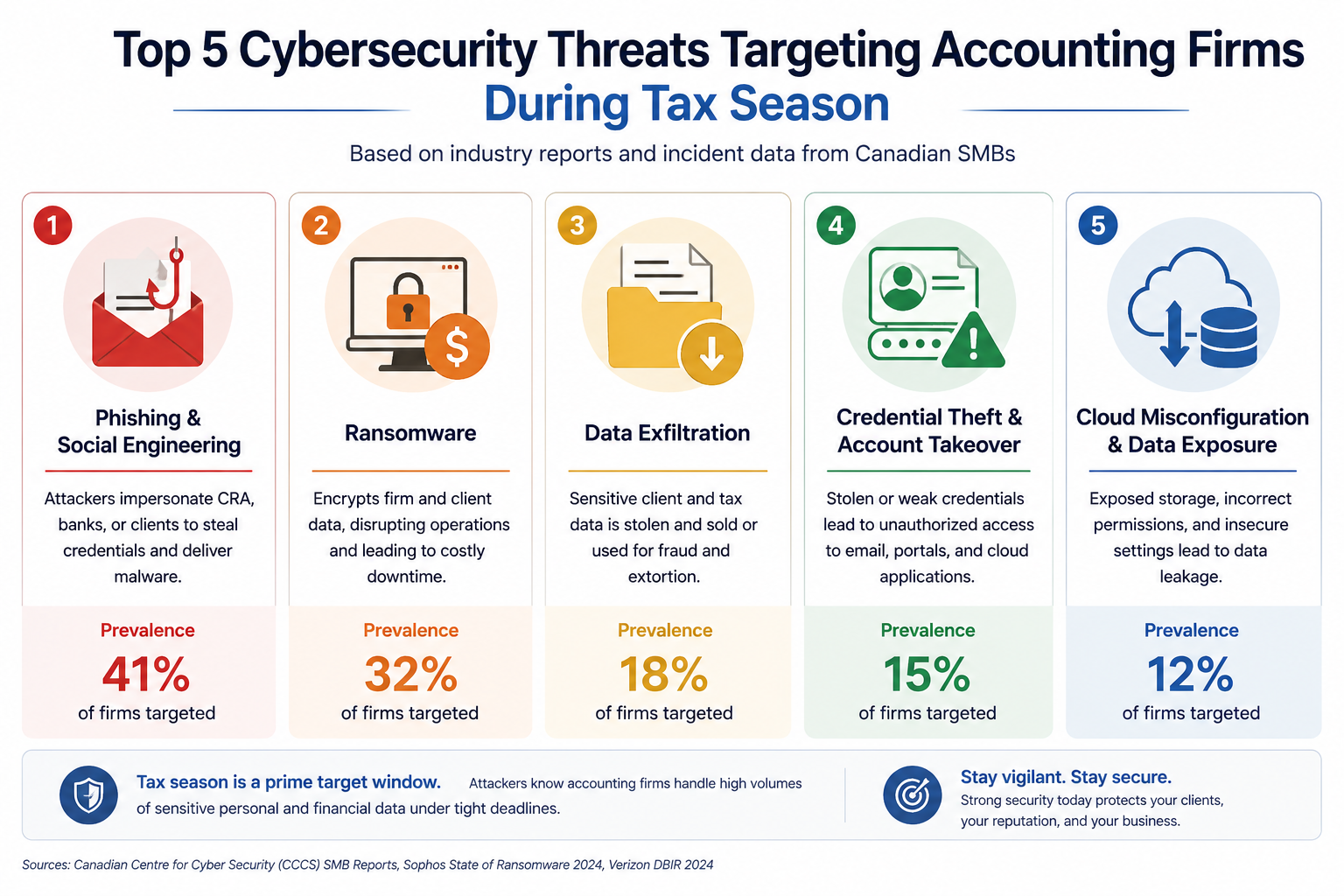
If you run an accounting firm in Edmonton, the data you hold is some of the most sensitive in the city. Tax filings, financial statements, payroll records, business succession plans, personal SINs, banking details. Attackers know this. Tax season specifically. Every year between January and May, accounting firms in Western Canada see a measurable spike in phishing, business email compromise, and ransomware attempts. This post walks through what cybersecurity actually means for an Edmonton accounting practice in 2026, what reasonable looks like, and what it should cost.
The short version. Accounting firms are uniquely targeted because attackers correctly assume the data has high resale value, the firm has time pressure during tax season, and clients will pay to keep filings on schedule. The good news is that the controls that actually stop the attacks are well understood and within budget. The harder work is consistency, especially during the months when staff are working late and clicking faster than they should.
Why accounting firms specifically
Three things make accounting firms unusually attractive to attackers compared to other professional services.
First, the data is high-value across multiple categories. Personal tax data, corporate financial data, banking records, payroll for client companies. A single firm compromise can yield thousands of personal records and dozens of corporate balance sheets. That data sells well on dark web markets and provides leverage for further targeted attacks against your clients.
Second, business email compromise targeting accounting firms has been on the rise. Attackers monitor email for invoice approvals, then send a perfectly timed fake instruction redirecting the payment to their account. We have seen Alberta firms lose between $30,000 and $400,000 to single incidents. The attacker often impersonates a known client.
Third, tax season creates time pressure that increases human error. Late nights, faster decisions, more clicks on emails that look urgent. Attackers know this and time their campaigns to tax season specifically.
What Edmonton accounting firms need
CPA Alberta and CPA Canada have been raising expectations around technology competence and client confidentiality. The CPA Code of Professional Conduct includes confidentiality obligations that extend to electronic data. PIPA adds breach notification timelines for personal information. CRA’s Mandatory Disclosure Rules and audit support obligations add their own data retention and access expectations.
None of these prescribe specific tools. They prescribe outcomes. So the question for a partner is not “what does my regulator require?” but “what controls would I be embarrassed to be missing if a breach happened tomorrow?”
The baseline
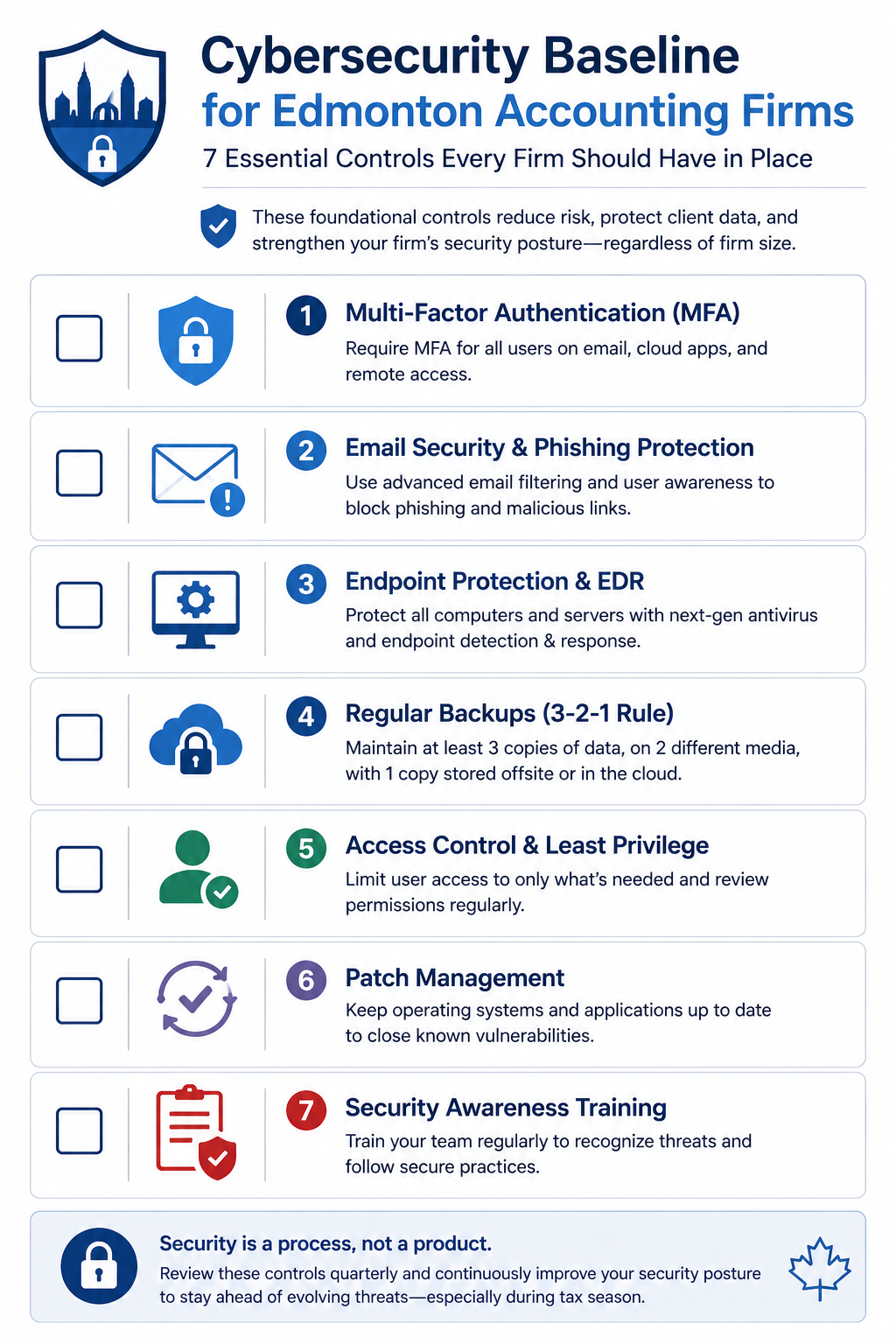
1. MFA on every account
The single highest impact control. Microsoft 365, accounting software (CaseWare, TaxCycle, Profile, etc.), banking portals, remote access. No exceptions for senior partners. Attackers know exactly which accounts are excluded.
2. EDR on every device
Microsoft Defender for Endpoint, SentinelOne, or CrowdStrike. Detects ransomware in progress and stops it before it spreads. Every laptop, every desktop, every server. Including the laptop the senior partner takes home.
3. Email security gateway with link sandboxing
Native M365 email security is good but not enough during tax season. Add a layer that opens every link in a sandbox before delivery and that flags BEC patterns. This is the single biggest defense against the impersonation attacks targeting your firm during deadline weeks.
4. Daily encrypted backups with offsite copy
Tested quarterly. Untested backups have failed at the worst possible moment for at least three Alberta accounting firms I know of, including during tax season.
5. Written incident response plan
Two pages. Who calls who, what gets disconnected, who notifies clients, who notifies CPA Alberta and CRA if applicable, where the offline backups live. Written before the incident, not during.
6. Annual phishing simulation
Send a simulated phishing email to every staff member. Train the people who click. Make it slightly harder during tax season since that is when real attacks intensify.
7. Vendor and client portal hygiene
If you use a client portal for document exchange, audit it. Confirm MFA is enforced, access is removed when client engagements end, and uploads are scanned. The same for any practice management or tax software portal that staff log into externally.
What it actually costs
For a 10 to 30 person Edmonton accounting practice, the entire baseline runs roughly $90 to $160 per user per month, all in. That covers M365 Business Premium licensing, EDR, email security, backup tooling, and the managed service relationship to run the phishing simulation, quarterly access review, and tax season hardening for you.
Compare to incident cost. The most recent IBM Cost of a Data Breach Report puts financial services around USD 5.9 million globally. For an Alberta accounting firm, real-world incidents we have seen range from $25,000 (small firm, paid ransom plus recovery) to over $300,000 (mid-sized firm, did not pay, took five weeks to recover, lost three clients). None of those numbers include reputational damage or potential CPA Alberta complaints.
What we see firms get wrong
Three patterns repeat. First, partial deployments. MFA on most accounts, EDR on most laptops. The gap is always where the attacker enters. Second, the IT generalist trap. Many firms rely on a friendly local IT generalist who is good at fixing printers but has never investigated a breach. Cybersecurity is a different skill set. Third, tax season fatigue. Controls get bypassed in March because someone wanted to move faster. The bypass becomes permanent. Schedule a review of all temporary exceptions every May.
FAQ
Does cyber insurance cover ransomware payments for accounting firms?
Sometimes, but coverage has tightened. Most insurers require evidence of MFA, EDR, and tested backups before quoting, and many exclude ransomware payments entirely if those controls are missing.
Are cloud-based accounting platforms (Xero, QBO, etc.) safer?
The platform handles its own infrastructure security. Your accounts on it are still your responsibility. MFA, access reviews, and the controls above all still apply.
How quickly can a baseline be implemented before tax season?
For a firm starting near zero, the full baseline takes 30 to 45 days. Start in November or December for next tax season. Starting in February is too late.
Related posts
- Cybersecurity for Edmonton Law Firms
- PCI-DSS for Edmonton Retail WiFi
- Managed IT Edmonton Dental Practices
If you are a partner reading this
Tax season is six months away. Now is the right time to assess where your firm stands. Our team works with several Edmonton accounting practices and we can do a focused 90 minute assessment that produces a one-page priority list, no commitment.
Book a free 90 minute cybersecurity assessment for your accounting firm. We will come to your office, walk through the seven controls above with whoever you want in the room, and leave you with a written priority list.
Last verified April 2026 by the aaanetworkx cybersecurity practice. Edmonton, Alberta.
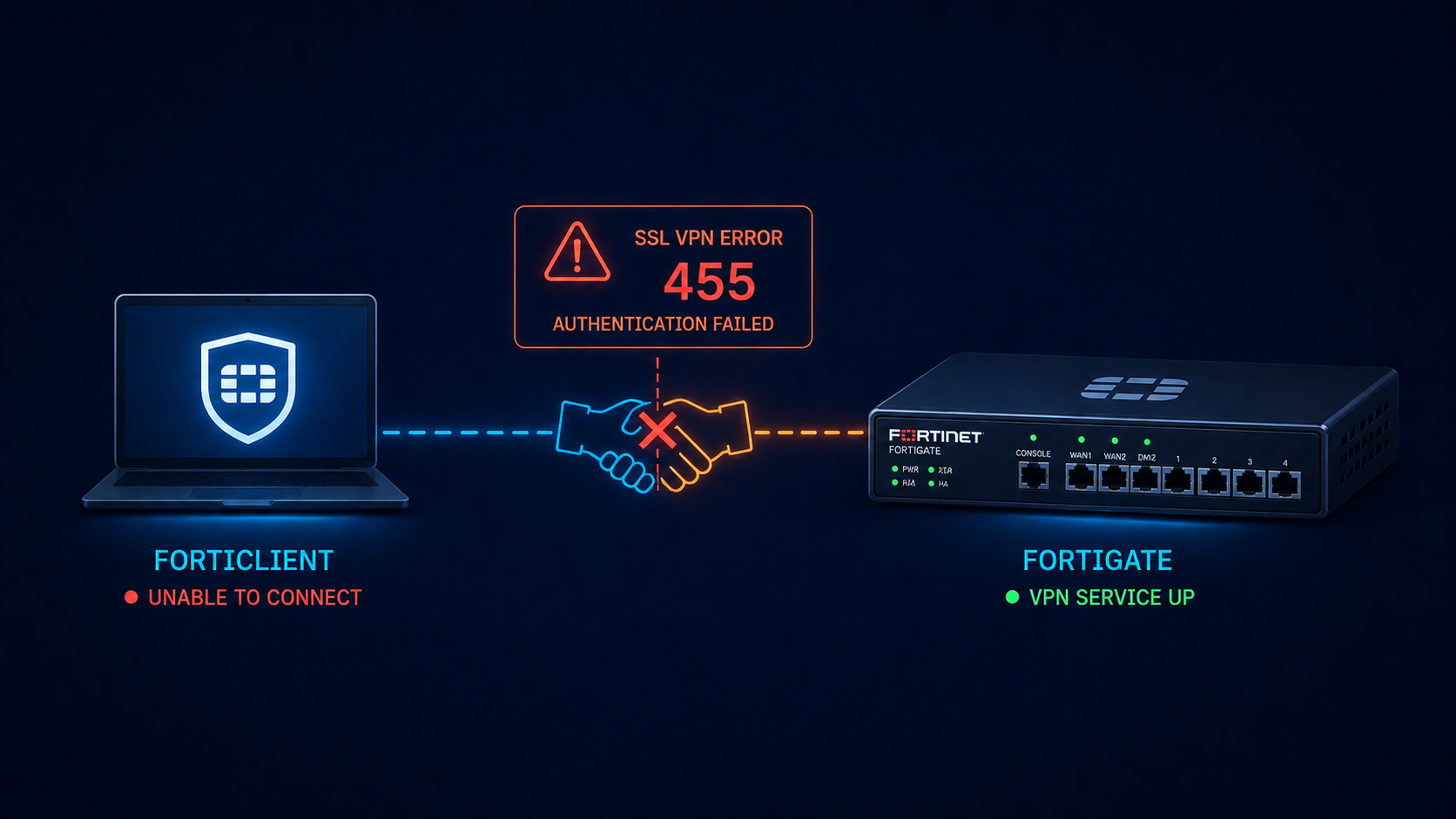
You opened FortiClient, hit Connect, and got back error -455 with no useful detail. The user cannot work, the helpdesk ticket is in your queue, and you need to fix it before the morning standup. This post walks through the five real causes of FortiGate SSL VPN error -455 ranked by frequency and the fix for each.
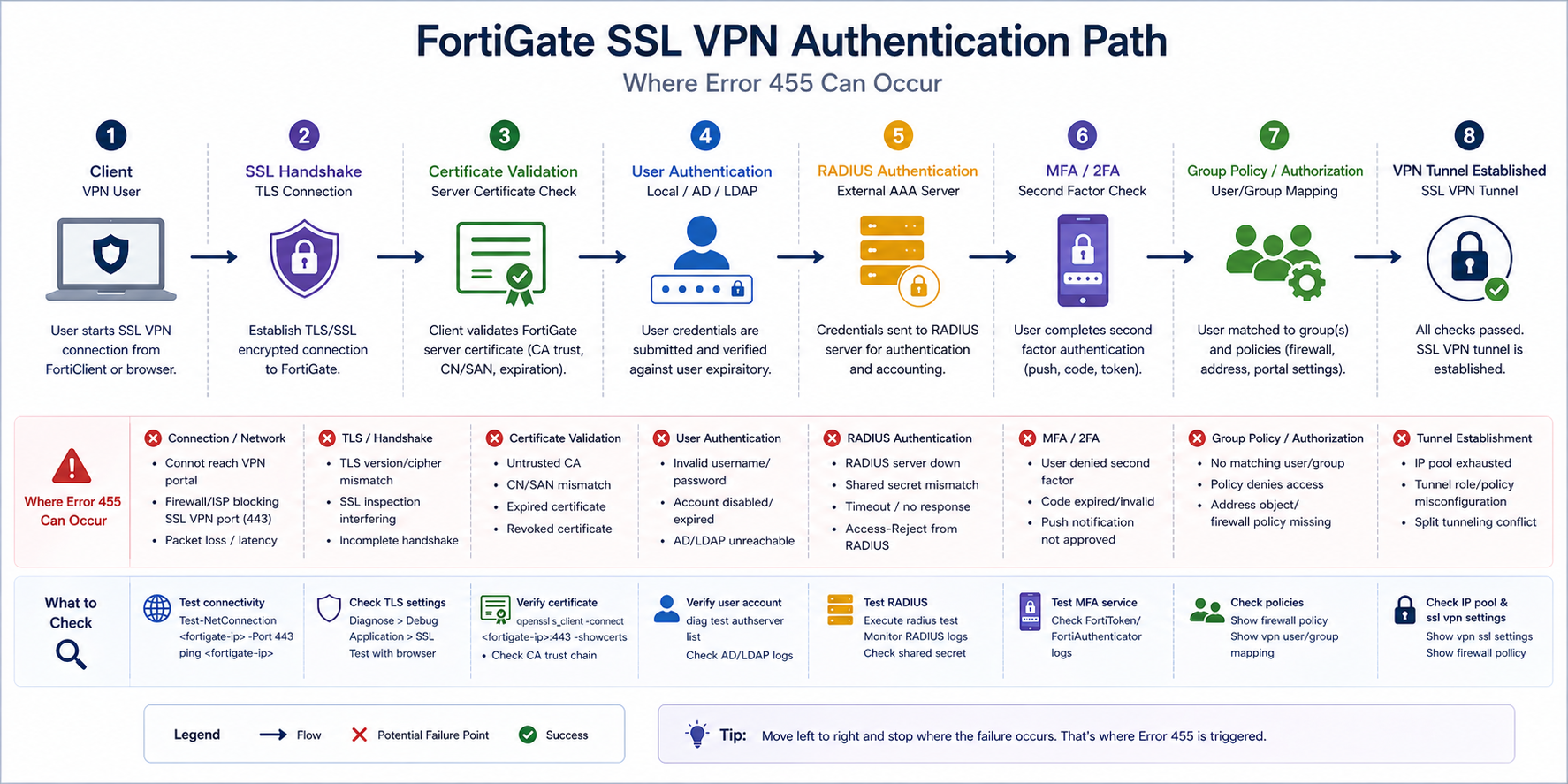
The short version. Error -455 is FortiClient’s way of saying authentication did not complete. The TCP connection succeeded, the SSL handshake started, and then somewhere during user authentication the negotiation failed. The error code is generic on purpose because Fortinet does not want to leak information to attackers about which step failed. Most of the time it is one of certificate validation, RADIUS reachability, MFA timing, or a group policy mismatch where the user does not have permission to connect.
The fastest path to a fix is checking the FortiGate’s SSL VPN log on the firewall side. The log there shows the actual authentication failure reason that the client side does not see, before any handshake fails.
What this error means
FortiClient surfaces a small set of generic error codes for SSL VPN failures, and -455 specifically means “authentication did not complete.” The actual root cause sits in the FortiGate logs at Log & Report → VPN Events. Always start there. The client error tells you something failed. The firewall log tells you what.
Verified against current Fortinet FortiOS 7.x documentation, accessed April 2026.
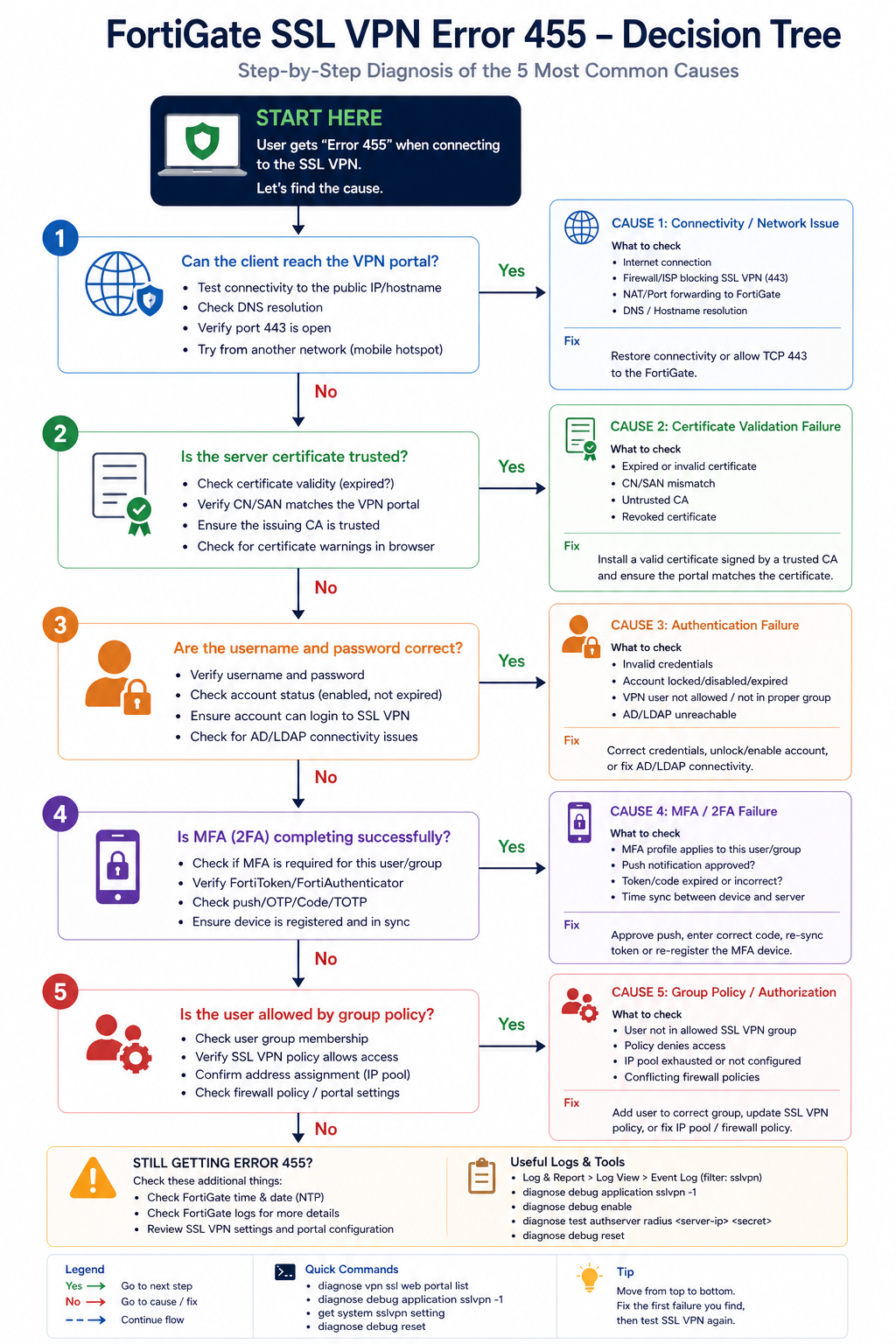
The five causes, ranked
Cause one, certificate validation failure, around 30 percent of cases
The FortiGate SSL VPN portal certificate is expired, untrusted by the client, or has a hostname mismatch. FortiClient strict mode rejects the connection. Often happens after a certificate renewal where the new cert was installed but FortiClient was deployed with cert pinning to the old one.
Verify by visiting the SSL VPN web portal in a regular browser. If the browser shows a certificate warning, fix the certificate. Use a publicly trusted CA (Let’s Encrypt, DigiCert, etc.) or push your internal CA to client trust stores.
Cause two, RADIUS server unreachable or slow, around 25 percent of cases
The FortiGate authenticates users via RADIUS to AD or another directory. If the RADIUS server is down or responses are too slow, FortiGate times out the authentication and FortiClient sees -455.
Verify on the FortiGate with diagnose test authserver radius [server-name] [user] [pass]. If the test fails, fix RADIUS reachability. Common issues: firewall rule blocking UDP 1812, RADIUS shared secret drift, or the AD server being overloaded.
Cause three, MFA timing or token issue, around 20 percent of cases
Multi-factor authentication is enforced on the SSL VPN, the user did not approve the push or enter the OTP in time, and FortiGate rejected the auth. This often surfaces as -455 even though the underlying cause is MFA timeout.
Verify in the FortiGate VPN events log. If the event shows MFA timeout or denial, the fix is user-side (approve faster, enter OTP correctly) or configuration-side (extend the MFA timeout window if too aggressive).
Cause four, user not in allowed group, around 15 percent of cases
The user authenticates correctly but is not a member of the AD/LDAP group the FortiGate’s SSL VPN policy requires. The error surfaces as -455 because authorization failed even though authentication succeeded.
Verify by checking the user’s group membership in AD and the FortiGate SSL VPN policy’s matched groups. Add the user to the right group and retry.
Cause five, FortiClient version incompatibility, around 10 percent of cases
An older FortiClient version is incompatible with the FortiOS version on the firewall, or vice versa. After a firewall upgrade, older clients sometimes fail with -455 because of TLS or feature mismatches.
Verify the FortiClient version against the FortiOS compatibility matrix. Upgrade FortiClient if behind. Avoid running older clients indefinitely once FortiOS has been upgraded.
What the official documentation does not mention
Fortinet’s KB articles describe -455 in general terms but rarely emphasize that the firewall log is the only place to find the real reason. Many helpdesks debug from the client side first, which costs an hour. Check the firewall log on every -455, every time. Also, FortiGate has a per-user authentication failure log that is rate-limited by default. If you cannot find the failure, increase the log verbosity temporarily on the FortiGate side and retry.
The architectural fix
Organizations that rarely see -455 do four things. First, monitor the SSL VPN portal certificate expiration with alerts at 60, 30, and 7 days. Second, monitor RADIUS server response time so they know when AD authentication is slow before users complain. Third, document the AD groups required for SSL VPN access in the user onboarding playbook so new staff are added correctly. Fourth, standardize FortiClient deployment via configuration management so version drift does not produce mystery -455 incidents.
FAQ
Will reinstalling FortiClient fix it?
Sometimes for the version incompatibility case. Otherwise no, the fix is on the firewall or RADIUS side.
Is -455 the same as -7200 or -8?
No. Different error codes mean different failure points. -455 is auth, -8 is general connection, -7200 is policy. Check the specific code, not just “VPN error.”
Should I switch to IPsec to avoid this?
Not for this issue. IPsec has its own error patterns. Pick SSL or IPsec based on user experience and platform requirements, not because of -455 specifically.
Related posts
VPN issues that keep coming back
If your organization has recurring SSL VPN authentication issues, the underlying cause is usually drift between firewall, AD, and client configuration. Tell us about your environment and we will help you stabilize remote access.
Last verified April 2026 by the aaanetworkx security practice.
HIPAA network segmentation requirements are written as outcomes, not a prescribed tool list, and that is what trips most teams up at audit.
HIPAA’s Security Rule does not tell you what brand of firewall to buy, what VLAN scheme to use, or what network segmentation specifically looks like. It tells you to take “reasonable and appropriate” measures to protect electronic protected health information (ePHI) and leaves you to figure out what reasonable means for your environment. Auditors then come and check whether what you did is, in fact, reasonable. This post walks through what reasonable network segmentation actually looks like in practice, what auditors are checking for, and what we see Edmonton-area healthcare practices get wrong.
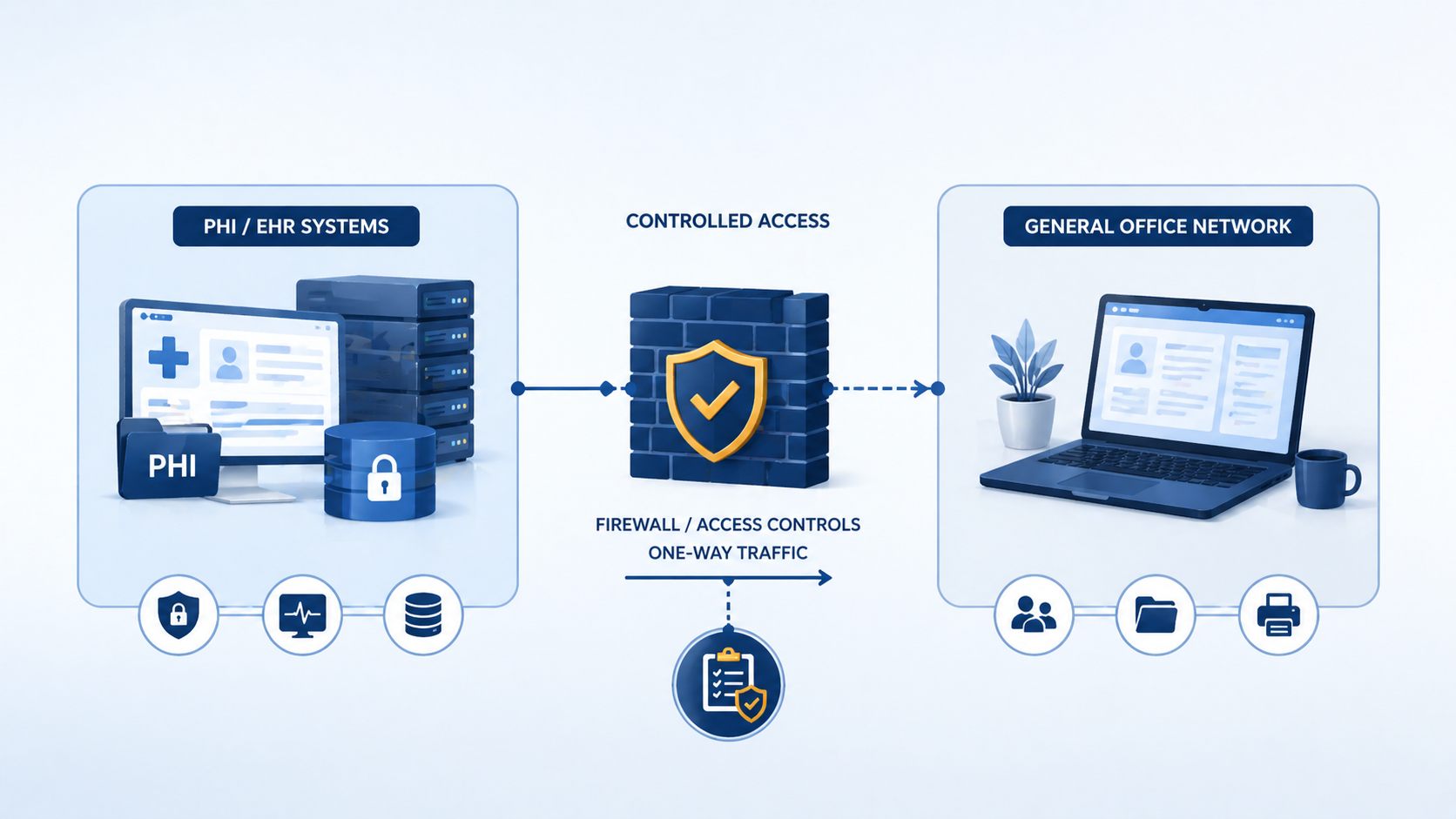
The short version. HIPAA expects you to logically separate systems that handle ePHI from systems that do not, and to have controls between them that prevent or detect unauthorized access. Most reasonable implementations involve at minimum a separate VLAN for ePHI systems, a firewall enforcing access policies between zones, monitoring of traffic between zones, and access controls that limit who can reach the ePHI zone at all. None of this is exotic. It is the same pattern PCI-DSS uses, with healthcare-specific tweaks.
What auditors penalize is not lack of cutting-edge tools. It is lack of evidence. A clinic with a basic firewall and clear documentation often passes an audit. A clinic with sophisticated tools and no documentation often fails.
What HIPAA actually says about network controls
The Security Rule’s technical safeguards (45 CFR 164.312) include access controls, audit controls, integrity protections, person/entity authentication, and transmission security. None of these explicitly say “network segmentation.” But the Risk Analysis requirement (164.308(a)(1)(ii)(A)) requires you to identify and assess potential risks to ePHI, and the Security Management Process requires you to implement security measures sufficient to reduce identified risks to a reasonable level.
For most environments, a flat network where ePHI systems share the same broadcast domain as general office workstations does not pass a competent risk analysis. The risk of lateral movement after a phishing-based compromise of a non-ePHI workstation is too high, and segmentation is the standard mitigation. Auditors expect to see segmentation as the answer to “how have you reduced the risk of unauthorized access to ePHI?”
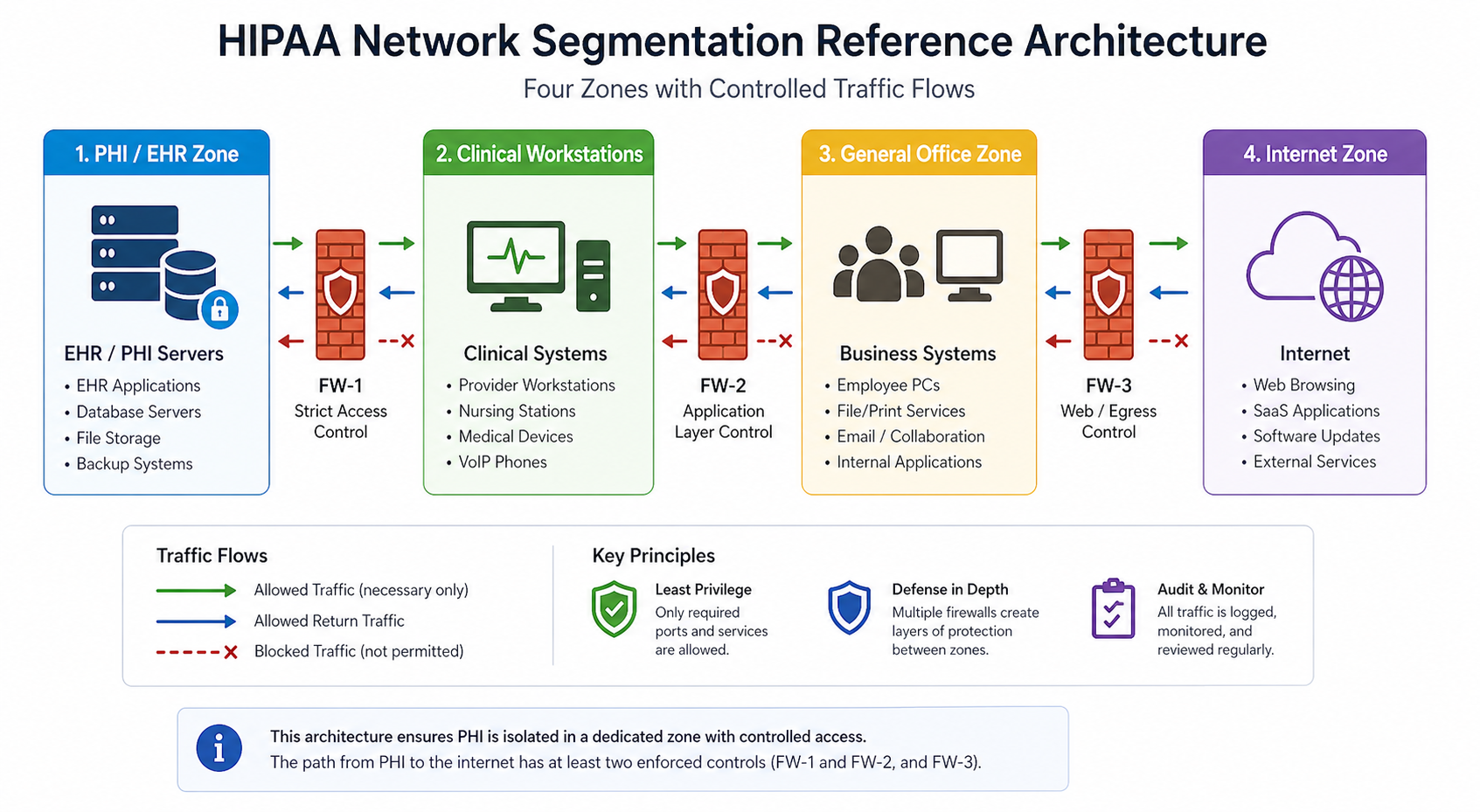
The practical bar most auditors apply is whether the path from PHI to the general internet has at least two enforced controls between them.
What auditors actually look for
Across HIPAA audits we have supported in the last three years, the consistent themes are these. Auditors want to see a clear inventory of which systems handle ePHI. They want to see those systems on a separate network segment with firewall enforcement at the boundary. They want to see firewall rules that are restrictive (default deny, explicit allow) and documented with business justification. They want logs of traffic crossing the boundary, retained for at least 90 days. They want evidence that the segmentation has been tested, ideally with vulnerability scans run from the general network attempting to reach ePHI systems and being blocked.
What auditors do not require is microsegmentation, NAC, or any specific commercial product. They require evidence that the controls you implemented actually work as documented.
A reasonable baseline
1. Inventory ePHI systems
Document every system that stores, processes, or transmits ePHI. EMR servers, imaging systems, billing systems, backup repositories, fax servers, anywhere ePHI lands. Update this list whenever you add a new system. The inventory drives every other control.
2. Place ePHI systems on a separate VLAN with firewall control
A dedicated VLAN with a firewall (next-gen firewall preferred, basic stateful firewall acceptable) at the boundary. Default deny, explicit allows for clinical workstations and authorized administrative access only.
3. Document the firewall ruleset with business justification
Every allow rule has a one-line justification documenting which workflow it supports. “TCP 443 to EMR server from clinical VLAN, supports daily charting” is enough. “Allow everything from VLAN 10 to VLAN 20” with no justification fails the audit.
4. Log all cross-zone traffic and retain for 90+ days
Firewall logs forwarded to a SIEM, syslog server, or even a managed log retention service. The retention requirement varies by interpretation but 90 days is the practical floor most auditors accept.
5. Test the segmentation annually
Run a vulnerability scan from the non-ePHI side aimed at ePHI systems. Confirm the firewall blocks unauthorized access. Document the test and the result. This is what auditors mean when they ask “how do you know your controls work?”
6. Authentication and access control on ePHI systems
Multi-factor authentication on any account that can access ePHI. Role-based access so users only see the records they need. Account review every quarter. This pairs with segmentation because segmentation alone does not prevent insider threats or compromised credentials.
Common audit findings
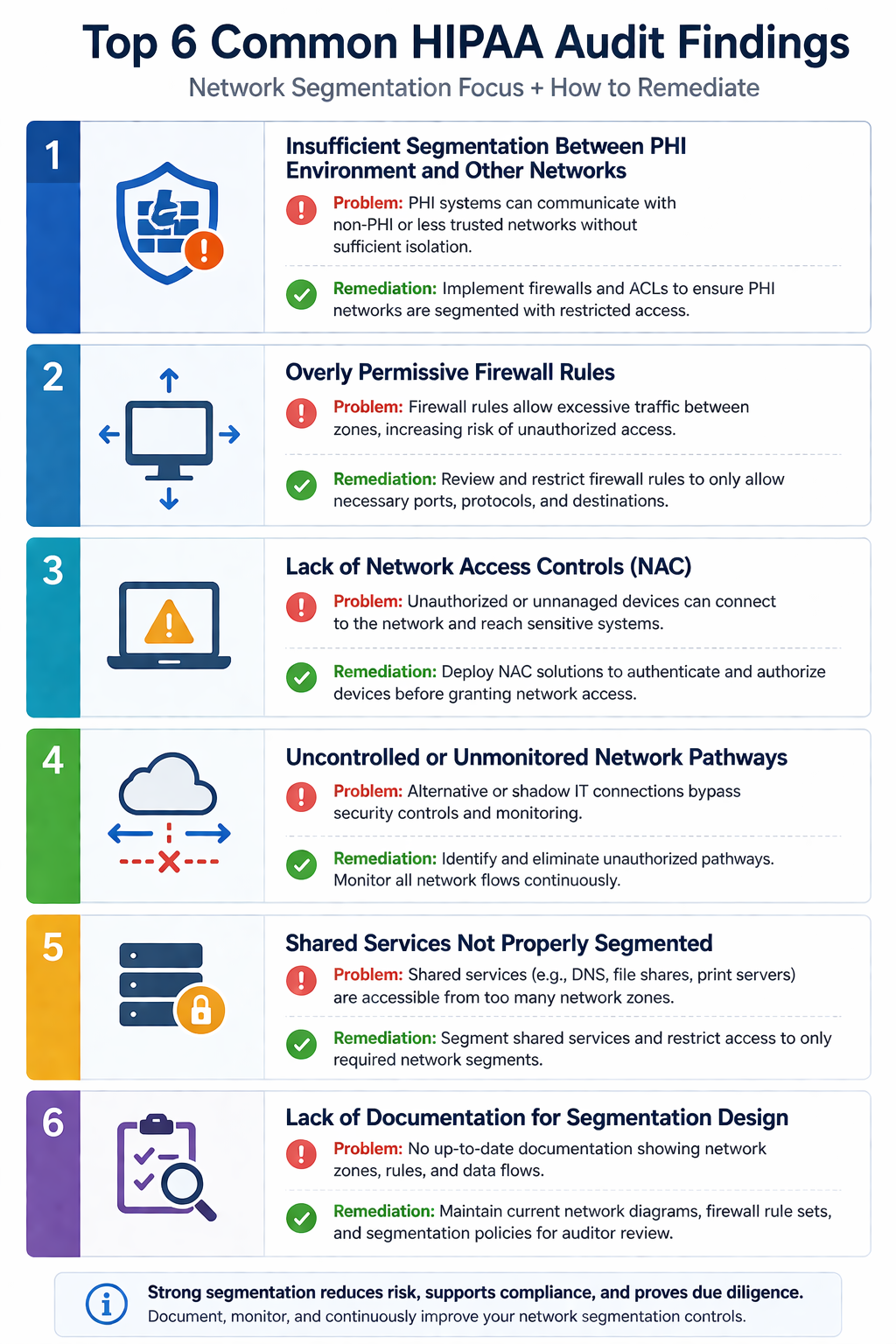
From audits we have observed, six findings repeat. First, flat networks where ePHI systems share VLANs with general workstations. Second, firewalls in place but with default-allow rules that effectively make segmentation cosmetic. Third, firewall logs not retained long enough to support an investigation. Fourth, no documented inventory of ePHI systems, so the scope of compliance is undefined. Fifth, vendor remote access tools that bypass the segmentation by establishing outbound tunnels. Sixth, wireless networks where guest Wi-Fi is on the same broadcast domain as ePHI systems.
Each is fixable in days, not months, but each leads to a finding that has to be remediated and reported in your next audit.
What the official guidance does not emphasize
HIPAA guidance is general by design, but two practical issues rarely make it into the documentation. First, vendor remote access. Many medical practices have remote support tunnels for their EMR vendor, imaging vendor, or practice management vendor. These tunnels often bypass the firewall entirely and provide an unmonitored path into the ePHI zone. Auditors increasingly want documentation of every vendor’s access path and evidence of monitoring.
Second, IoT devices. Newer medical equipment (digital sensors, blood pressure monitors, smart scales) often connects via Wi-Fi and reports to a manufacturer cloud. If those devices land on the same network as ePHI systems, they expand your attack surface in a way that is rarely on the architecture diagram. Segment IoT separately from clinical workstations and ePHI systems.
The implementation order
For practices starting near zero, the implementation sequence we use is: ePHI inventory first, segmented VLAN second, firewall and rule documentation third, logging fourth, MFA on ePHI accounts fifth, annual test sixth. This order delivers the highest risk reduction first, even if budget runs out before all six are done.
FAQ
Does HIPAA apply if we are based in Canada?
Only if you handle ePHI of US patients or contract with US healthcare entities. Canadian practices typically follow PIPA (Alberta), PIPEDA (federal), or the equivalent in their province. The principles are similar. Segmentation, access control, and logging are reasonable expectations under all of them.
Is microsegmentation required?
No. Coarse VLAN-based segmentation with firewall enforcement satisfies most auditors. Microsegmentation is a higher bar that organizations choose for additional defense in depth, not because HIPAA requires it.
Can a single firewall handle both segmentation and internet edge?
Yes, as long as you have separate interfaces or zones for the ePHI segment and rules that enforce isolation. Two physical firewalls is not required.
Related posts
- PCI-DSS for Edmonton Retail WiFi
- Managed IT Edmonton Medical Clinics
- Cybersecurity for Edmonton Law Firms
Audit coming up
If you have a HIPAA, PIPA, or PHIPA-related audit on the calendar in the next 90 days and you are not sure where you stand on network segmentation, our team does focused readiness assessments specifically for medical practices in Western Canada. Tell us about your environment and we will produce a one-page gap report you can act on.
Last verified April 2026 by the aaanetworkx compliance practice.