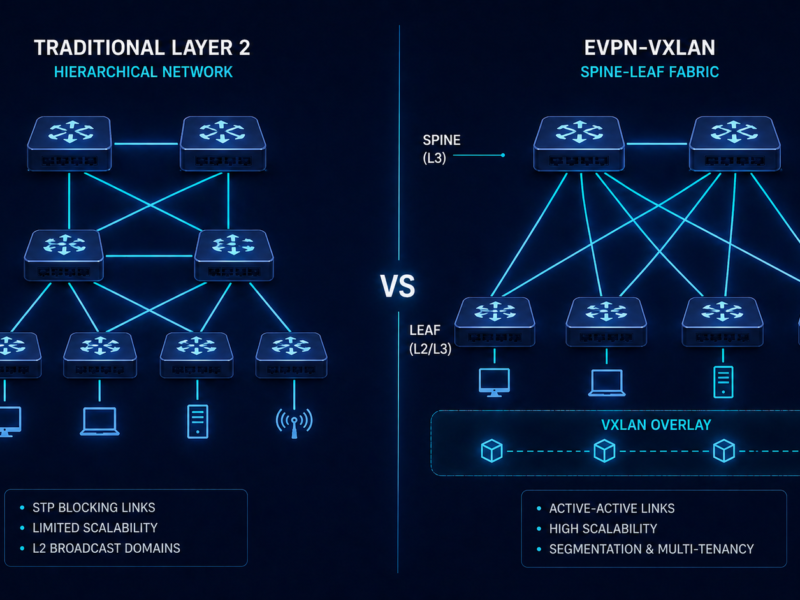
Cisco ACI does not behave like a traditional network. That is the point. This guide covers what ACI and SDN actually are, who should deploy them, where they fit, what they cost, and most usefully, how to troubleshoot the problems you will inevitably encounter. If you are evaluating ACI, inheriting an existing fabric, or just trying to understand why your data center team keeps talking about EPGs and Contracts, this is for you.
The short version. Software-Defined Networking separates the brain of the network (the control plane) from the muscle (the data plane). Cisco ACI is Cisco’s enterprise SDN platform for the data center, built on a three-node APIC controller cluster, Nexus 9000 spine and leaf switches running ACI firmware, and a policy model of EPGs, Contracts, VRFs, and Tenants that replaces traditional VLAN-based segmentation. It is powerful, expensive, and unforgiving of operational shortcuts. The fabric itself is reliable. Most production pain traces back to skipping one of four operational disciplines.
What is Software-Defined Networking?
SDN decouples the control plane (the logic that decides where traffic goes) from the data plane (the hardware that forwards packets). In a traditional network, every switch runs its own local control plane and talks to neighbours via OSPF or BGP. In SDN, a centralized controller holds the network-wide view and pushes policy down to the forwarding devices.
The practical benefit is programmability. Instead of logging into twenty switches to change a VLAN, you change a policy object in a controller and it propagates everywhere. The tradeoff is a new category of failure: the controller itself. SDN architectures typically expose a northbound API (controller to orchestration systems like Ansible or Terraform) and a southbound API (controller to forwarding devices via NETCONF, REST, or OpenFlow).
What is Cisco ACI?
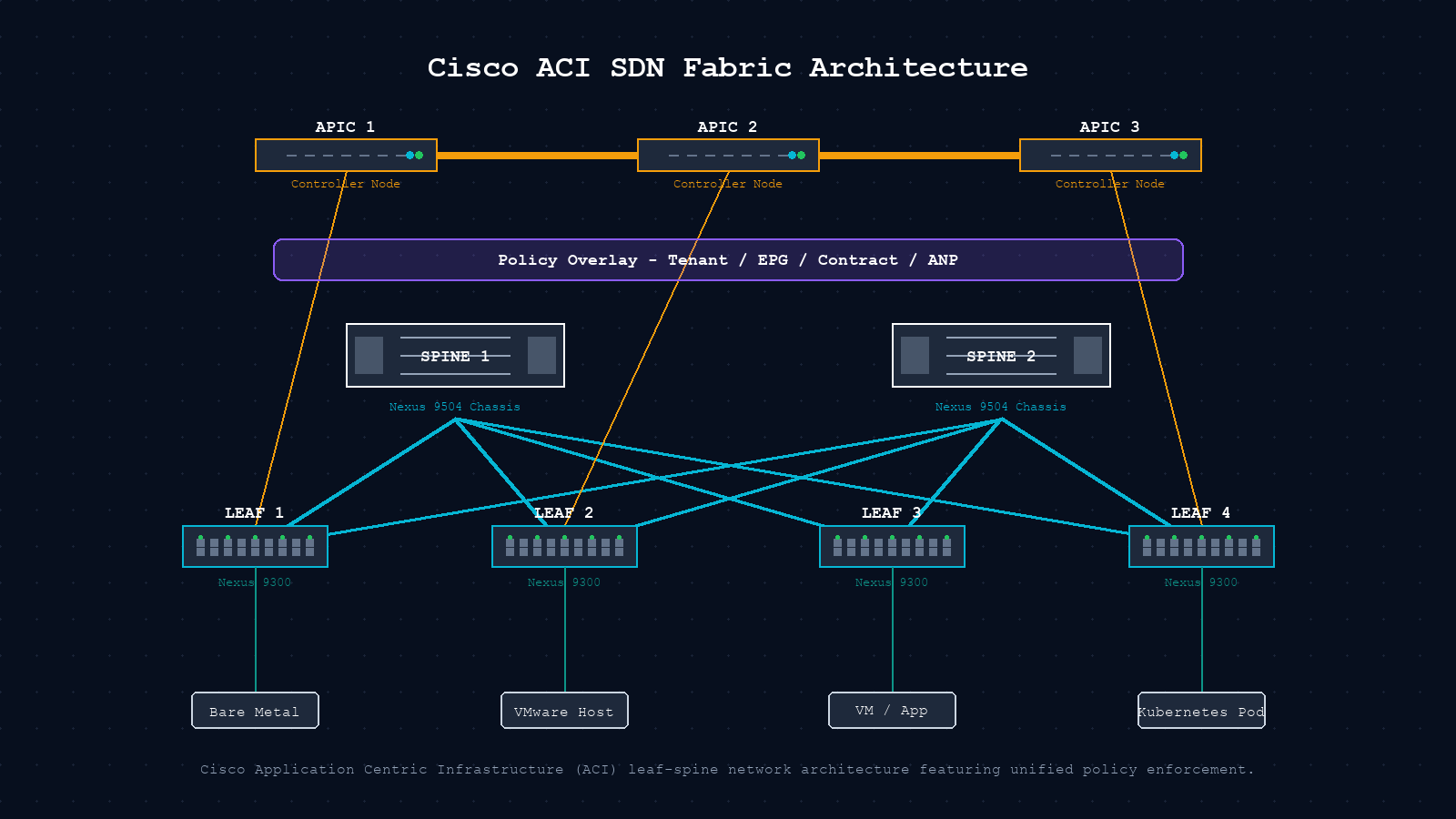
Cisco Application Centric Infrastructure (ACI) is Cisco’s enterprise SDN platform for data center fabrics. It is built around three components and a policy model that replaces traditional VLAN-based segmentation.
| Component | Role | Hardware / Detail |
|---|---|---|
| APIC Cluster | Centralized policy controller. Single source of truth. | 3-node cluster (M3 or L3 appliances). REST and NETCONF API. |
| Nexus 9000 Spine | High-speed inter-leaf transport. Runs IS-IS underlay. | Nexus 9504 / 9508 with ACI-mode firmware (not standard NX-OS). |
| Nexus 9000 Leaf | Workload-facing VTEP. Enforces zoning rules locally. | Nexus 9348 / 93180. VXLAN encapsulation at leaf boundary. |
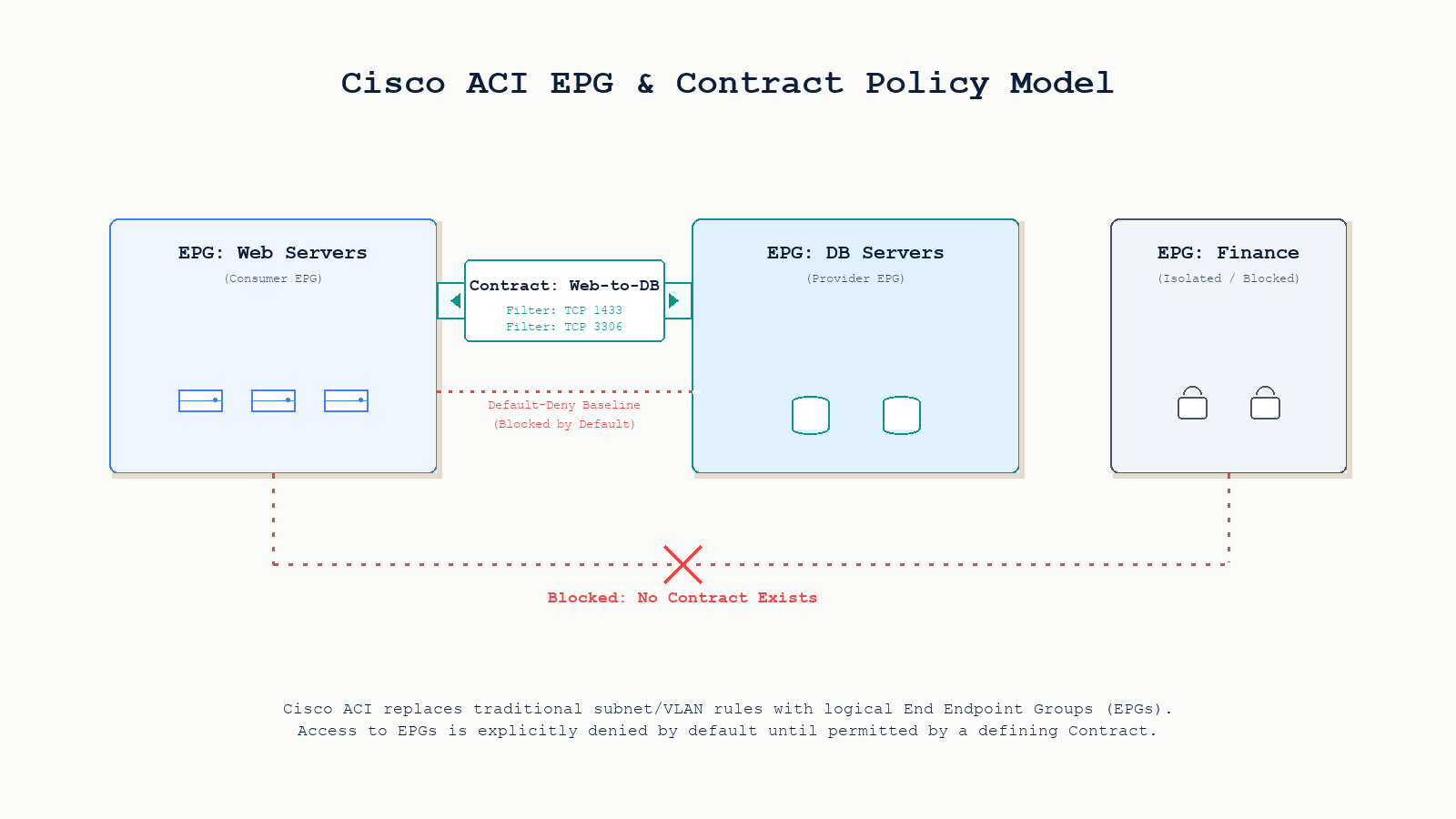
| Policy model | EPGs, Contracts, VRFs, Tenants replace VLAN configs. | Default-deny between EPGs. Contracts permit specific traffic. |
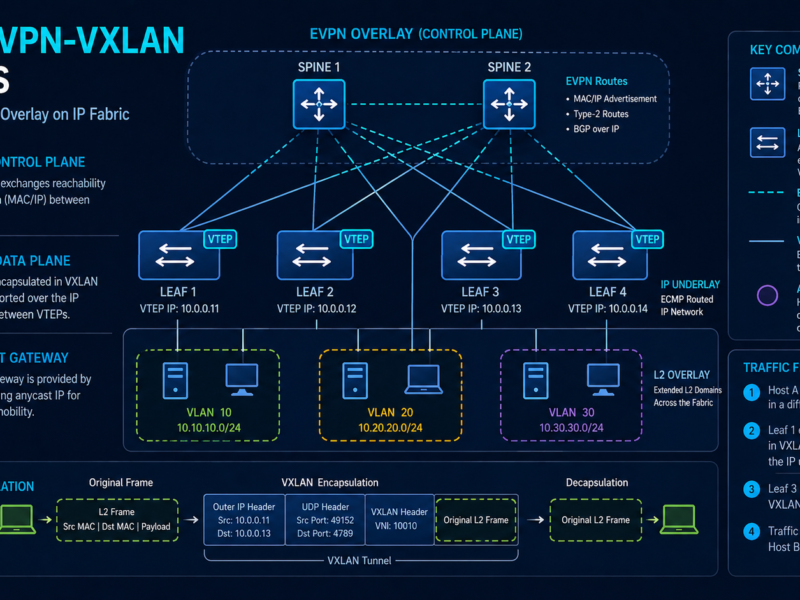
ACI uses VXLAN as the underlay encapsulation between leaves, IS-IS as the underlay routing protocol (a meaningful departure from most EVPN-VXLAN fabrics which use BGP), and EVPN as the overlay control plane for distributing endpoint information.
Key insight. ACI firmware is entirely different from standard NX-OS. A Nexus 9000 in ACI mode cannot run standard NX-OS commands and vice versa. Switching between modes requires a reload and full reconfiguration.
Who can use Cisco ACI?
ACI is an enterprise and service provider platform. It is not designed for small offices or branch networks. The organizations that get real value from it share certain traits.
Large enterprises. Financial services, healthcare systems, large manufacturing firms. The policy model enforces micro-segmentation at scale without per-device ACL management.
Colo and managed service providers. The multi-tenancy model gives each customer an isolated Tenant object with separate VRFs and policies, all on shared hardware.
Cloud-adjacent data centers. Cloud APIC extends policy into AWS or Azure, enforcing consistent contracts across on-premises and cloud endpoints.
Automation-mature teams. APIC REST API, Ansible modules, and the Terraform provider allow full infrastructure-as-code workflows. CLI-only teams will find the abstraction frustrating.
Not a good fit: organizations with fewer than 3 to 5 network engineers, networks that do not require micro-segmentation, or environments that cannot absorb the hardware and licensing investment.
Where is ACI deployed?
ACI’s most mature production deployments fall into four categories. Primary DC fabric: ACI’s original use case, a spine-leaf fabric connecting bare-metal servers, VMware vSphere clusters, Kubernetes nodes, and storage, all segmented by policy. Multi-site and multi-pod: Cisco Nexus Dashboard Orchestrator extends a single policy domain across multiple ACI fabrics in different physical locations, providing stretched EPGs and consistent contracts. Private cloud platforms: native integration with VMware vCenter (vDS integration), Red Hat OpenShift, and Kubernetes (ACI CNI plugin) allows compute and network policy to be co-managed. Regulated workloads: healthcare and financial services use the contract model to create verifiable, auditable segmentation between regulated and non-regulated workloads, which is very difficult to enforce reliably with traditional VLANs.
Cost
Cisco ACI pricing is complex and partner-negotiated. Treat these figures as directional, not quotes. Cisco partners discount significantly from list price.
| Component | List Price Range | Notes |
|---|---|---|
| Nexus 9504 spine (x2) | $40,000 to $120,000 each | Varies by line card selection |
| Nexus 9348 leaf (4 to 16) | $15,000 to $50,000 each | 48x25G plus 12x100G typical |
| APIC cluster (3 nodes) | $30,000 to $60,000 | M3 or L3 form factors |
| ACI software licensing | $5,000 to $20,000 per leaf per year | Essentials vs Advantage tier |
| SmartNet support | ~15 to 20 percent of hardware per year | Required for TAC access |
| 3-year total (mid-size) | $500,000 to $1.5M | 8 to 16 leaves, 2 to 4 spines |
VMware NSX-T and Juniper Contrail are comparable in total price. Open-source SDN alternatives carry lower software costs but substantially higher engineering and integration costs.
Common problems in production ACI fabrics
Six root causes account for the majority of production incidents. Understanding them before the incident saves hours of misdiagnosis.
Policy black hole (default-deny). ACI silently drops traffic between EPGs with no Contract. It looks identical to a hardware failure. Always check Contracts before interfaces.
APIC cluster degraded. A failed APIC node prevents policy changes but forwarding continues. Teams often discover a degraded cluster only mid-incident, by which point routine changes have been queued for days.
VMM domain drift. VMware admins removing ACI-managed port groups causes silent divergence between vCenter and APIC. VMs lose EPG membership with no fault raised.
Endpoint learning loop. Misconfigured NIC teaming causes a MAC to flicker between leaves, generating COOP churn on spines and forwarding instability for that endpoint.
Fabric upgrade failure. A mid-upgrade interruption leaves a leaf in a partially upgraded state, requiring manual recovery, sometimes a full factory reset.
Route-target typo. A typo in a route-target import policy causes one leaf to silently fail to import a tenant’s routes. The BGP summary looks fine. Traffic black-holes for that tenant only.
Troubleshooting guide
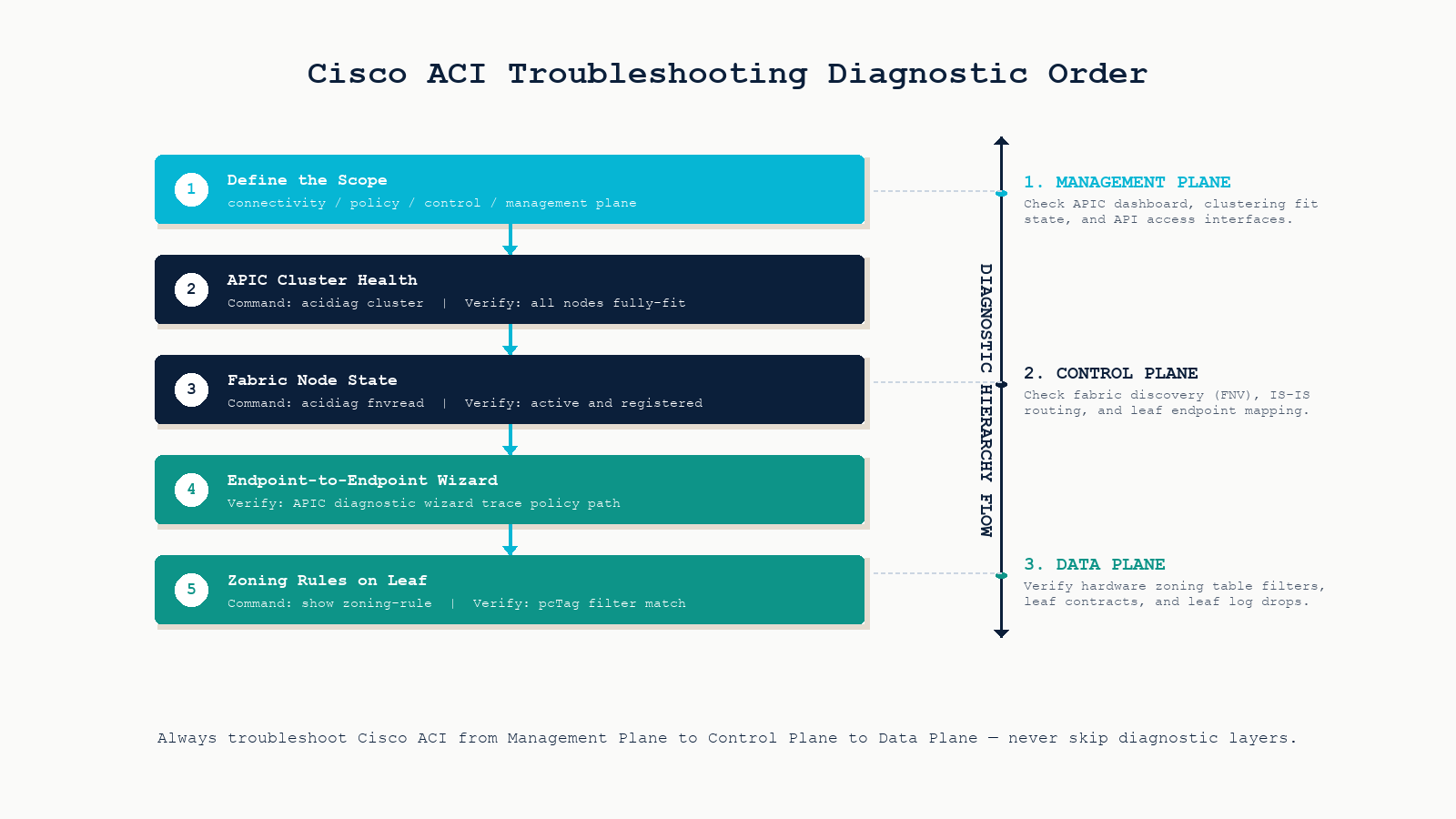
Walk these steps in order every time. Skipping to overlay or policy troubleshooting before confirming APIC cluster health is the most common time-waster in ACI operations.
The short version: management plane first, then control plane, then data plane. Never skip layers.
Step 1. Define the scope. Determine whether the problem is connectivity, policy, control plane, or management plane before touching any CLI. The scope determines which tool you reach for first.
Step 2. APIC cluster health. Run acidiag cluster. All nodes must show fully-fit. A degraded cluster blocks all policy changes until resolved.
Step 3. Fabric node state. Run acidiag fnvread. Every spine and leaf should show registered and active. Anything showing discovering or inactive requires investigation before proceeding.
Step 4. APIC troubleshooting wizard. Use Operations to Troubleshoot to Endpoint to Endpoint. Enter source and destination IPs. It traces the policy path, identifies which leaves the endpoints are on, and shows whether a contract is permitting or denying the flow.
Step 5. EPG and Contract verification. Navigate to Tenants, the relevant Tenant, Application Profiles, the relevant App Profile, then EPGs. Verify the Contract is applied as Provider on one EPG and Consumer on the other, not Provider on both.
Step 6. Endpoint learning. On the APIC: Fabric, Inventory, the relevant Leaf, Endpoints. Confirm the endpoint is learned on the expected leaf and port. If bouncing between leaves, check NIC teaming configuration.
Step 7. Zoning rules on the leaf. Run show zoning-rule on the leaf. Find the rule for your source and destination EPG (pcTag values). If the action is deny, a contract is blocking the flow. If no rule matches, the contract is missing.
Step 8. IS-IS underlay and COOP. Run show isis adjacency to confirm underlay adjacencies to both spines. Run show coop internal info repo ep key <mac> to verify spine knowledge of a specific endpoint.
Key CLI reference
# APIC cluster and fabric state
acidiag cluster
acidiag fnvread
acidiag avread

# Leaf endpoint and policy
show endpoint detail
show endpoint ip <ip-address>
show zoning-rule
show isis adjacency
show coop internal info repo ep key <mac-address>
Four traits of stable ACI fabrics
APIC cluster as tier-1 infrastructure. Monitor APIC health with the same rigor as compute infrastructure. A degraded cluster is a ticking clock. The next incident will be unresolvable until it is fixed.
Version-controlled configuration. Use the APIC snapshot feature or a GitOps pipeline via Ansible and Terraform. Any configuration change must be reversible within minutes.
Scheduled upgrade cadence. Deferred upgrades accumulate technical debt. A fabric three major releases behind will hit bugs that are already fixed on current software.
Living EPG and contract topology diagram. ACI’s policy model is only as legible as the documentation around it. A diagram the whole team can read reduces mean time to diagnosis by eliminating re-discovery at 2am.
FAQ
Can ACI run alongside traditional NX-OS switches in the same fabric?
No. Nexus 9000 switches run either standard NX-OS or ACI mode. The firmware images are distinct. You can connect a traditional network to an ACI fabric via L3Out or L2Out constructs, but they cannot share the same fabric domain.
What happens if all three APICs fail simultaneously?
Forwarding continues. Leaves operate based on their last programmed state. You cannot make policy changes, and new endpoints may not be learned correctly, but existing traffic flows are not immediately impacted. This is the control-plane / data-plane separation in practice.
Is ACI worth the cost for a medium-size organization?
Only if you specifically need policy-driven micro-segmentation at scale, multi-tenancy, and programmatic automation. If your primary need is a reliable high-throughput fabric without complex segmentation, a well-designed EVPN-VXLAN fabric on Nexus 9000 in standard NX-OS mode will serve you better at lower cost and complexity.
How does ACI compare to VMware NSX-T?
ACI is primarily a physical fabric solution with virtual integration added on top. NSX-T is primarily a virtual overlay that runs on top of any physical fabric. Organizations with large bare-metal workloads tend to prefer ACI. Organizations running primarily virtualized workloads often prefer NSX-T. Many large enterprises run both.
Should I check the underlay or the policy model first when troubleshooting?
APIC cluster health first, then fabric node state, then policy. A degraded APIC prevents troubleshooting everything else. Only when both are confirmed healthy does it make sense to dig into EPGs and Contracts.
Related posts
Designing, troubleshooting, or evaluating an ACI fabric
Most ACI instability encountered in production traces back to skipping one of four foundations: APIC monitoring, configuration version control, regular upgrade cadence, or living topology documentation. The fabric itself is reliable. The gaps are operational. Our data center practice has designed and operated ACI and EVPN-VXLAN fabrics across Western Canada for service providers and large enterprises. If you are evaluating ACI for your environment or trying to stabilize an existing fabric, we will help you make the right call.
Last verified May 2026 by the aaanetworkx data center practice.