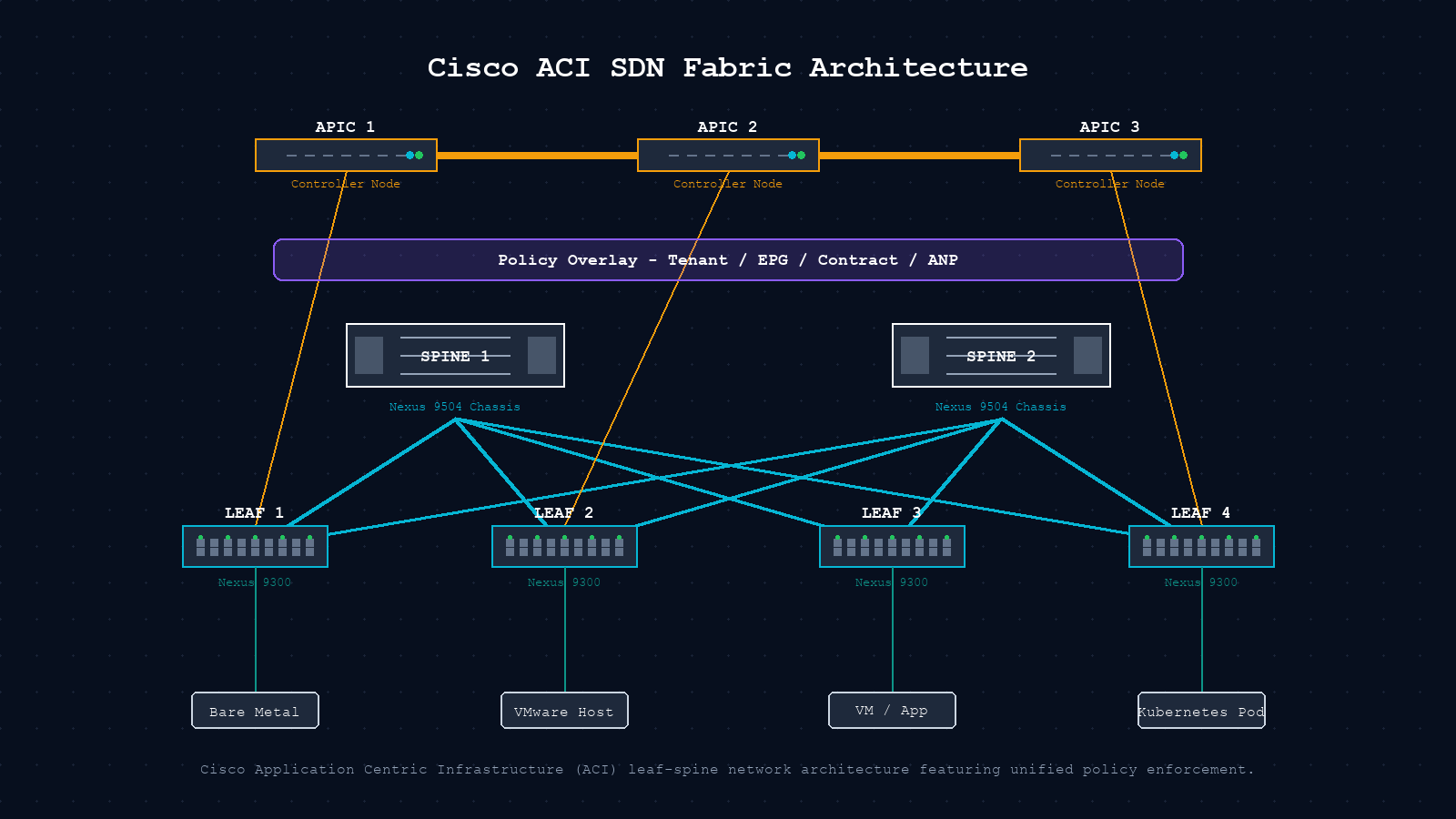
Cisco ACI does not behave like a traditional network. That is the point. This guide covers what ACI and SDN actually are, who should deploy them, where they fit, what they cost, and most usefully, how to troubleshoot the problems you will inevitably encounter. If you are evaluating ACI, inheriting an existing fabric, or just trying to understand why your data center team keeps talking about EPGs and Contracts, this is for you.
The short version. Software-Defined Networking separates the brain of the network (the control plane) from the muscle (the data plane). Cisco ACI is Cisco’s enterprise SDN platform for the data center, built on a three-node APIC controller cluster, Nexus 9000 spine and leaf switches running ACI firmware, and a policy model of EPGs, Contracts, VRFs, and Tenants that replaces traditional VLAN-based segmentation. It is powerful, expensive, and unforgiving of operational shortcuts. The fabric itself is reliable. Most production pain traces back to skipping one of four operational disciplines.
What is Software-Defined Networking?
SDN decouples the control plane (the logic that decides where traffic goes) from the data plane (the hardware that forwards packets). In a traditional network, every switch runs its own local control plane and talks to neighbours via OSPF or BGP. In SDN, a centralized controller holds the network-wide view and pushes policy down to the forwarding devices.
The practical benefit is programmability. Instead of logging into twenty switches to change a VLAN, you change a policy object in a controller and it propagates everywhere. The tradeoff is a new category of failure: the controller itself. SDN architectures typically expose a northbound API (controller to orchestration systems like Ansible or Terraform) and a southbound API (controller to forwarding devices via NETCONF, REST, or OpenFlow).
What is Cisco ACI?
Cisco Application Centric Infrastructure (ACI) is Cisco’s enterprise SDN platform for data center fabrics. It is built around three components and a policy model that replaces traditional VLAN-based segmentation.
| Component | Role | Hardware / Detail |
|---|---|---|
| APIC Cluster | Centralized policy controller. Single source of truth. | 3-node cluster (M3 or L3 appliances). REST and NETCONF API. |
| Nexus 9000 Spine | High-speed inter-leaf transport. Runs IS-IS underlay. | Nexus 9504 / 9508 with ACI-mode firmware (not standard NX-OS). |
| Nexus 9000 Leaf | Workload-facing VTEP. Enforces zoning rules locally. | Nexus 9348 / 93180. VXLAN encapsulation at leaf boundary. |
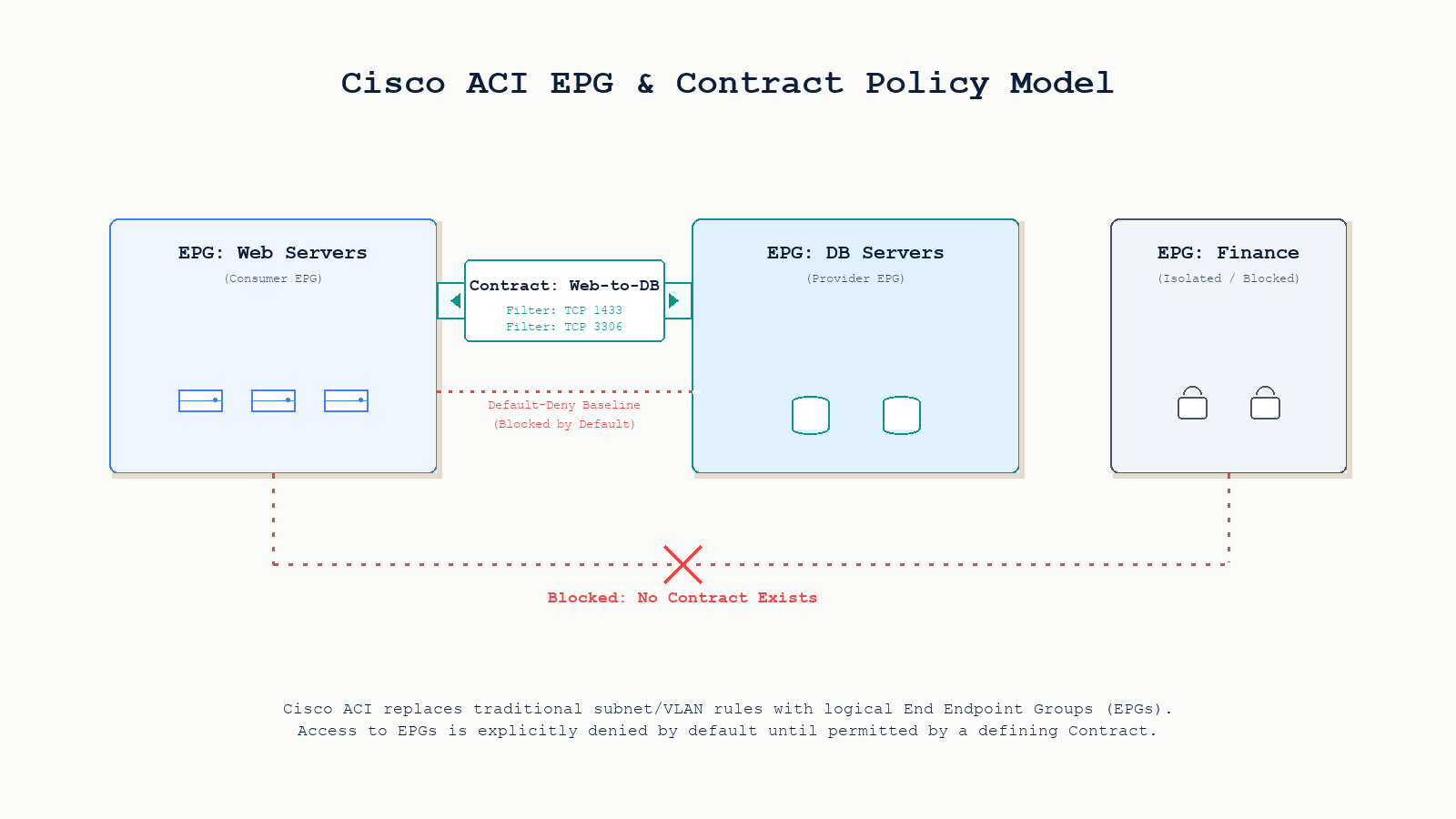
| Policy model | EPGs, Contracts, VRFs, Tenants replace VLAN configs. | Default-deny between EPGs. Contracts permit specific traffic. |
ACI uses VXLAN as the underlay encapsulation between leaves, IS-IS as the underlay routing protocol (a meaningful departure from most EVPN-VXLAN fabrics which use BGP), and EVPN as the overlay control plane for distributing endpoint information.
Key insight. ACI firmware is entirely different from standard NX-OS. A Nexus 9000 in ACI mode cannot run standard NX-OS commands and vice versa. Switching between modes requires a reload and full reconfiguration.
Who can use Cisco ACI?
ACI is an enterprise and service provider platform. It is not designed for small offices or branch networks. The organizations that get real value from it share certain traits.
Large enterprises. Financial services, healthcare systems, large manufacturing firms. The policy model enforces micro-segmentation at scale without per-device ACL management.
Colo and managed service providers. The multi-tenancy model gives each customer an isolated Tenant object with separate VRFs and policies, all on shared hardware.
Cloud-adjacent data centers. Cloud APIC extends policy into AWS or Azure, enforcing consistent contracts across on-premises and cloud endpoints.
Automation-mature teams. APIC REST API, Ansible modules, and the Terraform provider allow full infrastructure-as-code workflows. CLI-only teams will find the abstraction frustrating.
Not a good fit: organizations with fewer than 3 to 5 network engineers, networks that do not require micro-segmentation, or environments that cannot absorb the hardware and licensing investment.
Where is ACI deployed?
ACI’s most mature production deployments fall into four categories. Primary DC fabric: ACI’s original use case, a spine-leaf fabric connecting bare-metal servers, VMware vSphere clusters, Kubernetes nodes, and storage, all segmented by policy. Multi-site and multi-pod: Cisco Nexus Dashboard Orchestrator extends a single policy domain across multiple ACI fabrics in different physical locations, providing stretched EPGs and consistent contracts. Private cloud platforms: native integration with VMware vCenter (vDS integration), Red Hat OpenShift, and Kubernetes (ACI CNI plugin) allows compute and network policy to be co-managed. Regulated workloads: healthcare and financial services use the contract model to create verifiable, auditable segmentation between regulated and non-regulated workloads, which is very difficult to enforce reliably with traditional VLANs.
Cost
Cisco ACI pricing is complex and partner-negotiated. Treat these figures as directional, not quotes. Cisco partners discount significantly from list price.
| Component | List Price Range | Notes |
|---|---|---|
| Nexus 9504 spine (x2) | $40,000 to $120,000 each | Varies by line card selection |
| Nexus 9348 leaf (4 to 16) | $15,000 to $50,000 each | 48x25G plus 12x100G typical |
| APIC cluster (3 nodes) | $30,000 to $60,000 | M3 or L3 form factors |
| ACI software licensing | $5,000 to $20,000 per leaf per year | Essentials vs Advantage tier |
| SmartNet support | ~15 to 20 percent of hardware per year | Required for TAC access |
| 3-year total (mid-size) | $500,000 to $1.5M | 8 to 16 leaves, 2 to 4 spines |
VMware NSX-T and Juniper Contrail are comparable in total price. Open-source SDN alternatives carry lower software costs but substantially higher engineering and integration costs.
Common problems in production ACI fabrics
Six root causes account for the majority of production incidents. Understanding them before the incident saves hours of misdiagnosis.
Policy black hole (default-deny). ACI silently drops traffic between EPGs with no Contract. It looks identical to a hardware failure. Always check Contracts before interfaces.
APIC cluster degraded. A failed APIC node prevents policy changes but forwarding continues. Teams often discover a degraded cluster only mid-incident, by which point routine changes have been queued for days.
VMM domain drift. VMware admins removing ACI-managed port groups causes silent divergence between vCenter and APIC. VMs lose EPG membership with no fault raised.
Endpoint learning loop. Misconfigured NIC teaming causes a MAC to flicker between leaves, generating COOP churn on spines and forwarding instability for that endpoint.
Fabric upgrade failure. A mid-upgrade interruption leaves a leaf in a partially upgraded state, requiring manual recovery, sometimes a full factory reset.
Route-target typo. A typo in a route-target import policy causes one leaf to silently fail to import a tenant’s routes. The BGP summary looks fine. Traffic black-holes for that tenant only.
Troubleshooting guide
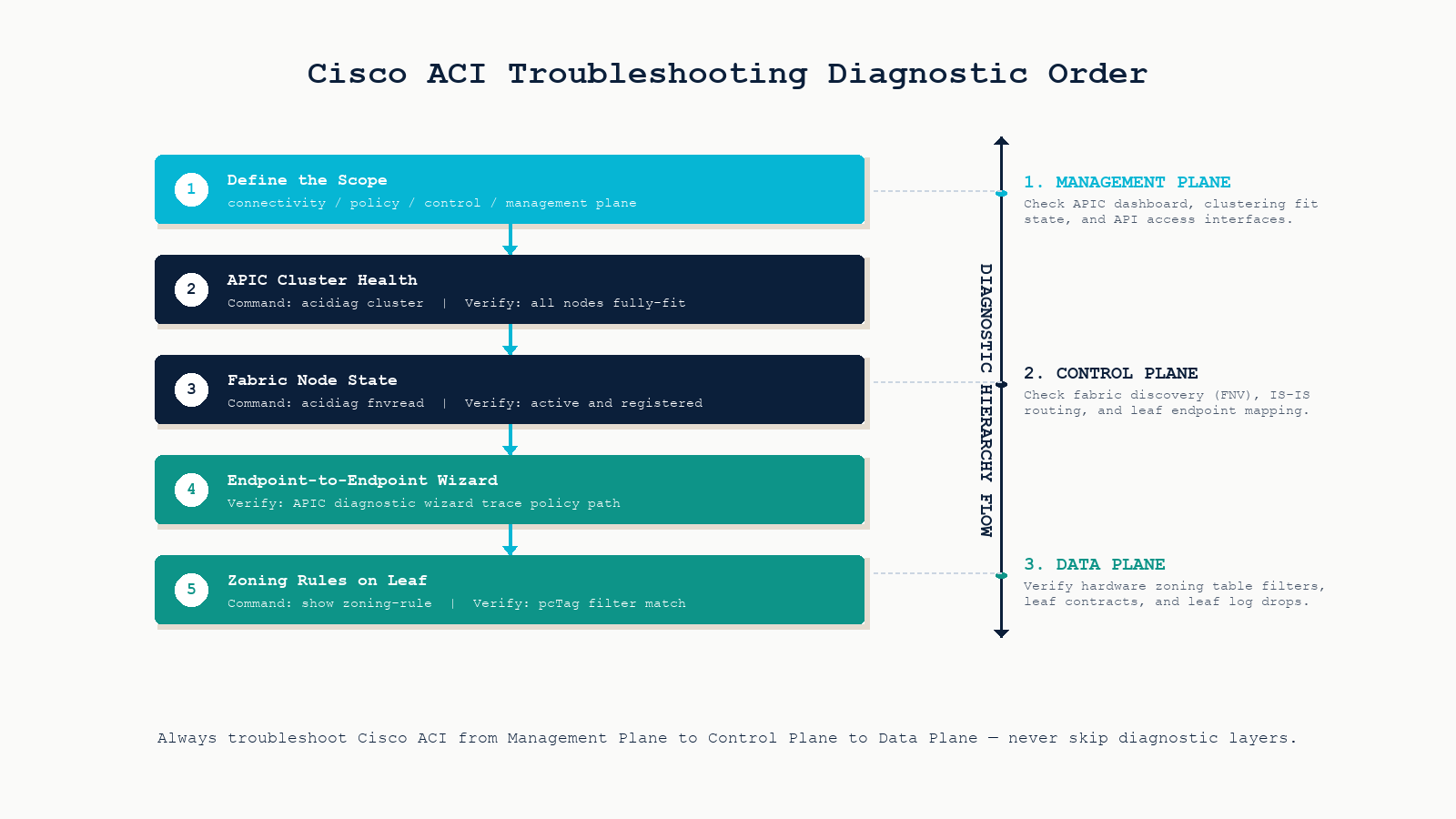
Walk these steps in order every time. Skipping to overlay or policy troubleshooting before confirming APIC cluster health is the most common time-waster in ACI operations.
The short version: management plane first, then control plane, then data plane. Never skip layers.
Step 1. Define the scope. Determine whether the problem is connectivity, policy, control plane, or management plane before touching any CLI. The scope determines which tool you reach for first.
Step 2. APIC cluster health. Run acidiag cluster. All nodes must show fully-fit. A degraded cluster blocks all policy changes until resolved.
Step 3. Fabric node state. Run acidiag fnvread. Every spine and leaf should show registered and active. Anything showing discovering or inactive requires investigation before proceeding.
Step 4. APIC troubleshooting wizard. Use Operations to Troubleshoot to Endpoint to Endpoint. Enter source and destination IPs. It traces the policy path, identifies which leaves the endpoints are on, and shows whether a contract is permitting or denying the flow.
Step 5. EPG and Contract verification. Navigate to Tenants, the relevant Tenant, Application Profiles, the relevant App Profile, then EPGs. Verify the Contract is applied as Provider on one EPG and Consumer on the other, not Provider on both.
Step 6. Endpoint learning. On the APIC: Fabric, Inventory, the relevant Leaf, Endpoints. Confirm the endpoint is learned on the expected leaf and port. If bouncing between leaves, check NIC teaming configuration.
Step 7. Zoning rules on the leaf. Run show zoning-rule on the leaf. Find the rule for your source and destination EPG (pcTag values). If the action is deny, a contract is blocking the flow. If no rule matches, the contract is missing.
Step 8. IS-IS underlay and COOP. Run show isis adjacency to confirm underlay adjacencies to both spines. Run show coop internal info repo ep key <mac> to verify spine knowledge of a specific endpoint.
Key CLI reference
# APIC cluster and fabric state
acidiag cluster
acidiag fnvread
acidiag avread

# Leaf endpoint and policy
show endpoint detail
show endpoint ip <ip-address>
show zoning-rule
show isis adjacency
show coop internal info repo ep key <mac-address>
Four traits of stable ACI fabrics
APIC cluster as tier-1 infrastructure. Monitor APIC health with the same rigor as compute infrastructure. A degraded cluster is a ticking clock. The next incident will be unresolvable until it is fixed.
Version-controlled configuration. Use the APIC snapshot feature or a GitOps pipeline via Ansible and Terraform. Any configuration change must be reversible within minutes.
Scheduled upgrade cadence. Deferred upgrades accumulate technical debt. A fabric three major releases behind will hit bugs that are already fixed on current software.
Living EPG and contract topology diagram. ACI’s policy model is only as legible as the documentation around it. A diagram the whole team can read reduces mean time to diagnosis by eliminating re-discovery at 2am.
FAQ
Can ACI run alongside traditional NX-OS switches in the same fabric?
No. Nexus 9000 switches run either standard NX-OS or ACI mode. The firmware images are distinct. You can connect a traditional network to an ACI fabric via L3Out or L2Out constructs, but they cannot share the same fabric domain.
What happens if all three APICs fail simultaneously?
Forwarding continues. Leaves operate based on their last programmed state. You cannot make policy changes, and new endpoints may not be learned correctly, but existing traffic flows are not immediately impacted. This is the control-plane / data-plane separation in practice.
Is ACI worth the cost for a medium-size organization?
Only if you specifically need policy-driven micro-segmentation at scale, multi-tenancy, and programmatic automation. If your primary need is a reliable high-throughput fabric without complex segmentation, a well-designed EVPN-VXLAN fabric on Nexus 9000 in standard NX-OS mode will serve you better at lower cost and complexity.
How does ACI compare to VMware NSX-T?
ACI is primarily a physical fabric solution with virtual integration added on top. NSX-T is primarily a virtual overlay that runs on top of any physical fabric. Organizations with large bare-metal workloads tend to prefer ACI. Organizations running primarily virtualized workloads often prefer NSX-T. Many large enterprises run both.
Should I check the underlay or the policy model first when troubleshooting?
APIC cluster health first, then fabric node state, then policy. A degraded APIC prevents troubleshooting everything else. Only when both are confirmed healthy does it make sense to dig into EPGs and Contracts.
Related posts
Designing, troubleshooting, or evaluating an ACI fabric
Most ACI instability encountered in production traces back to skipping one of four foundations: APIC monitoring, configuration version control, regular upgrade cadence, or living topology documentation. The fabric itself is reliable. The gaps are operational. Our data center practice has designed and operated ACI and EVPN-VXLAN fabrics across Western Canada for service providers and large enterprises. If you are evaluating ACI for your environment or trying to stabilize an existing fabric, we will help you make the right call.
Last verified May 2026 by the aaanetworkx data center practice.
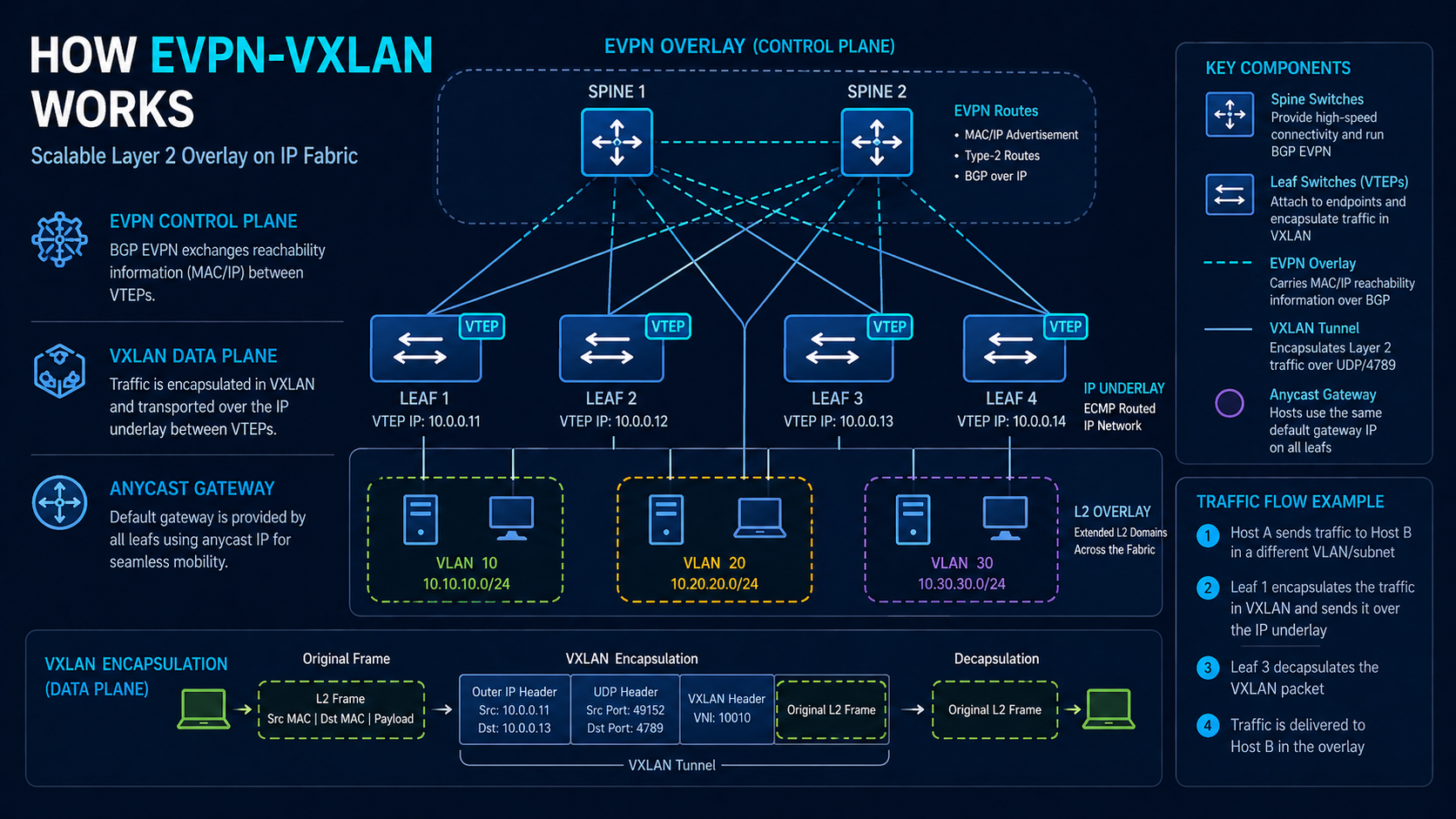
EVPN-VXLAN is the dominant fabric architecture for new data center builds, but the way most resources explain it is either too marketing-fluffy or too RFC-dense for a working engineer to actually grok. This post walks through how EVPN-VXLAN actually works in production, with the packet walk, the route types that matter, and the failure modes the slides skip. By the end, you should be able to explain to a peer how a packet from one host actually finds another host on the other side of the fabric.
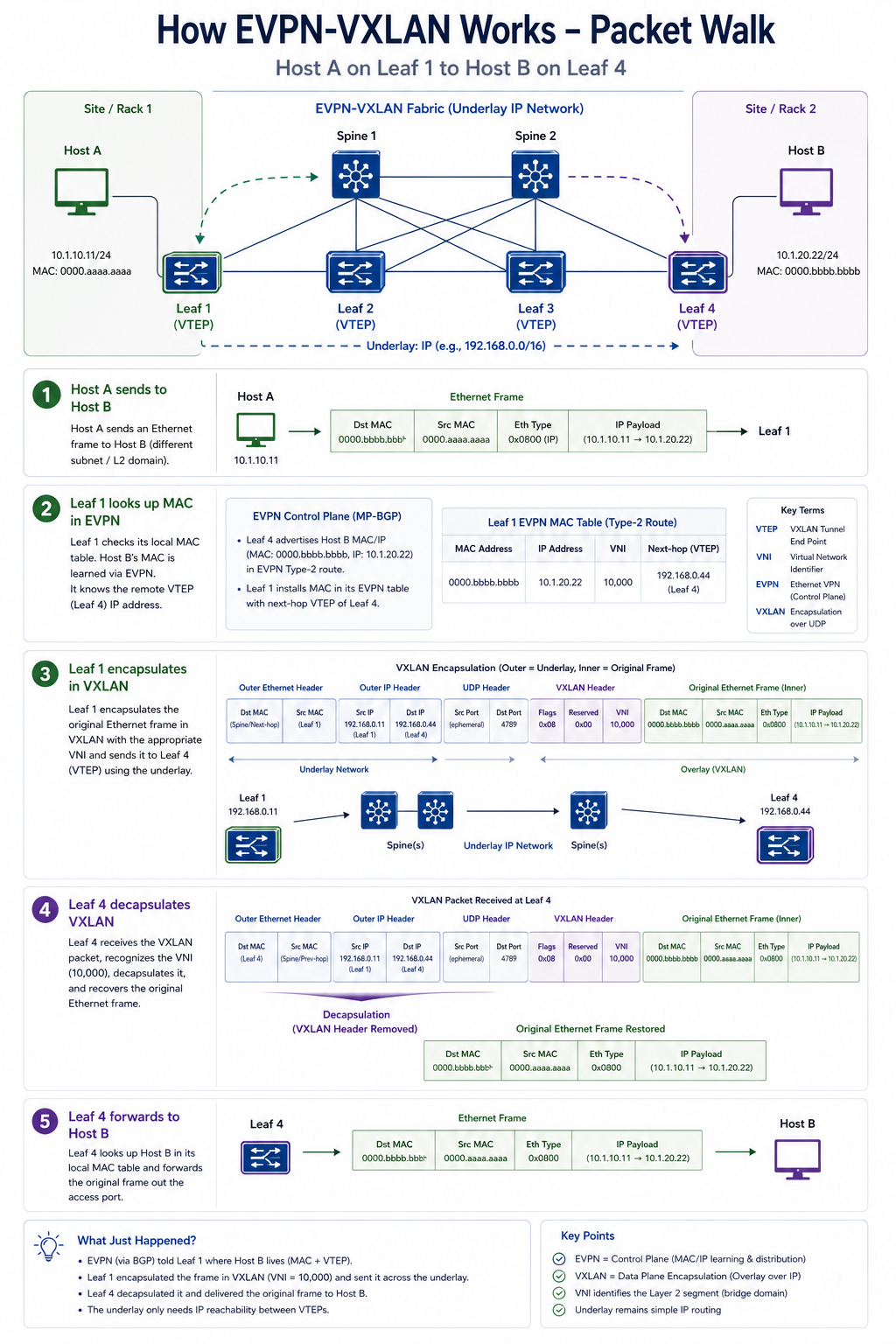
The short version. EVPN-VXLAN separates the network into two layers. The underlay is a routed IP fabric, typically with eBGP between every leaf and spine, where every VTEP (the leaf) has IP reachability to every other VTEP. The overlay is BGP EVPN, which carries MAC and IP information about hosts attached to each VTEP. When a packet from host A on leaf 1 needs to reach host B on leaf 4, leaf 1 looks up host B’s MAC, finds it associated with leaf 4’s VTEP IP, encapsulates the original Ethernet frame in a VXLAN header pointing to leaf 4, and sends it across the underlay. Leaf 4 decapsulates and delivers to host B. That is the entire core mechanic, and it is simpler to understand than the slides suggest.
The two layers, briefly
The underlay is a pure IP routed network. Spines are P routers, leaves are PE routers. eBGP runs between every leaf and every spine. The only job of the underlay is to give every VTEP a reachable IP address (typically the leaf’s loopback). The underlay does not know about VLANs, MAC addresses, or tenants. It just routes IP packets.
The overlay is BGP EVPN, which runs as a separate AFI on the same BGP sessions or on dedicated overlay sessions. EVPN carries information about the hosts attached to each VTEP, including their MAC addresses, their IP addresses, the VLAN they belong to (mapped to a VNI in VXLAN), and the EVPN instance and route distinguisher. When a leaf learns about a new MAC locally, it advertises a Type 2 EVPN route to its peers. When a leaf learns about a remote host through EVPN, it programs the local hardware to encapsulate traffic to that host into VXLAN destined for the remote VTEP.
The packet walk
Let us trace a packet from Host A (MAC AA:AA, IP 10.1.1.1, on Leaf 1) to Host B (MAC BB:BB, IP 10.1.1.2, on Leaf 4). Both hosts are in VLAN 100, mapped to VNI 10100.
Step 1. Host A sends an Ethernet frame with source MAC AA:AA, destination MAC BB:BB.
Step 2. Leaf 1 receives the frame on a port in VLAN 100. Leaf 1 looks up MAC BB:BB in its forwarding table. The lookup returns “VTEP at IP 10.0.0.4 (Leaf 4’s loopback), VNI 10100”. This information was learned earlier from a Type 2 EVPN route that Leaf 4 advertised when it saw Host B.
Step 3. Leaf 1 wraps the original Ethernet frame in a VXLAN header. The VXLAN header includes VNI 10100. Leaf 1 then wraps the VXLAN header in an outer IP header with source 10.0.0.1 (Leaf 1’s loopback) and destination 10.0.0.4 (Leaf 4’s loopback), and an outer UDP header with destination port 4789 (the standard VXLAN port). Finally, Leaf 1 wraps everything in an outer Ethernet header for transmission to whichever spine is the next hop.
Step 4. The packet traverses the underlay. Spines route it based on the outer IP header (destination 10.0.0.4) using ECMP. The packet might go through Spine 1 or Spine 2 depending on hash. The spines do not know about Host A, Host B, VLAN 100, or VNI 10100. They just route IP.
Step 5. Leaf 4 receives the packet, sees its own loopback as the destination, decapsulates the outer Ethernet, IP, UDP, and VXLAN headers. The original Ethernet frame is exposed. Leaf 4 reads the VNI (10100), maps it to its local VLAN 100, and forwards the original frame out the port where Host B lives.
Step 6. Host B receives the original frame as if it were on the same Layer 2 segment as Host A, even though they are physically on different leaves connected only by an IP fabric.
That is the entire mechanic. Everything else in EVPN is bookkeeping to make this work at scale, support multi-tenancy, handle failures, and add Layer 3 routing.
The five EVPN route types
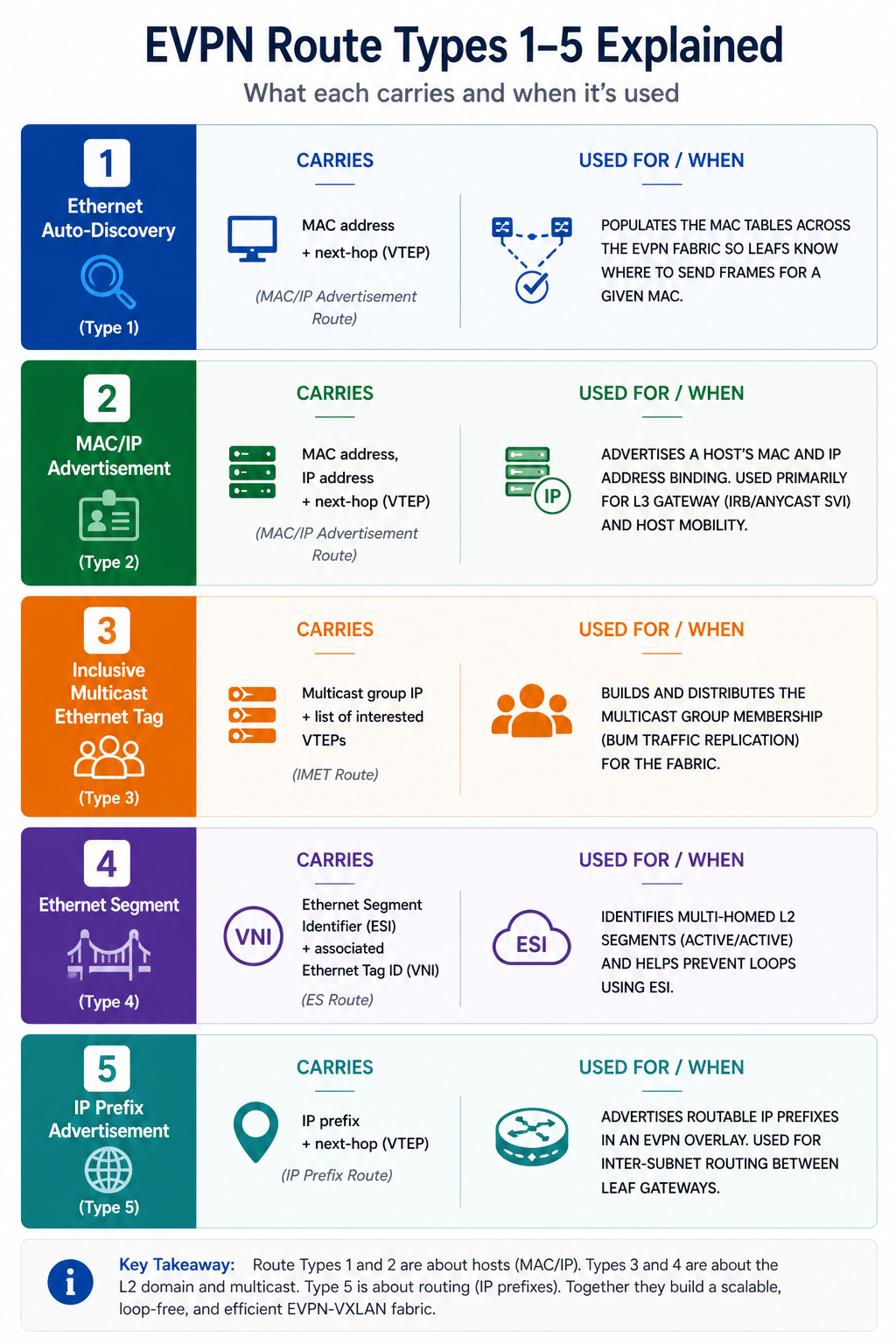
EVPN defines several route types that carry different information across the fabric. The five most relevant in production:
Type 1, Ethernet Auto-Discovery. Used for multi-homed devices. Helps with mass withdraw when an ESI link goes down. Less relevant in single-homed designs.
Type 2, MAC-IP Advertisement. The workhorse. Carries a MAC address, optionally an IP address, the VNI, and the originating VTEP. Every host attached to the fabric generates one of these. This is what populates the forwarding tables on remote leaves.
Type 3, Inclusive Multicast Ethernet Tag. Used to build the BUM (broadcast, unknown unicast, multicast) replication list. When a host sends an ARP that needs to be flooded, Type 3 routes tell each leaf which other leaves are interested.
Type 4, Ethernet Segment Route. Used for designated forwarder election in multi-homing scenarios.
Type 5, IP Prefix Route. Used for inter-subnet routing within the fabric. When a leaf has hosts in different subnets and needs to advertise the prefix to other leaves, Type 5 carries that.
VTEP, ESI, and other terms
A few terms that come up constantly. VTEP (VXLAN Tunnel Endpoint) is the function that encapsulates and decapsulates VXLAN. In a typical fabric, every leaf is a VTEP. VNI (VXLAN Network Identifier) is a 24-bit value that identifies which virtual network a packet belongs to. Maps to a VLAN on the leaf. ESI (Ethernet Segment Identifier) is used when a single host or device is multi-homed across multiple leaves, identifying that segment uniquely. RD (Route Distinguisher) makes EVPN routes unique per VRF/EVI. RT (Route Target) controls which EVPN routes are imported into which EVPN instance.
What the marketing skips
EVPN-VXLAN works beautifully when configured correctly. It also has failure modes that vendor decks omit.
MAC mobility events cascade. When a host moves from one leaf to another, EVPN tracks this with a mobility sequence number. A misbehaving host that constantly moves (think a flapping LACP bond) generates EVPN updates that ripple through the entire fabric. Performance degrades and engineers spend hours hunting for “fabric instability” that is actually one bad host.
Multi-vendor interop has real edge cases. Cisco, Arista, Juniper, and Nokia all implement EVPN per the RFC, but each has slight differences in how they handle ESI labels, MAC mobility timers, and route-target derivation. Multi-vendor fabrics work, but the edge cases require documentation.
BUM traffic still uses replication. Despite the routed underlay, broadcast and multicast traffic in EVPN is replicated, either via ingress replication (each leaf replicates per destination) or via underlay multicast. Both have scaling limits at fabric size.
Convergence depends on BFD tuning. Sub-second convergence requires BFD with appropriate timers. Tuning too aggressively burns CPU. Tuning too loosely loses the convergence advantage. Find the platform sweet spot.
When to use EVPN-VXLAN
EVPN is the right answer when you need multi-tenancy at scale, scale-out east-west traffic, multi-site Layer 2 mobility, or operational consistency across many leaves. It is the wrong answer for a small single-site network with limited tenancy and a team that does not want to learn BGP. Pick deliberately based on environment, not because vendors are pushing it.
FAQ
Is EVPN-VXLAN the same as Cisco ACI?
No. ACI uses VXLAN encapsulation but a different control plane (APIC and OpFlex). EVPN-VXLAN is the open standard, ACI is Cisco’s proprietary equivalent. Both can coexist with care.
Can I run EVPN-VXLAN over the WAN?
Yes, with appropriate underlay. EVPN was originally designed for service provider WAN, and it works well between data center sites with sufficient underlay capacity.
How is EVPN different from MPLS L2VPN?
EVPN uses BGP for the control plane and supports multi-homing, mass withdraw, and MAC learning in the control plane (not data plane). Traditional MPLS L2VPN learned MACs in the data plane via flooding. EVPN is a generational improvement.
Related posts
Designing or operating an EVPN fabric
EVPN-VXLAN rewards good design and punishes shortcuts. Our data center practice has designed and operated EVPN fabrics across Western Canada for service providers and large enterprises. If you are evaluating EVPN for your environment, we will help you make the right call.
Last verified April 2026 by the aaanetworkx data center practice.
EVPN VXLAN vs traditional L2 is the most common data center architecture decision in 2026, and the answer is not always EVPN.
Every data center network refresh in the last five years has come with the same conversation. Should we go to EVPN-VXLAN or stay with traditional Layer 2? Vendor marketing says EVPN. Conservative ops teams say “if it ain’t broke, don’t fix it.” Both are partially right. This post compares the two honestly, based on what we have seen work and not work for real environments, and gives you a decision framework that fits your situation, not which one is best universally.
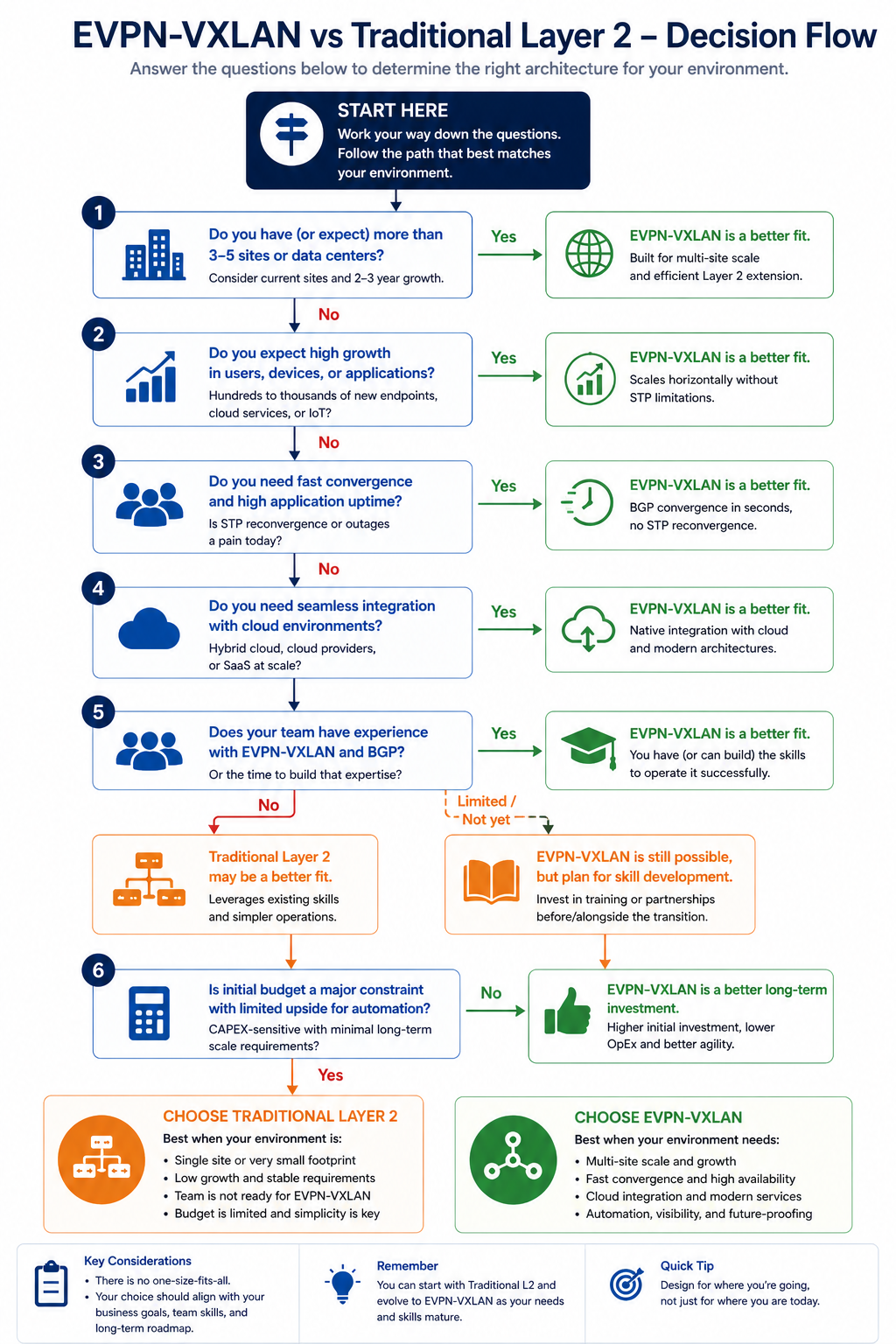
The short version. EVPN-VXLAN wins decisively in environments with multi-tenant requirements, large scale (hundreds of VLANs or VRFs), heavy east-west traffic, or geographic distribution. Traditional Layer 2 wins in smaller environments where simplicity and team familiarity outweigh future flexibility, especially with under 50 VLANs and a single physical site. The middle is the hard part, and that is where most of these decisions actually live.
Quick definitions, just in case
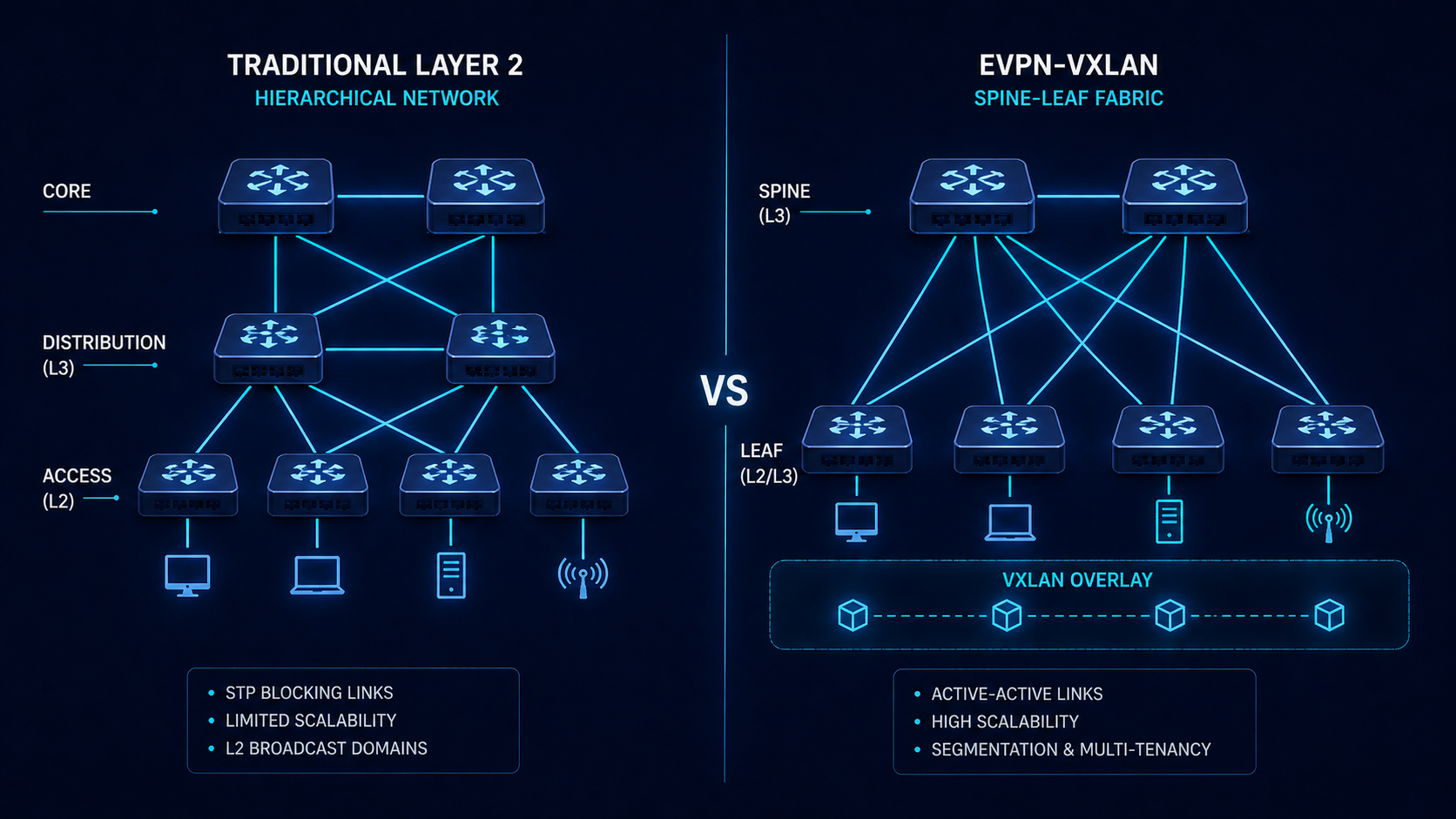
Traditional Layer 2 means hierarchical Ethernet, with VLANs spanning a core, distribution, and access layer. STP or MLAG handles loop prevention. VLAN extension between sites uses some form of L2VPN or DCI tunnel.
EVPN-VXLAN is a fabric design where a routed underlay (typically eBGP per leaf-spine session) carries IP between every VTEP, and an EVPN overlay carries MAC-IP and IP prefix information that builds virtual networks on top. VXLAN encapsulation tunnels Layer 2 over Layer 3, so any leaf can reach any other leaf for any tenant without spanning tree.
Where EVPN-VXLAN wins
Multi-tenancy at scale. EVPN handles thousands of L2 and L3 virtual networks with route distinguisher and route target controls. Traditional Layer 2 with VLANs caps at 4094, and managing more than a few hundred VLANs cleanly is operationally painful.
Stretched data centers. EVPN gives you Layer 2 mobility across sites without requiring traditional DCI gymnastics. Move a workload between sites and the MAC follows.
Scale-out east-west traffic. Spine-leaf with ECMP routing eliminates the bottleneck of traditional 3-tier where most traffic has to traverse core links. Modern application architectures (microservices, large analytics) thrive on this.
Predictable convergence. With routed underlay and BGP, failures converge in seconds without spanning tree drama.
Operational consistency at scale. Once you understand the fabric, every leaf is identical. New leaves are added with a few lines of configuration and EVPN auto-discovers them.
Where traditional Layer 2 still wins
Small environments. A 50-host data center with 20 VLANs and a single site does not benefit from EVPN. The complexity overhead exceeds the operational gain. Two well-configured stacked switches with MLAG is simpler, cheaper, and reliable.
Team familiarity. EVPN requires comfort with BGP, route targets, MAC mobility, and overlay troubleshooting. Teams that operate confidently with VLANs and STP can stumble badly during the EVPN learning curve. The wrong technology run by the wrong team is worse than the right technology run by the wrong team.
Legacy application requirements. Some legacy applications expect specific multicast or broadcast behaviors that work flawlessly on classic L2 and require careful EVPN configuration to support. The application team is rarely happy to update for an infrastructure refresh.
Budget constraints. Spine-leaf with 100G or 400G uplinks is more capital intensive upfront than refreshing a 3-tier network with current generation switches. The TCO often favors EVPN over five years, but year one cost can exceed a traditional refresh.
The honest tradeoff matrix
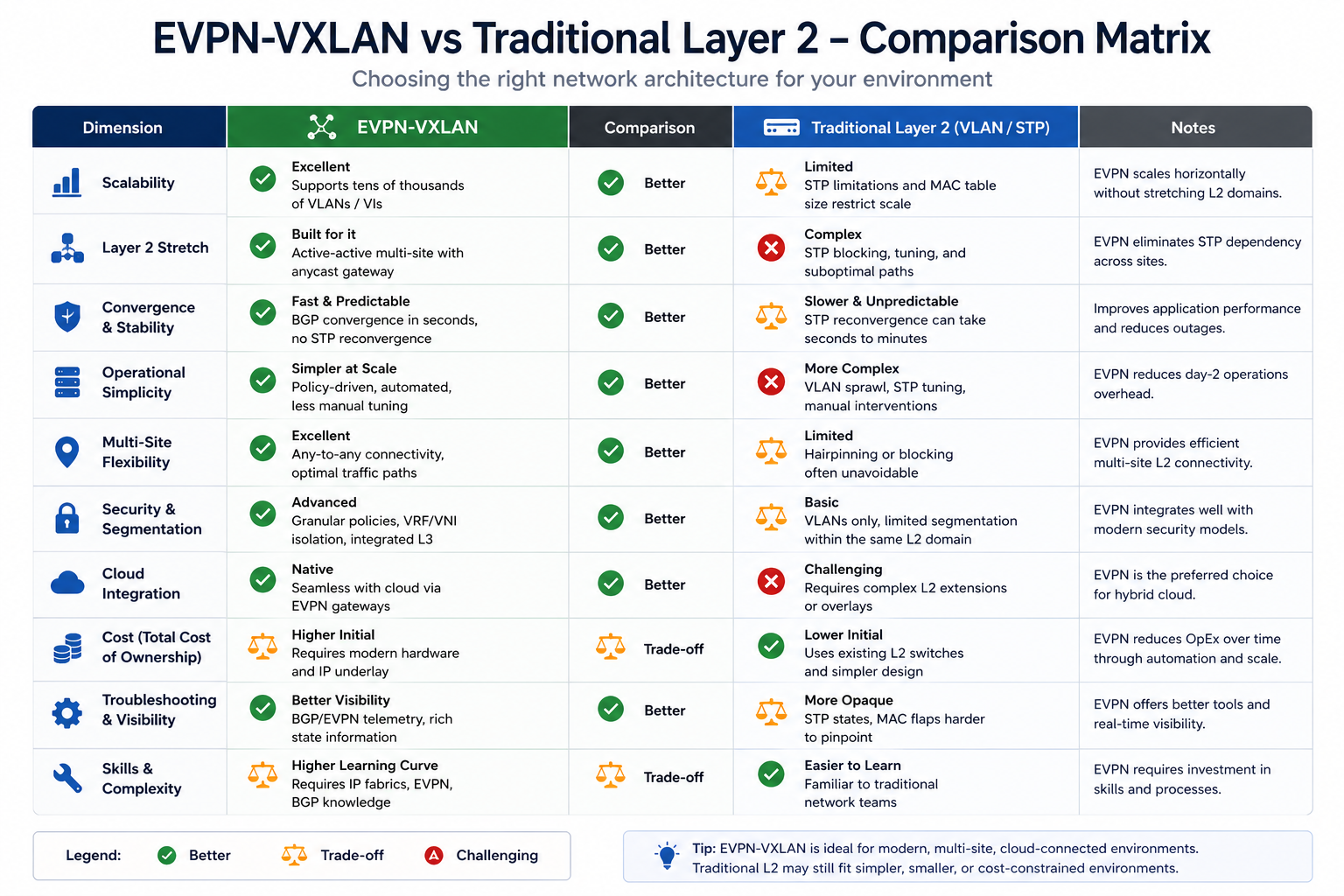
Some things EVPN-VXLAN does better, some things traditional L2 still does better, and some things are about even depending on configuration. Here is the honest take based on production experience.
Scale: EVPN wins decisively above ~100 VLANs or multi-site requirements.
Operational complexity: Traditional L2 wins for small networks, EVPN wins for large.
Convergence time: EVPN wins, sub-second failover with proper BFD tuning.
Vendor lock-in: EVPN is more standardized, but multi-vendor still has interop quirks.
Day-2 troubleshooting: EVPN is harder for engineers new to it. Plan for training.
Cost (CapEx): Traditional L2 wins for small environments. EVPN wins TCO above ~100 hosts.
Future flexibility: EVPN wins by a wide margin.
Maturity: Both are mature in 2026. EVPN is no longer bleeding edge.
How to actually choose
Three questions narrow most decisions to one option.
Question one: how many tenants or VLANs do you need to support in five years? If under 50 and not growing, traditional Layer 2 is fine. If above 100 or growing fast, lean EVPN.
Question two: are you single-site or multi-site? Single-site under 100 hosts, traditional is reasonable. Multi-site with workload mobility, EVPN is the right answer.
Question three: does your team have BGP comfort? No, and no plan to gain it, traditional L2. Yes, or willing to invest in training, EVPN. Do not deploy EVPN with a team that will not be comfortable operating it. The first incident at 3am will be brutal.
What we see go wrong in EVPN deployments
Three patterns repeat. First, teams adopt EVPN because vendors recommended it but never invest in BGP and overlay training. Operations becomes painful, the team blames EVPN, and the network ends up worse than the L2 design they replaced. Second, teams over-engineer with multi-vendor fabrics on day one to avoid lock-in, then discover that interop quirks consume their first six months. Third, teams adopt EVPN at scale where traditional L2 would have been sufficient, paying for complexity they do not need.
FAQ
Can I run both in parallel during transition?
Yes. Most large transitions run both for 12 to 24 months while migrating workloads. Plan the integration carefully and isolate failure domains.
Is EVPN-VXLAN good for small businesses?
Almost never. The complexity is not justified. Use traditional Layer 2 with stacked switches.
Will my application teams notice?
If done right, no. EVPN should be transparent to applications. If applications notice, something was deployed incorrectly.
Related posts
Need a design opinion
Picking between EVPN-VXLAN and traditional Layer 2 is a five to ten year decision. Our data center practice has designed both, and we are comfortable telling you the boring answer when boring is right. Tell us about your environment and we will give you an honest recommendation.
Last verified April 2026 by the aaanetworkx data center practice.

How EVPN-VXLAN Powers Scalable, Multi-Tenant Data Center Networks
Modern data centers face relentless pressure, more workloads, more tenants, more east-west traffic, and the constant need to scale without complexity. If you are still running a traditional three-tier network or relying on VLANs and Spanning Tree, you have likely already hit those limits.
EVPN-VXLAN is the industry-standard answer. In this guide, we break down exactly how it works, why the leaf-spine topology is its natural partner, and how to choose between symmetric and asymmetric IRB for your environment.
Need help designing your data center fabric? Talk to our engineers →
Why Traditional Data Center Architectures Struggle at Scale
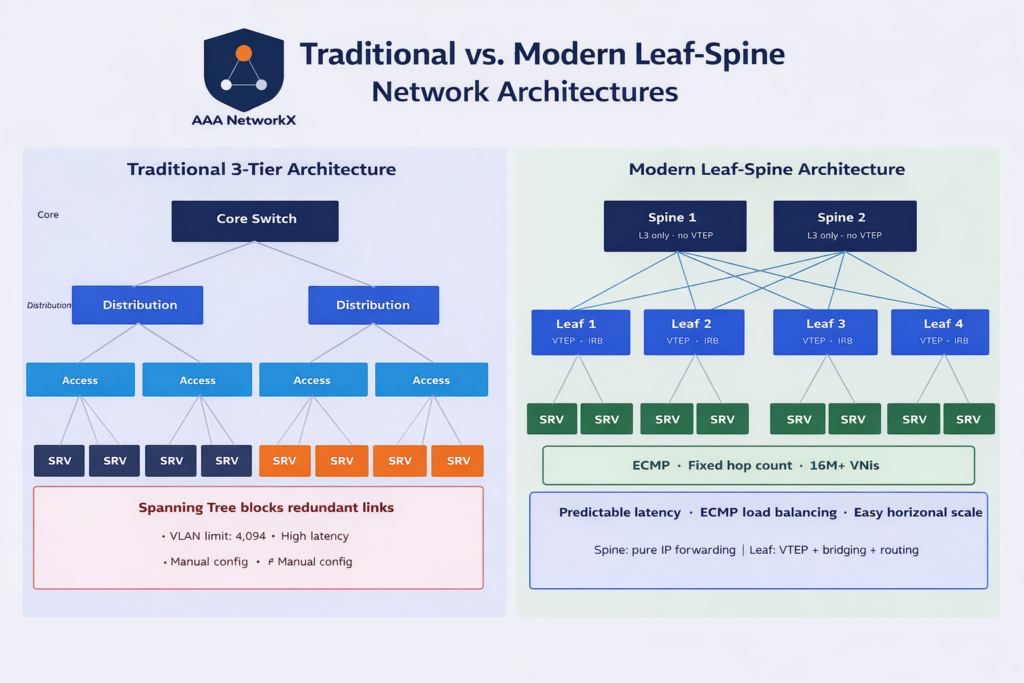
Traditional three-tier data center architectures (core–distribution–access) were engineered for a world dominated by north-south traffic, client-to-server flows. Today, that model is reversed. Modern cloud workloads generate massive east-west traffic between servers, containers, and microservices.
The result is a mismatch that shows up as real operational pain:
- VLAN exhaustion, the 802.1Q standard caps VLANs at 4,094. A large multi-tenant environment exhausts this in a single data center.
- Spanning Tree Protocol (STP) inefficiency, STP blocks redundant links, wastes bandwidth, and causes slow convergence during failures.
- Complex configuration, each change touches multiple devices, increasing human error and change windows.
- Poor fault isolation, a broadcast storm or loop in one VLAN can affect all tenants.
- Rigid workload mobility, in traditional setups, moving a Virtual Machine (VM) between hosts often requires complex VLAN extending, which is prone to configuration drift and network loops.
These are not edge cases. They are architectural constraints that limit how far traditional designs can scale.
What Is EVPN-VXLAN? (Control Plane + Data Plane Explained)
EVPN-VXLAN solves the scalability problem by cleanly separating two concerns:
VXLAN handles the data plane. It encapsulates Layer 2 Ethernet frames inside UDP/IP packets, creating a logical overlay that stretches across any Layer 3 underlay. The key enabler is the 24-bit VXLAN Network Identifier (VNI), which supports over 16 million unique network segments, compared to the 4,094-segment VLAN ceiling.
EVPN handles the control plane. Instead of learning MAC addresses by flooding frames and observing replies (the traditional “flood-and-learn” method), EVPN uses Multi-Protocol BGP (MP-BGP) to distribute MAC and IP reachability information in a controlled, scalable way. This eliminates unnecessary broadcast traffic, speeds up convergence, and gives operators visibility into the network at all times.
Together, they give you a fabric that scales to hundreds of thousands of endpoints without the operational chaos of traditional designs.
Leaf-Spine Architecture: The Ideal Underlay for EVPN-VXLAN
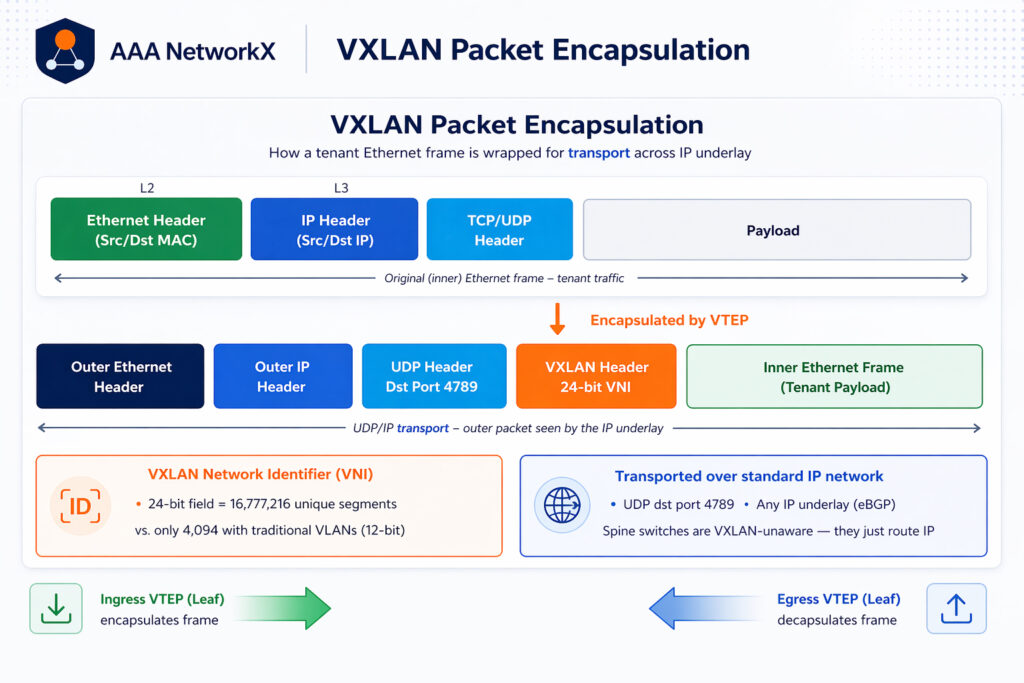
EVPN-VXLAN is almost always deployed on a leaf-spine topology, and for good reason. Leaf-spine provides:
- Predictable latency, any server-to-server path is always leaf → spine → leaf, giving you a fixed, consistent hop count.
- ECMP load balancing, multiple equal-cost paths are available simultaneously, distributing traffic and eliminating bottlenecks.
- Easy horizontal scaling, adding capacity means adding leaf switches, not redesigning the core.
Spine switches in this design focus purely on Layer 3 IP forwarding. They are not VXLAN-aware, they simply route IP packets between leaf nodes as fast as possible.
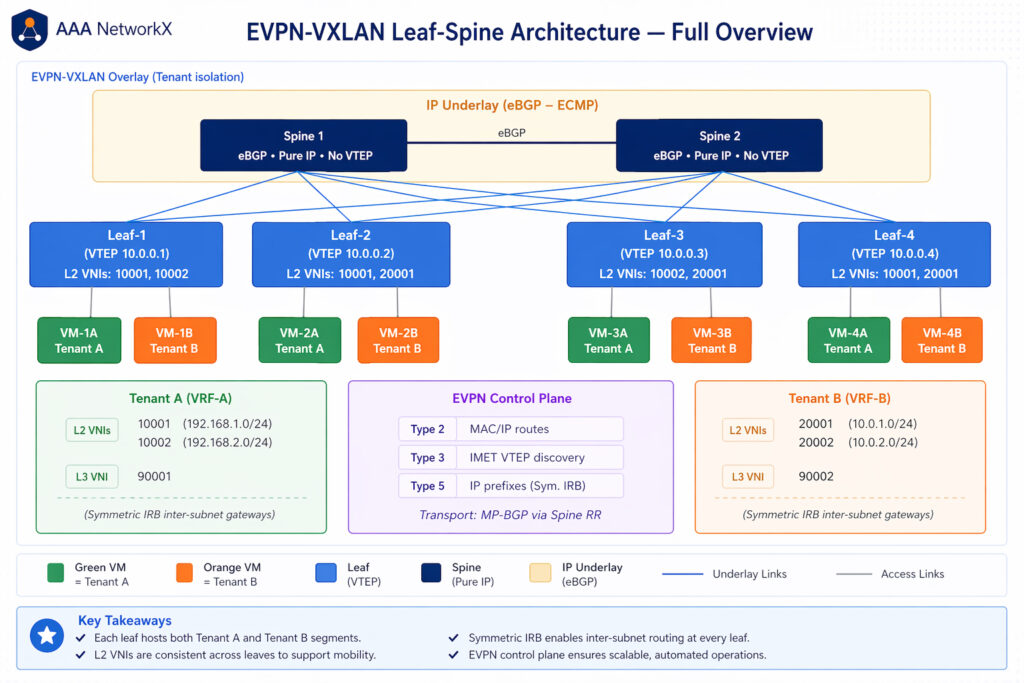
Leaf switches are where the intelligence lives. They act as VXLAN Tunnel Endpoints (VTEPs), encapsulating and decapsulating VXLAN traffic at the network edge. With Integrated Routing and Bridging (IRB) enabled, a leaf switch serves as both a Layer 2 bridge for intra-subnet traffic and a Layer 3 gateway for inter-subnet traffic, all within the same tenant VRF.
The design separates the underlay (a simple eBGP-routed IP network that moves packets between VTEPs) from the overlay (EVPN-VXLAN, which carries tenant traffic and enforces isolation). This separation makes troubleshooting dramatically easier, underlay problems are IP routing problems; overlay problems are EVPN problems.
EVPN Route Types That Make It Work
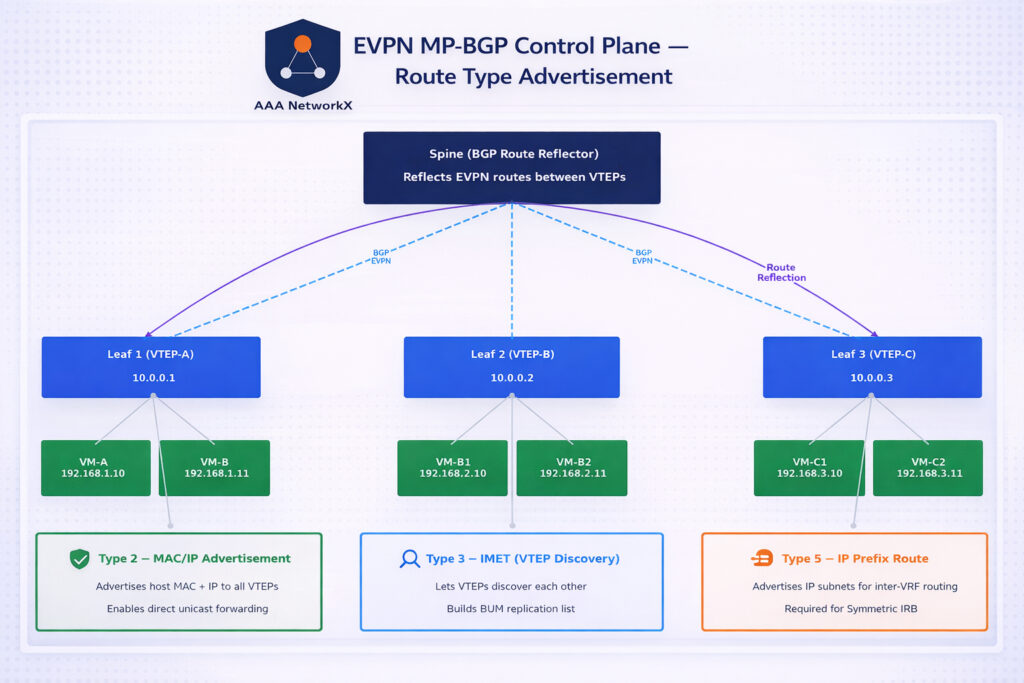
EVPN uses different BGP route types, each serving a specific purpose:
| Route Type | Purpose |
|---|---|
| Type 2 (MAC/IP Advertisement) | Advertises a host’s MAC address and IP address to all VTEPs so they can forward traffic directly without flooding |
| Type 3 (Inclusive Multicast Ethernet Tag / IMET) | Allows VTEPs to discover each other and build BUM (Broadcast, Unknown unicast, Multicast) replication lists |
| Type 5 (IP Prefix Route) | Advertises IP prefixes into the fabric for inter-subnet routing; essential for symmetric IRB |
In practice, Type 2 handles known unicast traffic, Type 3 bootstraps the fabric, and Type 5 enables tenant routing to scale across the fabric.
Symmetric IRB vs. Asymmetric IRB: Which Should You Use?
When traffic must cross subnets within a tenant (inter-subnet routing), the leaf switch performs Integrated Routing and Bridging (IRB). There are two models:
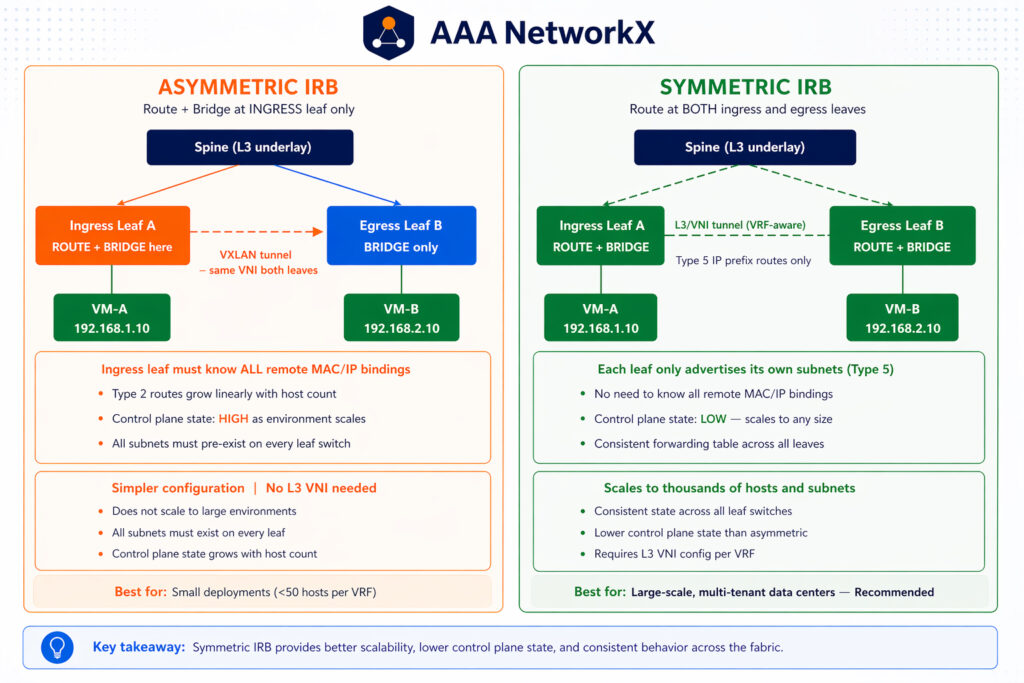
Asymmetric IRB
The ingress leaf performs both routing and bridging in one step. The egress leaf only bridges. This is simpler to configure, but it requires the ingress leaf to hold MAC/IP bindings for every host across all remote subnets, control plane state that grows linearly with host count.
Best for: Small to medium deployments with limited subnet counts.
Symmetric IRB
Both ingress and egress leaves perform routing. An additional Layer 3 VNI carries the traffic between them, and Type 5 routes advertise IP prefixes rather than individual host routes. Control plane state is much lower because each VTEP only needs to know about its directly attached subnets.
Best for: Large-scale, multi-tenant environments, the recommended approach for most enterprise and cloud data centers.
Summary: If you are building for scale, use symmetric IRB. The operational overhead of managing per-host state in asymmetric mode quickly outweighs its initial simplicity.
Have questions about symmetric vs. asymmetric IRB for your environment? Talk to an AAANetworkX engineer →
Key Benefits of EVPN-VXLAN for Enterprise and Cloud Data Centers
| Benefit | How EVPN-VXLAN Delivers It |
|---|---|
| Scalability | 24-bit VNIs support 16M+ segments; distributed routing avoids centralized bottlenecks |
| Multi-tenancy | VRFs provide per-tenant routing tables; VNIs enforce data plane isolation |
| High Availability | ECMP across multiple spine paths; fast BGP convergence on failure |
| Operational Simplicity | Control plane learning eliminates flooding; centralized BGP visibility |
| Vendor Interoperability | Open standards (BGP, VXLAN) work across Cisco, Juniper, Arista, Nokia, and others |
EVPN-VXLAN vs. Traditional VLAN and MPLS
| Feature | Traditional VLAN | MPLS | EVPN-VXLAN |
|---|---|---|---|
| Scale | 4,094 segments | High | 16M+ segments |
| Control Plane | Flood-and-learn / STP | LDP / RSVP | MP-BGP |
| Deployment Complexity | Low (but operationally painful at scale) | High | Moderate |
| Cloud/Data Center Fit | Poor | Poor | Excellent |
| Multi-tenancy | Limited | Yes (with L3VPN) | Yes (VRF + VNI) |
EVPN-VXLAN fills the gap between the simplicity of VLANs and the power of MPLS, without requiring a dedicated MPLS transport infrastructure.
Ready to Build a Scalable Data Center Network?
At AAANetworkX, we design and implement modern data center fabrics for enterprises and service providers. Whether you are evaluating EVPN-VXLAN for the first time or planning a migration from a traditional three-tier design, our team can help.
Contact AAANetworkX for a free consultation →
Read next: SD-WAN Explained, Connecting Your Sites to the Cloud →