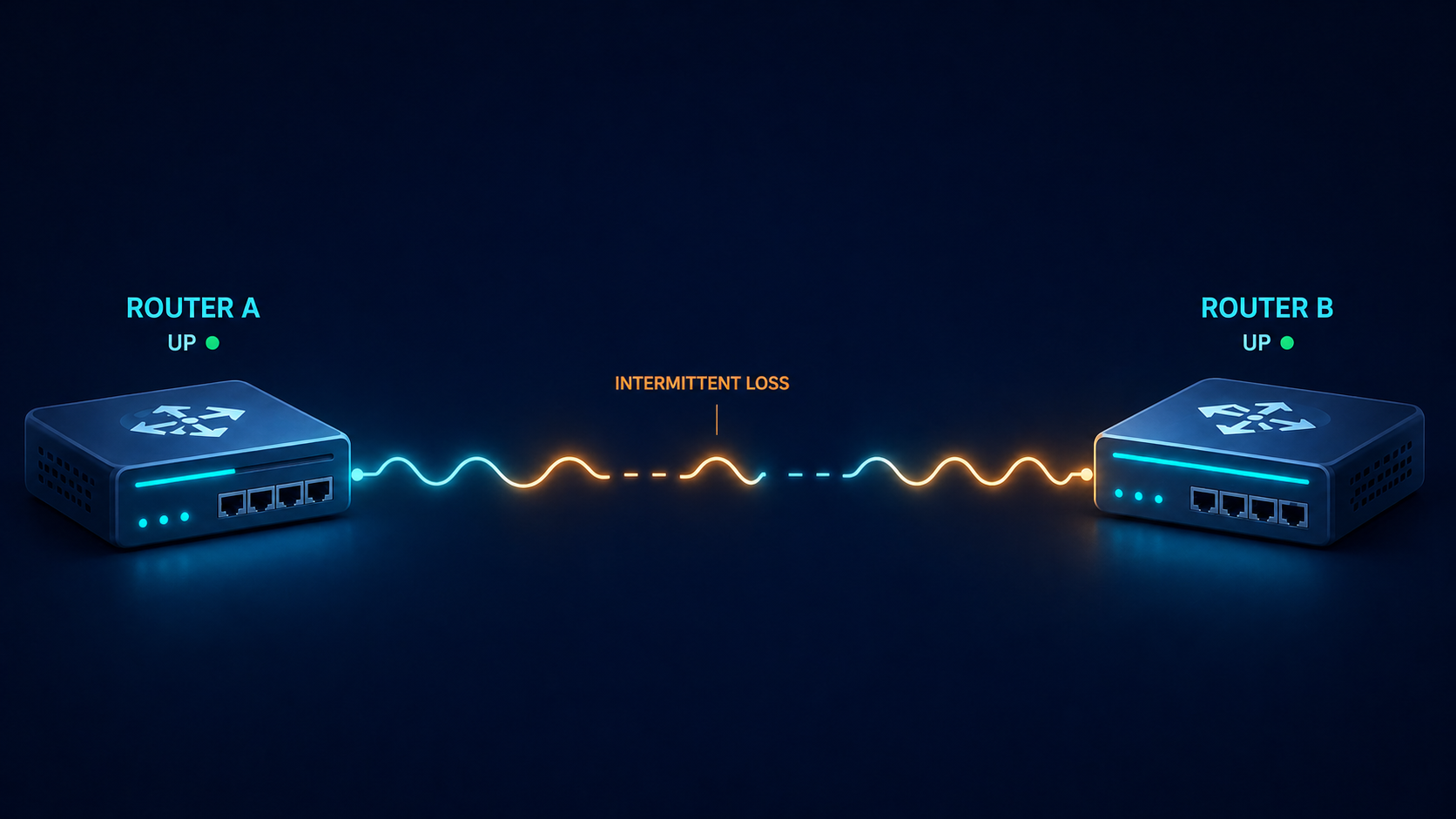
EIGRP is supposed to converge fast and stay quiet. When you see neighbor flapping in the log, something on the underlying link or in the configuration has changed, and EIGRP is the messenger telling you about it. This post walks through the five real causes of EIGRP neighbor flapping ranked by what we actually see in production, and how to stop the same flap from coming back next week.
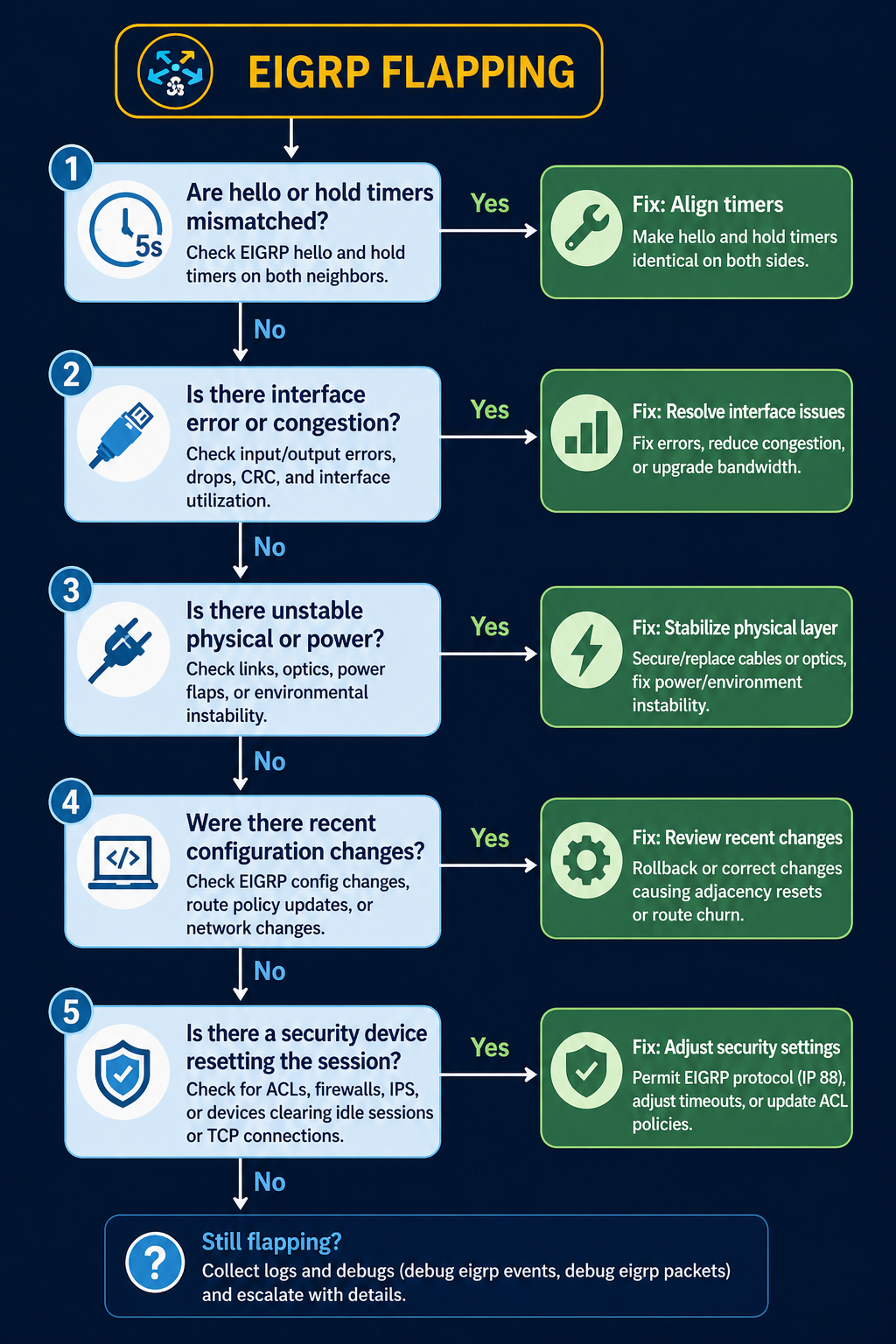
The short version. About 35 percent of EIGRP flap incidents come down to hold timer expiration on a link that has marginal performance, not a true outage. Another 25 percent are MTU mismatch on the link. The remaining 40 percent split across k-values mismatch, authentication drift, and platform-specific behavior. The fix order matters, because checking k-values before checking the link itself wastes time on the wrong layer.
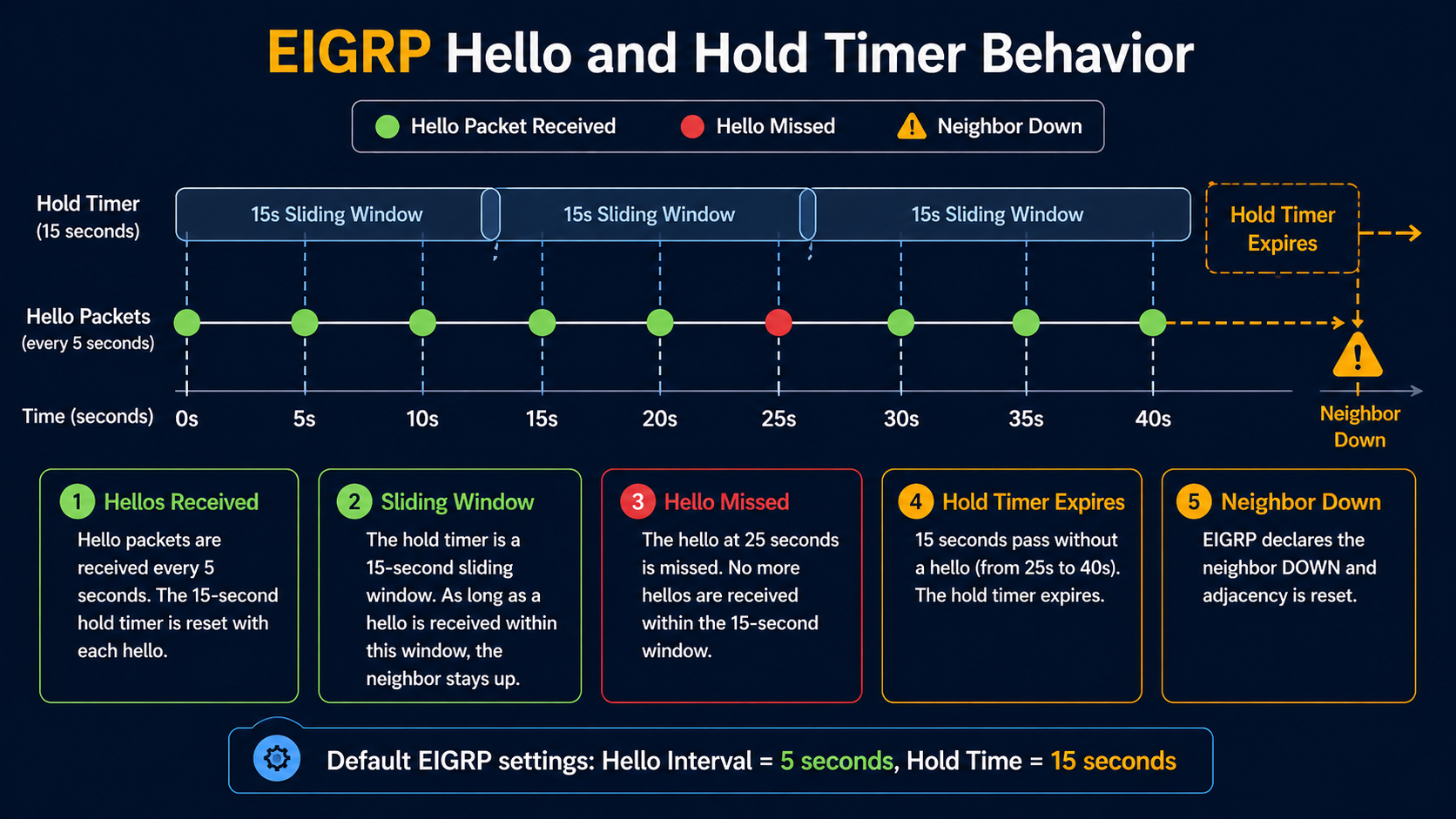
EIGRP has a tight relationship between its hello timer (5 seconds default on LAN, 60 seconds on slow WAN) and its hold timer (3x hello). If the link drops two consecutive hellos, the neighbor goes down. The flap window is narrow, so any link with intermittent issues will show up in EIGRP logs first, before any other monitoring catches it. Which means EIGRP flapping is often a symptom of something else, not a problem in itself, if any one of them drifts.
What flapping actually means
EIGRP neighbor flapping shows up as repeated log entries like %DUAL-5-NBRCHANGE: EIGRP-IPv4 1: Neighbor x.x.x.x is down: holding time expired followed shortly by Neighbor x.x.x.x is up: new adjacency. The pattern repeats. Each flap triggers a SIA (Stuck in Active) recalculation if a route depended on that neighbor, which in turn can stress the rest of the network if the flap is bad enough.
You will see the flap in three places. The router log shows the neighbor change events. The output of show ip eigrp neighbor shows a recently established adjacency with the uptime counter near zero. Your monitoring system shows route flaps and possibly traffic blackholes during the recovery window.
Verified against current Cisco IOS-XE documentation, accessed April 2026.
The five causes, ranked by what we actually see
Cause one, hold timer expiration on a marginal link, around 35 percent of cases
The link is up but periodically dropping packets. Two consecutive lost hellos and EIGRP declares the neighbor dead. Verify with interface error counters, CRC counts, and input drops on both sides. A link that shows even small CRC counts at sub-1-percent level is enough to flap EIGRP.
Fix the link. Replace the SFP, swap the patch, check for fiber issues, or address the wireless backhaul. Increasing the hold timer to mask the flap is not a fix, it just delays the symptom while the underlying link continues to degrade.
Cause two, MTU mismatch on the link, around 25 percent of cases
EIGRP hellos are small enough to pass even with MTU mismatch, but EIGRP update packets carrying topology changes can exceed a smaller-than-expected MTU and get dropped. The neighbor periodically loses sync, the adjacency resets, and you see flapping that correlates with route changes elsewhere in the network.
Verify with show interfaces | i MTU on both sides. Match them. EIGRP does not have an mtu-ignore equivalent the way OSPF does, so the actual MTU has to be aligned.
Cause three, k-values mismatch, around 15 percent of cases
EIGRP uses k-values to weight its composite metric. The default is k1=1, k3=1, others=0, which uses bandwidth and delay only. If someone has tuned k-values on one router but not its neighbor, the adjacency will form initially but become unstable when topology changes propagate. Less common than the first two but easy to miss.
Verify with show ip protocols on both sides. The K values line should match exactly. If it does not, fix the side that drifted.
Cause four, authentication drift, around 15 percent of cases
If MD5 authentication keys have rotated on one side but not the other, hellos still pass briefly during the rollover window and then start failing. The adjacency forms then drops within minutes.
Verify with show ip eigrp interface detail and check the authentication mode and key chain. Both sides need to use the same active key during the same time window. Key rotation should always overlap, never hand off cleanly.
Cause five, platform-specific bug or stuck-in-active behavior, around 10 percent of cases
Specific Cisco IOS-XE releases have had bugs around EIGRP neighbor maintenance, especially on platforms with high control plane load. Stuck-in-active conditions can also escalate to flapping if the network is poorly summarized and queries propagate too far.
Suspect this only after causes one through four are eliminated. Check release notes for EIGRP-related bug fixes on the platform code in use.
What the official documentation does not mention
EIGRP flapping on a stable physical link sometimes correlates with high CPU on the router, not link issues. If hello processing falls behind because of a control plane spike (a large policy change, a flapping interface elsewhere, an aggressive netflow export), hellos are not transmitted on schedule and the neighbor times out. Check CPU history (show processes cpu sorted history) when EIGRP flaps with no obvious link cause.
Also, summary routes can mask flap behavior in a way that makes diagnosis harder. If your hub router is summarizing branch prefixes, a flap of a single branch only shows up at the hub, not on adjacent routers, which means a flap that propagates as a route withdraw can look like it originated at the hub when it actually came from a remote site.
The architectural fix
Networks that see EIGRP flap more than rarely have one of three gaps. They are not summarizing aggressively enough, so query scope is too wide and SIA cascades amplify. They have inconsistent k-values across the network, usually because someone tuned one segment without documentation. Or they monitor on EIGRP neighbor state alone and never see the underlying link errors that drive most flaps. Address all three. Standardize k-values, summarize at the boundary of every routing domain, and add interface error monitoring with a threshold low enough to alert before EIGRP starts flapping.
FAQ
Should I increase the hold timer to stop the flap?
No. Increasing hold timer hides the symptom and delays detection of real outages. Fix the underlying cause instead.
Does GR (Graceful Restart) help?
Only if the flap is caused by a planned event like a software upgrade. GR does nothing for actual link instability or configuration drift.
Is migrating from EIGRP to OSPF a fix?
Not a fix for the underlying cause, no. Both protocols flap when the link is bad. Migration is a longer term decision based on whether you need vendor neutrality, not flap mitigation.
Related posts
Need a routing audit
If EIGRP is flapping in your network often enough that you have noticed, the underlying issue is usually three or four small things, not one big one. Our routing practice does targeted EIGRP and OSPF audits for enterprises that are tired of unexplained route flaps. Send us a sample of your flap log and we will tell you what to look at first.
Last verified April 2026 by the aaanetworkx routing practice.
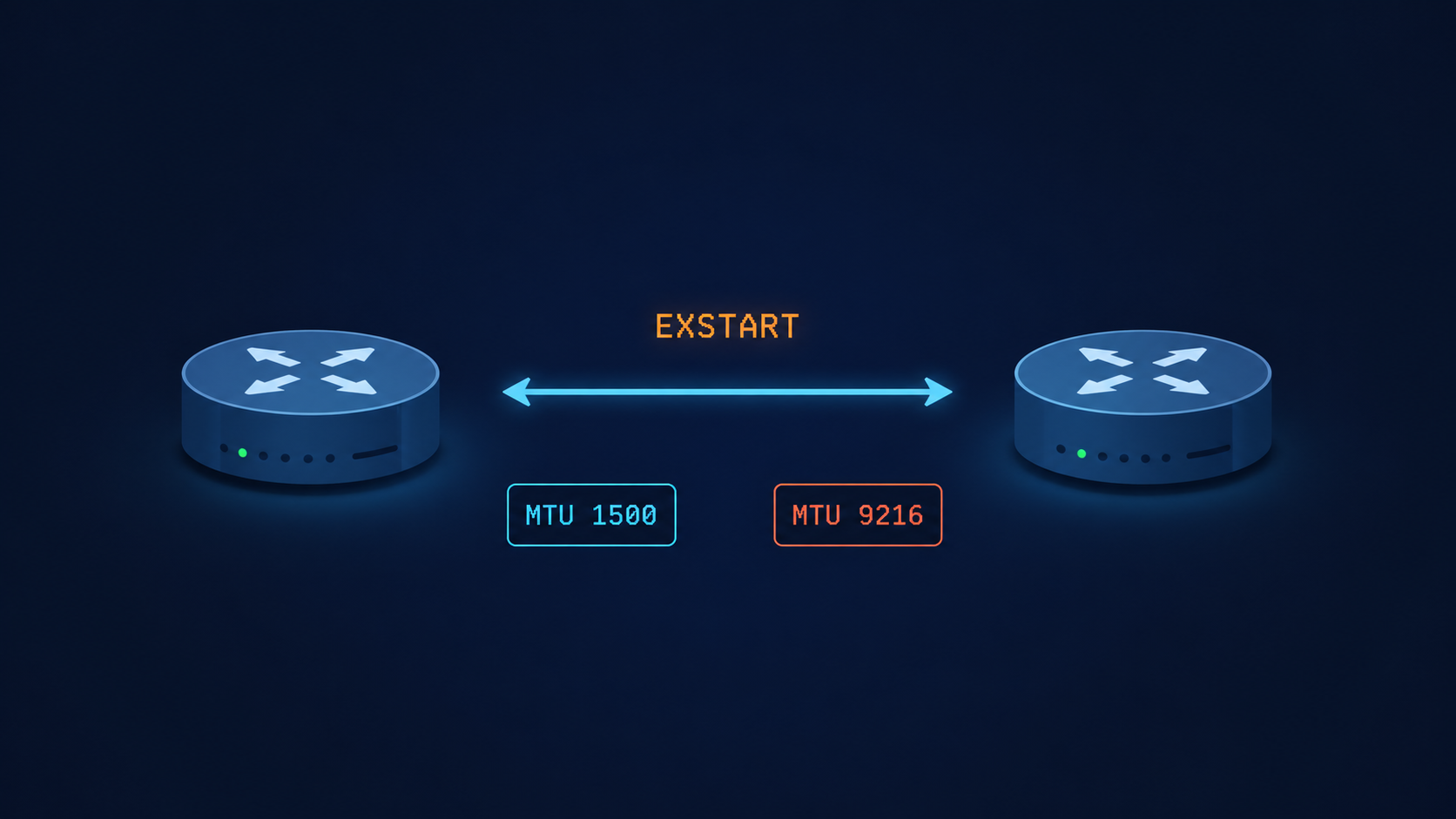
OSPF neighbor stuck in EXSTART means the adjacency stalled while exchanging database descriptions, and the cause is almost always one of five specific things.
You typed show ip ospf neighbor, expected to see Full, and got EXSTART instead. The link is up, ping works, the interfaces are even talking to each other a little because you can see the neighbor in the table. But OSPF will not finish forming the adjacency. After 60 seconds the state flips to EXCHANGE, then back to EXSTART, then again, in a loop. This post walks through the five real causes of OSPF stuck in EXSTART, ranked by what we actually see in production, and the verified fix for each.
The short version, before you scroll. EXSTART is the state where two OSPF routers are negotiating who gets to be master in the upcoming database description exchange. To do that, each side sends a DBD packet. If the sending router cannot send a packet that the receiver can accept, the negotiation never completes and both sides stay locked in EXSTART. The most common reason that DBD packet gets rejected is an MTU mismatch. About 60 percent of the time, that is exactly what is happening. Match the MTUs and you are usually done in under five minutes.
The other 40 percent of cases come from a small set of less obvious causes that this post covers in order, so you do not waste an hour rechecking MTU when the real issue is somewhere else.
What this state actually means
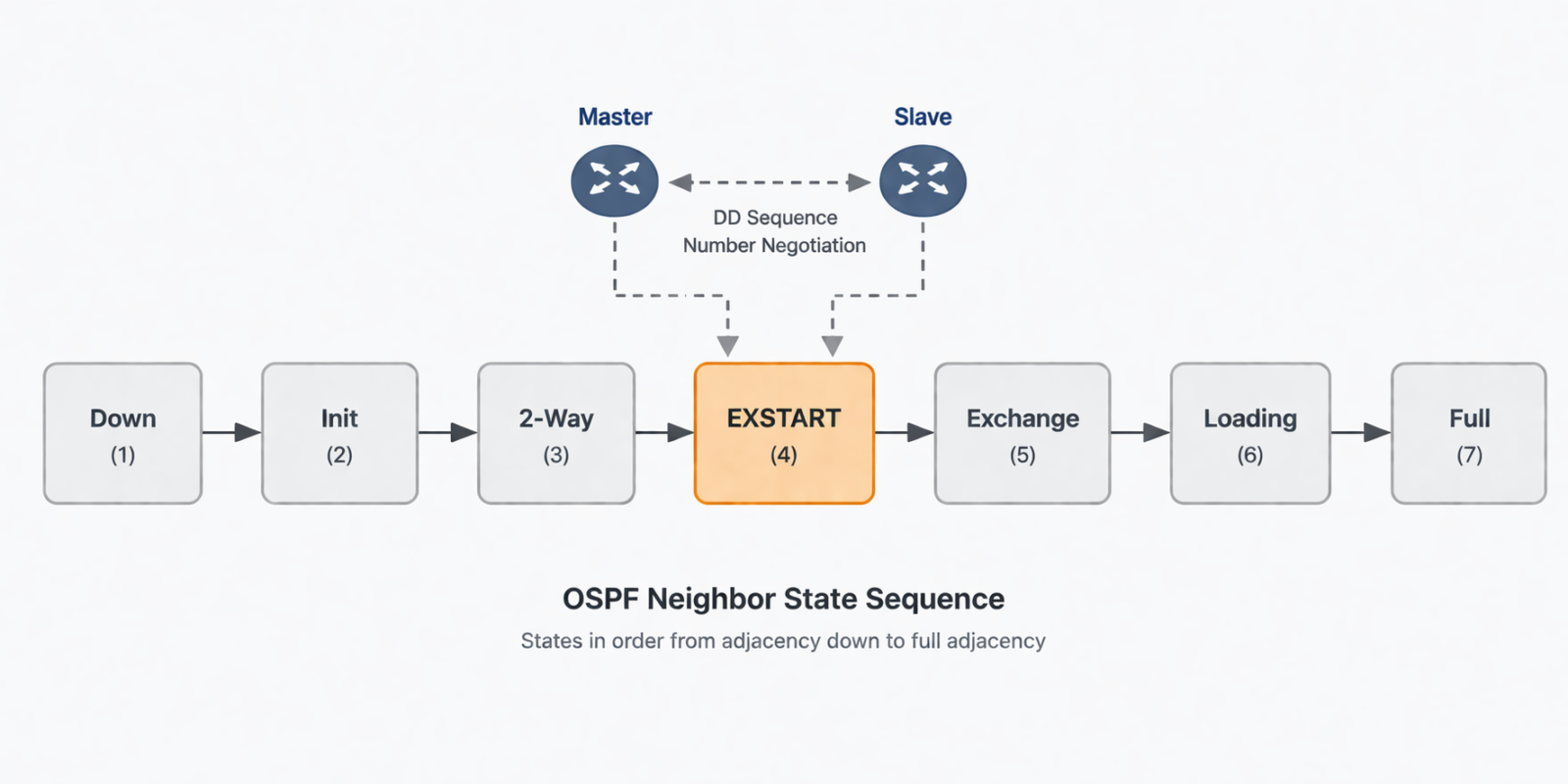
EXSTART is one of the seven OSPF neighbor states, and it sits between Two-Way and Exchange. After two routers have agreed they can hear each other (Two-Way), they need to elect a master and a slave for the upcoming database synchronization. The master is the one with the higher router ID. To kick off this election, each router sends a DBD packet with the I, M, and MS bits set. If both DBD packets arrive successfully, the routers settle on master and slave and progress to Exchange. If either DBD packet is dropped, malformed, or rejected, no election finishes and the state stays at EXSTART.
You will see this in three places. The output of show ip ospf neighbor shows the neighbor in EXSTART instead of Full. The output of debug ip ospf adj shows DBD packets being sent but never acknowledged, or being rejected with an MTU mismatch warning. And your network monitoring system flags a flapping OSPF adjacency or a missing OSPF route in the routing table.
Verified against RFC 2328 (OSPF v2) and current Cisco IOS-XR and Juniper Junos documentation, accessed April 2026.
The five causes, ranked by what we actually see
Cause one, MTU mismatch on the link, around 60 percent of cases
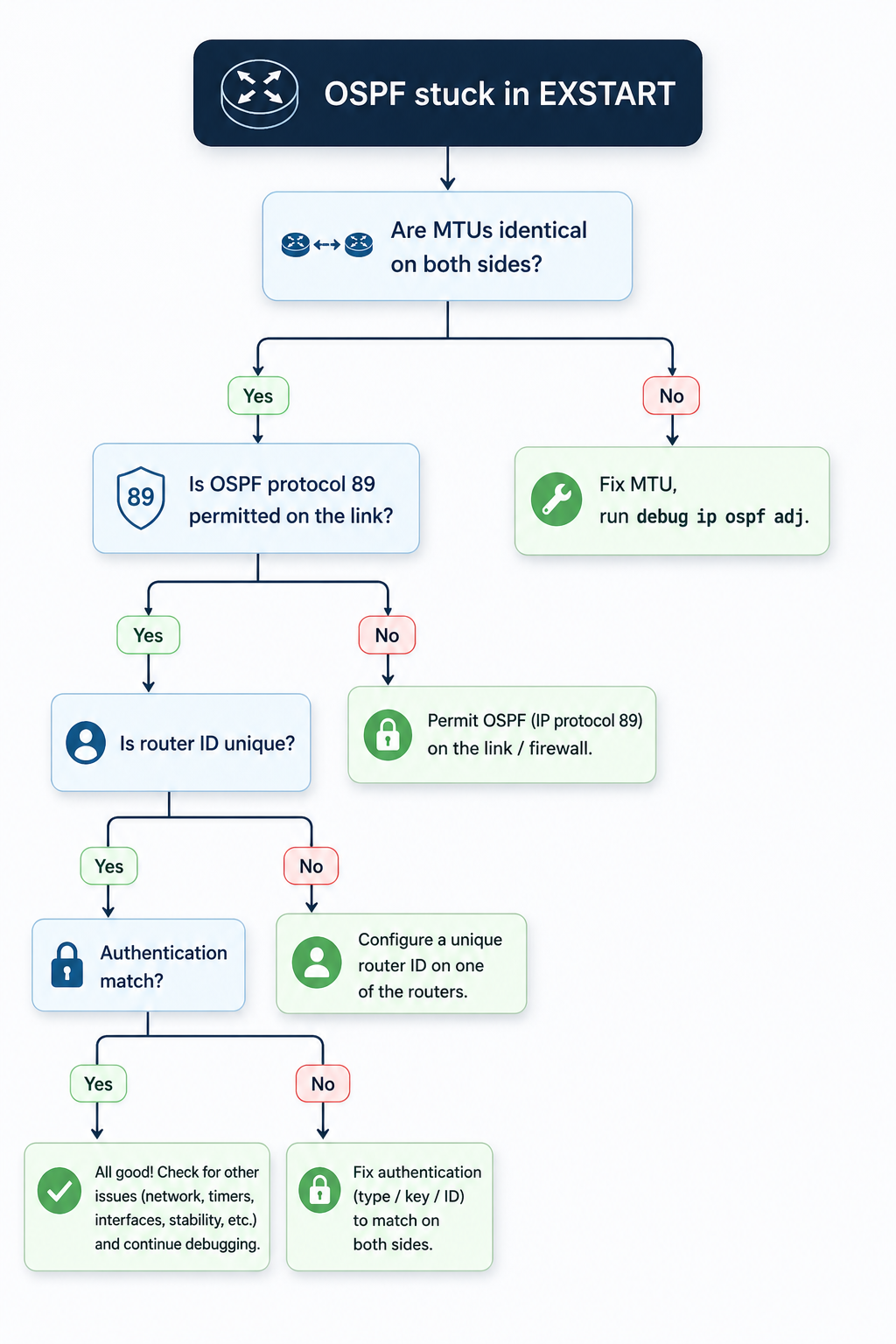
By far the most common cause. OSPF DBD packets contain the sending router’s interface MTU. If that value does not match the receiver’s interface MTU, the receiver silently discards the DBD packet and the adjacency stalls. This usually happens after someone enables jumbo frames on one side of a peering but forgets the other side, or after a hardware swap where the new platform defaults to a different MTU.
Verify with show interfaces | i MTU on Cisco or show interfaces extensive on Juniper, on both sides. The values must match exactly. If they do not, fix the smaller one to match the larger, or set both to a known baseline like 1500 for non-jumbo links and 9216 for jumbo links.
If you absolutely cannot fix the MTU on one side (vendor lockout, customer-managed CPE, etc.), Cisco lets you bypass the MTU check on a per-interface basis with ip ospf mtu-ignore. Use this as a last resort, not a default, because the underlying mismatch can still cause problems for any OSPF packet larger than the MTU.
Cause two, OSPF protocol packets being filtered, around 15 percent of cases
Less obvious. An ACL, firewall, or transit security policy is permitting initial OSPF Hellos (which are small) but dropping the larger DBD packets that follow in EXSTART. Common on transit links that pass through a security appliance, or on virtual networks where the underlying infrastructure has a hidden MTU limit.
Verify by sourcing a large ICMP packet from one router to the other with the do-not-fragment bit set, sized just below the configured MTU. If the ICMP fails but Hellos succeed, you have a mid-path filter or fragmentation issue. Trace the path and identify the offender.
Cause three, duplicate OSPF router ID, around 10 percent of cases
Two routers in the same OSPF area with the same router ID will fail to elect a master, because the master selection is based on router ID. The state can hang at EXSTART rather than fail outright. This usually happens after a config copy gone wrong, or when a loopback was provisioned with a default address.
Verify with show ip ospf | i Router ID on both sides. If they match, change one to a unique value (typically the loopback address of that specific router) and reset OSPF on that interface.
Cause four, OSPF authentication mismatch, around 10 percent of cases
OSPF Hellos can pass with simple key validation but DBD packets fail because of a different authentication method or key ID. This shows up especially in multi-area designs where some interfaces use MD5 and some use null authentication, and the configuration drifted on one side.
Verify with show ip ospf interface [int] and look for the authentication line. Both sides must use the same authentication type and the same key ID. Fix the side that drifted, or if you cannot determine which is correct, take both back to null authentication temporarily to confirm the link works, then re-add MD5 with matching keys.
Cause five, software defect on one platform, around 5 percent of cases
Rare but real. Specific Cisco IOS-XE and Junos releases have had bugs where DBD packets are formed incorrectly during master/slave negotiation, especially when one side runs an older release. The fix is a code upgrade on the affected platform, after vendor TAC confirms the bug ID.
Suspect this only after causes one through four are eliminated. Check release notes for the platform code on both sides for recently fixed OSPF adjacency bugs.
What the official documentation does not mention
Cisco and Juniper count MTU differently. Cisco’s MTU value reported by show interfaces is the L3 MTU, which excludes Layer 2 framing. Juniper’s show interfaces extensive shows the full physical MTU including framing. Comparing the two side by side without converting can make MTUs look mismatched when they are actually identical, or look identical when they are mismatched. Always confirm with a packet capture if you are mixing vendors.
Also, EXSTART can briefly appear during normal OSPF convergence even on a healthy link, especially after a reboot or interface flap. If you see EXSTART for fewer than 30 seconds and then the adjacency goes to Full, that is normal. EXSTART persisting beyond a minute is when you start troubleshooting.
The architectural fix
Most networks that see EXSTART more than once a year have no MTU baseline. Define one for every link type in your network (1500 for default Ethernet, 1546 for tagged Ethernet, 9216 for jumbo) and enforce it through configuration management. Add an automated weekly check that compares MTUs across every OSPF adjacency in the network and emails the team on any mismatch. Most production networks I review have at least one silent MTU mismatch sitting on a link that has not converged correctly for months, hidden because OSPF still works for hellos and small packets.
Pair this with OSPF authentication standardized across the network. Inconsistent authentication is the second silent killer of routing reliability and is just as easy to drift on.
When to escalate
Engage your platform vendor TAC if you have eliminated MTU, ACL/path filter, router ID, and authentication, the link still flaps in EXSTART, and the issue follows a specific code release. Bring the output of debug ip ospf adj from both sides, the relevant interface configurations, and a clear timeline of when the problem started.
FAQ
Will the adjacency form if I just enable mtu-ignore?
Often yes, but you are masking the underlying mismatch. The adjacency forms because OSPF stops checking the MTU during DBD exchange, but any OSPF packet larger than the smaller side’s MTU may still drop in production traffic. Use mtu-ignore as a temporary workaround only, never as a permanent fix.
Does point to point versus broadcast network type matter?
Yes. On broadcast networks, the DR/BDR election can also stall in EXSTART if there is no agreement on who is the DR. On point-to-point networks, this is not a factor. If you are seeing EXSTART on a broadcast network, also verify the network type is set the same on both sides.
Can a hardware fault cause this?
Rarely, but yes. A failing transceiver or line card that drops large packets but passes small ones can mimic an MTU issue. Check for interface errors and CRC counts, and try the same OSPF peering on a different interface or platform to isolate.
Related posts
Stuck on EXSTART after trying everything
If your team has been chasing this for more than an hour and rechecked MTU, ACLs, router ID, and authentication, the issue is usually one rung deeper, in the path or the platform. Our routing practice handles OSPF and BGP for service providers and large enterprises and we treat stuck adjacencies as service-affecting from minute one. Tell us about the topology and we will help you isolate it.
Last verified April 2026 by the aaanetworkx routing practice.

Traditional WAN vs SD-WAN: What’s the Difference and Why It Matters for Your Business
Network connectivity is the foundation of everything modern businesses do, from accessing cloud applications and supporting remote workers to connecting dozens of branch offices across the country. When the network underperforms, everything suffers.
For decades, organizations depended on Traditional WAN, primarily MPLS circuits, to link their locations together. It was reliable, but it was also expensive, rigid, and increasingly mismatched with how businesses operate today.
SD-WAN (Software-Defined Wide Area Network) changes the equation. It delivers the performance and reliability businesses need, at a fraction of the cost, with far greater flexibility. In this guide, we break down exactly how the two approaches compare and what that means for your organization.
Thinking about SD-WAN? Talk to an AAANetworkX engineer →
The Problem with Traditional WAN in a Cloud-First World
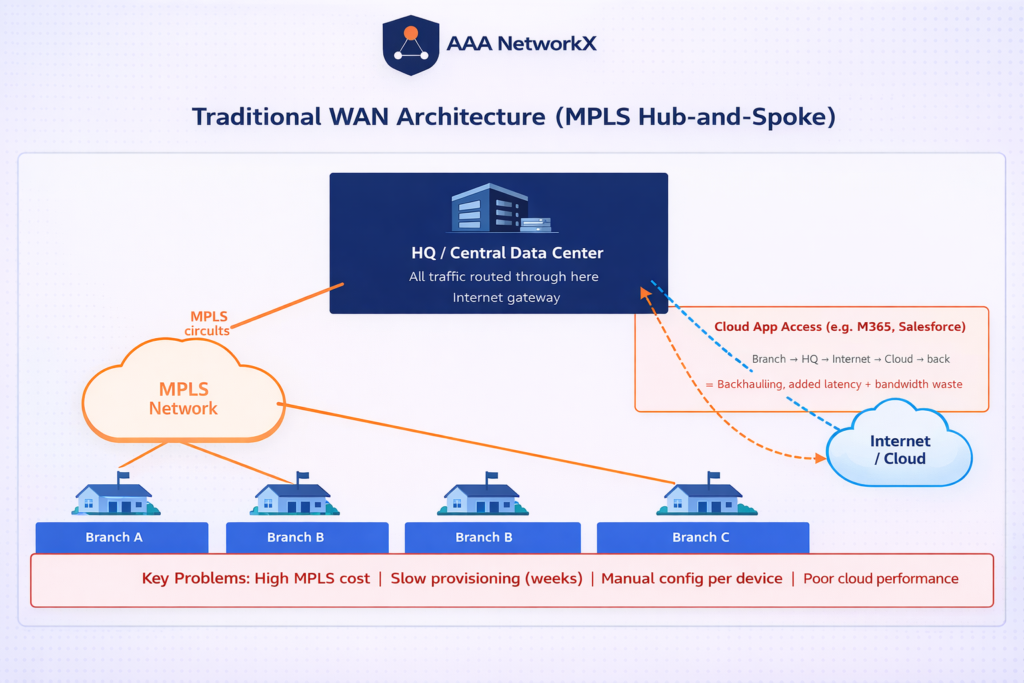
Traditional WAN was built for a different era, one where applications lived in a central data center and users sat in fixed office locations. In that world, dedicating a private MPLS circuit to each branch made sense.
Today, that world no longer exists for most organizations.
MPLS Is Reliable, But It’s Expensive and Inflexible
MPLS (Multiprotocol Label Switching) delivers consistent, low-latency connectivity. But it comes with significant tradeoffs:
- High cost, dedicated MPLS circuits are expensive to provision and maintain, especially across many locations
- Long lead times, adding a new branch can take weeks or months of provisioning time
- Locked to a single provider, MPLS contracts typically tie you to one carrier, limiting negotiating power
The Backhauling Problem: Why Cloud Apps Suffer on Traditional WAN
One of the biggest performance killers in traditional WAN is backhauling. When a branch office user needs to access Microsoft 365, Salesforce, or any other cloud application, their traffic often travels all the way to a central data center first, then out to the internet, and back again.
This indirect route adds latency, degrades application performance, and creates unnecessary load on the central site. As cloud adoption accelerates, this problem compounds.
Manual Configuration and the Scalability Wall
Traditional WAN is fundamentally hardware-centric. Every router at every branch must be configured manually. Deploying a new site, pushing a policy change, or responding to a network issue requires touching individual devices, one at a time. As branch count grows, the operational burden grows with it.
What Is SD-WAN? A Plain-English Explanation
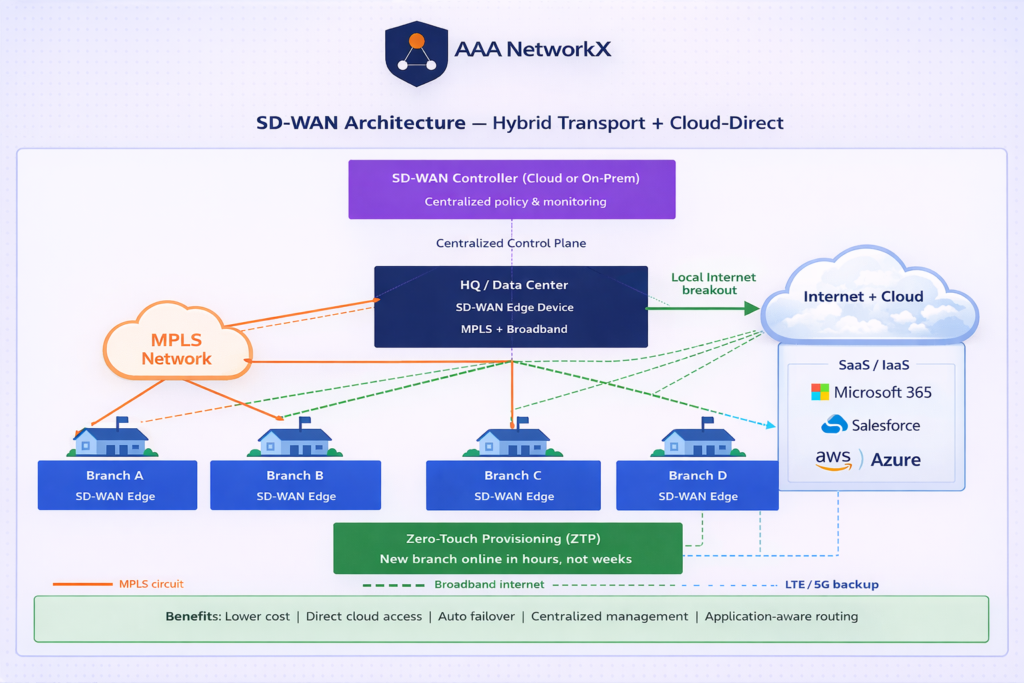
Software-Defined Wide Area Network (SD-WAN) decouples the network control plane from the hardware. Instead of configuring individual routers, network policies are defined centrally, in software, and automatically pushed to all locations.
Software-Defined, Centrally Managed
A single SD-WAN controller gives IT teams a unified view of the entire WAN. Policies, routing rules, security settings, and application priorities are managed from one place and applied consistently across all sites, whether you have 5 branches or 500.
Multiple Transport Options: MPLS, Broadband, LTE
SD-WAN is transport-agnostic. It can use MPLS, broadband internet, LTE/5G, or any combination of these simultaneously. This is called a hybrid WAN approach, you get the reliability of MPLS where you need it and the cost efficiency of broadband where it makes sense.
Application-Aware Routing: The Right Path for Every App
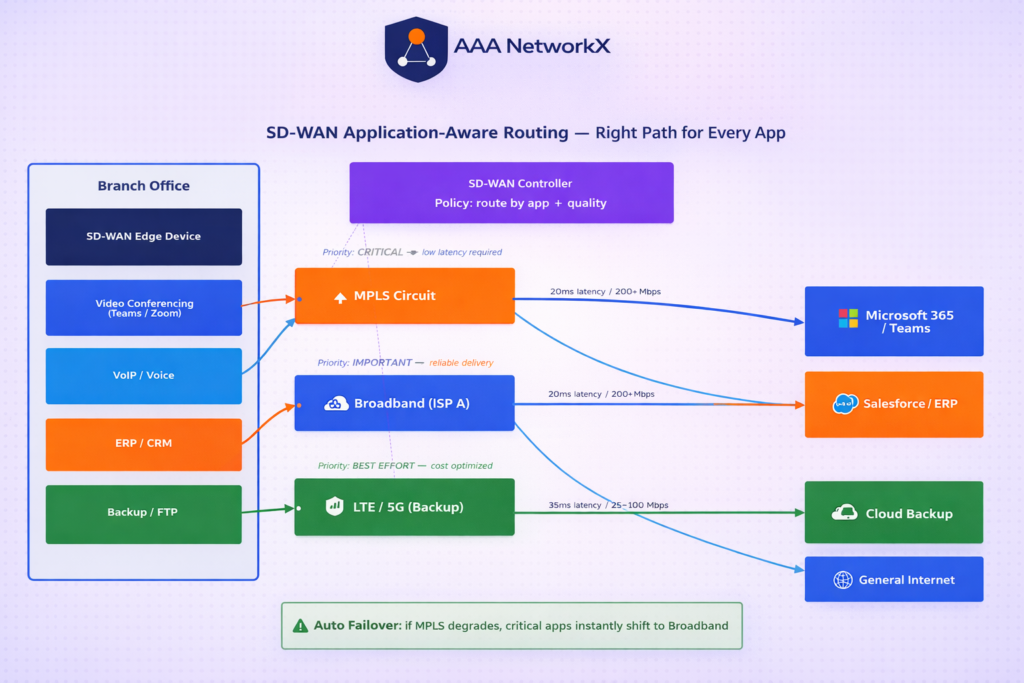
This is where SD-WAN delivers its most tangible value. SD-WAN continuously monitors the quality of each available link (latency, jitter, packet loss) and routes traffic based on application requirements:
- Video conferencing and VoIP get low-latency, high-reliability paths
- Bulk data transfers use cheaper broadband links
- If one path degrades or fails, traffic automatically shifts to the best available alternative, with no human intervention required
Traditional WAN vs SD-WAN: Side-by-Side Comparison
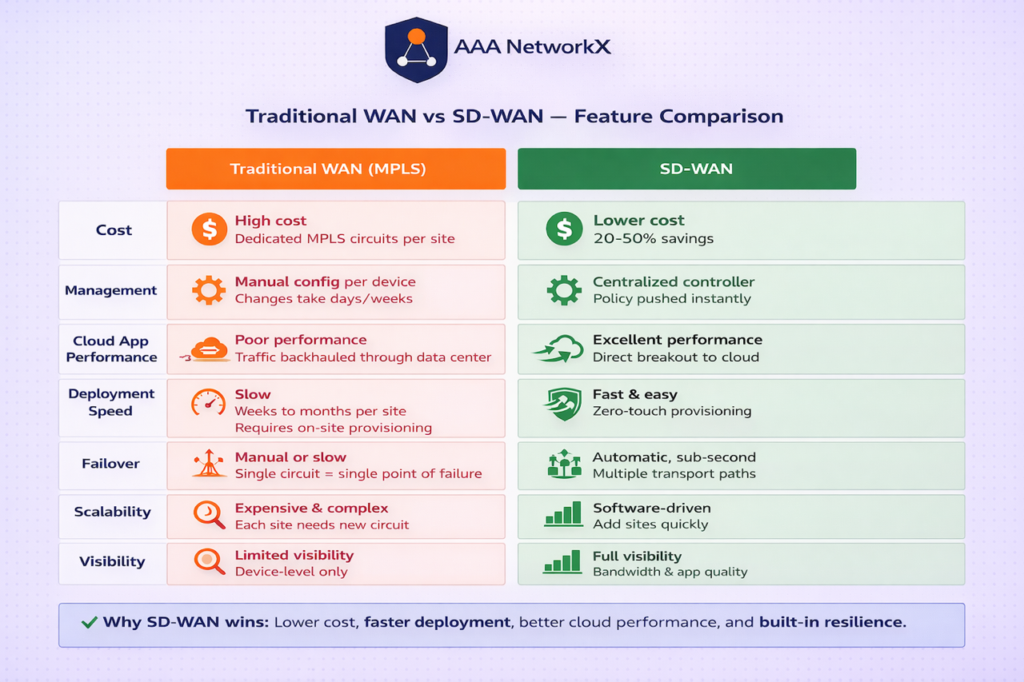
| Feature | Traditional WAN (MPLS) | SD-WAN |
|---|---|---|
| Cost | High (dedicated circuits) | Lower (leverages internet/LTE) |
| Management | Manual, per-device | Centralized, policy-driven |
| Cloud App Performance | Poor (backhauling) | Excellent (direct breakout) |
| Deployment Speed | Weeks to months | Hours to days |
| Scalability | Complex and expensive | Simple, software-driven |
| Transport Flexibility | MPLS only | MPLS + broadband + LTE |
| Visibility | Limited | Full application-level visibility |
| Failover | Manual or slow | Automatic, sub-second |
Why Businesses Are Migrating to SD-WAN
Faster Branch Rollouts
With SD-WAN, deploying a new branch is a software operation. A device arrives at the new site, connects to the internet, and automatically downloads its configuration from the controller, a process called zero-touch provisioning (ZTP). What used to take weeks now takes hours.
Automatic Failover and Path Selection
SD-WAN monitors link quality continuously. If an MPLS circuit goes down or becomes congested, SD-WAN instantly reroutes traffic through the best available alternative, broadband, LTE, or another MPLS circuit. End users typically experience no interruption.
Significant Cost Reduction
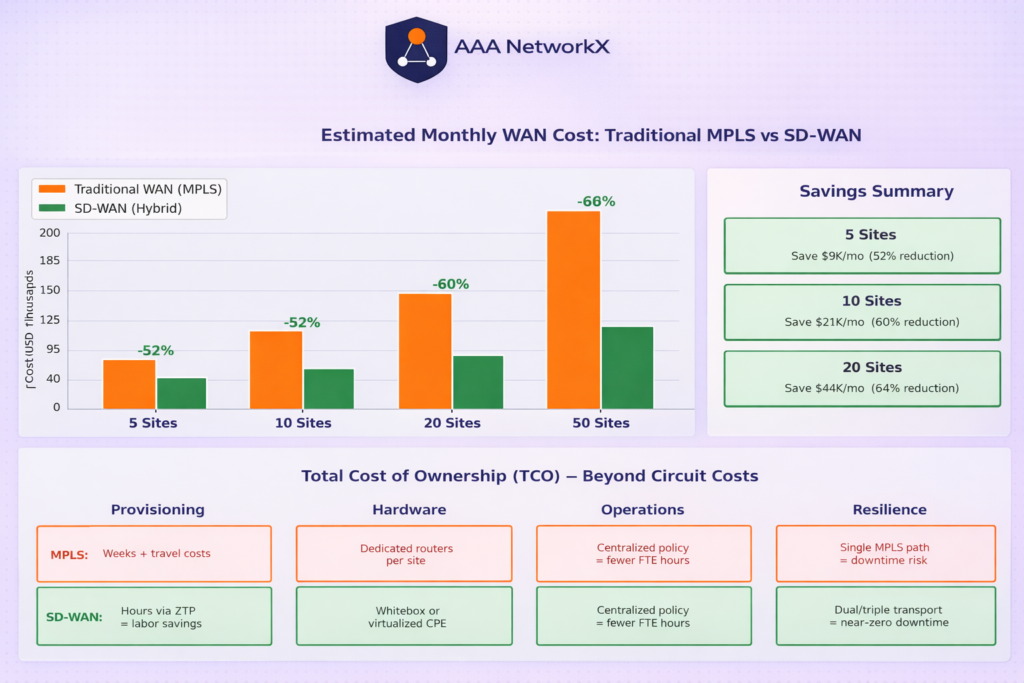
By supplementing or partially replacing expensive MPLS circuits with lower-cost broadband connections, organizations commonly achieve 20–50% WAN cost reductions while maintaining or improving performance.
Better Visibility and Control
Traditional WAN offers limited insight into what is happening on the network. SD-WAN provides application-level visibility, you can see exactly which applications are running, how much bandwidth they consume, and how each link is performing. This makes capacity planning and troubleshooting dramatically easier.
Is SD-WAN Right for Your Organization?
SD-WAN delivers the strongest ROI for organizations that:
- Have multiple branch offices or remote sites
- Are heavily using cloud applications (Microsoft 365, Google Workspace, Salesforce, etc.)
- Are experiencing high WAN costs from MPLS-only infrastructure
- Need to scale quickly without proportional increases in IT effort
- Require better visibility and control over application performance
If you are running a single-site operation with minimal cloud usage, traditional WAN may still be sufficient. But for most modern enterprises, SD-WAN is not just an upgrade, it is a necessity.
Ready to assess your WAN? Talk to an AAANetworkX engineer →
Modernize Your Network with AAANetworkX
At AAANetworkX, we help businesses design, deploy, and manage SD-WAN solutions tailored to their specific needs. Whether you are evaluating SD-WAN for the first time, planning a migration from MPLS, or looking to optimize an existing SD-WAN deployment, our certified network engineers are here to help.
Get a free SD-WAN assessment →
Read next: How EVPN-VXLAN Powers Scalable Data Center Networks →