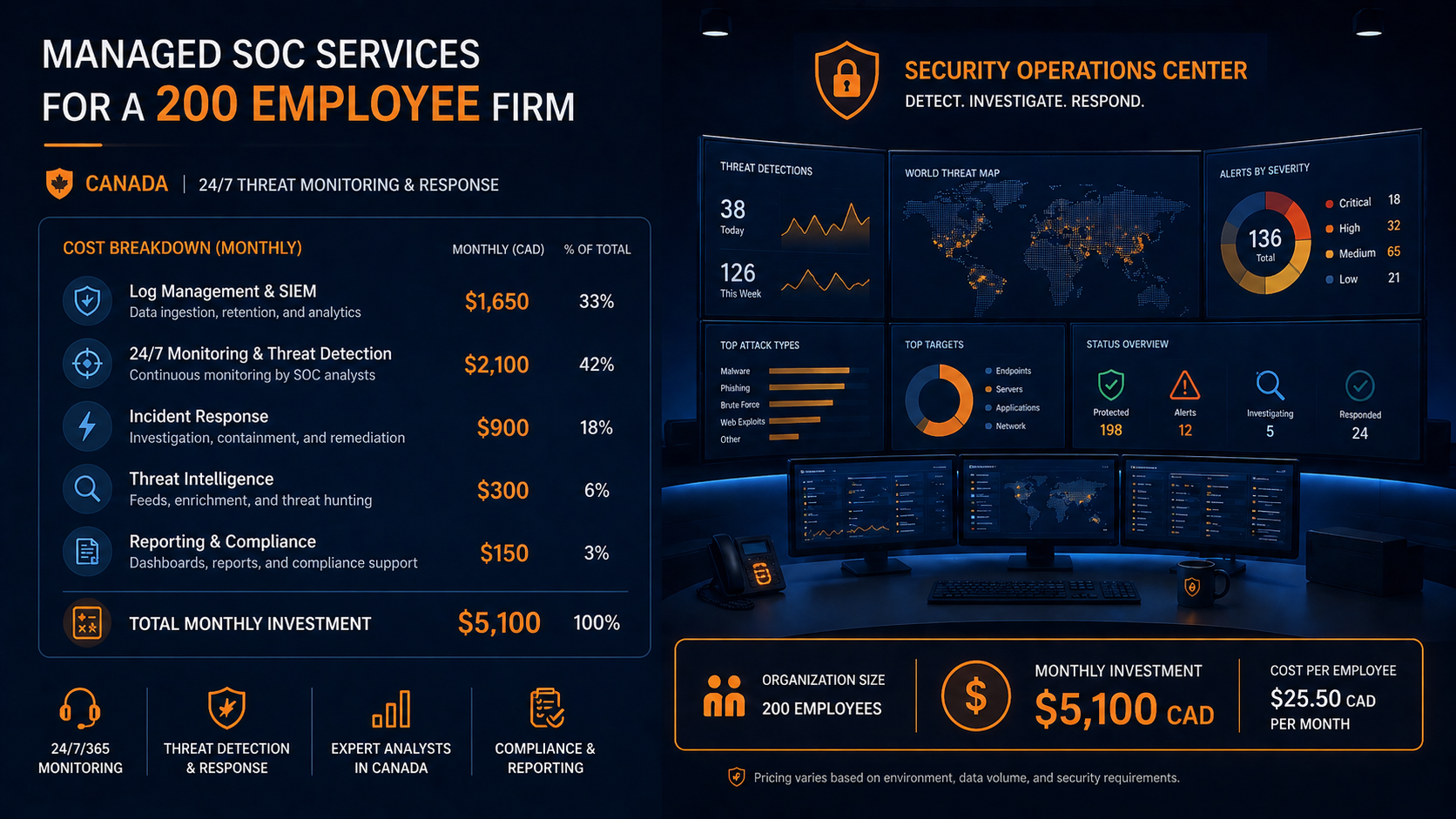
If you run security at a 200 employee firm in Canada, you have probably been asked to either build a SOC or buy one. The math on building one in-house in 2026 rarely works at this size, but managed SOC pricing varies wildly across providers and the components included differ substantially. This post breaks down managed SOC cost 200 employee firm benchmarks in Canada for 2026, what is included at different price points, and how to evaluate quotes.
The short version. Managed SOC services for a 200 employee firm in Canada in 2026 typically run between $4,500 and $14,000 CAD per month, depending on what is included. The wide range reflects real differences in scope. The low end is alert triage only, often called managed detection and response (MDR). The high end includes proactive threat hunting, incident response retainer, executive reporting, and integration with your existing tooling. The middle, around $7,000 to $9,000 CAD per month, is where most firms in your size range land for a comprehensive offering.
Building the equivalent in-house starts at roughly $700,000 CAD per year for the staffing alone (three SOC analysts plus a manager) and that does not include tooling, infrastructure, or 24/7 coverage. The math is rarely close.
What a managed SOC actually includes
Always included
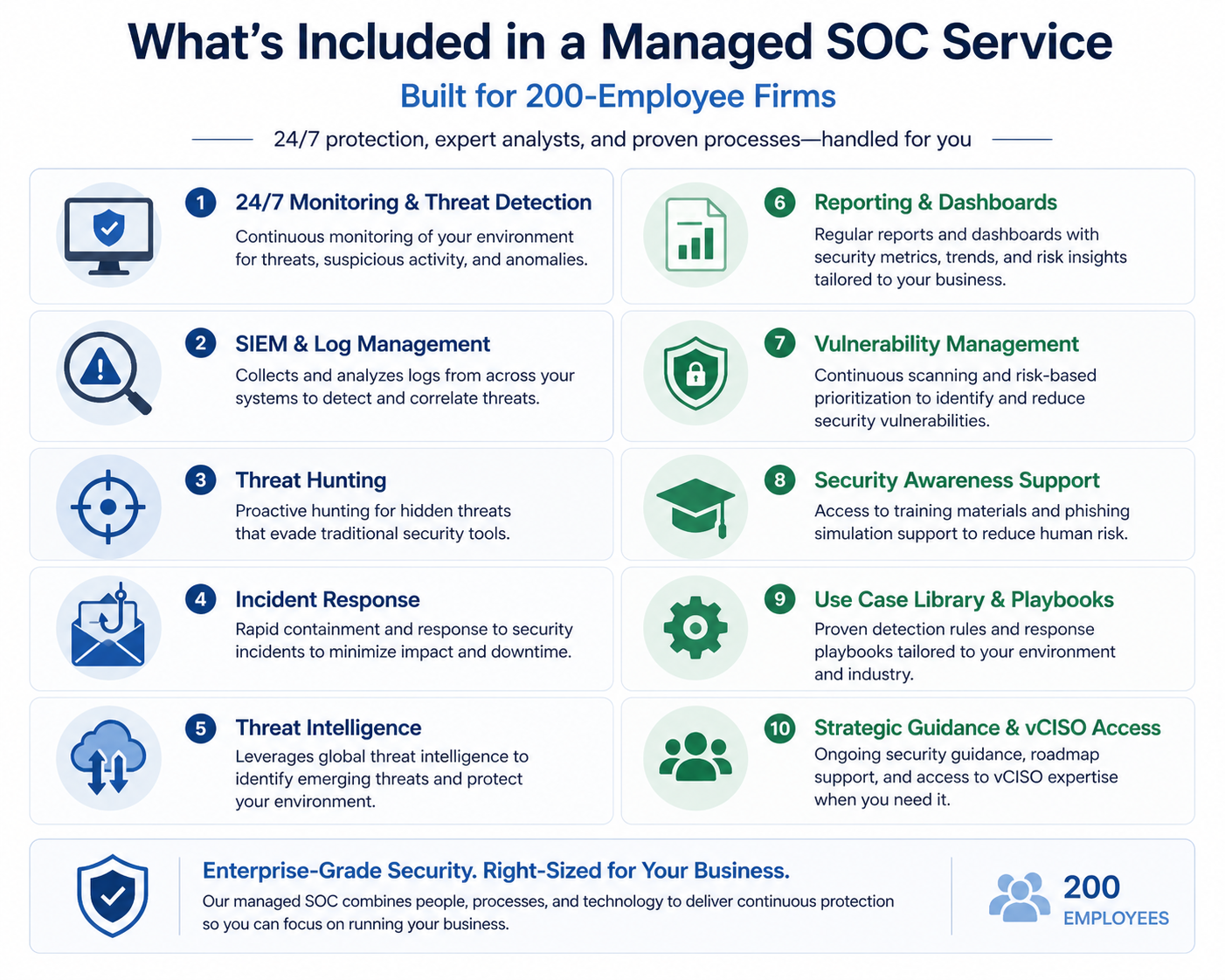
24/7 monitoring of telemetry from your endpoints (EDR), email security, identity (M365/Entra ID logs), and at least one network source (firewall logs or NDR). Alert triage by trained analysts. Incident notification within a defined SLA (typically 15 minutes for high severity). A monthly summary report.
Often included at mid range
Proactive threat hunting based on threat intelligence feeds. Quarterly tuning of detection rules to your environment. Integration with your SIEM if you have one, or a managed SIEM if you do not. Vulnerability scanning. Phishing simulation. A named SOC manager who knows your environment.
Premium add-ons
Incident response retainer with on-site or remote IR team available within hours, not days. Tabletop exercise facilitation. Compliance evidence packaging for SOC 2, ISO 27001, or sector-specific frameworks. Custom dashboards for executive reporting. Threat actor attribution. Most premium services add $2,000 to $5,000 CAD per month on top of the core.
The cost breakdown
For a 200 employee firm in Canada with reasonably standard infrastructure (Microsoft 365, hybrid AD, on-prem servers, cloud workloads on Azure or AWS, a few thousand endpoints across staff and contractors), the cost breaks down approximately as follows.
Tier 1, alert triage only (MDR), $4,500 to $6,500 CAD/month. EDR-focused monitoring, email security alerts, basic identity events. Notifications when something serious happens. No threat hunting, no tuning, no IR retainer. Suitable for firms that already have an internal incident handler and just need eyes on alerts overnight.
Tier 2, comprehensive managed SOC, $7,000 to $9,500 CAD/month. Everything in Tier 1 plus threat hunting, network telemetry monitoring, tuning, monthly executive reporting, and a 60 minute monthly review with the SOC team. Suitable for most firms in the 200 employee range without a dedicated security team.
Tier 3, comprehensive plus IR and compliance, $11,000 to $14,000 CAD/month. Everything in Tier 2 plus IR retainer, tabletop exercises, compliance evidence support, and quarterly tuning. Suitable for firms in regulated industries or those targeting SOC 2 / ISO certification.
In-house comparison
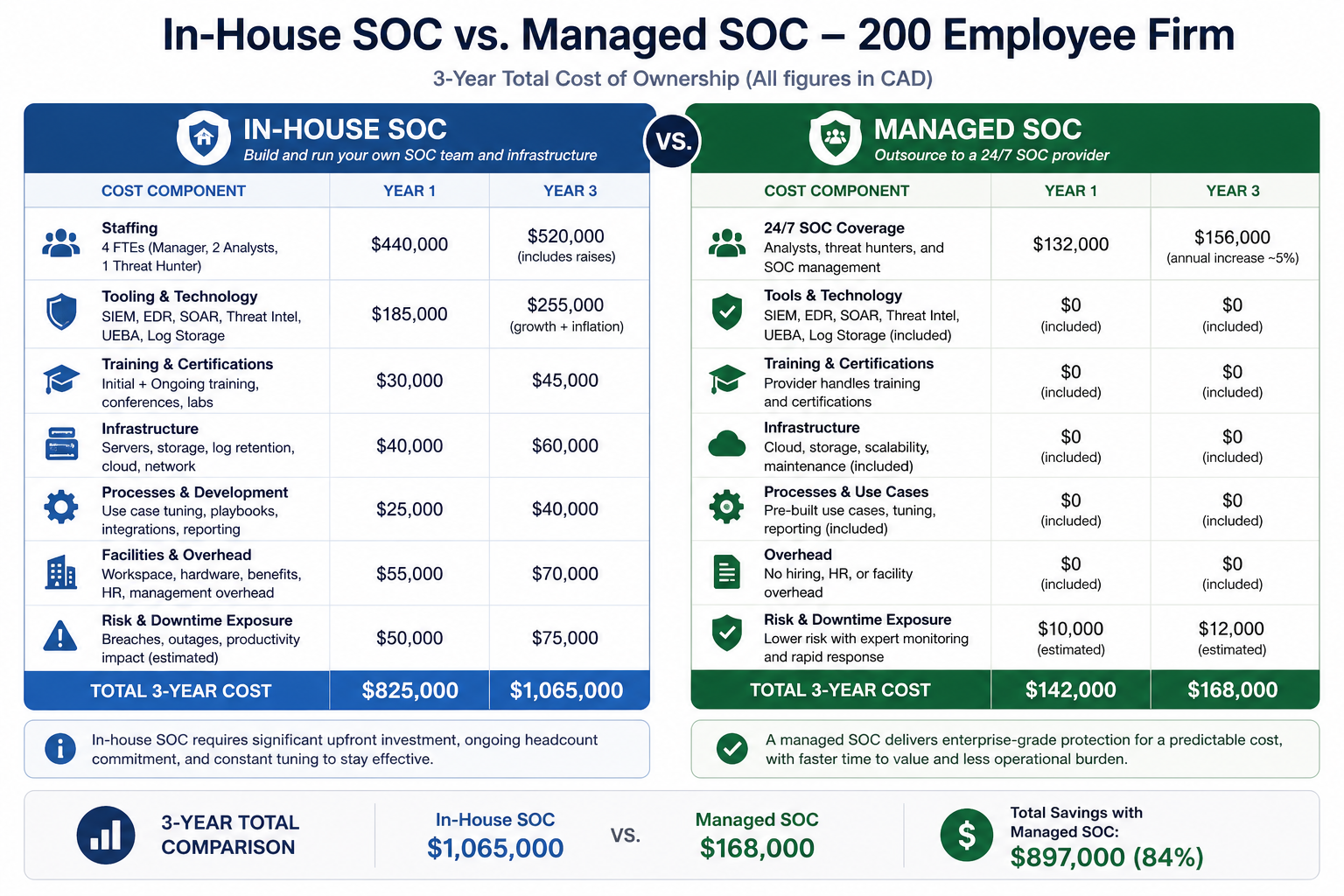
Building an in-house SOC for 24/7 coverage at a 200 employee firm requires a minimum of three security analysts (to cover three shifts) plus a SOC manager. In Canada, fully loaded compensation for SOC analysts in 2026 is roughly $90,000 to $130,000 CAD each, and a SOC manager is $140,000 to $180,000 CAD. That is roughly $440,000 to $570,000 CAD in salaries alone, before tooling.
Add SIEM licensing ($60,000 to $120,000 per year for a firm of this size), threat intelligence feeds ($30,000 to $60,000), training and certifications ($15,000 per analyst per year), and you are at roughly $700,000 to $900,000 CAD per year, plus turnover costs because SOC analysts are hard to retain.
Tier 2 managed SOC at $7,000 to $9,500 per month is $84,000 to $114,000 per year. The in-house option is 7 to 10 times more expensive at this size, and the managed option typically delivers more analyst experience because providers see threats across hundreds of clients.
What to evaluate when comparing quotes
Quotes from MSSPs vary because they are pricing different things. Three questions get to the actual scope.
What telemetry sources are included? EDR only, or EDR plus email plus identity plus network? More sources mean better detection but cost more.
What is the response on a high severity incident? Phone call within 15 minutes? Email within an hour? Hands-on remote remediation? Each is different.
Who tunes the detection rules? The provider, customized to your environment? Or off-the-shelf rules with no customization? The latter generates floods of false positives that erode trust within months.
What we see firms get wrong
Three patterns. First, hiring a low-end MDR thinking it is a full SOC, then being surprised when nobody is hunting threats or tuning. Second, paying for premium services they do not use, such as quarterly tabletops at firms that never actually run them. Third, picking the lowest quote without evaluating the analyst tier behind it. SOC providers vary enormously in analyst experience, and the cheap providers often run with junior staff who escalate everything to the customer rather than investigating.
FAQ
Can a smaller firm benefit from a managed SOC?
Yes. The math gets even more favorable below 200 employees, because in-house becomes essentially impossible. Pricing for a 50 employee firm is typically $2,500 to $4,500 CAD per month for Tier 2 equivalent.
Should I expect a contract commitment?
Most managed SOC contracts are 12 to 36 months. Shorter terms cost more per month. Negotiate annual price reviews if signing 3-year contracts.
Will my cyber insurance recognize a managed SOC?
Yes, and it often lowers premium. Most insurers now ask whether you have 24/7 monitoring as part of underwriting.
Related posts
- HIPAA Network Segmentation Requirements
- PCI-DSS for Edmonton Retail WiFi
- Hidden Risks of Co-Managed Microsoft 365
If you are evaluating SOC options
If you are building a budget request or comparing MSSP quotes, our team can walk through your environment and give you an honest read on what you actually need versus what providers will try to sell you. Book a 60 minute scoping call and we will help you build the right ask.
Last verified April 2026 by the aaanetworkx security practice.

Cybersecurity Edmonton accounting firms need is sharpened by tax season risk concentration and the way CRA filing windows shape phishing patterns.
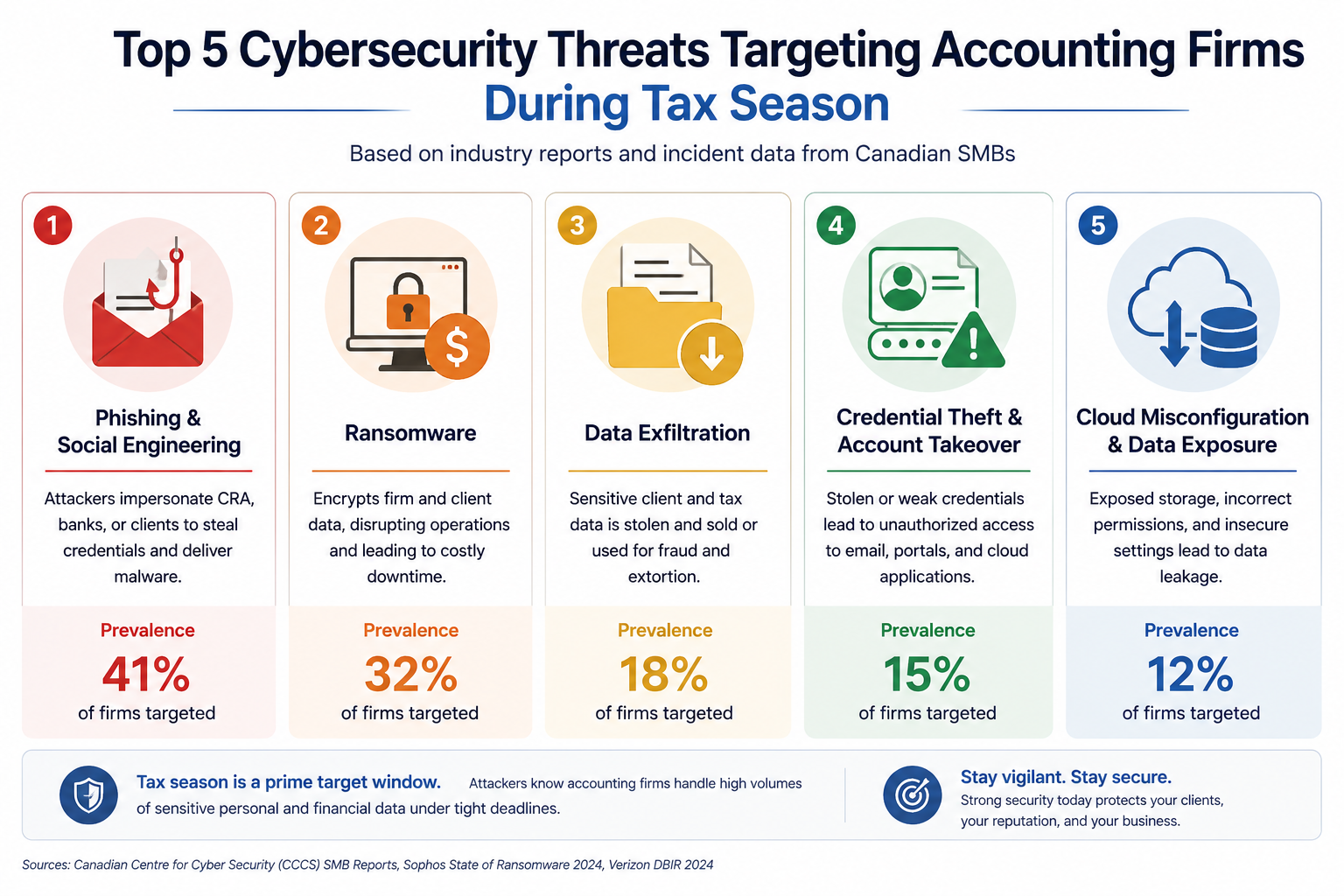
If you run an accounting firm in Edmonton, the data you hold is some of the most sensitive in the city. Tax filings, financial statements, payroll records, business succession plans, personal SINs, banking details. Attackers know this. Tax season specifically. Every year between January and May, accounting firms in Western Canada see a measurable spike in phishing, business email compromise, and ransomware attempts. This post walks through what cybersecurity actually means for an Edmonton accounting practice in 2026, what reasonable looks like, and what it should cost.
The short version. Accounting firms are uniquely targeted because attackers correctly assume the data has high resale value, the firm has time pressure during tax season, and clients will pay to keep filings on schedule. The good news is that the controls that actually stop the attacks are well understood and within budget. The harder work is consistency, especially during the months when staff are working late and clicking faster than they should.
Why accounting firms specifically
Three things make accounting firms unusually attractive to attackers compared to other professional services.
First, the data is high-value across multiple categories. Personal tax data, corporate financial data, banking records, payroll for client companies. A single firm compromise can yield thousands of personal records and dozens of corporate balance sheets. That data sells well on dark web markets and provides leverage for further targeted attacks against your clients.
Second, business email compromise targeting accounting firms has been on the rise. Attackers monitor email for invoice approvals, then send a perfectly timed fake instruction redirecting the payment to their account. We have seen Alberta firms lose between $30,000 and $400,000 to single incidents. The attacker often impersonates a known client.
Third, tax season creates time pressure that increases human error. Late nights, faster decisions, more clicks on emails that look urgent. Attackers know this and time their campaigns to tax season specifically.
What Edmonton accounting firms need
CPA Alberta and CPA Canada have been raising expectations around technology competence and client confidentiality. The CPA Code of Professional Conduct includes confidentiality obligations that extend to electronic data. PIPA adds breach notification timelines for personal information. CRA’s Mandatory Disclosure Rules and audit support obligations add their own data retention and access expectations.
None of these prescribe specific tools. They prescribe outcomes. So the question for a partner is not “what does my regulator require?” but “what controls would I be embarrassed to be missing if a breach happened tomorrow?”
The baseline
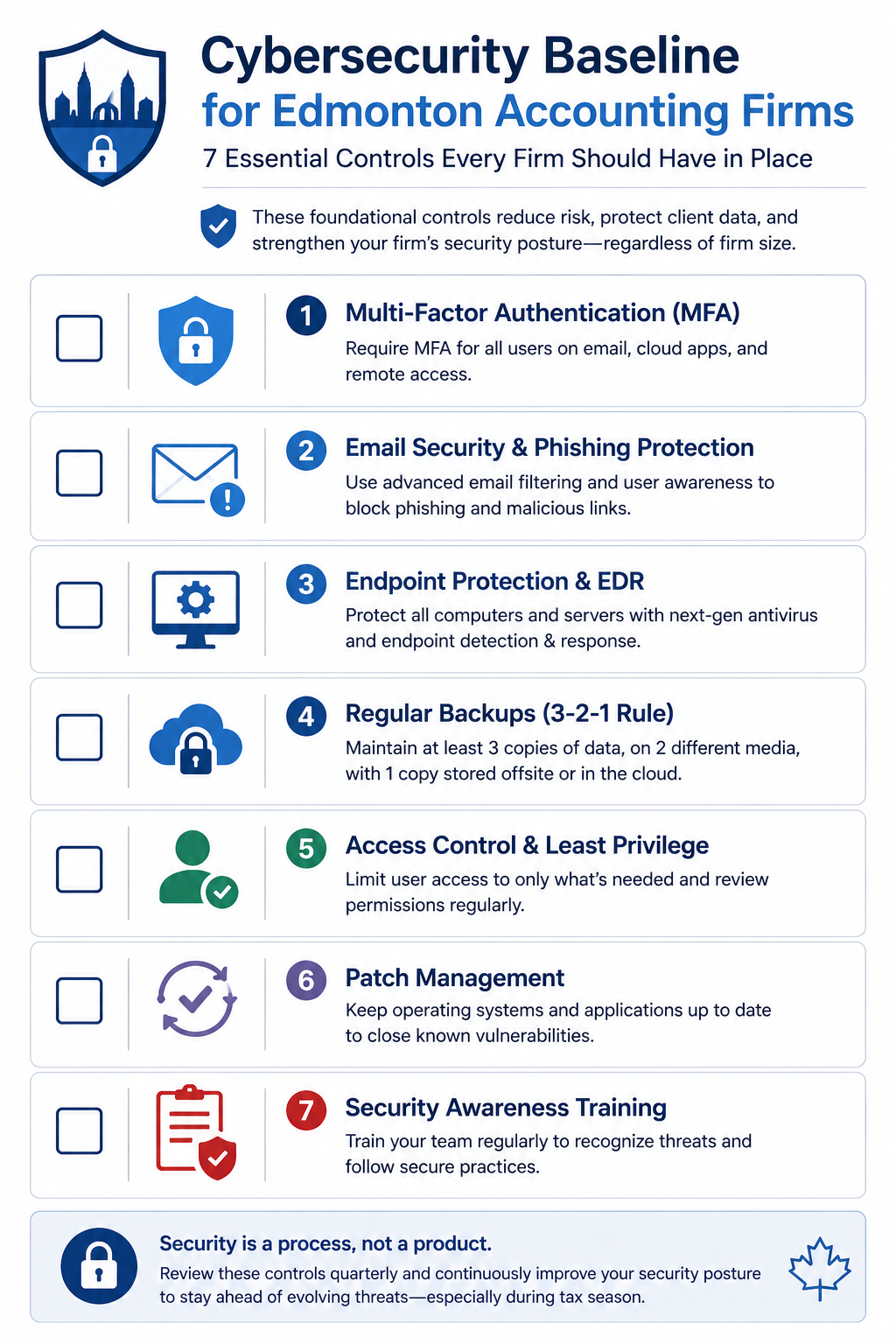
1. MFA on every account
The single highest impact control. Microsoft 365, accounting software (CaseWare, TaxCycle, Profile, etc.), banking portals, remote access. No exceptions for senior partners. Attackers know exactly which accounts are excluded.
2. EDR on every device
Microsoft Defender for Endpoint, SentinelOne, or CrowdStrike. Detects ransomware in progress and stops it before it spreads. Every laptop, every desktop, every server. Including the laptop the senior partner takes home.
3. Email security gateway with link sandboxing
Native M365 email security is good but not enough during tax season. Add a layer that opens every link in a sandbox before delivery and that flags BEC patterns. This is the single biggest defense against the impersonation attacks targeting your firm during deadline weeks.
4. Daily encrypted backups with offsite copy
Tested quarterly. Untested backups have failed at the worst possible moment for at least three Alberta accounting firms I know of, including during tax season.
5. Written incident response plan
Two pages. Who calls who, what gets disconnected, who notifies clients, who notifies CPA Alberta and CRA if applicable, where the offline backups live. Written before the incident, not during.
6. Annual phishing simulation
Send a simulated phishing email to every staff member. Train the people who click. Make it slightly harder during tax season since that is when real attacks intensify.
7. Vendor and client portal hygiene
If you use a client portal for document exchange, audit it. Confirm MFA is enforced, access is removed when client engagements end, and uploads are scanned. The same for any practice management or tax software portal that staff log into externally.
What it actually costs
For a 10 to 30 person Edmonton accounting practice, the entire baseline runs roughly $90 to $160 per user per month, all in. That covers M365 Business Premium licensing, EDR, email security, backup tooling, and the managed service relationship to run the phishing simulation, quarterly access review, and tax season hardening for you.
Compare to incident cost. The most recent IBM Cost of a Data Breach Report puts financial services around USD 5.9 million globally. For an Alberta accounting firm, real-world incidents we have seen range from $25,000 (small firm, paid ransom plus recovery) to over $300,000 (mid-sized firm, did not pay, took five weeks to recover, lost three clients). None of those numbers include reputational damage or potential CPA Alberta complaints.
What we see firms get wrong
Three patterns repeat. First, partial deployments. MFA on most accounts, EDR on most laptops. The gap is always where the attacker enters. Second, the IT generalist trap. Many firms rely on a friendly local IT generalist who is good at fixing printers but has never investigated a breach. Cybersecurity is a different skill set. Third, tax season fatigue. Controls get bypassed in March because someone wanted to move faster. The bypass becomes permanent. Schedule a review of all temporary exceptions every May.
FAQ
Does cyber insurance cover ransomware payments for accounting firms?
Sometimes, but coverage has tightened. Most insurers require evidence of MFA, EDR, and tested backups before quoting, and many exclude ransomware payments entirely if those controls are missing.
Are cloud-based accounting platforms (Xero, QBO, etc.) safer?
The platform handles its own infrastructure security. Your accounts on it are still your responsibility. MFA, access reviews, and the controls above all still apply.
How quickly can a baseline be implemented before tax season?
For a firm starting near zero, the full baseline takes 30 to 45 days. Start in November or December for next tax season. Starting in February is too late.
Related posts
- Cybersecurity for Edmonton Law Firms
- PCI-DSS for Edmonton Retail WiFi
- Managed IT Edmonton Dental Practices
If you are a partner reading this
Tax season is six months away. Now is the right time to assess where your firm stands. Our team works with several Edmonton accounting practices and we can do a focused 90 minute assessment that produces a one-page priority list, no commitment.
Book a free 90 minute cybersecurity assessment for your accounting firm. We will come to your office, walk through the seven controls above with whoever you want in the room, and leave you with a written priority list.
Last verified April 2026 by the aaanetworkx cybersecurity practice. Edmonton, Alberta.
“`html
Cisco Meraki solutions help businesses simplify network management, improve security, and reduce operational complexity with cloud-managed infrastructure that works for growing organizations.
Cisco Meraki deployments for Edmonton businesses in 2026 are becoming less about “nice to have centralized management” and more about operational survival. Hybrid work, rising ransomware attacks, remote branch offices, and growing compliance requirements have pushed many Alberta organizations away from traditional networking toward cloud-managed infrastructure that can actually be monitored and secured consistently.
If you are an IT manager, business owner, or operations director in Edmonton, chances are you have already experienced at least one of these problems in the last years:
- WiFi outages no one could diagnose remotely
- VPN complaints from remote employees
- Aging firewalls with expired support
- Multiple office locations managed separately
- No visibility into network performance
- Security gaps caused by inconsistent configurations
That is exactly where Cisco Meraki has gained traction across Edmonton businesses, professional services firms, healthcare clinics, warehouses, retail chains, and multi-site organizations.
Why businesses are moving to Cisco Meraki
Three things are driving Meraki adoption across organizations.
Firstly, IT teams are stretched thin
Many small and mid-sized businesses have one or two internal IT staff supporting everything: Microsoft 365, user support, printers, security, networking, remote workers, and cloud systems. Traditional networking environments require separate management interfaces, manual firmware updates, command-line troubleshooting, and inconsistent monitoring. Meraki centralizes these into a single dashboard accessible from anywhere. For businesses without a dedicated network engineer, this is a major operational advantage.
Secondly, hybrid work changed network requirements
Before 2020, most businesses designed networks around office-based users. That model is gone. Now organizations need secure remote VPN access, reliable wireless coverage, cloud application visibility, multi-site connectivity, centralized policy management, and faster troubleshooting. Cisco Meraki was designed around cloud-managed infrastructure from the beginning, which made it particularly effective for distributed environments.
Thirdly, cybersecurity expectations increased
Cyber insurance providers and compliance frameworks increasingly expect businesses to maintain secure remote access, network segmentation, multi-factor authentication, event logging, device visibility, firmware patching, and guest WiFi isolation. Older unmanaged or partially managed networks often struggle to meet those expectations consistently. Meraki simplifies many of these controls through centralized security policies and automated management.
What Cisco Meraki actually includes
Many businesses think Meraki is “just WiFi.” It is much broader than that.
Meraki MX Security Appliances
These are cloud-managed firewalls and SD-WAN devices providing site-to-site VPN, remote VPN access, content filtering, intrusion detection and prevention, traffic shaping, application visibility, WAN failover, and security event logging. For businesses with multiple offices, the Auto VPN feature is one of the biggest advantages because branch offices can securely connect with minimal manual configuration.
Meraki MR Wireless Access Points
Enterprise wireless access points managed entirely through the dashboard. Key benefits include centralized WiFi management, guest WiFi isolation, usage analytics, fast roaming, remote troubleshooting, RF optimization, and security policy enforcement. We regularly see organizations replace aging consumer-grade wireless systems with Meraki and immediately reduce support tickets related to dropped connections and inconsistent coverage.
Meraki MS Switches
Cloud-managed switches with remote port configuration, VLAN management, PoE support for phones and APs, port monitoring, device identification, and automated alerts. For small IT teams, being able to remotely troubleshoot a switch port without driving across Edmonton is a major operational improvement.
Meraki Systems Manager
Endpoint and mobile device management integrated into the same ecosystem, allowing organizations to manage laptops, mobile devices, tablets, security policies, application deployment, and device compliance. For organizations already using Microsoft Intune, Meraki Systems Manager is not always necessary, but for smaller businesses wanting simpler management, it can be effective.
The cybersecurity advantage of Meraki
Meraki is not a complete cybersecurity solution by itself, but it significantly improves network security posture when configured properly.
Network visibility
One of the biggest problems during incidents is not knowing what devices exist on the network. Meraki provides visibility into connected devices, bandwidth usage, suspicious traffic, application usage, rogue access points, and failed login attempts. That visibility matters during both troubleshooting and security investigations.
Network segmentation
Many ransomware incidents spread laterally because internal networks are flat. Meraki makes segmentation easier by allowing businesses to separate guest WiFi, corporate devices, VoIP phones, security cameras, IoT devices, and server infrastructure. Segmentation limits the blast radius if a device becomes compromised.
Secure remote access
Remote VPN access remains one of the most targeted entry points for attackers. Meraki supports MFA integration, secure client VPN, identity-based policies, and centralized access control. For businesses still relying on outdated VPN appliances, upgrading remote access security is often one of the fastest risk reductions available.
What businesses usually get wrong
Three patterns appear repeatedly during network assessments.
Mixing enterprise and consumer hardware
A business may have one enterprise firewall, consumer WiFi routers, unmanaged switches, and random ISP equipment. The result is inconsistent security and almost impossible troubleshooting. Standardization matters more than most businesses realize.
Poor wireless design
Access points are often installed based on convenience instead of coverage planning. Common issues include too few access points, APs installed in poor locations, channel overlap, signal interference, and warehouse coverage gaps. Even good hardware performs poorly without proper design.
No monitoring or alerting
Many organizations only discover network issues after users complain. Meraki’s centralized alerts and monitoring reduce downtime significantly because problems are identified earlier.
What a typical deployment costs
For small and mid-sized businesses, a basic Meraki deployment cost usually depends on number of locations, firewall requirements, wireless coverage needs, licensing, switching infrastructure, and cabling requirements. Meraki licensing is subscription-based, which some organizations dislike initially, but it includes centralized cloud management, firmware updates, and ongoing platform access.
The real ROI
The biggest return usually comes from operational efficiency, not hardware savings. Organizations typically reduce troubleshooting time, on-site IT visits, network downtime, VPN complaints, wireless support tickets, and configuration inconsistencies. For businesses with small IT teams, those operational gains often justify the investment quickly.
FAQ
Is Cisco Meraki good for small businesses?
Yes. Meraki is widely used by small and mid-sized businesses because it simplifies management and reduces the need for advanced networking expertise internally.
Does Meraki require a network engineer?
Not necessarily. Basic management is significantly easier than traditional CLI-heavy networking environments, though proper design and deployment still benefit from experienced networking professionals.
Can Meraki replace traditional VPNs?
In many cases, yes. Meraki supports both remote access VPN and site-to-site VPN connectivity with centralized management.
Is Meraki secure enough for professional services firms?
When properly configured, yes. Many law firms, healthcare clinics, accounting firms, and financial organizations use Meraki infrastructure alongside broader cybersecurity controls.
What happens if the internet goes down?
The network continues operating locally, but cloud dashboard management becomes temporarily unavailable until connectivity returns.
If you are considering a Meraki deployment
Most organizations already know where their network frustrations are. The real question is whether the current infrastructure can support the business reliably over the next three to five years. A focused network assessment usually identifies issues quickly: wireless coverage gaps, VPN bottlenecks, security weaknesses, aging infrastructure, segmentation problems, and visibility limitations.
Our team works with businesses deploying Cisco Meraki environments for secure networking, wireless optimization, remote access, and centralized infrastructure management. Book a network assessment and wireless review for your office or multi-site environment. We will review your current infrastructure, identify performance and security gaps, and provide a practical upgrade roadmap you can implement with or without us.
Related posts

Cybersecurity Edmonton law firms need in 2026 has tightened around three control sets the Law Society and your insurer both expect.
If you are a managing partner at an Edmonton law firm and you have been thinking about cybersecurity lately, it is probably because you read about another firm getting hit. Probably ransomware. Probably a firm of similar size to yours. Probably last quarter or last month. The headlines have been steady for two years, and the trend is not slowing down. This post walks through what actually matters for a small to mid sized Edmonton law firm in 2026, what the threats really look like, what the Law Society is starting to expect, and what a reasonable baseline costs.
The short version. Law firms are a top three target sector for ransomware in Canada because attackers correctly assume firms have the budget to pay, the time pressure of client deadlines, and a low tolerance for public reputational damage. The good news is that the controls that actually stop the attacks we see are not exotic. They are well understood, available off the shelf, and within the budget of a 10 person firm. The harder part is implementing them consistently and keeping them in place. That is the work.
Why law firms specifically
Three things make law firms unusually attractive to attackers compared to other professional services.
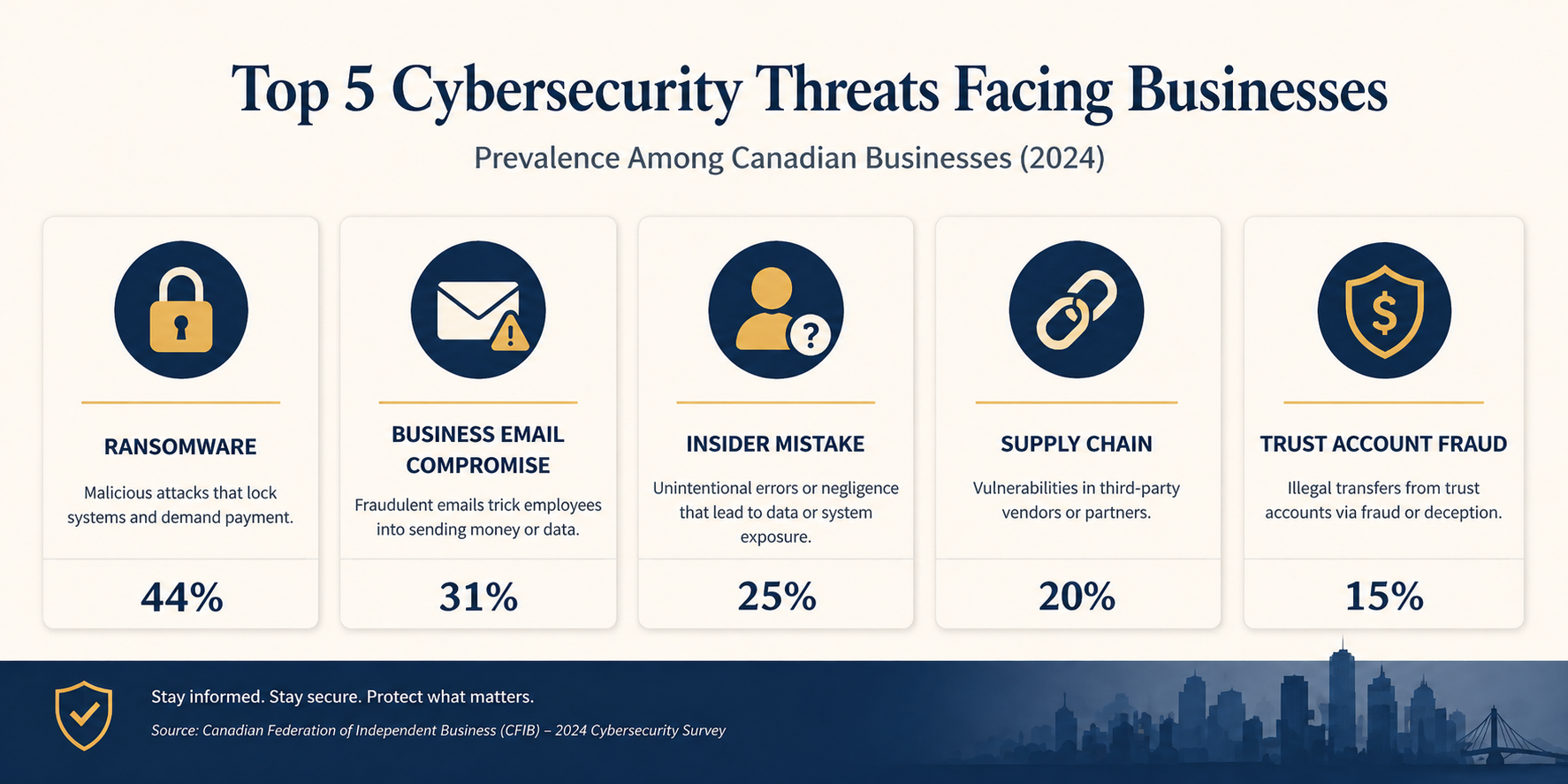
First, the data is high value. M&A files, settlement documents, IP filings, divorce records, criminal defence material. All of it commands either ransom value (the firm will pay to keep it from leaking) or direct sale value on dark web markets.
Second, the trust account makes you a fraud target. Wire transfer fraud schemes targeting real estate closings have hit dozens of Alberta firms in the last three years. Attackers monitor email for closing dates, then send a perfectly timed fake instruction to redirect funds. Settled cases in Canada show losses ranging from $80,000 to over $1 million per incident.
Third, firms have client deadlines and court dates. Attackers know that downtime during a trial week or a closing window has unique leverage, which raises the price you will pay to recover quickly. Together, these three factors make legal one of the most attacked verticals in Canada.
What Edmonton law firms actually need
The Law Society of Alberta has been steadily increasing its expectations around technology competence and client confidentiality. The Code of Conduct already obligates lawyers to take reasonable steps to protect confidential information, and recent guidance has been more specific about what reasonable means in a digital context. PIPA (Alberta’s Personal Information Protection Act) adds breach notification obligations once personal information is involved, with timelines measured in days, not weeks. FINTRAC compliance adds further reporting obligations for any firm handling real estate trust funds.
None of these regulations dictate specific tools. They dictate outcomes. So the question for a partner is not “what does the Law Society require?”, it is “what controls would I be embarrassed to be missing if a breach happened tomorrow and the regulator asked?” That answer is more or less the same for every firm regardless of firm size.
The baseline that catches 90 percent of real attacks
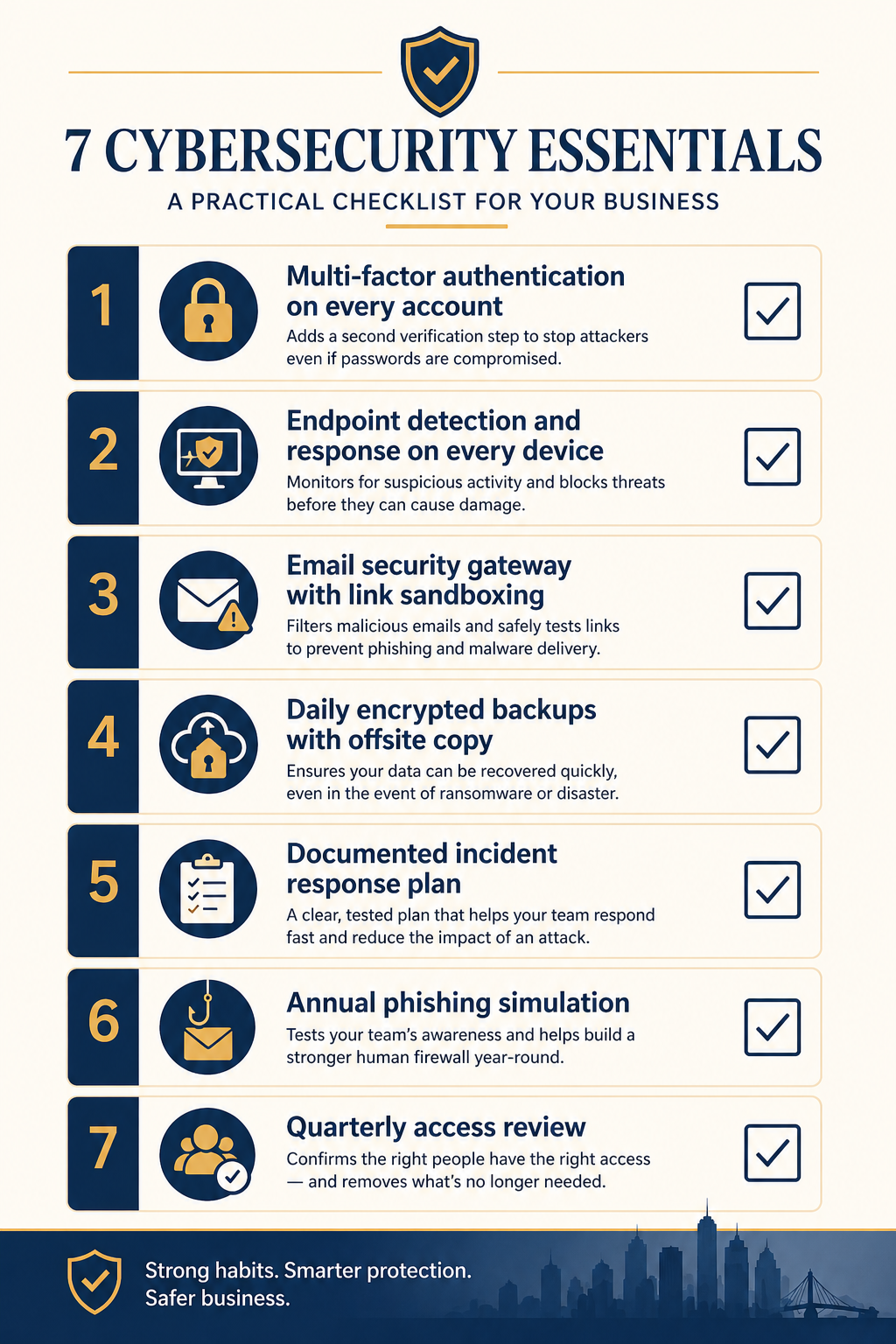
1. Multi-factor authentication on every account, no exceptions
The single highest impact control. MFA on Microsoft 365, on your practice management software, on remote access, on the trust accounting system. The exception list should be empty. We see firms that have it on most accounts but excluded the senior partner because she finds it annoying. Attackers know exactly which accounts get exclusions and target them first.
2. Endpoint detection and response on every device
The next generation of antivirus. Tools like Microsoft Defender for Endpoint, SentinelOne, or CrowdStrike that actually detect and stop ransomware in progress, not just match known signatures. Every laptop, every desktop, every server. Including the one in the back office that nobody touches.
3. Email security gateway with link sandboxing
The native Microsoft 365 spam filter is good but not enough. Add a layer that opens every link in a sandbox before delivering and that flags business email compromise patterns. This is the single biggest defence against the wire transfer fraud schemes targeting trust accounts.
4. Daily encrypted backups with an offsite copy
If ransomware does get in, backups are what saves you. Daily, encrypted, with one copy that is physically or logically offsite (immutable cloud storage works). Test the restore quarterly. Untested backups have failed at the worst possible moment for at least three Alberta firms I know of.
5. A written incident response plan
Two pages, max. Who calls who when something goes wrong, what gets disconnected, what gets reported and to whom (Law Society, PIPA, insurer, client, FINTRAC if applicable), where the offline backups live. The plan does not need to be sophisticated. It needs to exist on paper, before the incident, so nobody is making decisions in panic.
6. Annual phishing simulation
Once a year, send a simulated phishing email to every staff member. Track who clicks. Train the people who click. The point is not to shame anyone, it is to keep awareness fresh and to give you a metric that improves over time. Click rates above 15 percent indicate the firm needs more frequent training.
7. Quarterly access review
Review who has access to what every quarter. Remove access for departed staff (it is shocking how often this gets missed for months). Tighten permissions on shared drives so junior staff do not have read access to senior partner files they should not see. This is mostly a process discipline, not a technology investment.
What it actually costs
For a 10 to 25 person Edmonton firm, the entire baseline above runs roughly $80 to $150 per user per month, all in. That covers Microsoft 365 Business Premium licenses (which include MFA and Defender), an email security gateway, backup tooling, the EDR layer, and a managed service relationship that runs the phishing simulation and quarterly access review for you.
Compare that to the cost of an actual incident. The most recent IBM Cost of a Data Breach Report puts the average total cost of a breach in the legal sector around USD 4.5 million globally. For an Alberta firm, the local reality is smaller but still painful. Settled ransomware incidents we have seen at Edmonton-area firms range from $40,000 (small firm, paid ransom plus recovery) to over $400,000 (mid sized firm, did not pay, took six weeks to recover, lost two clients). Those numbers do not include reputational damage or potential Law Society discipline.
The math is rarely close. Spending $20,000 a year to avoid a $200,000 incident with even a 20 percent annual probability is just risk management arithmetic. Most partners I talk to have not done this calculation explicitly, and most are surprised at how favourable it is.
What we see firms get wrong
Three patterns repeat. First, partial deployments. MFA on most accounts, EDR on most laptops, backups on most servers. The gap is always where the attacker enters. Coverage matters more than sophistication. Second, the IT generalist trap. Many firms rely on a friendly local IT generalist who is good at fixing printers but has never investigated an incident. Cybersecurity is a different skill set, and the gap shows up under pressure. Third, the once-and-done mindset. Firms install the tools, check the box, and never review them again. Attackers do not stop evolving, so neither can your defences.
FAQ
Does cyber insurance cover ransomware payments?
Sometimes, but coverage has tightened significantly. Most insurers now require evidence of MFA, EDR, and tested backups before they will quote, and many exclude ransomware payments outright if those controls are missing. Insurance is a backstop, not a substitute for the baseline.
We use a cloud practice management system, are we covered?
The cloud system handles its own infrastructure security, but your accounts on it are still your responsibility. MFA on every login, regular access review, and the email and endpoint controls above all still apply. Cloud does not transfer risk, it just changes which parts you control.
How fast can a baseline be implemented?
For a firm starting near zero, a competent team can deploy the full baseline above in 30 to 45 days without disrupting practice. For a firm that already has Microsoft 365 Business Premium, often two to three weeks.
Related posts
- Cybersecurity for Edmonton Accounting Firms
- HIPAA Network Segmentation Requirements
- PCI-DSS for Edmonton Retail WiFi
If you are a partner reading this
You probably already know your firm has gaps. The question is what is sitting open right now and how exposed you are to the specific attack patterns hitting Alberta firms this year. Our team works with several Edmonton firms in your size range and we can do a focused 90 minute assessment that produces a one page priority list, no commitment.
Book a free 90 minute cybersecurity assessment for your firm. We will come to your office, walk through the seven controls above with whoever you want in the room, and leave you with a written priority list you can act on with or without us.
Last verified April 2026 by the aaanetworkx cybersecurity practice. Edmonton, Alberta.