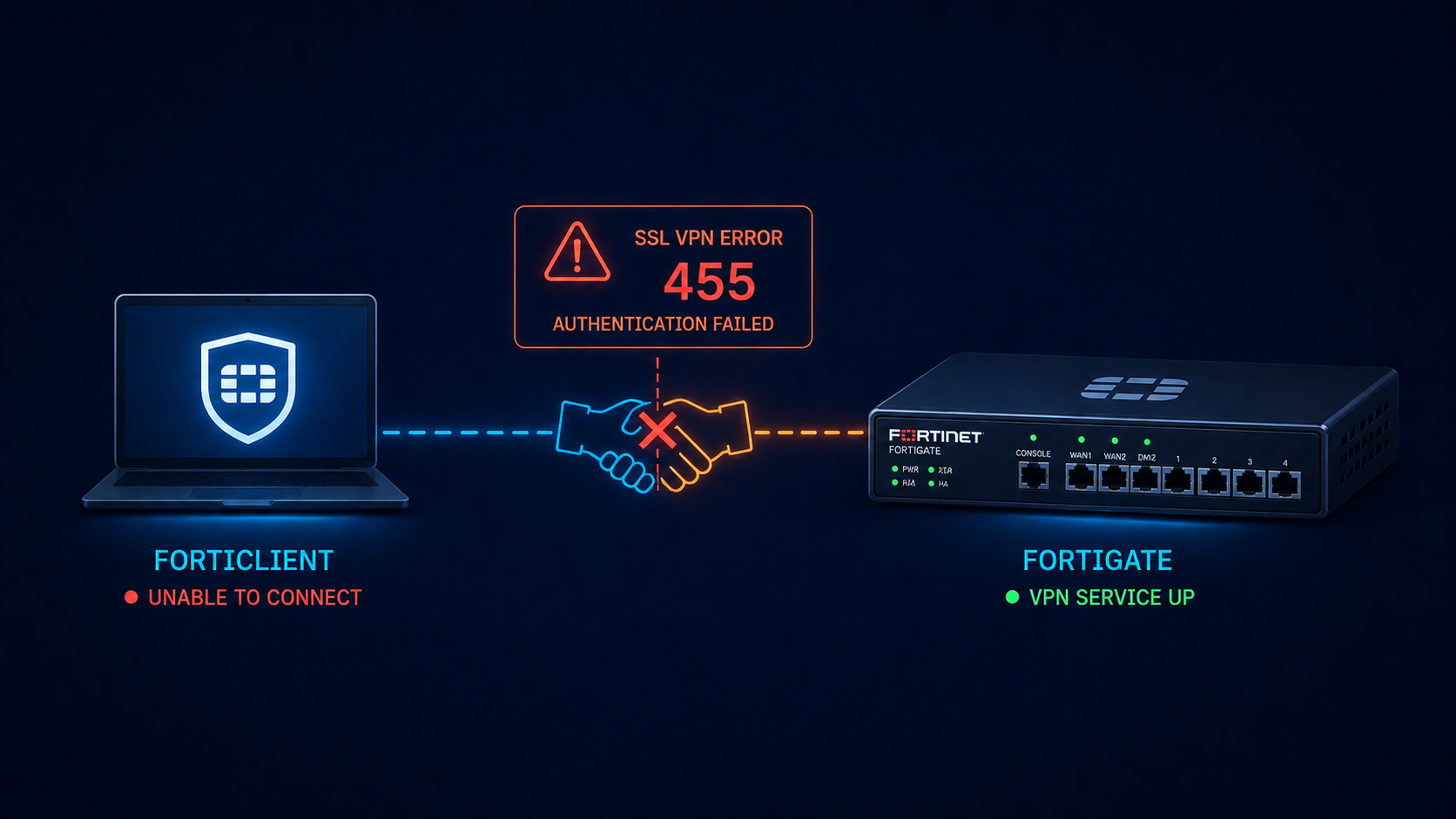
You opened FortiClient, hit Connect, and got back error -455 with no useful detail. The user cannot work, the helpdesk ticket is in your queue, and you need to fix it before the morning standup. This post walks through the five real causes of FortiGate SSL VPN error -455 ranked by frequency and the fix for each.
The short version. Error -455 is FortiClient’s way of saying authentication did not complete. The TCP connection succeeded, the SSL handshake started, and then somewhere during user authentication the negotiation failed. The error code is generic on purpose because Fortinet does not want to leak information to attackers about which step failed. Most of the time it is one of certificate validation, RADIUS reachability, MFA timing, or a group policy mismatch where the user does not have permission to connect.
The fastest path to a fix is checking the FortiGate’s SSL VPN log on the firewall side. The log there shows the actual authentication failure reason that the client side does not see, before any handshake fails.
What this error means
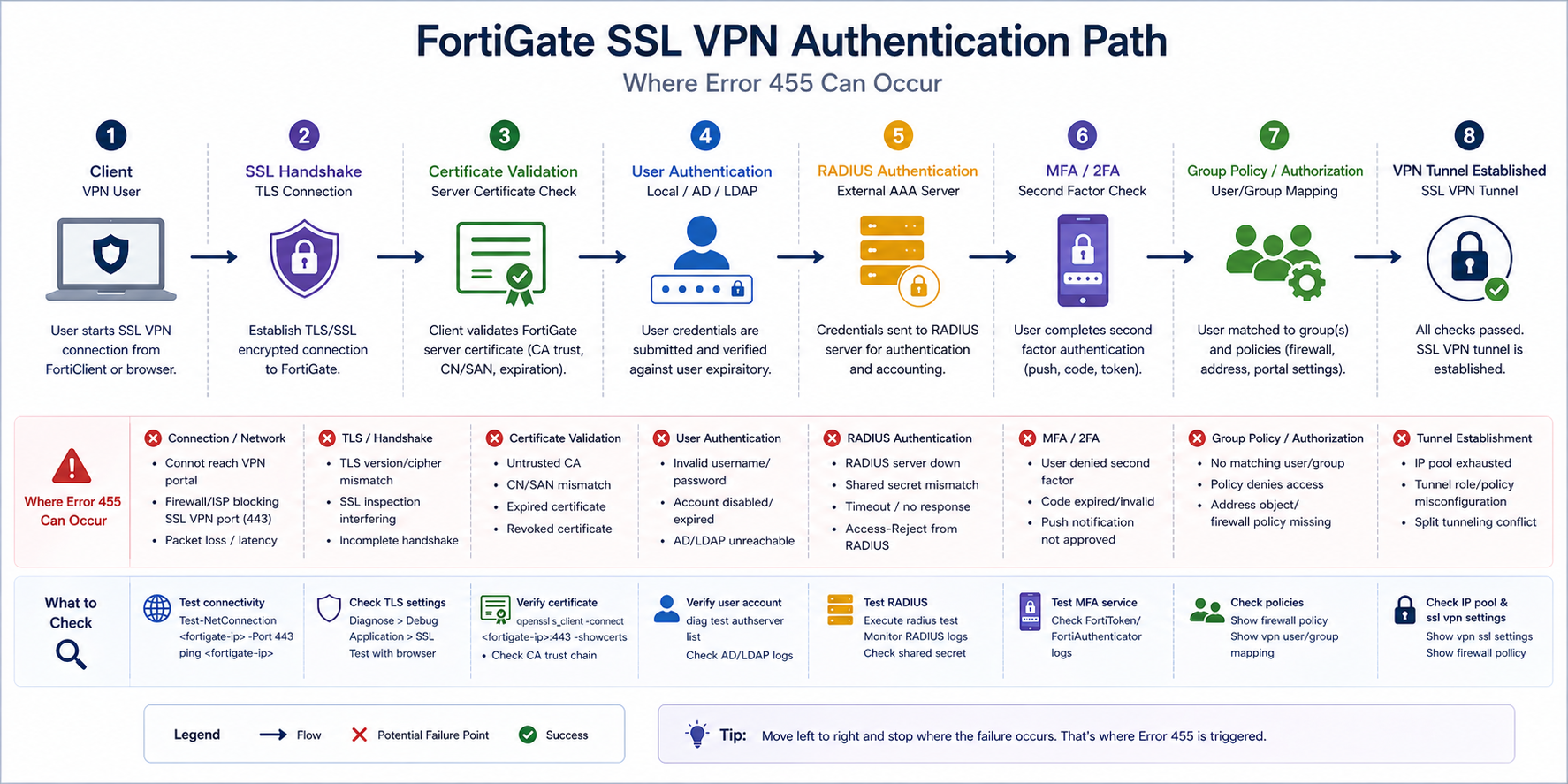
FortiClient surfaces a small set of generic error codes for SSL VPN failures, and -455 specifically means “authentication did not complete.” The actual root cause sits in the FortiGate logs at Log & Report → VPN Events. Always start there. The client error tells you something failed. The firewall log tells you what.
Verified against current Fortinet FortiOS 7.x documentation, accessed April 2026.
The five causes, ranked
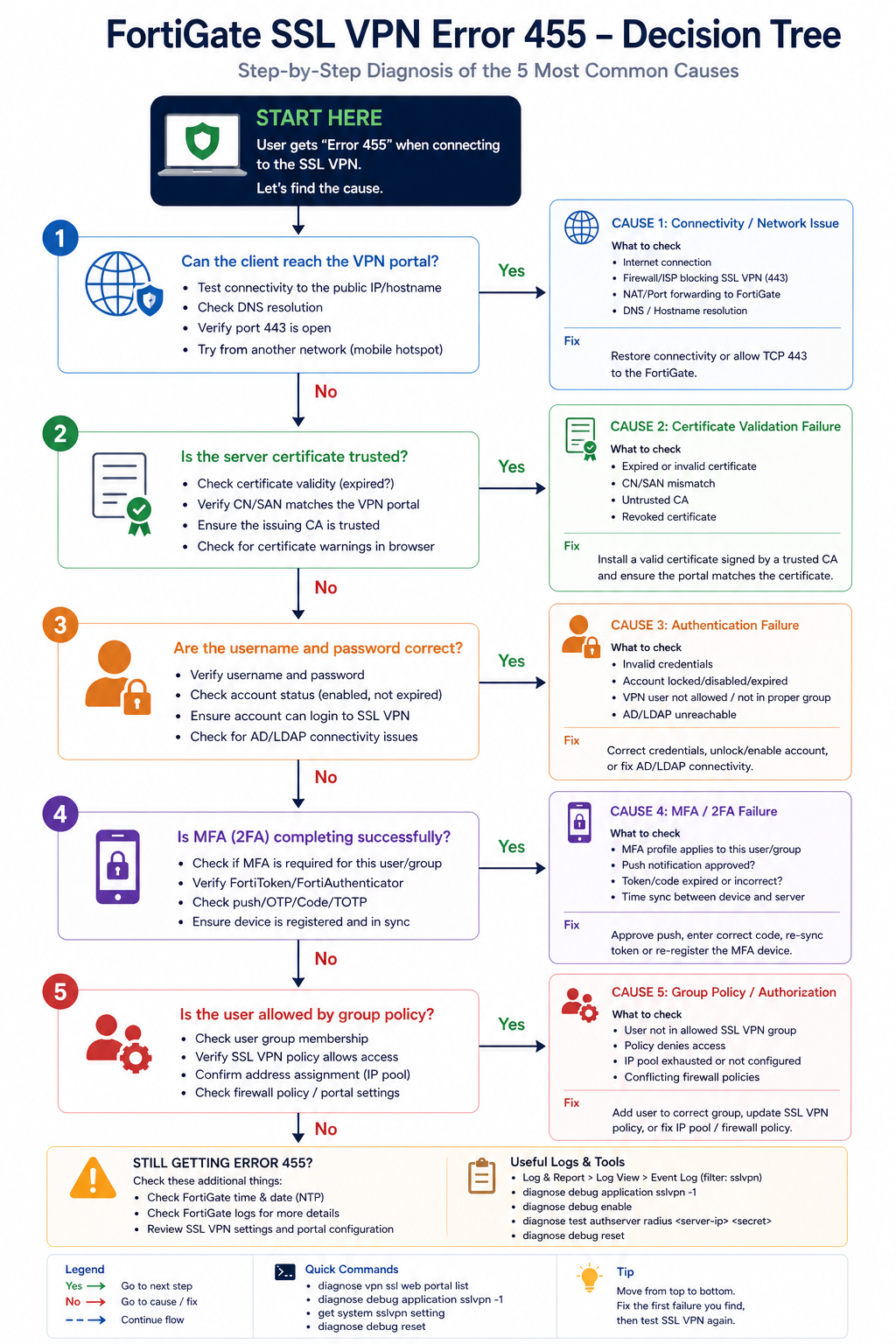
Cause one, certificate validation failure, around 30 percent of cases
The FortiGate SSL VPN portal certificate is expired, untrusted by the client, or has a hostname mismatch. FortiClient strict mode rejects the connection. Often happens after a certificate renewal where the new cert was installed but FortiClient was deployed with cert pinning to the old one.
Verify by visiting the SSL VPN web portal in a regular browser. If the browser shows a certificate warning, fix the certificate. Use a publicly trusted CA (Let’s Encrypt, DigiCert, etc.) or push your internal CA to client trust stores.
Cause two, RADIUS server unreachable or slow, around 25 percent of cases
The FortiGate authenticates users via RADIUS to AD or another directory. If the RADIUS server is down or responses are too slow, FortiGate times out the authentication and FortiClient sees -455.
Verify on the FortiGate with diagnose test authserver radius [server-name] [user] [pass]. If the test fails, fix RADIUS reachability. Common issues: firewall rule blocking UDP 1812, RADIUS shared secret drift, or the AD server being overloaded.
Cause three, MFA timing or token issue, around 20 percent of cases
Multi-factor authentication is enforced on the SSL VPN, the user did not approve the push or enter the OTP in time, and FortiGate rejected the auth. This often surfaces as -455 even though the underlying cause is MFA timeout.
Verify in the FortiGate VPN events log. If the event shows MFA timeout or denial, the fix is user-side (approve faster, enter OTP correctly) or configuration-side (extend the MFA timeout window if too aggressive).
Cause four, user not in allowed group, around 15 percent of cases
The user authenticates correctly but is not a member of the AD/LDAP group the FortiGate’s SSL VPN policy requires. The error surfaces as -455 because authorization failed even though authentication succeeded.
Verify by checking the user’s group membership in AD and the FortiGate SSL VPN policy’s matched groups. Add the user to the right group and retry.
Cause five, FortiClient version incompatibility, around 10 percent of cases
An older FortiClient version is incompatible with the FortiOS version on the firewall, or vice versa. After a firewall upgrade, older clients sometimes fail with -455 because of TLS or feature mismatches.
Verify the FortiClient version against the FortiOS compatibility matrix. Upgrade FortiClient if behind. Avoid running older clients indefinitely once FortiOS has been upgraded.
What the official documentation does not mention
Fortinet’s KB articles describe -455 in general terms but rarely emphasize that the firewall log is the only place to find the real reason. Many helpdesks debug from the client side first, which costs an hour. Check the firewall log on every -455, every time. Also, FortiGate has a per-user authentication failure log that is rate-limited by default. If you cannot find the failure, increase the log verbosity temporarily on the FortiGate side and retry.
The architectural fix
Organizations that rarely see -455 do four things. First, monitor the SSL VPN portal certificate expiration with alerts at 60, 30, and 7 days. Second, monitor RADIUS server response time so they know when AD authentication is slow before users complain. Third, document the AD groups required for SSL VPN access in the user onboarding playbook so new staff are added correctly. Fourth, standardize FortiClient deployment via configuration management so version drift does not produce mystery -455 incidents.
FAQ
Will reinstalling FortiClient fix it?
Sometimes for the version incompatibility case. Otherwise no, the fix is on the firewall or RADIUS side.
Is -455 the same as -7200 or -8?
No. Different error codes mean different failure points. -455 is auth, -8 is general connection, -7200 is policy. Check the specific code, not just “VPN error.”
Should I switch to IPsec to avoid this?
Not for this issue. IPsec has its own error patterns. Pick SSL or IPsec based on user experience and platform requirements, not because of -455 specifically.
Related posts
VPN issues that keep coming back
If your organization has recurring SSL VPN authentication issues, the underlying cause is usually drift between firewall, AD, and client configuration. Tell us about your environment and we will help you stabilize remote access.
Last verified April 2026 by the aaanetworkx security practice.
HIPAA network segmentation requirements are written as outcomes, not a prescribed tool list, and that is what trips most teams up at audit.
HIPAA’s Security Rule does not tell you what brand of firewall to buy, what VLAN scheme to use, or what network segmentation specifically looks like. It tells you to take “reasonable and appropriate” measures to protect electronic protected health information (ePHI) and leaves you to figure out what reasonable means for your environment. Auditors then come and check whether what you did is, in fact, reasonable. This post walks through what reasonable network segmentation actually looks like in practice, what auditors are checking for, and what we see Edmonton-area healthcare practices get wrong.
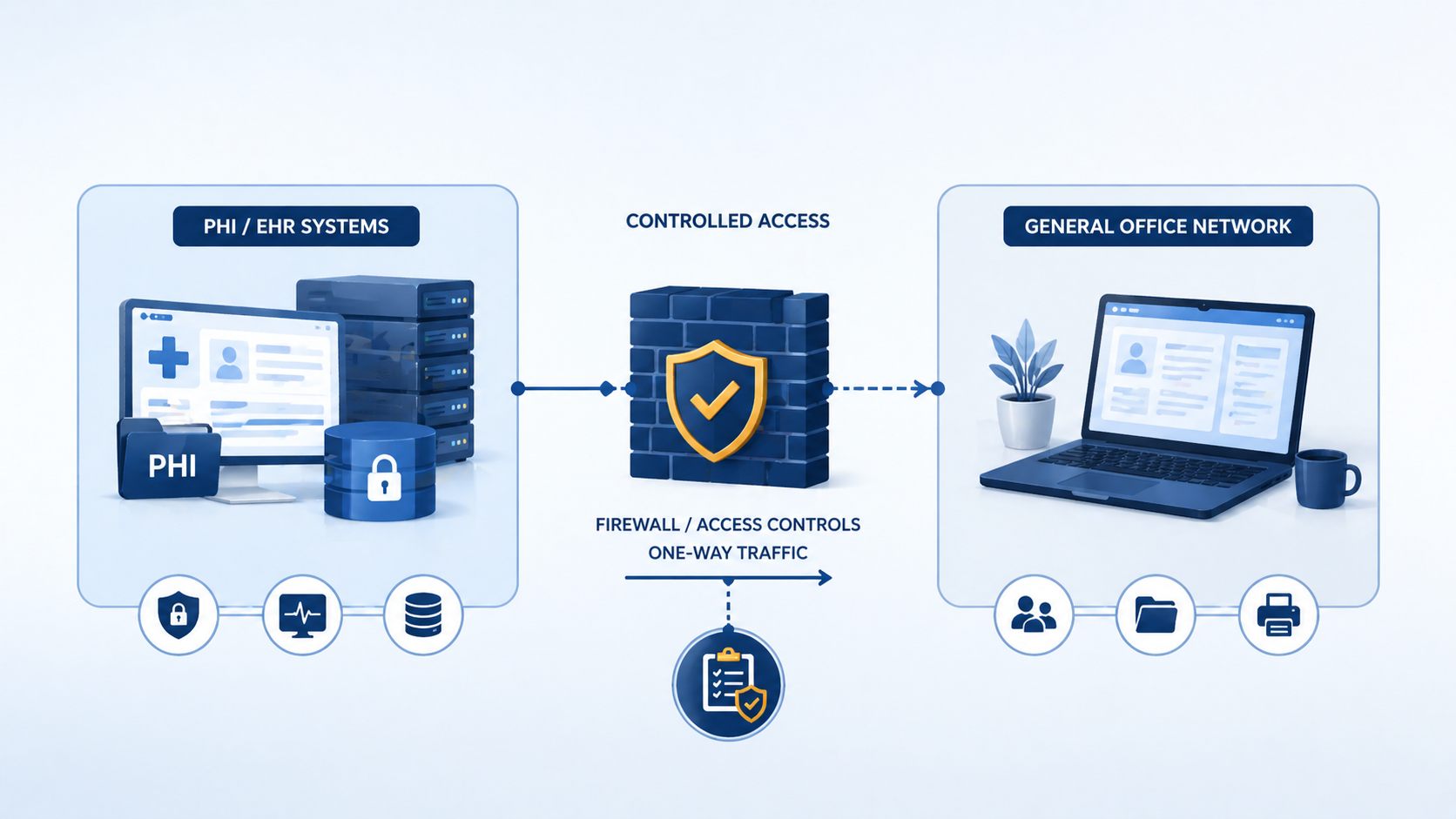
The short version. HIPAA expects you to logically separate systems that handle ePHI from systems that do not, and to have controls between them that prevent or detect unauthorized access. Most reasonable implementations involve at minimum a separate VLAN for ePHI systems, a firewall enforcing access policies between zones, monitoring of traffic between zones, and access controls that limit who can reach the ePHI zone at all. None of this is exotic. It is the same pattern PCI-DSS uses, with healthcare-specific tweaks.
What auditors penalize is not lack of cutting-edge tools. It is lack of evidence. A clinic with a basic firewall and clear documentation often passes an audit. A clinic with sophisticated tools and no documentation often fails.
What HIPAA actually says about network controls
The Security Rule’s technical safeguards (45 CFR 164.312) include access controls, audit controls, integrity protections, person/entity authentication, and transmission security. None of these explicitly say “network segmentation.” But the Risk Analysis requirement (164.308(a)(1)(ii)(A)) requires you to identify and assess potential risks to ePHI, and the Security Management Process requires you to implement security measures sufficient to reduce identified risks to a reasonable level.
For most environments, a flat network where ePHI systems share the same broadcast domain as general office workstations does not pass a competent risk analysis. The risk of lateral movement after a phishing-based compromise of a non-ePHI workstation is too high, and segmentation is the standard mitigation. Auditors expect to see segmentation as the answer to “how have you reduced the risk of unauthorized access to ePHI?”
The practical bar most auditors apply is whether the path from PHI to the general internet has at least two enforced controls between them.
What auditors actually look for
Across HIPAA audits we have supported in the last three years, the consistent themes are these. Auditors want to see a clear inventory of which systems handle ePHI. They want to see those systems on a separate network segment with firewall enforcement at the boundary. They want to see firewall rules that are restrictive (default deny, explicit allow) and documented with business justification. They want logs of traffic crossing the boundary, retained for at least 90 days. They want evidence that the segmentation has been tested, ideally with vulnerability scans run from the general network attempting to reach ePHI systems and being blocked.
What auditors do not require is microsegmentation, NAC, or any specific commercial product. They require evidence that the controls you implemented actually work as documented.
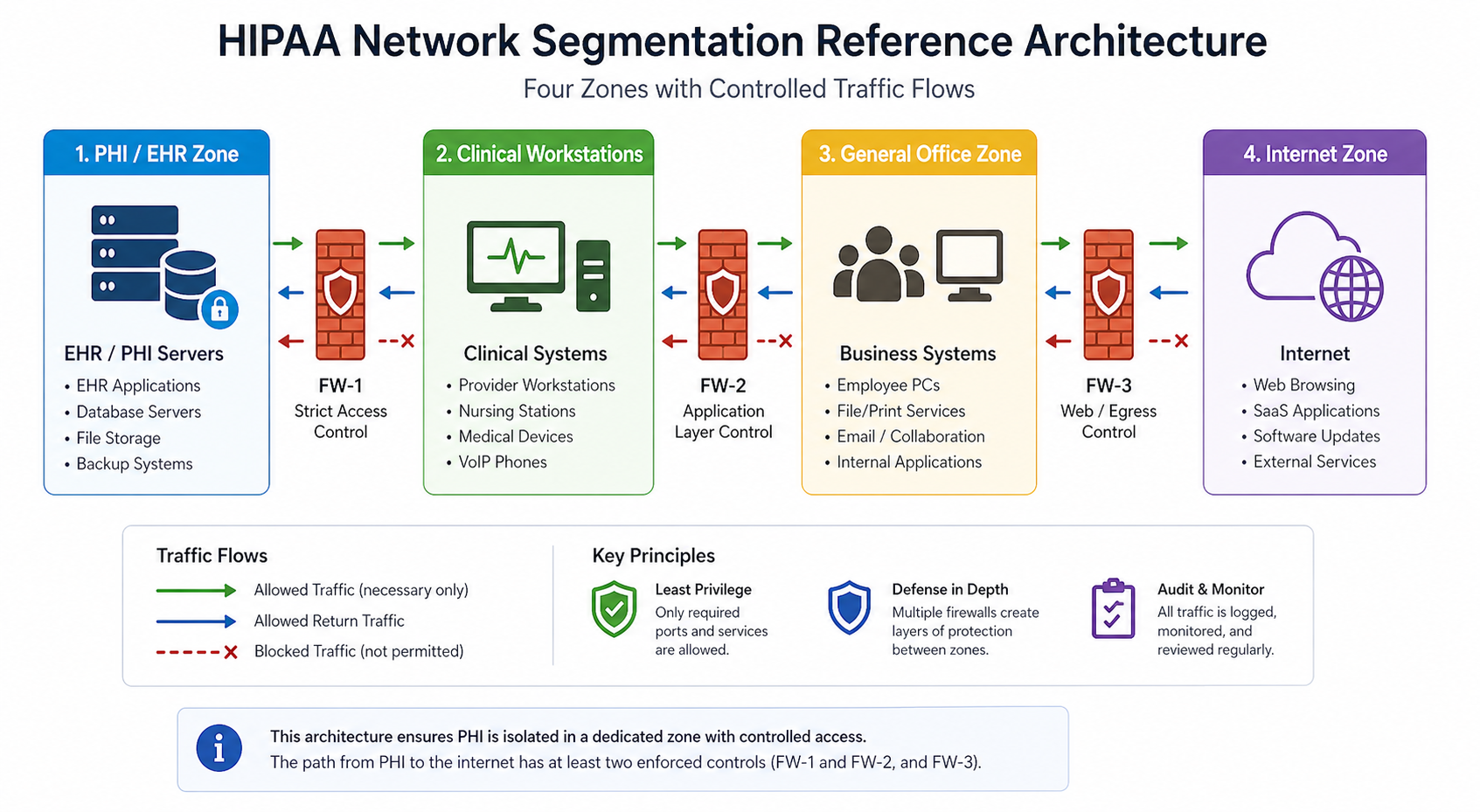
A reasonable baseline
1. Inventory ePHI systems
Document every system that stores, processes, or transmits ePHI. EMR servers, imaging systems, billing systems, backup repositories, fax servers, anywhere ePHI lands. Update this list whenever you add a new system. The inventory drives every other control.
2. Place ePHI systems on a separate VLAN with firewall control
A dedicated VLAN with a firewall (next-gen firewall preferred, basic stateful firewall acceptable) at the boundary. Default deny, explicit allows for clinical workstations and authorized administrative access only.
3. Document the firewall ruleset with business justification
Every allow rule has a one-line justification documenting which workflow it supports. “TCP 443 to EMR server from clinical VLAN, supports daily charting” is enough. “Allow everything from VLAN 10 to VLAN 20” with no justification fails the audit.
4. Log all cross-zone traffic and retain for 90+ days
Firewall logs forwarded to a SIEM, syslog server, or even a managed log retention service. The retention requirement varies by interpretation but 90 days is the practical floor most auditors accept.
5. Test the segmentation annually
Run a vulnerability scan from the non-ePHI side aimed at ePHI systems. Confirm the firewall blocks unauthorized access. Document the test and the result. This is what auditors mean when they ask “how do you know your controls work?”
6. Authentication and access control on ePHI systems
Multi-factor authentication on any account that can access ePHI. Role-based access so users only see the records they need. Account review every quarter. This pairs with segmentation because segmentation alone does not prevent insider threats or compromised credentials.
Common audit findings
From audits we have observed, six findings repeat. First, flat networks where ePHI systems share VLANs with general workstations. Second, firewalls in place but with default-allow rules that effectively make segmentation cosmetic. Third, firewall logs not retained long enough to support an investigation. Fourth, no documented inventory of ePHI systems, so the scope of compliance is undefined. Fifth, vendor remote access tools that bypass the segmentation by establishing outbound tunnels. Sixth, wireless networks where guest Wi-Fi is on the same broadcast domain as ePHI systems.
Each is fixable in days, not months, but each leads to a finding that has to be remediated and reported in your next audit.
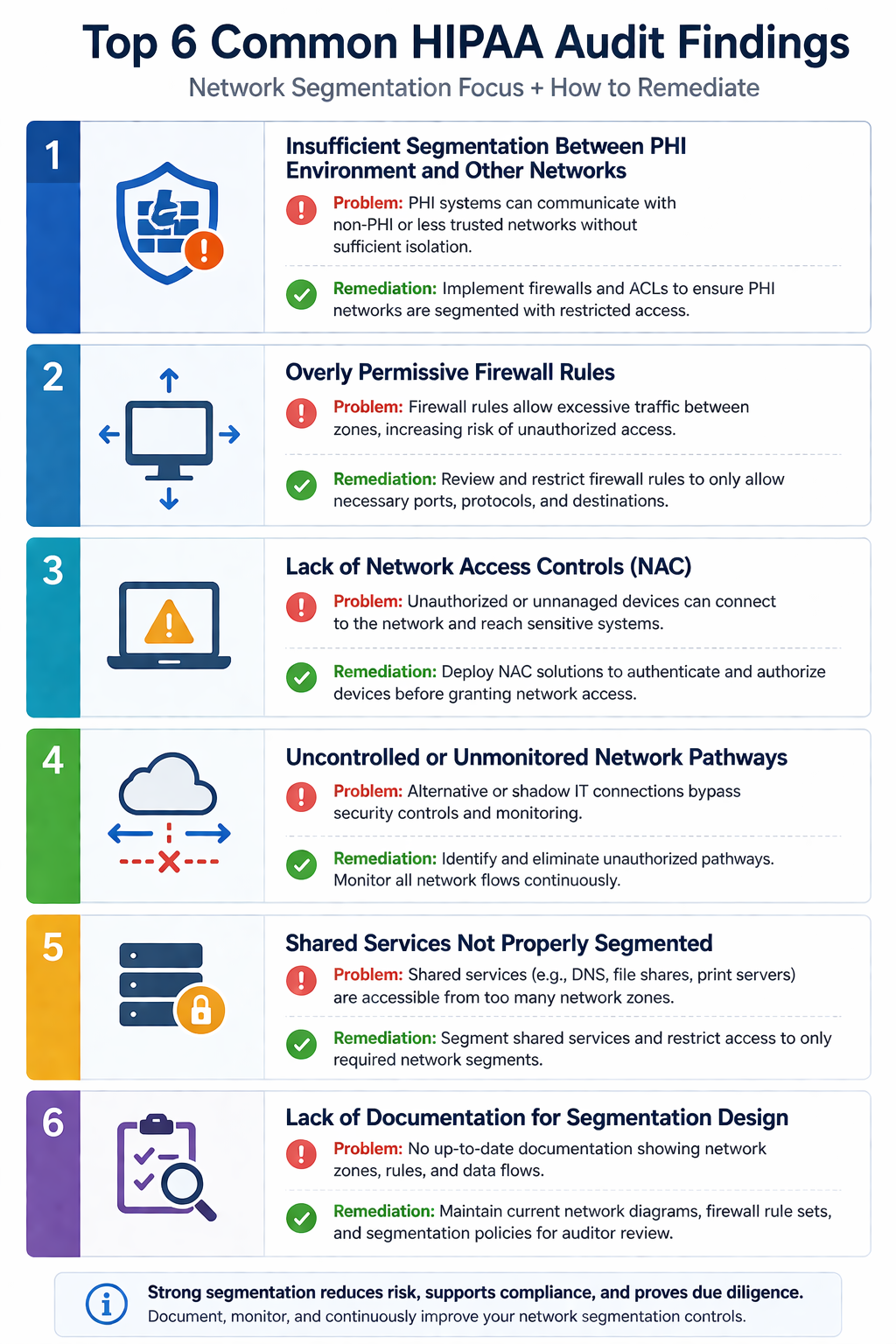
What the official guidance does not emphasize
HIPAA guidance is general by design, but two practical issues rarely make it into the documentation. First, vendor remote access. Many medical practices have remote support tunnels for their EMR vendor, imaging vendor, or practice management vendor. These tunnels often bypass the firewall entirely and provide an unmonitored path into the ePHI zone. Auditors increasingly want documentation of every vendor’s access path and evidence of monitoring.
Second, IoT devices. Newer medical equipment (digital sensors, blood pressure monitors, smart scales) often connects via Wi-Fi and reports to a manufacturer cloud. If those devices land on the same network as ePHI systems, they expand your attack surface in a way that is rarely on the architecture diagram. Segment IoT separately from clinical workstations and ePHI systems.
The implementation order
For practices starting near zero, the implementation sequence we use is: ePHI inventory first, segmented VLAN second, firewall and rule documentation third, logging fourth, MFA on ePHI accounts fifth, annual test sixth. This order delivers the highest risk reduction first, even if budget runs out before all six are done.
FAQ
Does HIPAA apply if we are based in Canada?
Only if you handle ePHI of US patients or contract with US healthcare entities. Canadian practices typically follow PIPA (Alberta), PIPEDA (federal), or the equivalent in their province. The principles are similar. Segmentation, access control, and logging are reasonable expectations under all of them.
Is microsegmentation required?
No. Coarse VLAN-based segmentation with firewall enforcement satisfies most auditors. Microsegmentation is a higher bar that organizations choose for additional defense in depth, not because HIPAA requires it.
Can a single firewall handle both segmentation and internet edge?
Yes, as long as you have separate interfaces or zones for the ePHI segment and rules that enforce isolation. Two physical firewalls is not required.
Related posts
- PCI-DSS for Edmonton Retail WiFi
- Managed IT Edmonton Medical Clinics
- Cybersecurity for Edmonton Law Firms
Audit coming up
If you have a HIPAA, PIPA, or PHIPA-related audit on the calendar in the next 90 days and you are not sure where you stand on network segmentation, our team does focused readiness assessments specifically for medical practices in Western Canada. Tell us about your environment and we will produce a one-page gap report you can act on.
Last verified April 2026 by the aaanetworkx compliance practice.

Enterprise IoT Security: How to Protect Your Edge Network from Cyber Threats
The Hidden Risk in Modern IoT Environments
The rapid growth of IoT has transformed how businesses operate, but it has also created a serious security gap that most organizations are not fully prepared for. Smart cameras, IoT sensors, and connected office systems are typically built for convenience and cost efficiency, not security. That design priority makes them attractive targets for attackers looking for easy entry points into corporate networks.
The problem runs deeper than the devices themselves. Most enterprises invest heavily in intrusion detection, intrusion prevention, and centralized logging at their core network. But edge environments, such as remote offices, clinics, and small business locations, often run on consumer-grade routers with minimal monitoring and no visibility into what is actually happening. The result is a dangerous mismatch: enterprise-level threats facing consumer-level defenses.
Why IoT Devices Are a Growing Target
Over 70 percent of IoT devices in production environments operate with known, unpatched vulnerabilities. Attacks against these devices are largely automated and continuous. Attackers run persistent scans looking for weak credentials, open ports, outdated firmware, and flat networks with no segmentation. When they find a way in, they do not just compromise the device. They use it to spy on internal traffic, deploy ransomware, recruit the network into botnets, and pivot deeper into critical systems.
Small and mid-sized businesses are disproportionately affected because the assumption that “we are too small to be targeted” still leads many owners to underinvest in edge security. The reality is that smaller organizations are often easier targets precisely because their defenses are weaker, not because attackers specifically chose them.
The Solution: Enterprise-Grade IDPS at the Edge
1. Next-Generation Firewall (NGFW)
Acts as the single enforcement point, inspecting all incoming and outgoing traffic using Deep Packet Inspection (DPI).
2. Centralized Logging & Analytics
Tools like FortiAnalyzer provide:
- Real-time monitoring
- Event correlation
- Full visibility across the network
3. Network Segmentation
The architecture divides the network into:
- Trusted Zone (IoT devices)
- Untrusted Zone (external threats)
- Management Zone (security controls)
This ensures:
Least-privilege access
Contained breaches
Better monitoring
What Makes Enterprise Security Different?
Most businesses think “we have a firewall = we are secure.”
That’s not true.
Basic Firewall vs Enterprise Security
| Feature | Basic Setup | Enterprise-Grade (AAA NetworkX Approach) |
| Traffic Inspection | Port-based | Deep Packet Inspection (DPI) |
| Threat Detection | Limited | Signature + Behavioural |
| Visibility | Minimal logs | Centralized analytics |
| Response | Manual | Automated blocking |
| Segmentation | None | Strict zone isolation |
The key difference is visibility + automation
Enterprise systems don’t just allow/block traffic; they understand behaviour and react in real time
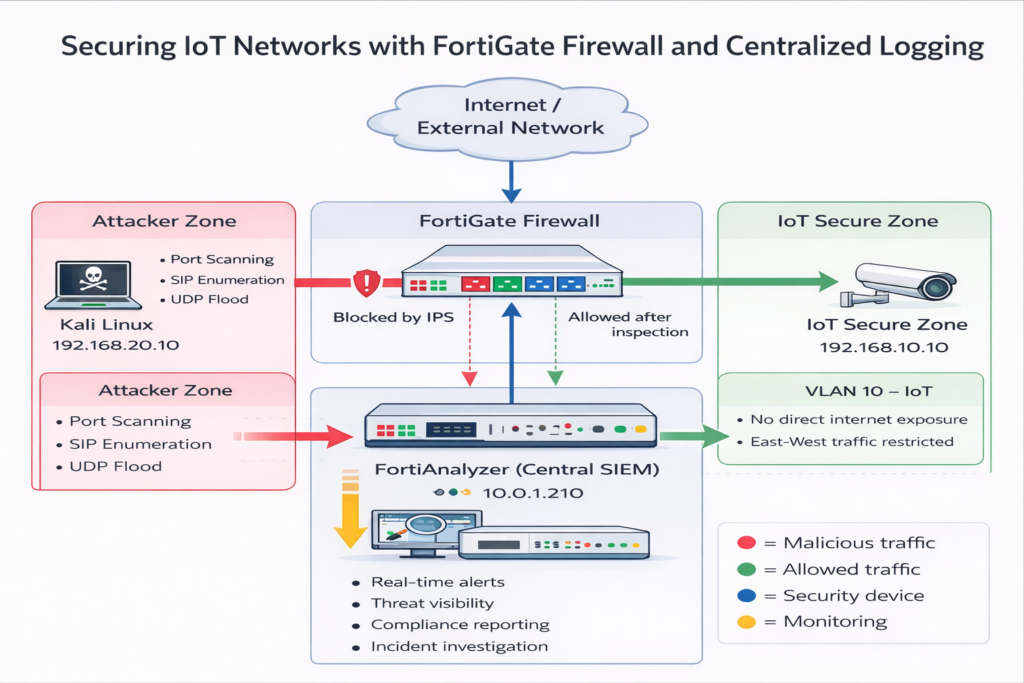
Real-World Testing: How Attacks Were Stopped
1. Advanced Reconnaissance Attacks
Attackers used aggressive scanning techniques to identify open ports.
Result:
- Threat detected instantly
- Escalation classified as critical
- Traffic automatically blocked
The system effectively “cloaked” the device from attackers
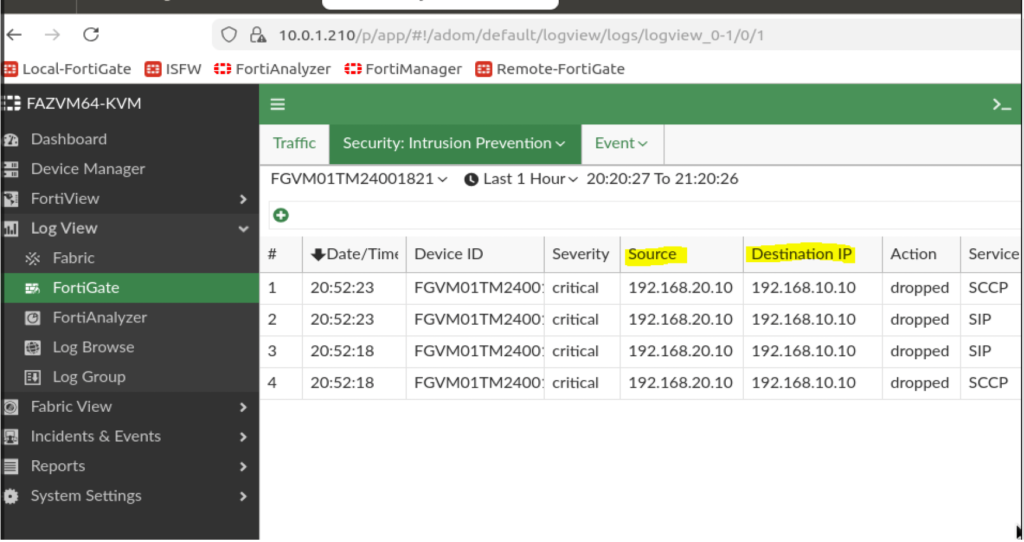
2. Protocol-Level Probing (SIP Attacks)
IoT cameras often rely on SIP (Session Initiation Protocol), making them vulnerable.
Result:
- Legitimate traffic allowed
- Suspicious activity logged and monitored
- Full visibility maintained
3. Denial-of-Service (DoS) Attacks
A high-volume UDP flood was launched to overwhelm the system.
Result:
- Anomaly-based detection triggered
- Malicious source blacklisted
- Device remained operational
This proves that behaviour-based security is critical for modern threats
Key Takeaways for Businesses
Visibility = Security
Without centralized logging, threats go unnoticed.
Behavior-Based Detection Wins
IoT traffic is predictable, making anomalies easier to detect.
Segmentation Prevents Breaches
One compromised device should NEVER expose your entire network.
What This Means for Your Business
If your organization uses:
- Smart cameras
- VoIP systems
- Cloud-connected devices
- Remote offices
You are already operating in an IoT edge environment
And likely:
Lack enterprise-grade protection
Have limited visibility
Are vulnerable to silent attacks
How AAA NetworkX Can Help
At AAA NetworkX, we design and deploy:
Fortinet-based firewall & IDPS solutions
Secure network segmentation architectures
Real-time monitoring & threat detection
IoT security hardening for businesses
Whether you’re a:
- Medical clinic
- Small business
- Enterprise with remote sites
We bring enterprise-level security to your edge network.
Get a Free Security Assessment?
If you’re unsure about your current security posture, we’ll help you identify risks and fix them fast.
At AAA NetworkX, we design and troubleshoot real-world network environments, including:
Network performance optimization
Site-to-site VPNs (WireGuard & IPsec)
Firewall and security configuration
About the Author
George Takyi Nti
Cybersecurity & Network Security Specialist
George specializes in designing and deploying enterprise-grade security architectures, with a focus on Intrusion Detection and Prevention Systems (IDPS), Fortinet solutions, and IoT infrastructure protection. His work centers on strengthening edge network security through advanced threat detection, network segmentation, and real-time monitoring.