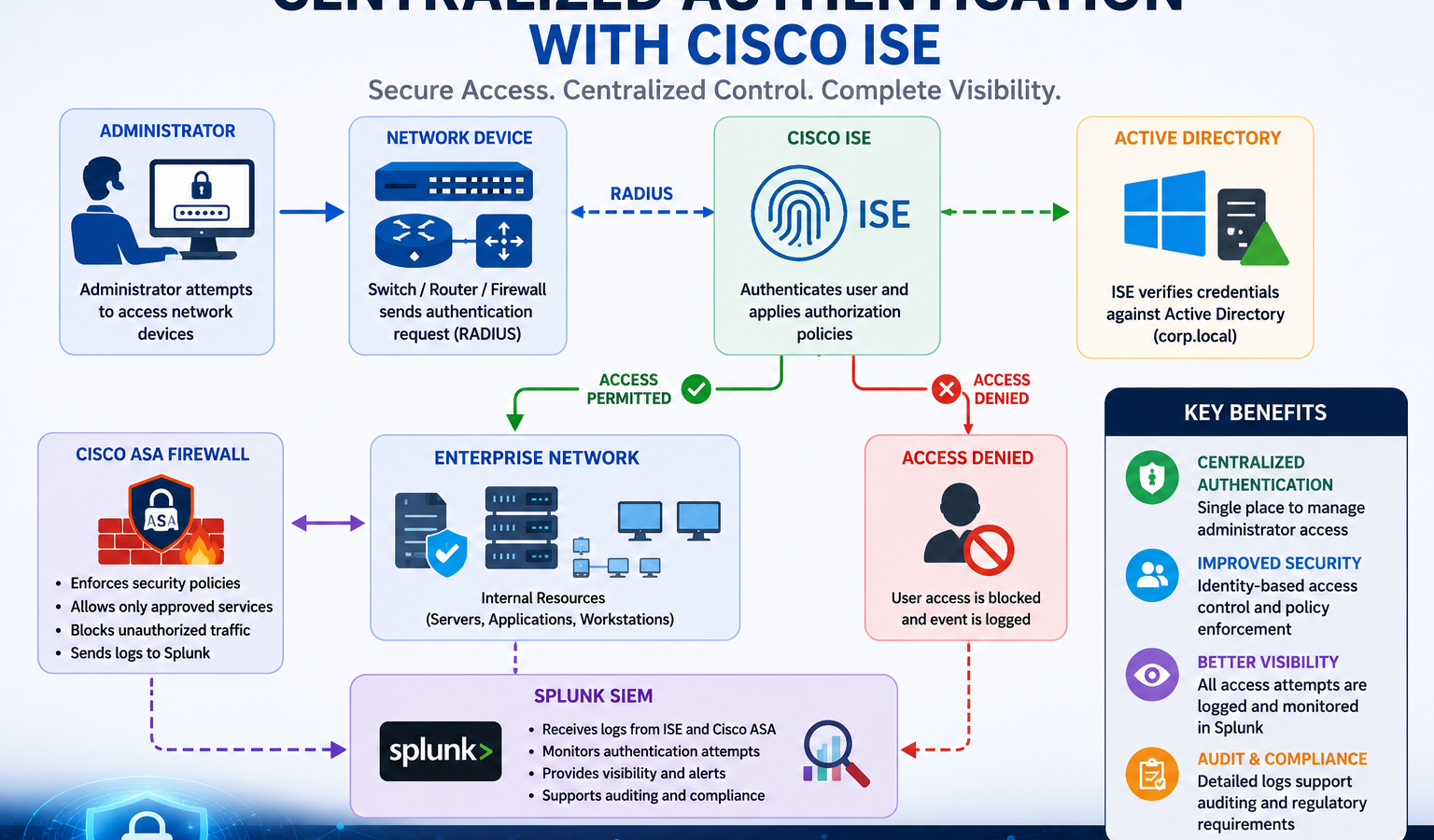
If your network engineers still keep a local username and password on every switch, your operations are one resignation away from a security incident. Centralized authentication with Cisco Identity Services Engine (ISE) solves that, plus a stack of related problems: who logged in where, which device tried to join the network last Tuesday, why an admin’s account works on some routers but not others. This guide walks through how ISE actually works, where each piece fits, the deployment patterns, and the pitfalls that catch most teams.
The short version. Cisco ISE is the AAA and policy engine of a Cisco-centric network. Network devices (switches, routers, wireless controllers, firewalls) forward authentication requests to ISE via RADIUS or TACACS+. ISE validates the user against Active Directory or another identity store, applies an authorization policy, and returns either Access-Accept with the right access profile or Access-Reject. Logs flow to Splunk or another SIEM for audit. Three things make this hard in practice: AD integration, scaling beyond a single ISE node, and the protocols themselves.
What Cisco ISE actually does
Cisco ISE serves three primary functions in a typical enterprise. Network Access Control (NAC) for endpoints joining the corporate network, wired and wireless. This is 802.1X with ISE deciding the right VLAN, dACL, or SGT based on user, device type, and posture. Device Administration for engineers logging into network gear. This is TACACS+ with ISE controlling per-command authorization and full session logging. Guest and BYOD for visitors and personal devices, including self-registration portals, sponsor approval, and time-bound credentials.
The same ISE deployment usually handles all three. The license is separate per function (Essentials, Advantage, Premier) but the appliances and AD integration are shared.
RADIUS vs TACACS+, in one paragraph
Both are AAA protocols. Both work with ISE. Use the right one for the job. RADIUS (UDP 1812 for auth, 1813 for accounting) is for endpoints joining the network: laptops, phones, printers, IoT. It is fast, well-supported by every vendor, and integrates with 802.1X. TACACS+ (TCP 49) is for administrators logging into network devices. It separates authentication, authorization, and accounting, supports per-command authorization (deny “configure terminal” for level-5 users, allow show commands), and logs every command issued. Run both. RADIUS for users and devices on the data plane, TACACS+ for engineers on the management plane.
How the RADIUS flow actually works
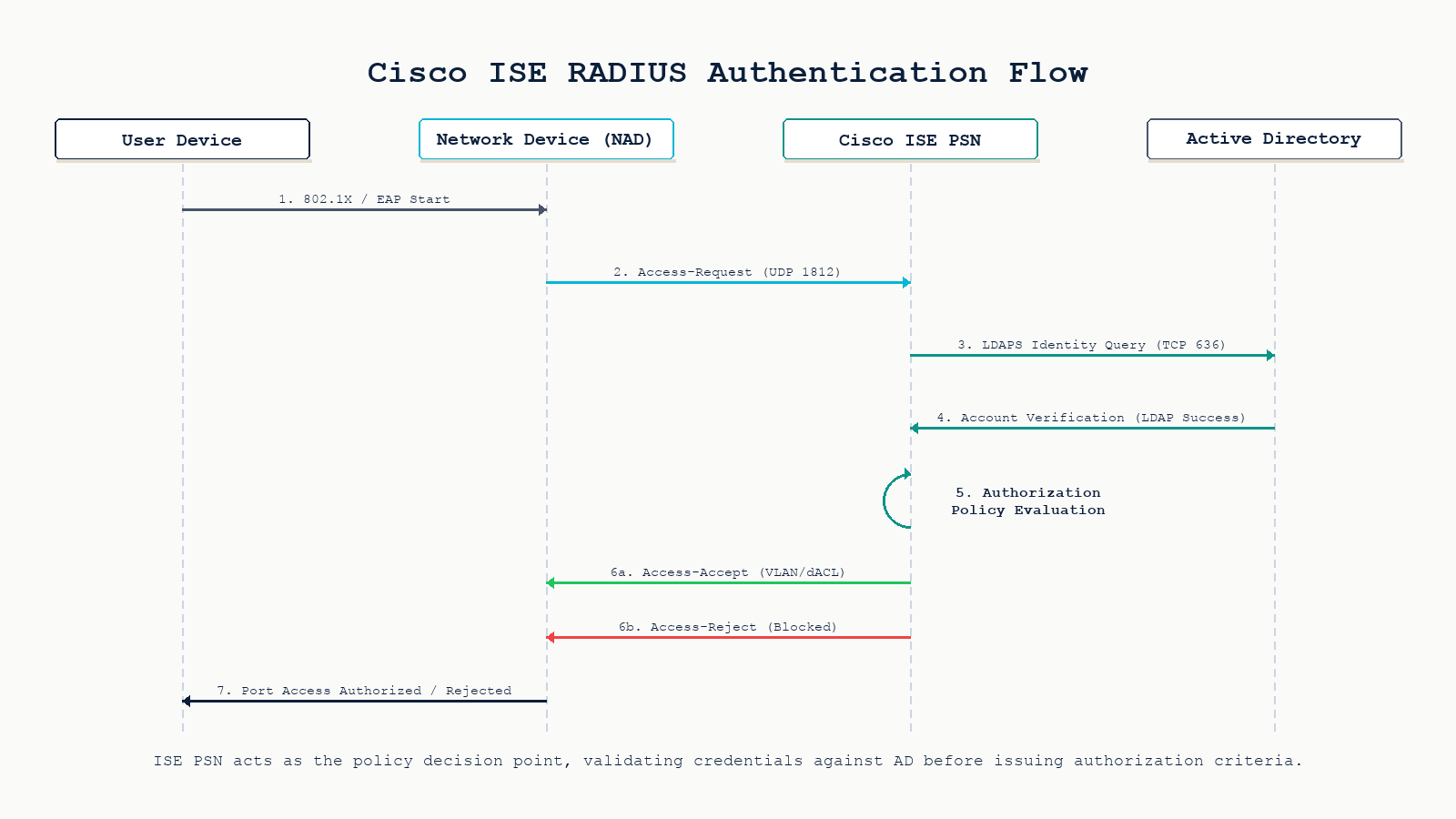
Walk through what happens when a user plugs a laptop into a switch port configured for 802.1X with ISE as the RADIUS server.
Step 1. The laptop’s supplicant sends EAPOL to the switch. The switch (acting as the Network Access Device, or NAD) wraps the EAP message in a RADIUS Access-Request and sends it to ISE on UDP 1812. The shared secret authenticates the NAD-to-ISE relationship.
Step 2. ISE looks up the user identity. If using Active Directory, ISE sends an LDAPS query (TCP 636) to a domain controller, retrieves the user object, and reads group memberships. ISE also looks up the device through endpoint profiling if dot1x with MAB fallback is configured.
Step 3. ISE evaluates the authorization policy. Policies are ordered rules: “if user in AD group Engineers AND device profile is corporate-laptop AND posture is compliant, then permit with VLAN 10 and dACL Engineers-Full”. Order matters. The first matching rule wins.
Step 4. ISE returns either an Access-Accept with RADIUS attributes (VLAN, dACL, SGT, session timeout) or an Access-Reject. The switch applies the VLAN and dACL to the port, the laptop gets a DHCP lease, and traffic flows. Or it does not, and the user calls the helpdesk.
Step 5. Accounting starts. ISE logs the session start, periodic interim updates, and the session stop when the user disconnects. The accounting data flows to Splunk or your SIEM for audit.
Active Directory integration is where most pain lives
ISE joins AD as a computer account (or set of accounts, one per PSN). The join creates a Kerberos trust between ISE and the domain. Once joined, ISE can resolve users, query group memberships, and authenticate via Kerberos, NTLM, or PAP depending on the protocol.
Three things break this in production. Time skew. Kerberos requires the ISE clock and the DC clock to be within 5 minutes of each other. NTP must be configured and working on both. DNS resolution. ISE must be able to resolve the AD domain and the DCs by name. A reverse DNS gap will make Kerberos fail silently. Account lockout policy. If your AD policy locks accounts after 5 failed attempts, a misconfigured supplicant on a single laptop can lock the user out within seconds. Use a dedicated ISE service account with lockout disabled or set very high.
Deployment patterns
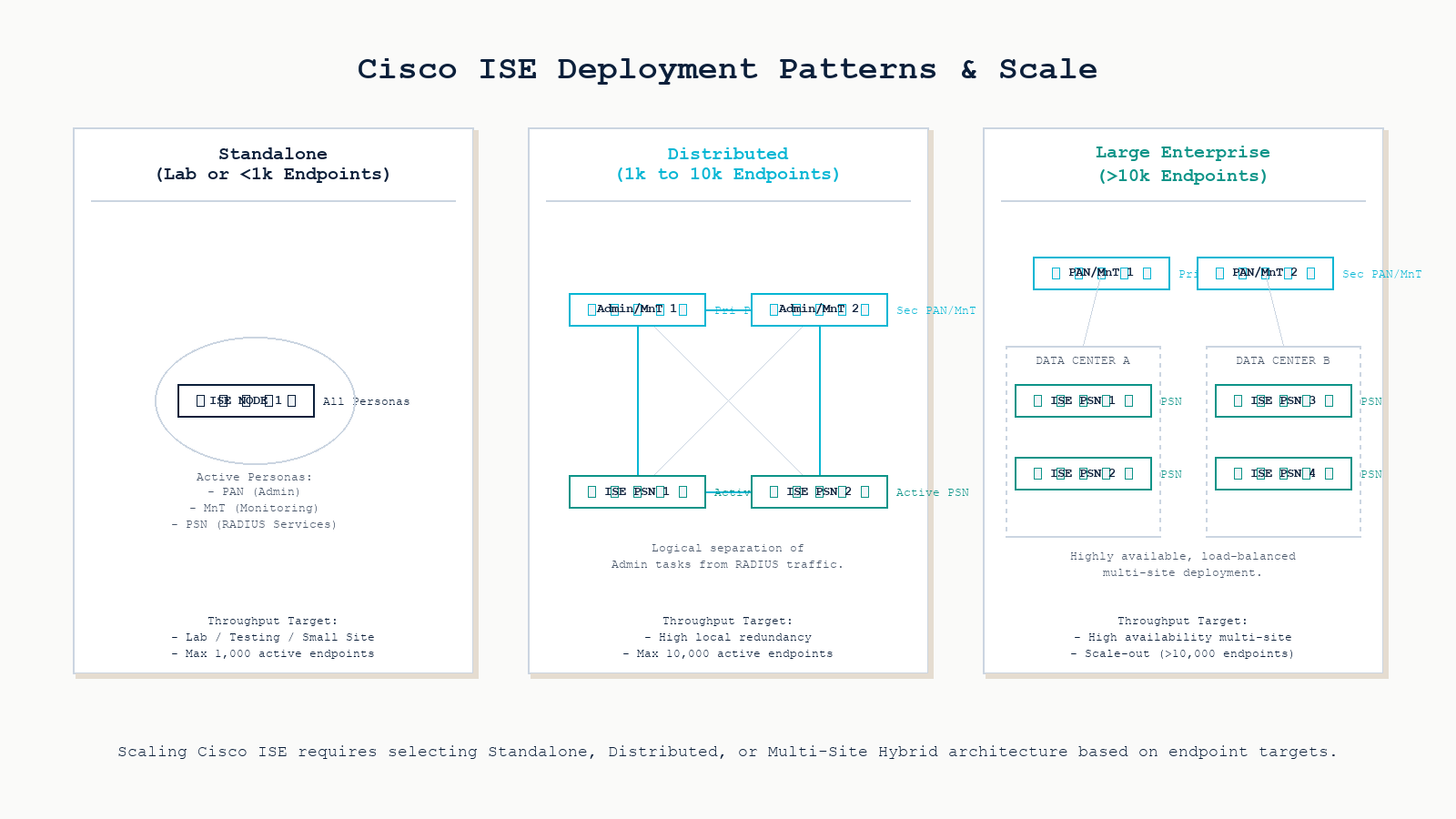
ISE supports three node personas: PAN (Policy Administration Node, the management plane), MnT (Monitoring and Troubleshooting), and PSN (Policy Service Node, the runtime that handles RADIUS and TACACS+ requests). The deployment shape depends on size and resilience requirements.
Standalone. All three personas on one appliance or VM. Fine for labs and small offices under 100 endpoints. No redundancy. Lose the node, lose authentication.
Small-to-medium distributed. Two PAN/MnT nodes (primary and secondary), two PSN nodes for runtime. Handles 1,000 to 10,000 endpoints comfortably. Survives single node failure.
Large enterprise. Two PAN/MnT nodes in different data centers, four to forty PSN nodes spread by region or site. Some deployments dedicate PSNs by function (one set for wired NAC, another for TACACS+ device admin, another for guest). Latency from NAD to PSN matters. RADIUS round-trips under 50ms are the target.
Common deployment pitfalls
Shared secret mismatch. The single most common ISE problem on day one. The switch config has one shared secret, the ISE network device config has another. Symptom: every Access-Request times out, ISE shows no logs because it never sees the request as valid. Always copy-paste, never re-type.
Authorization policy order. A more specific rule placed below a more general one will never fire. If your “Permit Engineers” rule sits below a “Default Permit Domain Users” catch-all, engineers get the default profile, not the engineering one. Reorder rules from specific to general.
Forgetting MAB fallback. Printers, IP phones, and badge readers do not speak 802.1X. Without MAC Authentication Bypass (MAB) as a fallback after dot1x times out, every non-supplicant device is denied. Configure both methods on every access port, with dot1x preferred and MAB as fallback.
PSN sizing. Each PSN has a documented RADIUS request-per-second ceiling. Exceeding it during a morning login storm causes timeouts and users falling back to authentication failure. Right-size the PSN cluster for your peak, not your average.
Certificate management. EAP-TLS, the strongest 802.1X method, requires certificates on every endpoint and on ISE. Forgetting to renew the ISE EAP cert before expiration breaks all 802.1X sessions cluster-wide. Calendar the renewal a month in advance.
Wiring in the firewall and SIEM
A Cisco ASA (or any modern NGFW) sits between authenticated segments and uses ISE-supplied Security Group Tags (SGTs) or RADIUS attributes to make its own policy decisions. The firewall enforces only what ISE has already classified. Combined with Splunk receiving authentication logs from ISE and traffic logs from the ASA, the SIEM has a complete picture: who tried to access what, from which device, at what time, and whether the firewall allowed or denied the resulting traffic.
This is the visibility argument for centralized auth. Local accounts on every switch produce log fragments scattered across fifty devices. ISE plus Splunk produces a single auditable timeline.
Why centralize at all?
- Single place to manage administrator access. Disable a leaving engineer’s AD account once and they lose access to every router, switch, firewall, and wireless controller in the same minute.
- Identity-based policy. Permissions follow the user, not the IP address or VLAN. Same user, same access from any port or any Wi-Fi SSID.
- Complete visibility. Every authentication attempt logged, every command an engineer issued logged, every endpoint joining the network classified.
- Audit and compliance. PCI-DSS, SOC 2, and HIPAA all require centralized authentication and audit trails for privileged access. ISE plus a SIEM satisfies the technical control directly.
FAQ
Do I need ISE if I only use RADIUS for Wi-Fi?
Not necessarily. For wireless-only RADIUS against AD, Windows Network Policy Server (NPS) is free and works. ISE becomes the right answer when you also need wired 802.1X with profiling, TACACS+ for device administration, posture assessment, guest portals, or SGT-based segmentation. If any two of those apply, ISE saves complexity overall.
Can ISE work with Azure AD or Entra ID instead of on-prem AD?
Yes, via Azure AD Domain Services or by using ISE’s SAML/REST integrations. Direct LDAPS to Entra ID is not supported the way on-prem AD is. Most hybrid deployments still join ISE to an on-prem AD that syncs to Entra via Azure AD Connect.
What is the latency budget for RADIUS round-trips?
Under 50 ms NAD-to-PSN is the comfortable target. Up to 100 ms works for most users. Above 200 ms, supplicants start timing out during morning login storms. For multi-site deployments, place a PSN at each major site rather than backhauling RADIUS across a WAN.
How do I survive an ISE outage?
Configure backup RADIUS servers on every NAD (a secondary PSN, plus an emergency local fallback). Use the switch’s aaa authentication login default group radius local command so engineers can still log in with a local break-glass account when ISE is unreachable. Document the break-glass credentials in your vault and rotate them quarterly.
Is ISE worth the licensing cost?
For Cisco-centric networks with 1,000 or more endpoints and compliance requirements, yes. The audit trail and centralized policy savings outweigh the license cost. For mixed-vendor environments or smaller networks, alternatives like Aruba ClearPass, FreeRADIUS plus a SIEM, or Microsoft NPS may be more practical.
Related posts
Designing or operating centralized authentication
Centralized authentication is one of those investments that looks expensive on day one and pays back every time someone leaves the company, every audit, every incident review. Our network security practice has designed and operated ISE deployments for organizations across Western Canada, plus alternative AAA stacks (ClearPass, FreeRADIUS) for non-Cisco environments. If you are evaluating ISE or trying to fix one that is not behaving, we will help you make the right call.
Last verified May 2026 by the aaanetworkx network security practice.