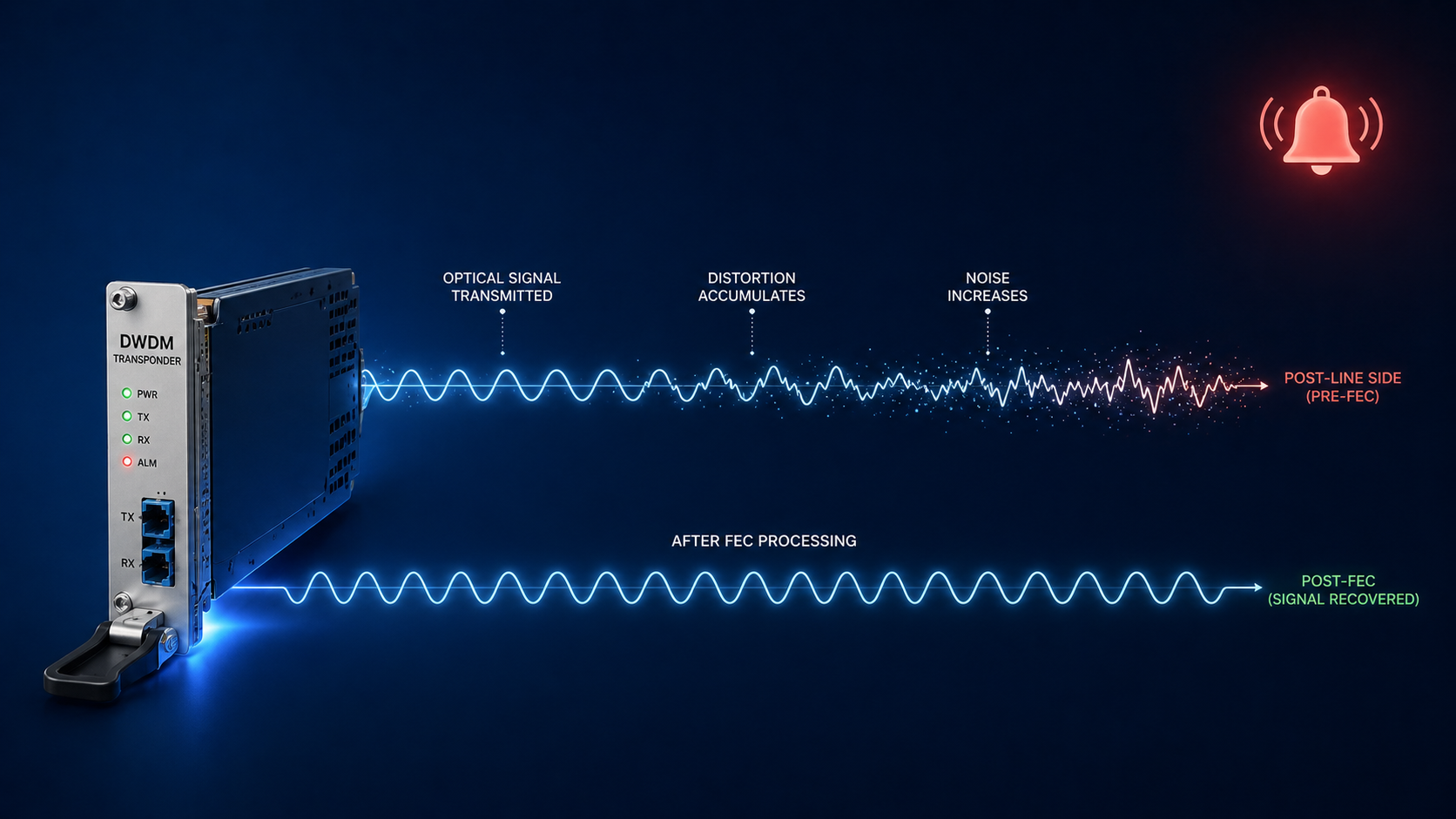
DWDM pre-FEC BER alarm is the earliest signal that an optical link is degrading toward a hard failure.
You got the page. A DWDM transponder somewhere in your network is reporting a pre-FEC BER alarm. The link is still up. Traffic is still flowing. But your monitoring system is telling you something has changed on the optical layer, and that something is pointing toward eventual failure if you do not act. This post walks through what a pre-FEC BER alarm actually means, the five real causes ranked by what we see in production, and the right order to troubleshoot so you do not make it worse.
The short version. Pre-FEC BER (forward error correction bit error rate) is the raw error rate measured at the transponder receiver before the FEC engine corrects it. Modern coherent optics correct enormous amounts of error in real time, which is why the link still works even when the alarm fires. The alarm is your early warning system. By the time you see it, the optical path is already degrading, and you typically have hours to days before FEC runs out of margin and traffic actually drops. The good news is that pre-FEC BER alarms are usually fixable without an outage, if you know the order to check things.
The bad news is that the wrong move at this stage, especially the wrong cleaning attempt on a connector, can take a degraded link and make it a hard failure within minutes. So the order matters more than the speed.
What this alarm actually means
Every coherent DWDM transponder uses forward error correction to push more bandwidth down a fiber than the raw signal-to-noise ratio would otherwise allow. The receiver counts errors in the incoming bit stream before correction, calculates a running pre-FEC BER value, and compares it to a configured threshold. When the BER crosses that threshold, the alarm fires.
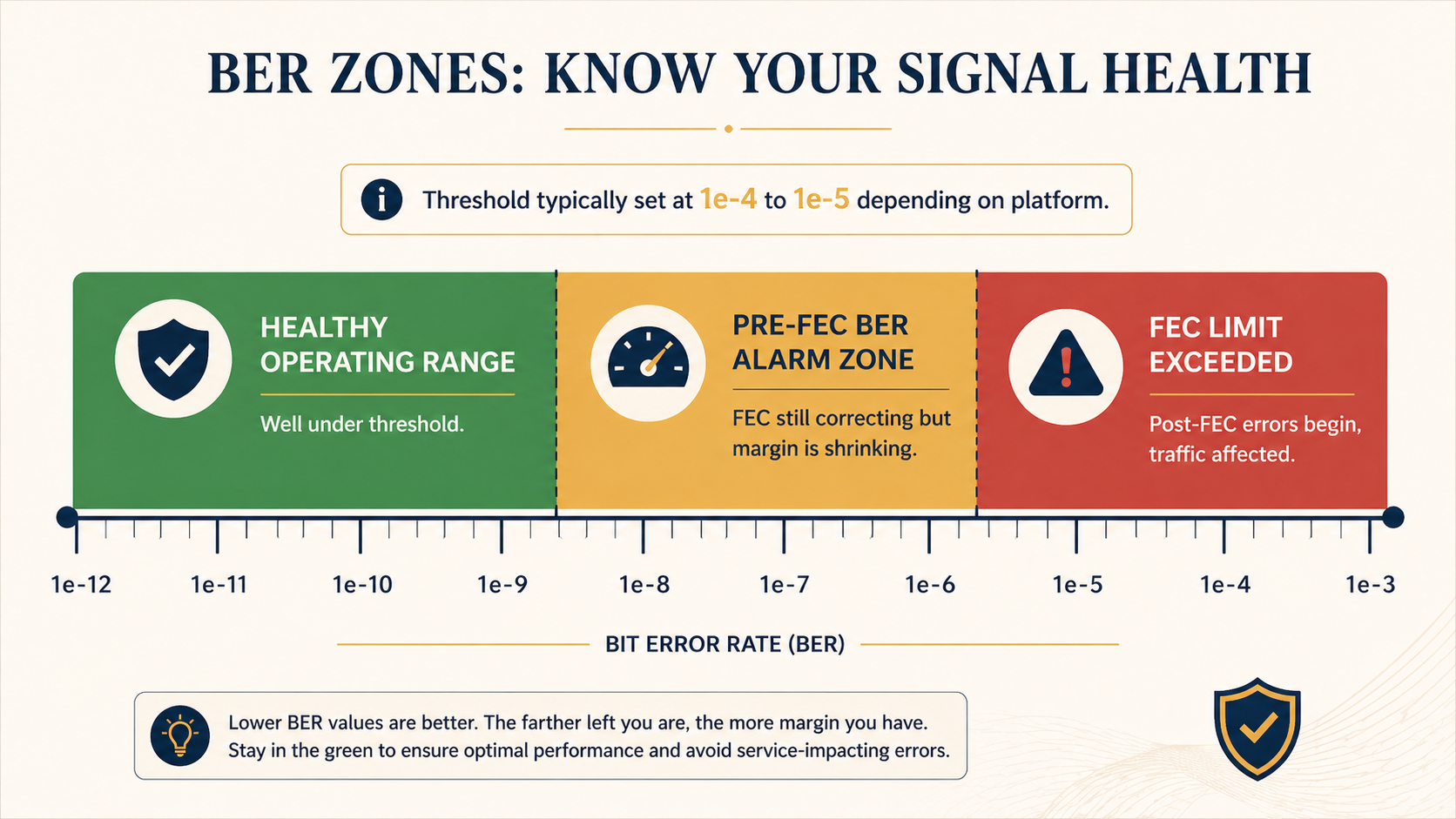
Threshold values vary by platform but typically sit between 1e-4 and 1e-5. That is far above the post-FEC BER you actually deliver to traffic, which on a healthy 100G or 400G coherent link should be near 1e-15 or better, often called error free for practical purposes. The pre-FEC value is the canary, not the customer impact metric.
You will see the alarm in three places. The transponder card or pluggable optic raises a local LED and logs the event. Your DWDM management platform (Ciena MCP, Nokia NSP, Infinera Transcend, Cisco Crosswork, etc.) raises an alarm with the wavelength, span, and current BER value. And your network monitoring system flags the affected service if you have it correlated with the optical layer. If you only have the customer-facing alarm and not the optical one, you will probably be debugging this with much less time on the clock.
Verified against current Ciena, Nokia, and Cisco DWDM platform documentation, accessed April 2026.
The five causes, ranked by what we actually see
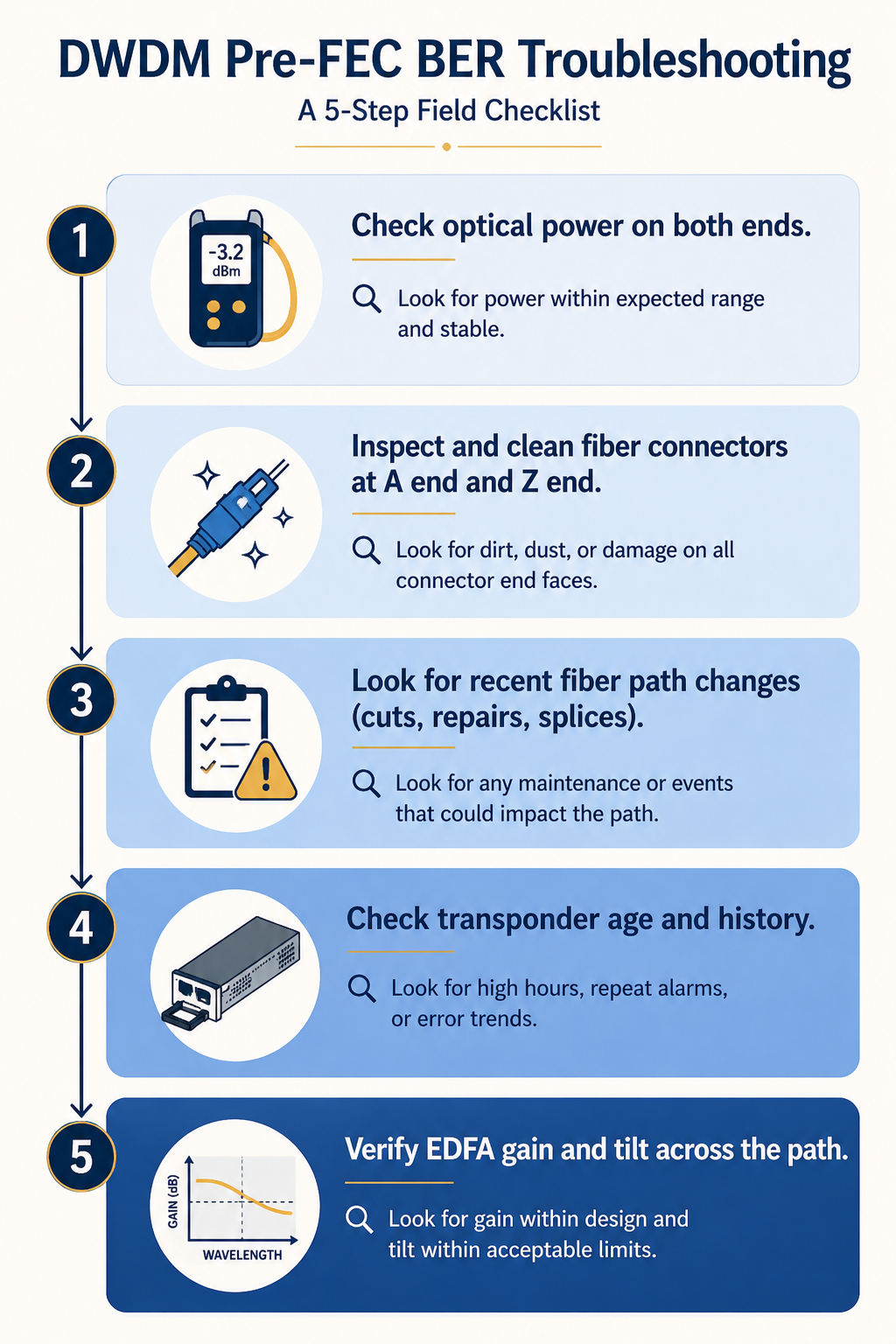
Cause one, dirty or damaged connector somewhere on the fiber path, around 40 percent of cases
By far the most common. A speck of dust, a fingerprint, or a microscopic scratch on a connector endface adds optical loss and back reflection, which lowers the OSNR at the receiver and drives BER up. Often the connector was disturbed recently during patch panel work, a fiber move, or a maintenance window.
Verify by checking the optical power level at the receiver against the design budget. A drop of 1 to 3 dB from baseline is suspicious. A drop of more than 3 dB strongly indicates a connector issue. Trace the path and inspect each connector with a fiberscope. Do not assume it is clean because it looks clean. Visible inspection at human eye scale tells you nothing about a single mode connector.
Critical: clean in the right order, and use the right tool. A click cleaner on a connector that has a damaged endface can grind the contamination further into the ferrule. Always inspect first, then clean only if dirty, then re-inspect to confirm you did not make it worse.
Cause two, optical power degradation from a bend or stress on the fiber, around 20 percent of cases
Fiber that has been stepped on, pinched in a cable tray, kinked at a panel exit, or stressed by recent rack work. Loss is concentrated at the bend point and may not be on the patch panel itself.
Verify with an OTDR shot from one end. The trace will show a discrete loss event at the bend location. If you do not have an OTDR available immediately, walking the path and visually checking for fiber that does not have natural curvature catches a surprising number of these.
Cause three, aging transponder or pluggable optic, around 15 percent of cases
Coherent optics drift over time. Laser wavelength can shift slightly, modulator bias points move, and DSP performance degrades. After five to seven years in service, even good optics can start running closer to FEC threshold. The give-away is that the BER trends up gradually over weeks, not suddenly, and the optical power at the transmit end is also slightly off baseline.
Verify by comparing the current performance metrics to the original commissioning records. If transmit power has dropped by 1 to 2 dB and BER has climbed gradually, the optic is the suspect. Plan to replace it during a maintenance window. This is the only cause where the fix is hardware swap rather than path remediation.
Cause four, accumulated chromatic dispersion or PMD, around 15 percent of cases
On long haul links, accumulated chromatic dispersion (CD) and polarization mode dispersion (PMD) eat into your OSNR margin. If something has changed on the path (a longer reroute due to a fiber cut, a new amplifier site added, a span change), the CD or PMD budget may have shifted past what the transponder DSP can compensate.
Verify by checking your DWDM management platform for the link’s measured CD and PMD values against the commissioning baseline. Significant changes correlate with path topology changes. Fix is either physical (compensation modules) or operational (reroute back to the original path or accept the new performance baseline).
Cause five, EDFA gain tilt or amplifier issue, around 10 percent of cases
An erbium doped fiber amplifier (EDFA) on the path is producing uneven gain across the C band, so some wavelengths are amplified well and others are not. Often shows up as one or two specific wavelengths alarming while neighbours stay healthy.
Verify by checking per-channel power across the affected wavelength range at each amplifier site. A gain tilt event will show as a slope across the band rather than a single channel issue. Fix is amplifier maintenance or replacement.
What the vendor documentation does not tell you
The vendor docs tell you to check optical power and clean connectors. They do not tell you that the act of cleaning a connector during an active alarm has a non-trivial chance of making things worse if you skip the inspection step. Hard rule, never clean a connector you have not inspected first. About one in twenty alarms we have seen escalated from pre-FEC alarm to total link loss because someone reached for a click cleaner without inspecting the endface.
Also, pre-FEC BER alarms can fire and clear on their own due to environmental factors like temperature changes affecting splice loss in outside plant fiber. A pre-FEC BER that ranges between alarm and clear over a 24 hour cycle may not be a defect, it may be normal day/night thermal variation. The fix is to raise the threshold slightly or to accept the variation rather than chase it.
The architectural fix
Networks that catch BER issues early and act on them have three things in place. First, an OTDR baseline taken at commissioning for every span, stored where the NOC can find it. When BER climbs, comparing the current OTDR shot to the baseline tells you in minutes whether the path has changed. Second, automated trending on pre-FEC BER per wavelength so the NOC sees the slope, not just the threshold crossing. A wavelength climbing slowly toward threshold deserves a planned maintenance ticket weeks before it alarms. Third, a strict connector hygiene policy with documented inspection-before-cleaning workflow, training every NOC technician, and a stocked supply of fiberscopes at every datacenter.
When to escalate
Engage your DWDM platform vendor TAC if BER continues to climb after the fiber path is verified clean and the optical power is within budget. Bring the per-second BER counters from the affected transponder, the optical power readings from both ends, the OTDR baseline and current trace, and the path’s amplifier records. Without that data, vendor TAC cannot help and you will spend hours getting them up to speed.
FAQ
Is a pre-FEC BER alarm service-affecting?
Not directly, no. By design, FEC corrects the errors before they reach the customer payload. The alarm tells you the FEC is working harder than it should, and that you have a finite window before correction runs out of margin.
How long do I have before traffic actually drops?
Depends entirely on the rate of change. A BER that holds steady at threshold can run for weeks. A BER that doubles every hour will hit FEC limit in less than a day. Trend the value, do not just react to the threshold.
Should I just raise the BER threshold to silence the alarm?
Almost never. The threshold exists to give you that lead time. Raising it removes the canary. Only adjust threshold when you have explicitly accepted a known steady state condition (like the day/night thermal example) and documented why.
Related posts
Need a second opinion before you cut into the path
Optical layer mistakes are expensive because they cascade. Our optical practice handles transport for service providers and large enterprises across Western Canada and we treat pre-FEC alarms as actionable from minute one. Send us the alarm details and we will help you isolate it before you touch the fiber.
Last verified April 2026 by the aaanetworkx optical practice.
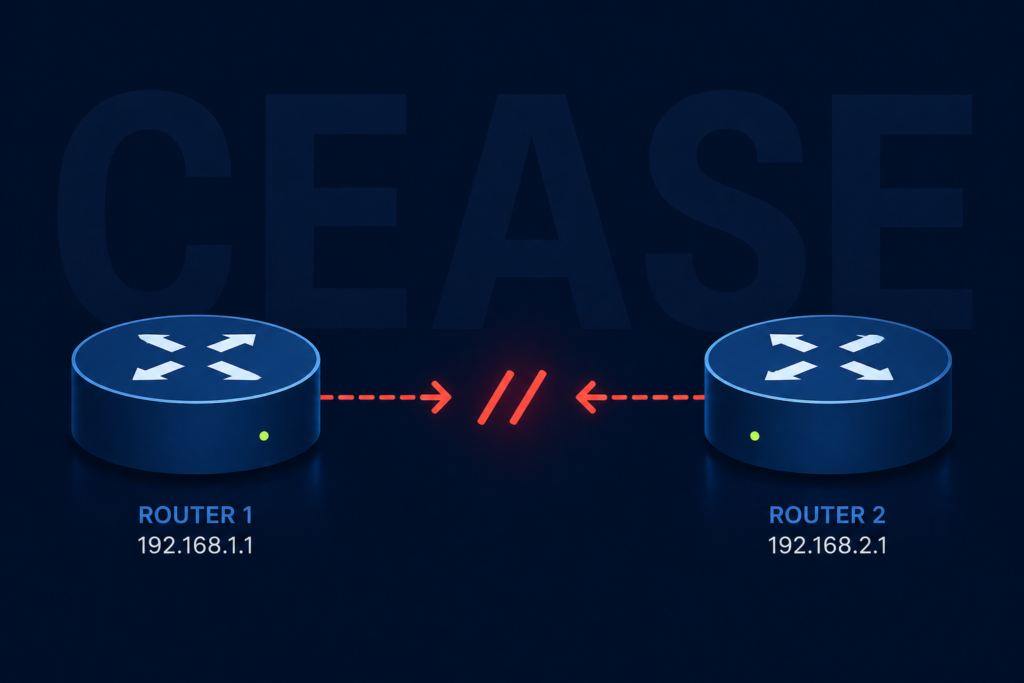
The first time I saw a BGP notification with the cease code, I assumed the peer router had crashed. It had not. A junior engineer on the other side had typed clear ip bgp neighbor and walked off to lunch. That experience, repeated in slightly different forms across hundreds of customer networks since, taught me that the word “cease” in BGP is doing a lot of heavy lifting and almost always points to a human or automated decision rather than a hardware fault.
If you are staring at a log line that looks something like %BGP-3-NOTIFICATION: sent to neighbor x.x.x.x 6/4 (Administrative Reset), this post walks through what each subcode means, what most likely caused it in your environment, and how to make sure it does not happen at three in the morning to the one peer that actually matters.
What the cease notification actually means
In the BGP protocol, error code 6 is reserved for cease, which the RFC defines as a notification sent when a peer wants to terminate the session for any reason that is not a protocol error. It is not the router saying “you broke BGP.” It is the router saying “I have decided to stop talking to you, here is the polite reason why.”
The reason is encoded in the subcode, a number from one to nine. The subcode is the entire story. Without it, troubleshooting is guesswork. With it, you usually have your answer in under a minute.
You will see the notification in three places. The router that sent it logs an outbound notification. The router that received it logs an inbound notification with the same subcode. And your network monitoring system, if it is decoding BGP traps, raises an alert with the human readable name of the subcode.
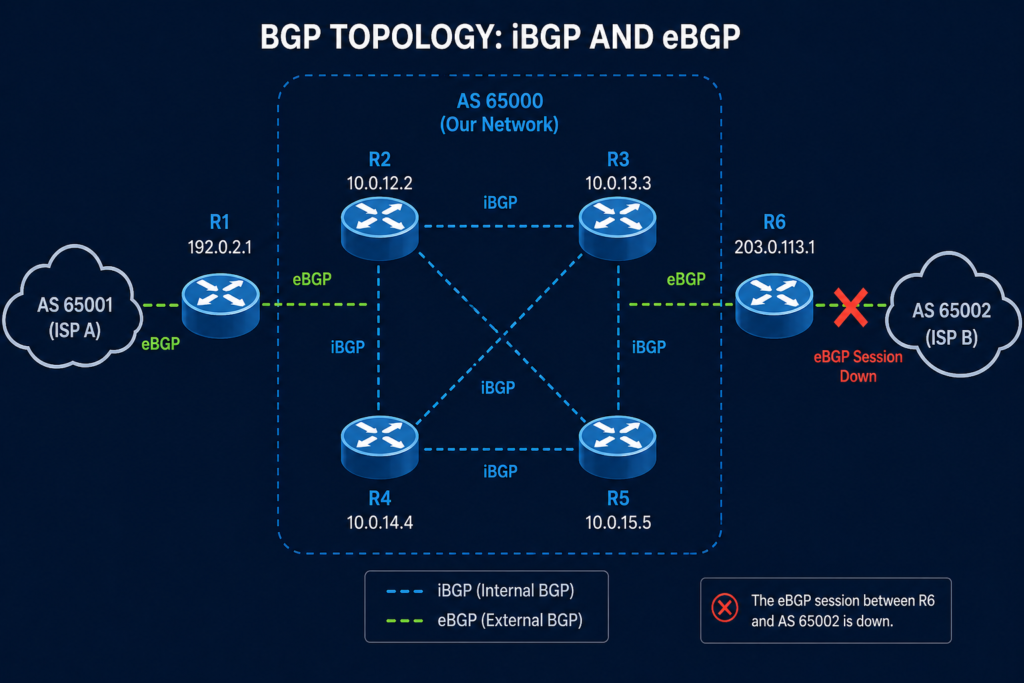
Verified against RFC 4486 (Subcodes for BGP Cease Notification Message), accessed April 2026.
The seven subcodes and what they really mean in production
Subcode 1, maximum number of prefixes reached
The receiving peer hit the configured prefix limit and tore the session down to protect itself. This one is almost always a configuration mismatch, where one side increased their prefix advertisements without telling the other side to raise the limit. Check the maximum-prefix configuration on the receiving peer, agree on a new ceiling, and reset.
Subcode 2, administrative shutdown
Someone typed shutdown under the neighbor configuration. That someone is either you, your colleague, or a change automation script. Check your change management log first. If nothing was scheduled, check who has SSH access to the device and pull the access log.
Subcode 3, peer deconfigured
The peer is no longer in the configuration at all. This typically appears during cutover work where a peering arrangement is being moved to a new device. If you did not plan a cutover, find out who did.
Subcode 4, administrative reset
Someone issued a clear ip bgp neighbor command. This is the lunch break scenario from the opening of this post. Harmless if intentional, alarming if not. Same audit trail as subcode 2.
Subcode 5, connection rejected
The peer received a TCP connection attempt and refused it, usually because the source IP did not match the configured neighbor address. Common after a router reload that brought up a different interface first. Check the update-source configuration.
Subcode 6, other configuration change
A configuration change was applied that required a reset to take effect. Examples include changing the AS number, updating an inbound route map, or modifying authentication. Look for a recent configuration commit on the peer.
Subcode 7, connection collision resolution
Both peers tried to open a session at the same time and the protocol picked one to keep. This is normally invisible and self healing. If you see it repeatedly, you have a routing flap somewhere causing both ends to retry simultaneously.
Subcode 8, out of resources
The peer ran out of memory, CPU, or another internal resource and tore down the session to protect itself. This is the only cease subcode that points to a real platform problem rather than a configuration or human action.
Subcode 9, hard reset
Used in the context of graceful restart, this indicates the peer is unwilling or unable to preserve forwarding state. Investigate the graceful restart configuration on both sides.
What the vendor documentation does not tell you
Cisco, Juniper, Arista, and Nokia all decode the subcode slightly differently in their log strings, and a few of them collapse subcodes 2 and 4 into the same human readable label, which makes log parsing fragile. Do not match on the human readable name. Match on the numeric subcode. We have seen monitoring systems miss a subcode 8 (out of resources) because the log string read “Administrative Reset” on one platform and “Cease, code 6 subcode 8” on another.
Also, the cease notification is sent at the moment of teardown. If your peer device crashes outright, you will not receive a notification at all, you will receive a hold timer expiration. So the absence of a cease notification when a session goes down is itself a clue, it points you toward a hardware or path failure rather than a deliberate teardown.
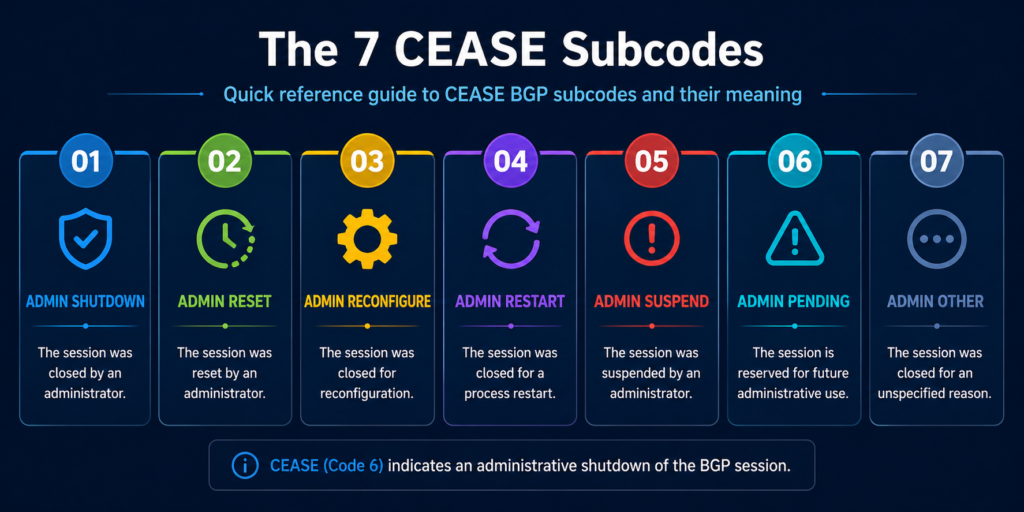
The architectural fix
If you are seeing cease notifications more than once a quarter on the same peering, the issue is not the protocol. It is your change management discipline on either your side or the peer’s side. Three controls eliminate almost all of these in production. First, prefix limits configured symmetrically on both sides, with a warning threshold set well below the hard limit so you get an alert before a teardown. Second, an automated daily diff of your BGP configuration that emails the network team when anything under the neighbor stanza changes. Third, a peering contact list updated quarterly so when you do receive an unexpected reset, you can reach the right human at the other end in minutes rather than hours.
When to escalate
Engage your platform vendor TAC for any subcode 8 event, since that points to a software or hardware resource problem you cannot fix from the configuration. Engage the peer operator for any subcode 1 or 6 event you did not initiate, since the change happened on their side. For subcodes 2, 3, or 4 that you did not initiate, the conversation is internal, not external.
FAQ
Is a cease notification an error?
Technically no. It is the protocol’s polite way of saying the session is going down. Whether it represents a problem depends entirely on the subcode and whether the teardown was expected.
Will the session come back automatically?
It depends on the subcode and your configuration. Subcodes 2 and 3 require manual intervention on the originating side. Subcodes 1, 4, 6, 7, and 9 will retry on the standard BGP timer. Subcode 8 will retry but is likely to fail again until the resource issue is resolved.
Does cease appear during normal BGP operation?
It can, particularly subcode 7 during convergence events. Occasional subcode 7 with no service impact is normal. Anything else warrants investigation.
When the resets keep coming
If your routing team is chasing cease notifications more than they would like, the underlying problem is usually that nobody owns the peering relationships end to end. Our routing practice manages BGP peerings for service providers and large enterprises and treats every cease subcode as a signal worth a phone call. Tell us about your peering setup and we will show you what we would monitor.
Last verified April 2026 by the aaanetworkx routing practice.
You sent a perfectly normal email to a customer on Microsoft 365 and it bounced back with this delightful message. “Service unavailable, Client blocked from sending from unregistered domains. 5.7.708.” If you are reading this, your team probably cannot send to anyone hosted in Microsoft 365 right now, which depending on your industry might mean nobody.
Take a breath. This one is fixable, usually within a couple of hours, but the path is not obvious if you have never walked it before.
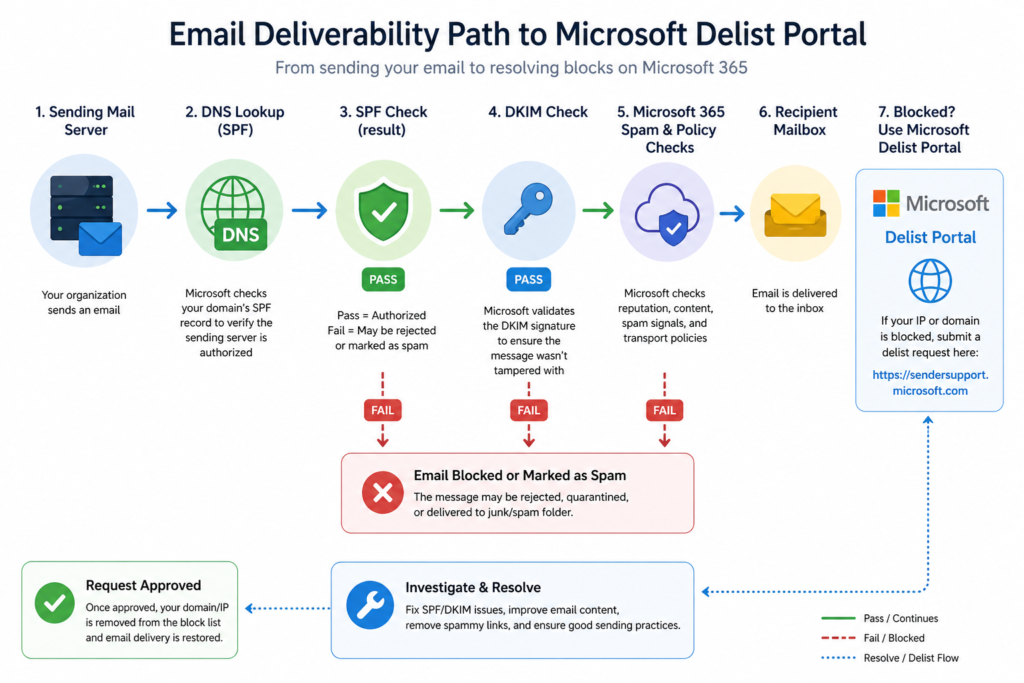
Here is what is happening. Microsoft has decided that the public IP address your mail is leaving from looks suspicious. That can happen for legitimate reasons (your firewall vendor changed something, your hosting provider reassigned the IP, your domain has not built reputation yet) or for less legitimate reasons (a compromised account on your network started sending spam through the same egress IP). Either way, the symptom is identical and the unblock procedure is the same.
What 5.7.708 actually means
The Exchange Online inbound mail filter assigns a reputation score to every IP address that connects to it. When that score crosses a threshold for any of several reasons, including unauthenticated sending, low domain age, or a sudden volume spike, the IP gets placed on what Microsoft calls the high risk delivery pool, and any mail coming from it receives a 5.7.708 rejection at the SMTP layer.
The bounce includes the offending IP in the diagnostic information. Find it in the original headers of the non delivery report. That IP is the one you need to unblock, and it is almost always your firewall’s public address, not the address of your internal mail server.
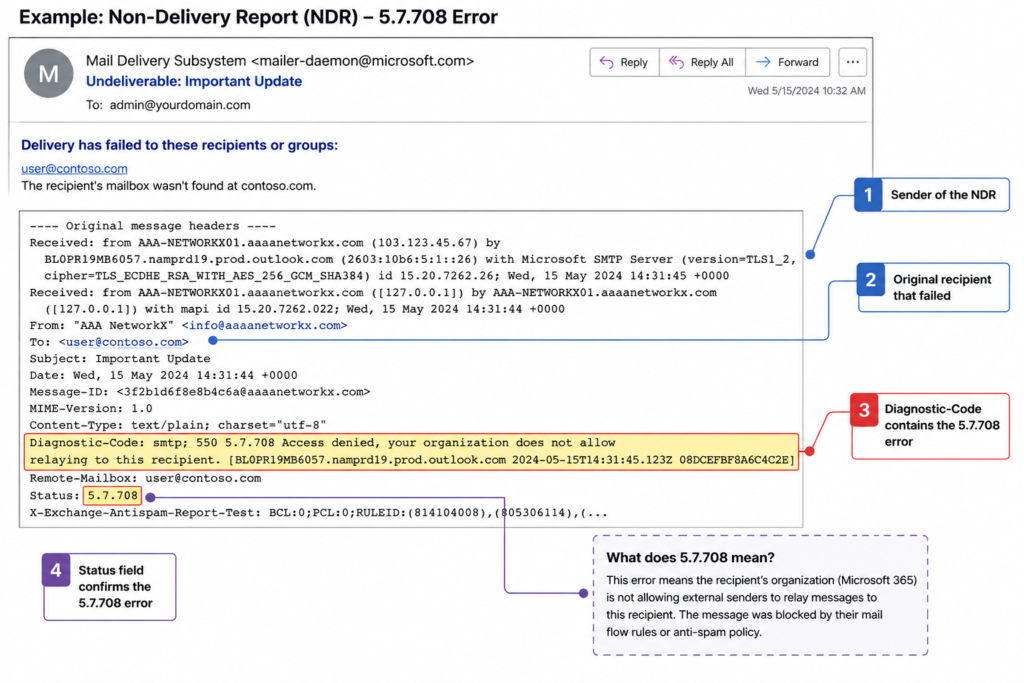
Verified against Microsoft Learn documentation for Exchange Online Protection error codes, accessed April 2026.
The three things that cause it, in order of how often we see them
Cause one, an account on your network was compromised, around 60 percent of cases
This is the most common trigger and the one people least want to hear. A user clicked a phishing link last week, an attacker is now sending pharmacy spam through Outlook on the web, and Microsoft noticed before you did. Before you do anything else, audit recent sign ins in the Microsoft 365 security portal for impossible travel and unusual sending volume. If you find the compromised account, reset the password, revoke all sessions, and check inbox rules for hidden forwarders.
Cause two, your SPF or DKIM is broken or missing, around 25 percent of cases
If your sending domain does not publish a valid SPF record that includes your egress IP, or your DKIM signature is failing, Microsoft has no way to verify that your mail is legitimate. Run your domain through any free SPF and DKIM checker. Fix the records. Wait for DNS to propagate. The block usually clears within a few hours after authentication starts passing.
Cause three, a new IP with no sending history, around 15 percent of cases
This hits companies that just moved to a new firewall, a new hosting provider, or a new SMTP relay. The IP has zero reputation, Microsoft is conservative by default, and your mail gets blocked until you build a track record. The fix here is the formal delist request, covered in the next section.
How to unblock the IP
Go to the Microsoft Smart Network Data Services delist portal. The URL is sender.office.com. Submit your IP address along with a working email contact for verification. Microsoft sends a confirmation email, you click the link, and a human reviews the request. Resolution times we have seen recently range from forty five minutes to about six hours. If the request is rejected, the rejection email tells you what authentication or reputation issue still needs to be fixed first.
While you wait, do not switch to a different egress IP just to get mail flowing. That new IP will get blocked too within a day if the underlying cause is a compromised account. Fix the cause first.
What the official documentation does not mention
Microsoft’s article tells you to use the delist portal. It does not mention that submissions from a free email address (gmail, outlook personal) are deprioritized in the review queue. Use a contact at your own domain or, better, at a domain you host elsewhere. It also does not mention that if your sending domain was recently registered (under thirty days), the delist will likely fail until the domain ages a bit. Patience, in that case, is the only fix.
The architectural fix that stops this from recurring
If you have hit 5.7.708 more than once, the underlying problem is that your egress mail flow has no monitoring on it. The teams that never see this error are the ones who do three things. They lock outbound port 25 to only the addresses of their authorized mail servers. They monitor outbound mail volume per user with an alert at three times the rolling average. And they enforce multifactor authentication on every account that has any mail send permission, including service accounts.
When to escalate
Open a Microsoft support case if the delist portal rejects your request three times in a row with no clear reason, or if the block returns within twenty four hours of being lifted despite no compromise indicators. Bring the bounce headers, the SPF and DKIM check results, and the timestamps of any recent network changes.
FAQ
How long does the Microsoft delist portal take?
Most submissions clear within four hours during business hours in Pacific time. Submissions outside that window may take longer.
Can I get added to an allow list to prevent this in future?
No. Microsoft does not maintain a permanent allow list for sending IPs. Reputation is recalculated continuously.
Will my queued mail deliver after the unblock?
Yes, your sending mail server will retry queued messages on its normal schedule and they will go through once the IP is removed from the high risk pool.
When the bounces will not stop
If your team is fighting this every few months, we should talk. Our managed messaging practice handles outbound mail hygiene for organizations that cannot afford a single hour of mail downtime. See how we keep your senders out of the high risk pool.
Last verified April 2026 by the aaanetworkx messaging practice.
If you opened the Synchronization Service Manager this morning and saw a long list of red entries with the code 8344 next to your Active Directory connector, you are in the right place. We see this one almost every week across customer environments, and the official Microsoft article only tells half the story.
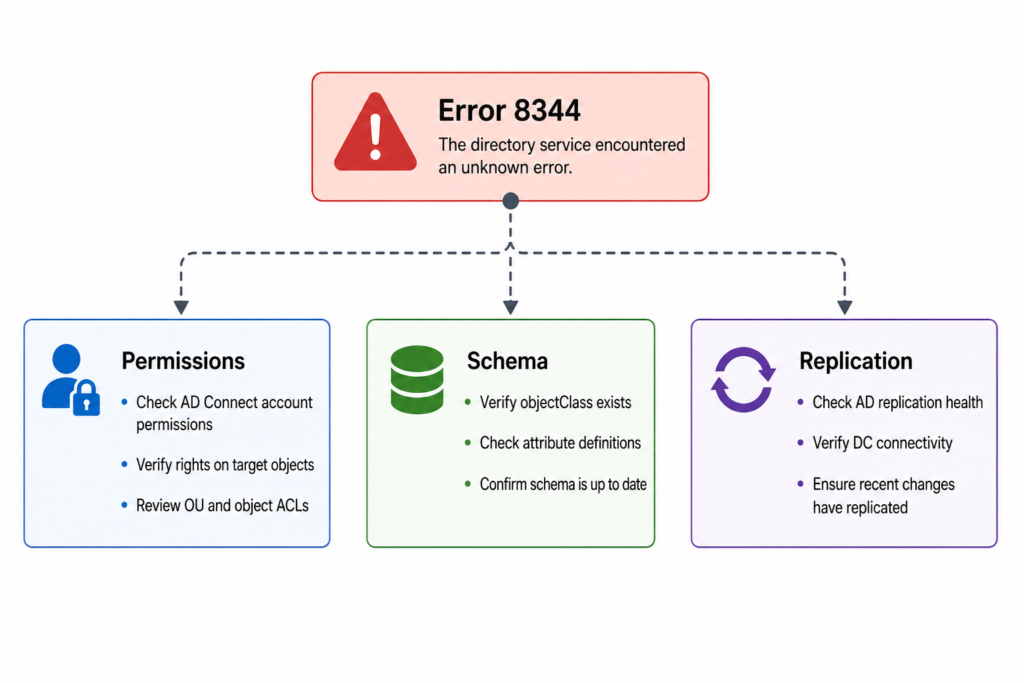
Here is the short version before you scroll. Sync error 8344 in Azure AD Connect (now branded Microsoft Entra Connect Sync) means the service account used to read or write into your on premises Active Directory does not have the rights it needs for that specific object. Most of the time it is a permission that got removed by a tightening of OU level ACLs, not a bug in the connector itself. The fix is to restore the inheritance or the explicit right on the affected OU, then trigger a delta sync.
That said, our NOC sees four very different root causes hiding under the same error number, and one of them only started appearing after the Entra Connect rebrand last year. So please do not stop at “grant write permissions and move on.” Read through the verified causes below.
What this error actually means
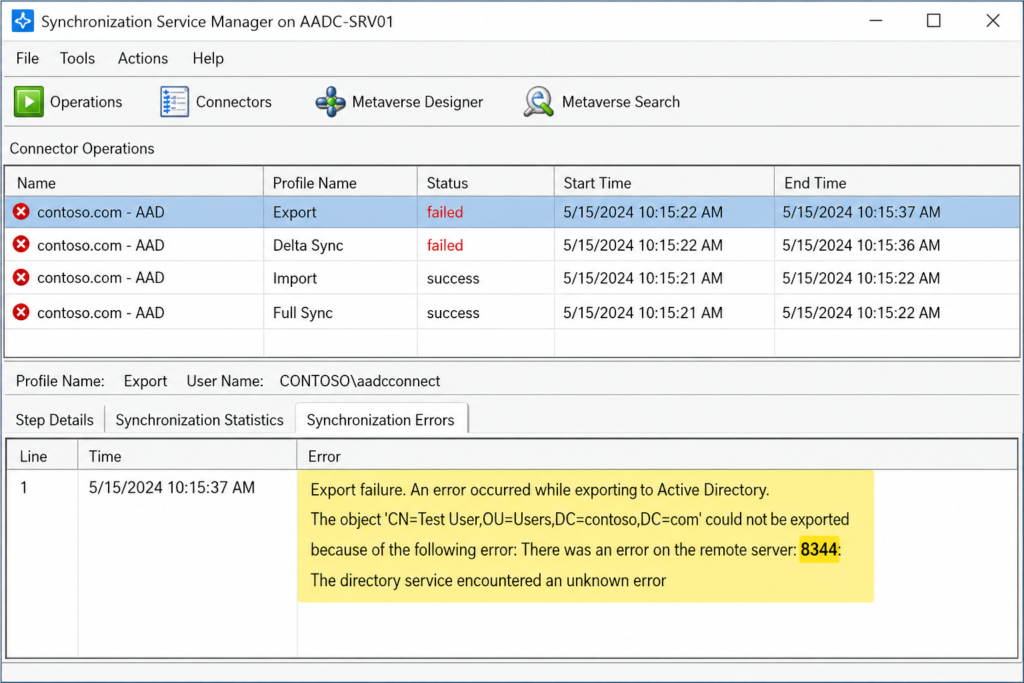
Error 8344 surfaces when the AD DS connector account inside Azure AD Connect attempts an operation against a directory object and the operation is rejected with the LDAP code insufficientAccessRights. The connector logs it as a synchronization failure on the specific object, not as a connector wide failure, which is why the rest of your sync still appears to work.
You will see it in three places. The Synchronization Service Manager shows the run profile result with a count of 8344 errors. The Windows Application event log on your sync server records event ID 6803 with the same description. And inside the Microsoft Entra admin center under Health and Sync errors, you will see the affected user or group flagged with a permission related warning.
Verified against Microsoft Learn documentation for Microsoft Entra Connect Sync, accessed April 2026.
The four causes we actually see, ranked by frequency
Cause one, removed inheritance on a target OU, roughly 55 percent of cases
Someone in the AD team tightened security on a sensitive OU (often Finance or Executives) and disabled inheritance without re adding the AD DS connector account to the explicit ACL. Confirm by opening Active Directory Users and Computers, enabling Advanced Features, and checking the Security tab on the OU. The MSOL_xxxxxxxxx account or the custom service account configured during installation should appear with at least Read all properties. If it does not, that is your culprit. Re add it, then run a delta import followed by a delta sync.
Cause two, password write back failing on protected groups, about 20 percent of cases
When self service password reset writes a new password back to AD, the connector needs Reset Password and Write lockoutTime rights. AdminSDHolder strips these from members of protected groups every hour. The fix is not to grant the permission directly on the user. The fix is to grant it on the AdminSDHolder container itself so the SDProp process preserves it.
Cause three, hybrid Exchange attribute writeback rejected, about 15 percent of cases
If you run Exchange hybrid, the connector writes attributes like proxyAddresses back into AD. A hardened schema or a third party identity governance tool can block this. Check the event log for the specific attribute that failed. The fix lives in the Exchange hybrid configuration, not in Azure AD Connect.
Cause four, the new Cloud Sync agent installed alongside legacy Connect, about 10 percent of cases and rising
This one is recent. After the rebrand to Entra Connect Sync in 2025, several customers ended up with both the classic agent and the new lightweight Cloud Sync agent active for overlapping OUs. The two race for write access and one of them loses with an 8344. If you see the error appear suddenly without any AD changes, this is almost always the cause. Disable one of the two for the affected scope.
What the official documentation does not mention
The Microsoft article tells you to check permissions. It does not tell you that the Enterprise Admins group is not always sufficient on child domains in a multi domain forest, because the connector account may need explicit delegation on each domain separately. It also does not warn you that running the Azure AD Connect wizard to “repair permissions” can overwrite custom delegation you set deliberately. Run that wizard with caution.
The architectural fix
If 8344 keeps reappearing, the underlying issue is not permissions. It is that your AD permission model and your sync service are owned by two different teams who do not talk to each other. The teams that never see this error twice are the ones who add the AD DS connector account to a documented baseline ACL applied to every OU through a Group Policy or DSACLS script. Pair that with a weekly automated check that runs the Azure AD Connect health diagnostic and emails the result.
Curious what a permission baseline would look like in your forest, we publish the exact script we deploy on managed identity engagements. Drop us a note and we will send it over.
When to escalate
Open a ticket with Microsoft if the same object fails 8344 after you have verified permissions on every OU in the object’s path, the AdminSDHolder container, and the schema. Bring the directory replication health report and the latest run profile XML when you do.
FAQ
Is sync error 8344 service affecting?
Only for the specific user or group named in the error. The rest of your tenant continues to sync normally, which is why this error often goes unnoticed for weeks until a help desk ticket arrives.
Will it clear on its own?
No. The connector retries the same object on every sync cycle and fails the same way until a human intervenes.
Has the fix changed in the new Entra Connect Sync release?
The underlying fix is identical. The diagnostic location moved from the legacy portal to the Entra admin center, and the run history view now groups errors by object rather than by run.
Need eyes on it now
If you have hit 8344 more than once this quarter, the issue is not the error, it is the absence of a feedback loop catching permission drift before it cascades. Our managed identity team monitors hybrid AD environments around the clock and resolves these before they reach your help desk. Book a fifteen minute walkthrough of how we would set this up in your environment.
Last verified April 2026 by the aaanetworkx identity practice.
VMware ESXi Alternatives in 2026: KVM, Proxmox, Hyper-V and What Actually Works in Production
If you have been running VMware ESXi for years, you probably remember when it felt like the obvious choice. It was stable, well-supported and had an ecosystem of tools that made managing virtual machines relatively straightforward. Then Broadcom acquired VMware in 2023, and everything changed.
The licensing shake-up that followed pushed subscription costs through the roof for many organizations. Perpetual licenses were eliminated, partner programs were restructured, and IT teams that had built their entire infrastructure around vSphere suddenly found themselves staring at renewal quotes that did not fit their budgets. For smaller businesses and mid-sized enterprises in particular, the numbers simply stopped making sense.
The good news is that the alternatives have never been better. Whether you are running a small business server room in Edmonton or managing a distributed infrastructure across multiple sites, there are mature, production-ready hypervisors that can handle the job, and in some cases do it better than ESXi ever did.
This guide covers the top VMware ESXi alternatives available today, what each one is actually good at, where the tradeoffs are, and how to think about choosing the right one for your environment.
Why IT Teams Are Reconsidering VMware ESXi
Before jumping into the alternatives, it is worth understanding what changed and why so many organizations are now actively looking for an exit path from the VMware ecosystem.
Broadcom’s acquisition strategy has been clear from the beginning: consolidate enterprise licensing, remove entry-level options, and focus exclusively on large enterprise customers. For organizations running 100 or more virtual machines and paying for vSphere Enterprise Plus, the changes may be manageable. For everyone else, the situation is much harder to justify.
- Perpetual licensing for vSphere was discontinued entirely
- Subscription pricing shifted to per-core models, dramatically increasing costs for many workloads
- Smaller VMware partners lost their certifications or exited the market
- Support quality and response times have declined according to many enterprise IT teams
The result is a wave of migration projects happening across organizations of all sizes. And because the major alternatives have matured significantly over the past few years, many teams are finding the transition less painful than they expected.
The Top VMware ESXi Alternatives in 2026
1. Proxmox VE: The Open Source Powerhouse
Proxmox VE is probably the most talked-about VMware replacement right now, and for good reason. It is a complete, open source virtualization platform built on Debian Linux that supports both KVM virtual machines and LXC containers from a single management interface. The web UI is genuinely good, which is something you cannot say about every open source project.
What makes Proxmox compelling is that it gives you enterprise-grade features without the enterprise-grade price tag. High availability clustering, live migration, Ceph storage integration, backup and restore, and role-based access control are all included at no cost. You can run Proxmox completely free, or pay for a subscription that gets you access to the enterprise repository and commercial support.
What Proxmox does well:
- Runs KVM VMs and LXC containers side by side on the same host
- Built-in clustering and live migration with no additional licensing
- Ceph integration for software-defined storage
- Clean web interface that actually makes sense to navigate
- Strong community and growing enterprise support ecosystem
Where to be careful:
- Very large environments with hundreds of hosts will find it less polished than vSphere in certain areas
- The free tier lacks enterprise repository access, so you depend on community package repositories
- Some third-party backup and monitoring integrations require more configuration work than in the VMware world
Best fit: Small to mid-sized businesses, MSPs managing multiple client environments, and organizations that want serious capability without a serious licensing bill.
2. KVM: The Foundation Everything Else Runs On
KVM, which stands for Kernel-based Virtual Machine, is a virtualization module built directly into the Linux kernel. It is not a standalone product like ESXi. It is the hypervisor engine underneath many of the other options on this list, including Proxmox. Understanding KVM separately matters because many teams choose to deploy it directly using tools like libvirt, QEMU, and either a web-based manager or command-line management depending on their workflow.
KVM powers a significant portion of the world’s cloud infrastructure. Amazon EC2, Google Compute Engine, and most major public cloud providers use KVM or a derivative of it under the hood. That is not a coincidence. It is fast, stable, well-maintained, and deeply integrated with the Linux ecosystem.
What KVM does well:
- Near-native performance for CPU and memory-intensive workloads
- Part of the Linux kernel, so it receives continuous security updates and improvements
- Extremely flexible. You can build exactly the management layer you want around it
- Strong support for Windows guests, including Hyper-V enlightenments for better performance
- Excellent integration with OpenStack, oVirt, and other orchestration platforms
Where to be careful:
- Raw KVM without a management layer is not suitable for teams without strong Linux experience
- There is no single official GUI. You will need to choose a management tool, and each has its own learning curve
- Enterprise support requires going through a distribution like Red Hat Enterprise Linux or SUSE Linux Enterprise
Best fit: Linux-heavy environments, cloud infrastructure teams, and organizations that want to build a custom virtualization stack with full control over every layer.
3. Microsoft Hyper-V: The Windows-Native Choice
If your environment is predominantly Windows, Hyper-V deserves serious consideration. It is included with Windows Server at no additional cost, and it integrates tightly with Active Directory, System Center, and the rest of the Microsoft management stack. For organizations already running Microsoft licensing, the economics are hard to argue with.
Hyper-V has come a long way from its early days. Nested virtualization, shielded VMs for security, Storage Spaces Direct for hyperconverged deployments, and tight Azure integration through Azure Stack HCI have made it a genuinely competitive platform for Windows-centric shops.
What Hyper-V does well:
- Included in Windows Server licensing with no additional hypervisor cost
- Deep integration with Active Directory, Group Policy, and Windows management tools
- Azure hybrid connectivity through Azure Arc and Azure Stack HCI
- Strong support for Windows workloads and licensing compliance
- Familiar management through Windows Admin Center and PowerShell
Where to be careful:
- Linux VM support works but is not as seamless as running Linux on KVM or Proxmox
- System Center Virtual Machine Manager adds cost and complexity if you need it
- Less suitable for mixed or Linux-first environments
Best fit: Windows-heavy organizations with existing Microsoft licensing, businesses already invested in Azure, and environments where Active Directory integration is a top priority.
4. XCP-ng: The Open Source Citrix Hypervisor Fork
XCP-ng is an open source fork of Citrix Hypervisor (formerly XenServer) and it has built a strong reputation as a straightforward, stable ESXi replacement. It is developed by the Xen Orchestra team, which also builds XO, the management interface that pairs with it.
What sets XCP-ng apart is its combination of simplicity and reliability. It does not try to do everything. It focuses on running virtual machines well, with a clean architecture and a management experience through Xen Orchestra that is easy to learn. Many VMware administrators find the transition to XCP-ng more intuitive than moving to Proxmox, partly because the concepts map more directly to how ESXi works.
What XCP-ng does well:
- Clean, purpose-built hypervisor based on the mature Xen architecture
- Xen Orchestra provides a polished web UI with good feature coverage
- Strong live migration and backup capabilities
- Active community and commercial support available through Vates
Where to be careful:
- Smaller ecosystem compared to KVM-based alternatives
- Advanced features in Xen Orchestra require a paid subscription
- Less commonly deployed than Proxmox, so community resources are more limited
Best fit: Teams looking for a clean ESXi-like experience, smaller IT departments that want simplicity over feature depth, and environments that previously ran Citrix Hypervisor.
5. Nutanix AHV: The Enterprise Hyperconverged Option
Nutanix AHV (Acropolis Hypervisor) ships with Nutanix’s hyperconverged infrastructure platform at no additional licensing cost. If you are already running Nutanix hardware or evaluating a move to hyperconverged infrastructure, AHV is worth understanding because it directly replaces the previous requirement to license VMware separately.
AHV is built on KVM but heavily customized and integrated into the Nutanix stack. The management experience through Prism is excellent, arguably better than vCenter for day-to-day operations. The tradeoff is that AHV is tightly coupled to Nutanix hardware and software. You cannot run AHV independently the way you can run Proxmox or KVM.
What AHV does well:
- Included with Nutanix licensing with no separate hypervisor cost
- Deeply integrated with Nutanix storage, networking, and management
- Prism management UI is clean and genuinely user-friendly
- Strong enterprise support with well-defined SLAs
- Built-in microsegmentation through Nutanix Flow
Where to be careful:
- Not a standalone hypervisor. It only makes sense as part of a Nutanix deployment
- Nutanix licensing is a significant cost in its own right
- Lock-in concerns exist, though they are different from VMware’s
Best fit: Enterprises evaluating a full infrastructure refresh, and large environments where the operational simplicity of Nutanix justifies the investment.
Side-by-Side Comparison
| Platform | Cost | Best For | Management UI | HA / Clustering | Enterprise Support |
|---|---|---|---|---|---|
| Proxmox VE | Free / Paid subscription | SMB, MSP, mixed workloads | Built-in web UI | Yes, built-in | Community and commercial |
| KVM | Free | Custom stacks, Linux experts | Third-party required | Via oVirt or others | Via RHEL or SLES |
| Hyper-V | Included with Windows Server | Windows-heavy shops | Windows Admin Center | Yes, via Failover Cluster | Microsoft |
| XCP-ng | Free / Paid XO subscription | Clean ESXi replacement | Xen Orchestra | Yes, built-in | Vates commercial |
| Nutanix AHV | Included with Nutanix | HCI enterprise refresh | Prism | Yes, built-in | Full enterprise SLA |
Which One Should You Choose?
There is no single answer, but there are clear patterns depending on your situation.
If you are a small or mid-sized business looking for the closest thing to ESXi without the cost, Proxmox VE is almost certainly your answer. It has the most momentum in the VMware migration space right now, the community is large and helpful, and the feature set covers everything most businesses actually need.
If your environment is predominantly Windows and you already pay for Windows Server licensing, Hyper-V makes the most economic sense. The integration with your existing Microsoft tools is a genuine advantage, and Azure connectivity is a bonus if cloud expansion is on your roadmap.
If you have strong Linux expertise in-house and want maximum flexibility, building on KVM gives you the most control. Pair it with oVirt for a more vSphere-like management experience, or use Proxmox as a managed KVM deployment.
If you want a simpler ESXi-like experience and your environment is not massive, XCP-ng is worth a serious look, especially if you prefer the Xen architecture over KVM.
If you are planning a full infrastructure refresh anyway, evaluating Nutanix AHV as part of a hyperconverged deployment may reduce your overall operational complexity significantly, at the cost of a higher upfront investment.
Migration Path Considerations
Migrating off VMware is not as simple as installing a new hypervisor and importing your VMs. There are a few things to plan carefully before you start.
VM export formats. VMware uses VMDK disk files and OVF/OVA for portability. KVM-based platforms like Proxmox use QCOW2 or raw images. Tools like qemu-img handle the conversion, but you should test in a non-production environment before touching anything critical.
VMware Tools. VMs running VMware Tools will need those removed and replaced with the relevant guest agent for the new platform. For Proxmox and KVM that means installing the QEMU guest agent. For Hyper-V it means Hyper-V Integration Services. This is straightforward but it requires touching each VM individually.
Networking. If you are running NSX or complex vSphere distributed switch configurations, replicating that network design on a new platform takes careful planning. Proxmox uses Linux bridges and Open vSwitch. Hyper-V has virtual switches. Neither maps directly from vSphere distributed switches, so document your current network design thoroughly before starting.
Storage. vSAN does not migrate. If you are using vSAN today, you will need a separate storage plan for the new platform. Proxmox with Ceph is the closest equivalent for software-defined storage. Hyper-V with Storage Spaces Direct is another option.
Phased migration. Most organizations do this in waves. Identify your least critical workloads and migrate those first. Get comfortable with the new platform, build your operational runbooks, then move progressively toward more critical systems. Running both platforms in parallel during the transition adds some complexity but dramatically reduces risk.
Final Thoughts
The VMware ESXi ecosystem dominated enterprise virtualization for two decades because it was genuinely the best option available. That is no longer as clearly true in 2026. The combination of Broadcom’s pricing changes and the maturation of open source alternatives has created a real opportunity for organizations to reduce costs and gain more control over their infrastructure.
The migration is not without effort. It requires planning, testing, and often some retraining. But for most small and mid-sized businesses, the payoff in cost savings and operational independence is worth it.
If you are in Edmonton or anywhere in Alberta and working through a virtualization migration or infrastructure refresh, the team at AAA NetworkX has been through these transitions with clients across a range of industries. We can help you assess your current environment, recommend the right platform for your workloads, and manage the migration from start to finish.
Cybersecurity for Small Businesses in Edmonton: How to Reduce Risk and Protect Operations
Cybersecurity for small businesses in Edmonton is crucial in today’s digital landscape. With the increasing number of cyber threats targeting local enterprises, it is essential for small business owners to implement effective security measures. Protecting sensitive data, customer information, and business operations from cyber attacks can help maintain trust and ensure long-term success. By investing in cybersecurity solutions tailored to the needs of small businesses in Edmonton, companies can safeguard their assets and stay ahead of potential risks.
For businesses in Edmonton, the impact of a cyber incident can be serious. Downtime, lost files, compromised email accounts, and reputational damage can all disrupt operations and create avoidable costs. A practical cybersecurity strategy helps reduce these risks and gives business owners more confidence in their systems.
Why Small Businesses Are Frequently Targeted
Many small businesses assume they are too small to attract cybercriminals. In reality, attackers often look for easier targets rather than larger ones. Businesses with weak passwords, outdated systems, unmonitored networks, or poorly secured remote access are more vulnerable to common threats.
Without the right protections in place, a single phishing email or compromised login can lead to data loss, unauthorized access, or extended downtime. For smaller organizations, even one security incident can have a major operational impact.
Common Cybersecurity Risks for Small Businesses
One of the most common threats is phishing. These attacks often arrive through email and are designed to look legitimate. An employee may click a link, open an attachment, or enter credentials into a fake login page without realizing it.
Weak password practices are another major issue. Reused passwords or simple login credentials make it easier for attackers to gain access to email, cloud platforms, and internal systems.
Many small businesses also rely on basic networking equipment that is not designed for business-grade protection. Without proper firewall configuration, monitoring, and access controls, threats can go undetected.
Backups are another weak point. Some businesses believe they are protected because backups exist, but if those backups are not isolated, monitored, and tested, they may not be usable when needed most.
What a Strong Small Business Cybersecurity Foundation Looks Like
A strong cybersecurity foundation begins with secure access. This includes using strong passwords, multi-factor authentication, and limiting access based on employee roles and responsibilities. Not every user should have access to every system.
Network protection is also essential. A properly configured business firewall helps control traffic, reduce exposure, and detect suspicious activity before it becomes a larger problem.
Endpoint protection helps secure laptops, desktops, and mobile devices used by staff. This is especially important for businesses with remote or hybrid work arrangements.
Regular patching and updates also play a critical role. Outdated operating systems, applications, and firmware can create vulnerabilities that attackers are quick to exploit.
Finally, businesses need reliable backup and recovery processes. Backups should be secure, monitored, and tested regularly so that recovery is possible if systems are disrupted.
Why Reactive IT Support Is Not Enough
Many small businesses only address cybersecurity after a problem appears. By that point, the damage may already be done. Recovering from a breach or ransomware incident is often far more expensive than putting the right protections in place early.
A proactive approach helps identify weaknesses before they affect operations. This includes monitoring systems, reviewing access controls, maintaining updates, and improving security over time as the business grows.
Cybersecurity should not be treated as a one-time fix. It is an ongoing part of maintaining a stable and reliable IT environment.
How AAA NetworkX Supports Small Business Security
AAA NetworkX helps small businesses build practical cybersecurity foundations that align with their daily operations. The goal is not unnecessary complexity. The goal is to reduce risk, improve visibility, and support business continuity. Learn more about our services.
This can include securing networks, improving access controls, strengthening endpoint protection, reviewing backups, and helping businesses move from reactive support to a more structured and proactive model.
For small businesses in Edmonton, this kind of support helps create a more secure and dependable IT environment without overengineering the solution.
Conclusion
Cybersecurity is no longer optional for small businesses. As digital systems become more central to day-to-day work, the risks associated with weak security continue to grow. A practical, well-managed cybersecurity strategy helps protect business data, reduce downtime, and support long-term stability.
If your small business needs help improving cybersecurity, AAA NetworkX can help. Contact AAA NetworkX today to learn how a stronger security foundation can protect your systems and support your operations.