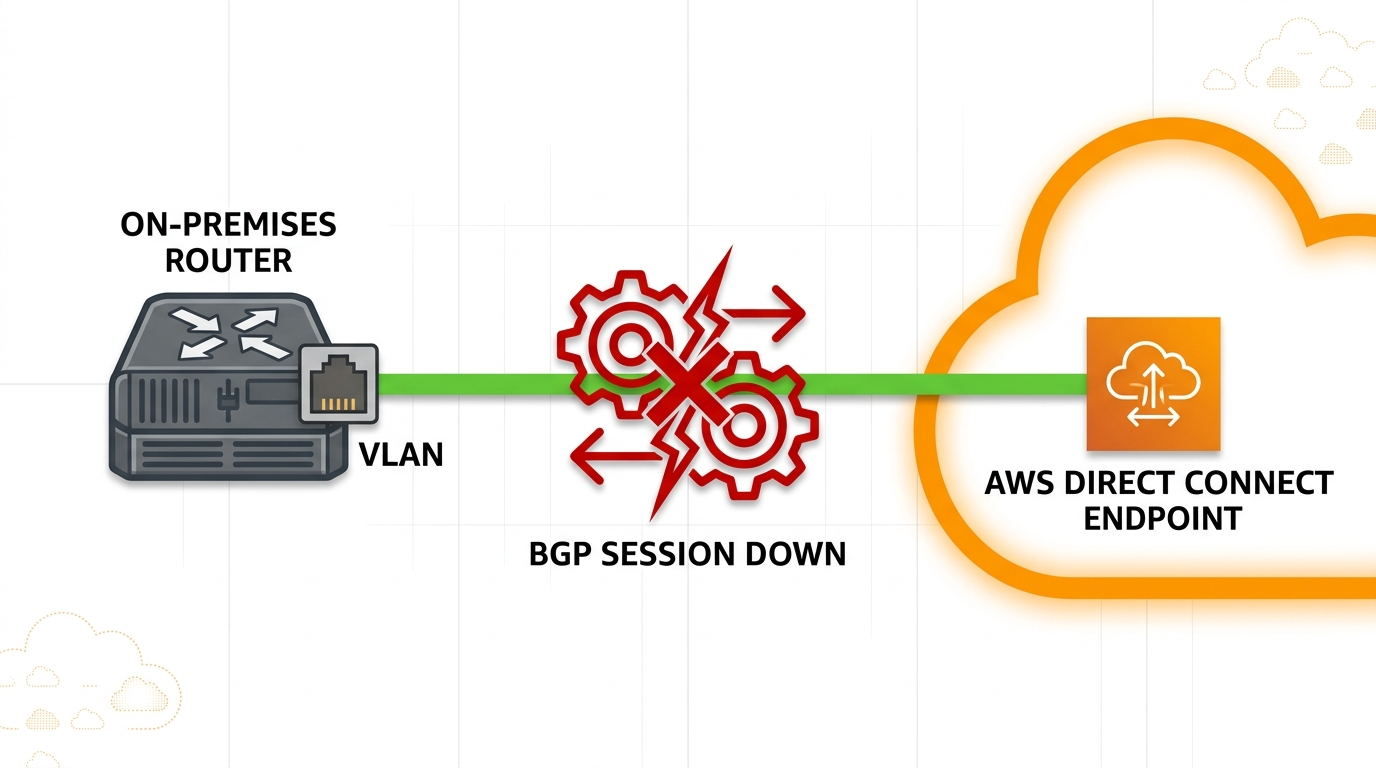
AWS Direct Connect BGP not establishing almost always means a configuration asymmetry between the customer router and the AWS DX virtual interface, not a problem on the AWS side.
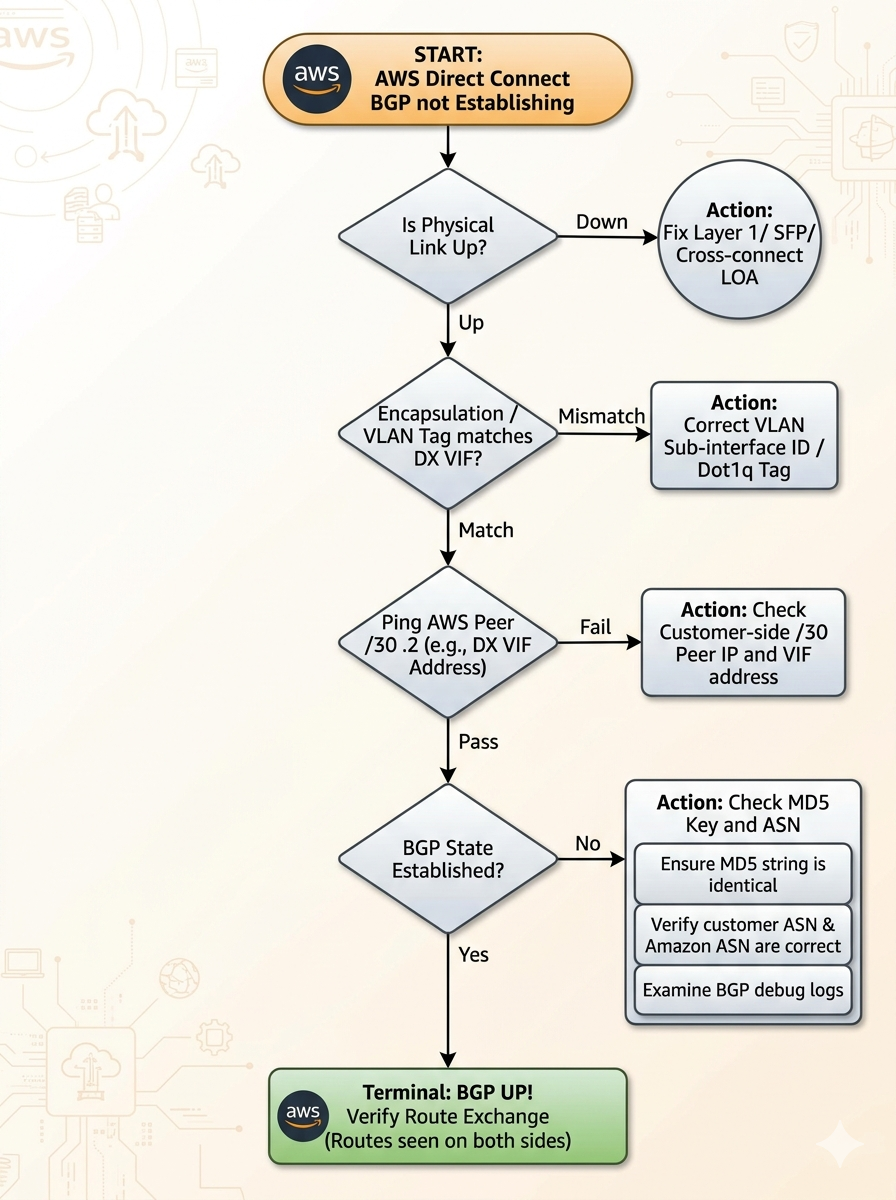
You provisioned an AWS Direct Connect virtual interface, the cross-connect light is up, the AWS console shows the VIF as available, but the BGP peering will not come up. This post walks through the five real causes of AWS Direct Connect BGP not establishing ranked by frequency, the diagnostic order, and the verified fix.
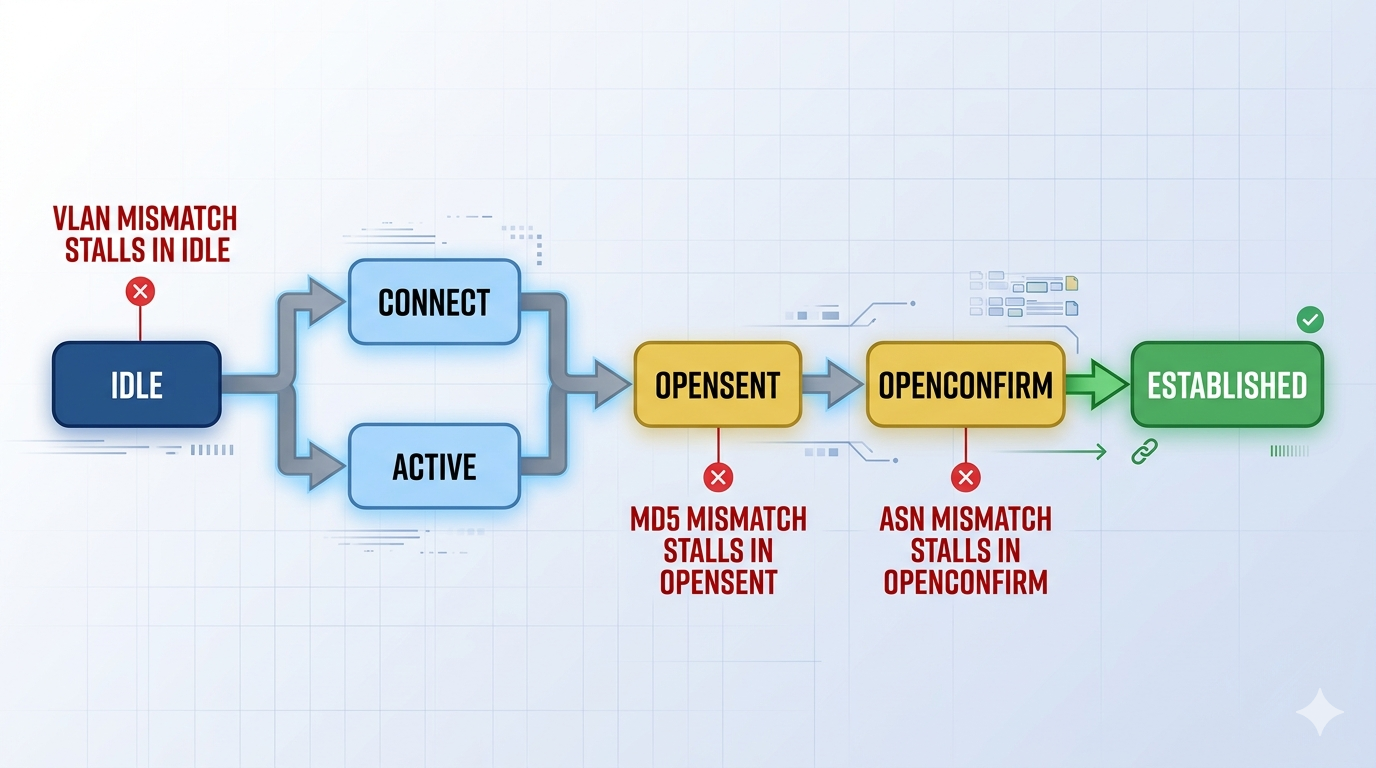
The short version. About 35 percent of cases are VLAN tag mismatch on the customer sub-interface. Another 25 percent are BGP MD5 authentication key mismatch. Another 20 percent are the customer using the wrong IP on the /30 peer link. The remaining 20 percent split across BGP ASN mismatch and MTU or MSS issues that drop the BGP open message, which is where the BGP session typically stalls.
What BGP not establishing means
An AWS Direct Connect VIF expects a BGP session over an 802.1Q tagged sub-interface on a /30 point-to-point peer link. The cross-connect light coming up means the optics, fiber, and Layer 1 are fine. BGP not establishing means the session is stuck in Idle, Connect, Active, or OpenSent on the customer side, and AWS reports the BGP peering as down on the VIF.
You will see this in the AWS console under Direct Connect → Virtual Interfaces → BGP Status. On the customer router, show bgp summary on Cisco or show bgp neighbor on Juniper will show the peer state. The state itself is a strong hint. Idle or Active usually means the peer is unreachable, which is a Layer 2 or Layer 3 problem. OpenSent that never advances usually means MD5 or ASN mismatch.
Verified against current AWS Direct Connect documentation, accessed May 2026.
The five causes, ranked
Cause one, VLAN tag mismatch on the sub-interface, around 35 percent
AWS assigns a specific VLAN ID to each VIF (the customer can request one or accept what AWS suggests). The customer router must tag the BGP traffic with that exact VLAN on the sub-interface facing the cross-connect. A common failure mode is the carrier (Megaport, Allstream, Bell, Equinix Fabric) tagging the VLAN differently than the customer configured, which leaves the BGP packets either untagged at the AWS end or double-tagged.
Verify with show interfaces <sub-if> on the customer router and confirm the VLAN matches what is shown in the AWS VIF config. If a carrier sits between, ask them to confirm whether they are presenting the VLAN tagged or untagged at your handoff. Q-in-Q tunneling is the most common surprise.
Cause two, BGP MD5 password mismatch, around 25 percent
Each DX VIF has an optional BGP authentication key. If you set one in the AWS console it must match exactly on the customer router. Three things break this in practice. Copy-paste introduces a leading or trailing space. The password is longer than the platform supports (Cisco IOS truncates silently above some lengths). Hidden Unicode characters from a password manager autofill that look like ASCII but are not.
Verify by re-typing the key by hand on both sides, not pasting. Keep the key under 80 ASCII characters. If you suspect MD5 is the cause, temporarily clear the key on both sides (BGP without auth) and confirm the session establishes. If it does, the failure is MD5 specifically.
Cause three, wrong customer-side IP on the /30 peer link, around 20 percent
AWS allocates a /30 to the BGP peer link. AWS holds .2 of the /30, the customer must configure .1. Engineers used to /29 or /24 peer links sometimes pick .3 or .5, or guess the prefix length. The result is the customer router cannot ARP the AWS BGP endpoint and the session stays in Active or Idle forever.
Verify by reading the exact peer IPs from the AWS VIF config, not the LOA-CFA. Configure the customer side as the .1 of the /30, with /30 mask. Ping the AWS-side .2 from the customer router. If ping fails but the cross-connect is up, the issue is at this layer.
Cause four, BGP ASN mismatch, around 10 percent
When you create the VIF in AWS, you specify your customer ASN. Private VIFs default to 64512 if you do not specify, public VIFs require a real ASN you control. If the ASN configured on the customer router does not match what is recorded in the VIF, BGP gets to OpenSent and AWS rejects the OPEN message with a notification.
Verify by reading the ASN from the AWS VIF detail panel. Match it on the customer router under router bgp <asn>. The AWS-side ASN is also shown there (typically 64512 for private VIFs, the AWS public ASN for public VIFs).
Cause five, MTU or MSS dropping the BGP open message, around 10 percent
Direct Connect supports jumbo frames on private VIFs at 9001 bytes if both ends agree, otherwise the path defaults to 1500. If the customer router has the sub-interface at 9001 but the carrier handoff is 1500, large BGP open messages with many capabilities advertised can fragment and get dropped, which leaves BGP in Active or OpenSent depending on the platform.
Verify by setting both sides to 1500 explicitly, then confirm BGP establishes. If it does, you can reintroduce jumbo frames intentionally once you confirm the carrier supports them end to end.
What the AWS sample config does not mention
AWS provides a downloadable sample config when you create a VIF. The sample is a starting point, not a finished config. It assumes a single sub-interface dedicated to the VIF, no upstream policy filtering, and the carrier presenting the VLAN tagged at your handoff. If any of those assumptions are wrong, the sample alone will not bring BGP up. Always confirm the carrier handoff and any inline policy on your edge router before troubleshooting AWS-side.
Also, a Direct Connect VIF has a single BGP session. Resilience comes from a second VIF on a second physical Direct Connect at a different AWS location, not from BGP redundancy on a single VIF. If you only have one DX, the BGP session being stable matters more than for a redundant VPN.
The architectural fix
AWS Direct Connect deployments that rarely fail share four practices. They use a dedicated sub-interface per VIF, never sharing with other traffic. They confirm the carrier handoff VLAN tagging in writing before BGP turn-up, not after. They keep the BGP MD5 key under 80 ASCII characters and store it in a secrets vault, not a chat thread. They monitor BGP session state with the AWS CloudWatch metric and alert on any drop, since a single VIF has no automatic failover.
FAQ
Will the BGP session establish on its own once the cross-connect is up?
Only if the customer side is configured correctly. The cross-connect being up is Layer 1. BGP is Layer 4 and depends on VLAN, IP, MD5, and ASN all matching. If any one is wrong, the session will keep retrying but never establish.
Should I use a public VIF or a private VIF?
Private VIF is for reaching VPCs through a virtual private gateway or transit gateway, which is what most customers want. Public VIF is for reaching AWS public services (S3, DynamoDB) over Direct Connect rather than the public internet. Public VIFs require a real ASN and AWS LOA verification of the prefixes you advertise.
Does AWS Direct Connect work for ca-central-1 from Edmonton?
Yes. The AWS Direct Connect locations for ca-central-1 are in Calgary and Toronto. From Edmonton, most carriers terminate the cross-connect in the Calgary AWS DX location with a backhaul over their core, which adds 4 to 6 ms of latency to ca-central-1.
Related posts
BGP not coming up on a new Direct Connect
If you are turning up a new AWS Direct Connect and the BGP session will not establish, our cloud networking team can review the carrier handoff, the customer-side sub-interface, and the AWS VIF config in parallel and isolate the asymmetry quickly. Tell us your carrier and edge platform and we will help you align.
Last verified May 2026 by the aaanetworkx cloud networking practice.
WireGuard vs IPsec: Why Your VPN Connects But Doesn’t Work
Most VPN issues aren’t configuration errors; they’re design problems.
During a real-world deployment between an on-prem network and AWS, we encountered a frustrating issue:
The VPN tunnel was fully established… but no traffic was passing.
At first glance, everything appeared correct. But as we dug deeper, it became clear that real-world networking behaves very differently from theory.
The Setup: Hybrid Cloud VPN
In this deployment :
- AWS VPC: 10.0.0.0/16
- On-prem network: 10.10.0.0/16
- VyOS routers on both ends
- EC2 instances across subnets
- Site-to-site VPN over the internet
The goal was simple: establish secure communication between cloud and on-prem environments.
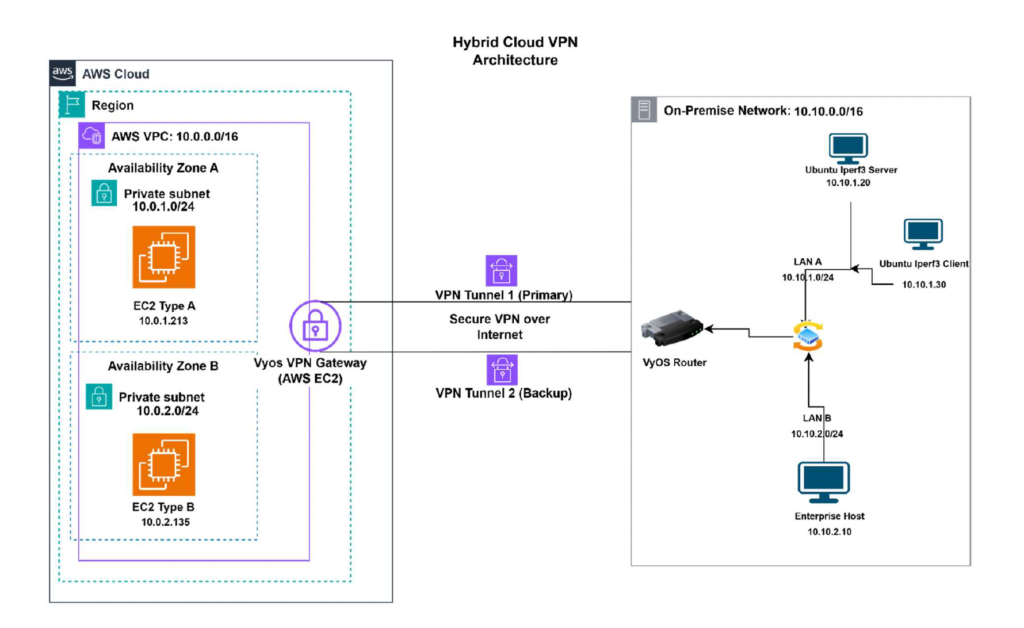
The Problem: Tunnel Up, No Traffic
The VPN appeared connected, yet no traffic was passing between the networks.
This is a frequent and often misunderstood VPN problem.
“Connected” does NOT guarantee it’s functioning properly.
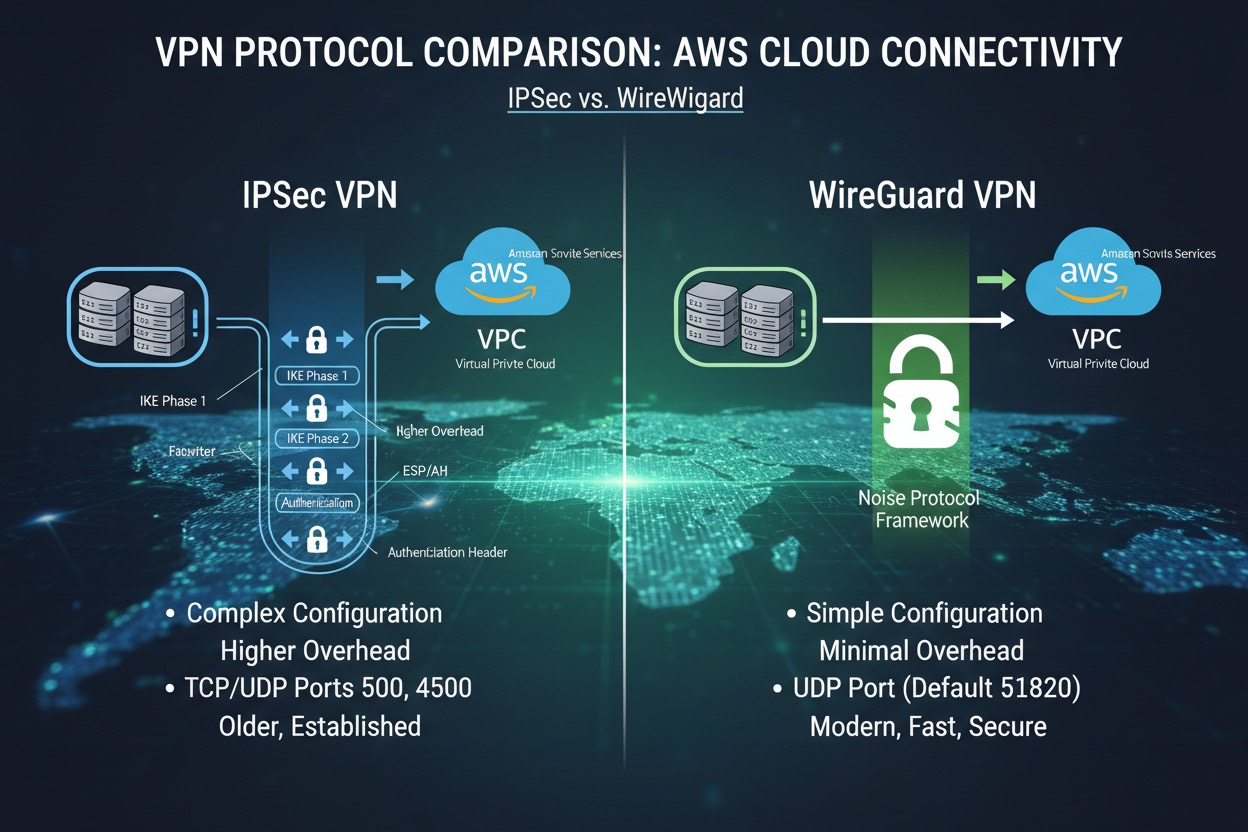
IPsec: Powerful but Complex
IPsec is the standard for enterprise VPNs and is widely supported across platforms.
However, it comes with complexity:
- Phase 1 (IKE) and Phase 2 configurations
- Encryption and hashing algorithms
- Tunnel policies and routing rules
- Firewall and security configurations
Even when everything appears correct, issues can still occur.
Where Things Break
In this case, the issue was caused by NAT (Network Address Translation) .
IPsec relies on protocols such as IKE and ESP, which are sensitive to NAT traversal. Without proper handling, traffic may be translated before reaching the VPN endpoint, breaking communication.
This leads to “working” tunnels that silently fail.
WireGuard: A Simpler Approach
WireGuard simplifies VPN deployment significantly.
Instead of complex multi-phase setups, it uses:
- Public and private keys
- Peer definitions
- Allowed IP ranges
That’s it.
Why It Works Better
WireGuard operates over a single UDP port, making it far more effective in NAT environments .
This results in:
- Faster setup
- Easier troubleshooting
- More consistent connectivity
Performance Comparison
Testing with iperf3 showed:
- WireGuard achieved higher throughput
- Lower latency
- Faster responsiveness
- IPsec provided stronger long-term stability
The differences weren’t extreme, but they were enough to highlight key trade-offs.
WireGuard vs IPsec: Quick Comparison
| Feature | WireGuard | IPsec |
|---|---|---|
| Setup | Simple | Complex |
| Performance | High | Moderate |
| NAT Handling | Better | Sensitive |
| Stability | Good | Strong |
| Usage | Growing | Standard |
What This Means for Your Business
If your VPN is poorly designed, you may experience:
- Intermittent connectivity issues
- Slow performance between office and cloud
- Increased troubleshooting time
- Hidden downtime
Choosing the right VPN, and configuring it correctly, can prevent these problems entirely.
Key Takeaways
- Network environment plays a major role in VPN performance
- NAT can break IPsec even when tunnels appear connected
- Simpler configurations reduce errors
- Real-world testing is critical
Need Help With VPN or Cloud Connectivity?
If your VPN is unreliable, slow, or just not working, we can help.
At AAA NetworkX, we design and troubleshoot real-world network environments, including:
Network performance optimization
Site-to-site VPNs (WireGuard & IPsec)
Firewall and security configuration
About the Author
Edberg Hammond is a network and cloud specialist at AAA NetworkX, specializing in hybrid cloud networking, VPN deployment, and secure infrastructure design.
He has hands-on experience solving real-world issues such as VPN tunnels that connect but fail to pass traffic, helping businesses avoid downtime and performance issues.
Based in Edmonton, Edberg works with organizations to design and troubleshoot reliable, scalable IT environments.