
Cybersecurity Edmonton law firms need in 2026 has tightened around three control sets the Law Society and your insurer both expect.
If you are a managing partner at an Edmonton law firm and you have been thinking about cybersecurity lately, it is probably because you read about another firm getting hit. Probably ransomware. Probably a firm of similar size to yours. Probably last quarter or last month. The headlines have been steady for two years, and the trend is not slowing down. This post walks through what actually matters for a small to mid sized Edmonton law firm in 2026, what the threats really look like, what the Law Society is starting to expect, and what a reasonable baseline costs.
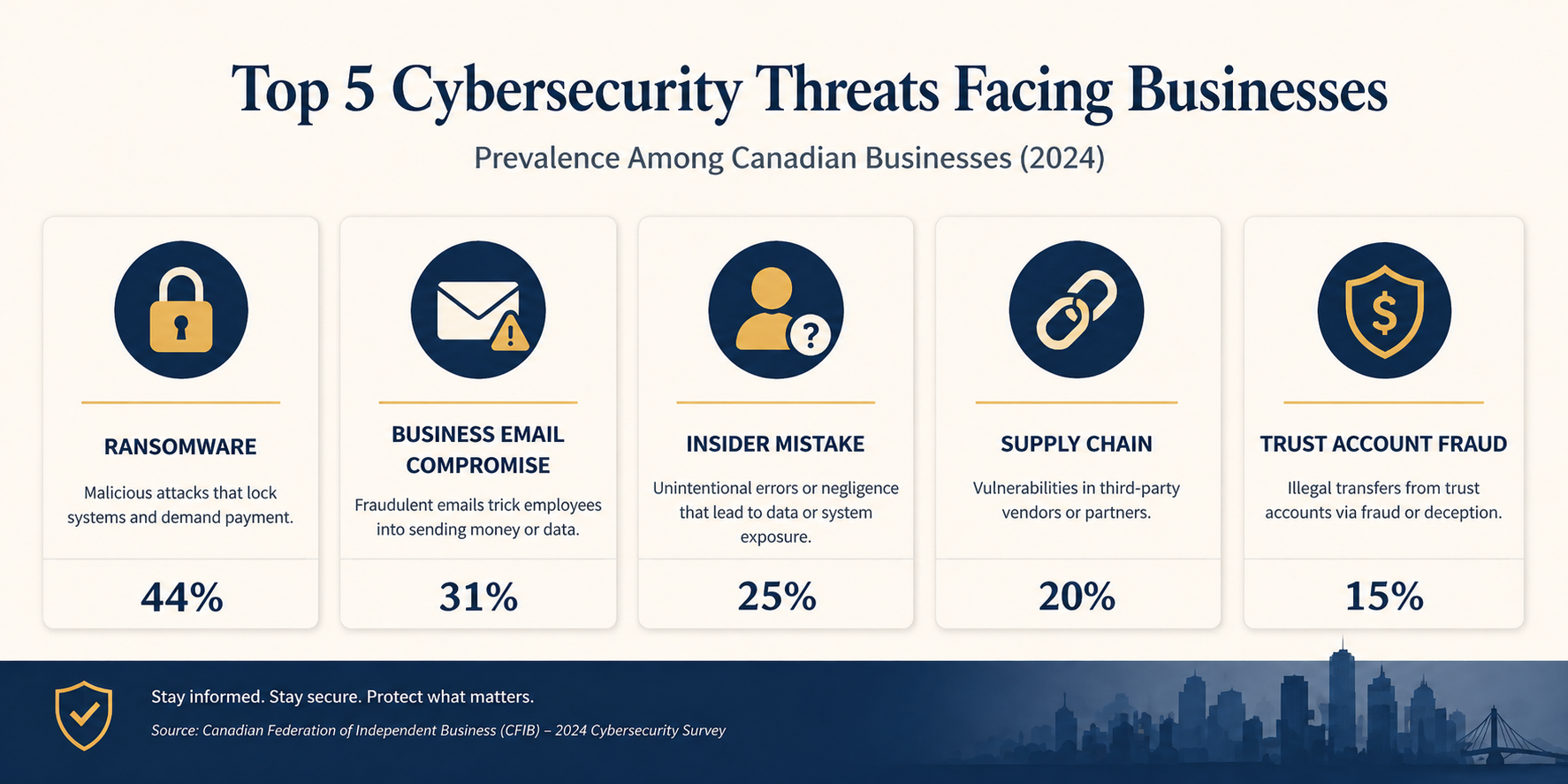
The short version. Law firms are a top three target sector for ransomware in Canada because attackers correctly assume firms have the budget to pay, the time pressure of client deadlines, and a low tolerance for public reputational damage. The good news is that the controls that actually stop the attacks we see are not exotic. They are well understood, available off the shelf, and within the budget of a 10 person firm. The harder part is implementing them consistently and keeping them in place. That is the work.
Why law firms specifically
Three things make law firms unusually attractive to attackers compared to other professional services.
First, the data is high value. M&A files, settlement documents, IP filings, divorce records, criminal defence material. All of it commands either ransom value (the firm will pay to keep it from leaking) or direct sale value on dark web markets.
Second, the trust account makes you a fraud target. Wire transfer fraud schemes targeting real estate closings have hit dozens of Alberta firms in the last three years. Attackers monitor email for closing dates, then send a perfectly timed fake instruction to redirect funds. Settled cases in Canada show losses ranging from $80,000 to over $1 million per incident.
Third, firms have client deadlines and court dates. Attackers know that downtime during a trial week or a closing window has unique leverage, which raises the price you will pay to recover quickly. Together, these three factors make legal one of the most attacked verticals in Canada.
What Edmonton law firms actually need
The Law Society of Alberta has been steadily increasing its expectations around technology competence and client confidentiality. The Code of Conduct already obligates lawyers to take reasonable steps to protect confidential information, and recent guidance has been more specific about what reasonable means in a digital context. PIPA (Alberta’s Personal Information Protection Act) adds breach notification obligations once personal information is involved, with timelines measured in days, not weeks. FINTRAC compliance adds further reporting obligations for any firm handling real estate trust funds.
None of these regulations dictate specific tools. They dictate outcomes. So the question for a partner is not “what does the Law Society require?”, it is “what controls would I be embarrassed to be missing if a breach happened tomorrow and the regulator asked?” That answer is more or less the same for every firm regardless of firm size.
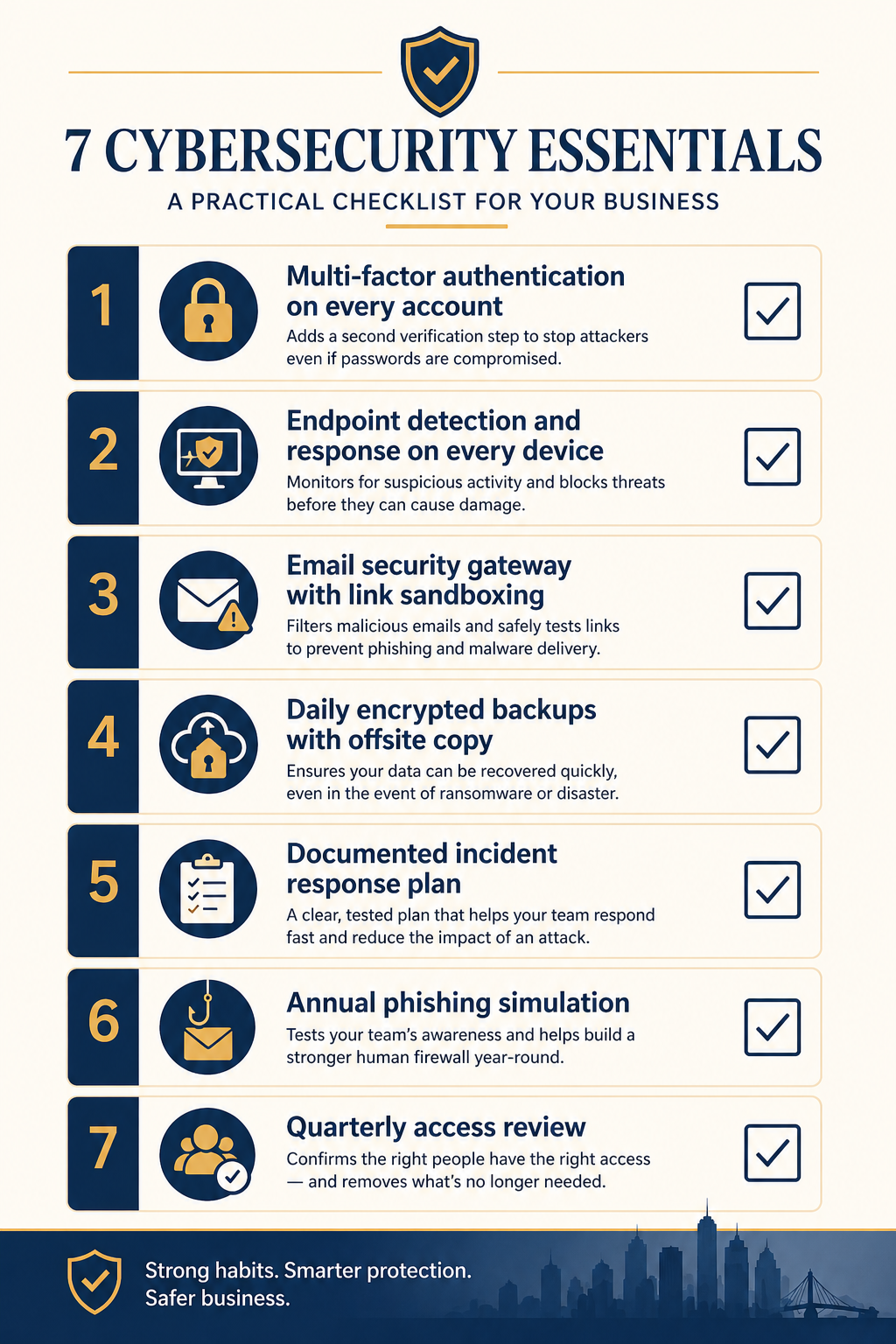
The baseline that catches 90 percent of real attacks
1. Multi-factor authentication on every account, no exceptions
The single highest impact control. MFA on Microsoft 365, on your practice management software, on remote access, on the trust accounting system. The exception list should be empty. We see firms that have it on most accounts but excluded the senior partner because she finds it annoying. Attackers know exactly which accounts get exclusions and target them first.
2. Endpoint detection and response on every device
The next generation of antivirus. Tools like Microsoft Defender for Endpoint, SentinelOne, or CrowdStrike that actually detect and stop ransomware in progress, not just match known signatures. Every laptop, every desktop, every server. Including the one in the back office that nobody touches.
3. Email security gateway with link sandboxing
The native Microsoft 365 spam filter is good but not enough. Add a layer that opens every link in a sandbox before delivering and that flags business email compromise patterns. This is the single biggest defence against the wire transfer fraud schemes targeting trust accounts.
4. Daily encrypted backups with an offsite copy
If ransomware does get in, backups are what saves you. Daily, encrypted, with one copy that is physically or logically offsite (immutable cloud storage works). Test the restore quarterly. Untested backups have failed at the worst possible moment for at least three Alberta firms I know of.
5. A written incident response plan
Two pages, max. Who calls who when something goes wrong, what gets disconnected, what gets reported and to whom (Law Society, PIPA, insurer, client, FINTRAC if applicable), where the offline backups live. The plan does not need to be sophisticated. It needs to exist on paper, before the incident, so nobody is making decisions in panic.
6. Annual phishing simulation
Once a year, send a simulated phishing email to every staff member. Track who clicks. Train the people who click. The point is not to shame anyone, it is to keep awareness fresh and to give you a metric that improves over time. Click rates above 15 percent indicate the firm needs more frequent training.
7. Quarterly access review
Review who has access to what every quarter. Remove access for departed staff (it is shocking how often this gets missed for months). Tighten permissions on shared drives so junior staff do not have read access to senior partner files they should not see. This is mostly a process discipline, not a technology investment.
What it actually costs
For a 10 to 25 person Edmonton firm, the entire baseline above runs roughly $80 to $150 per user per month, all in. That covers Microsoft 365 Business Premium licenses (which include MFA and Defender), an email security gateway, backup tooling, the EDR layer, and a managed service relationship that runs the phishing simulation and quarterly access review for you.
Compare that to the cost of an actual incident. The most recent IBM Cost of a Data Breach Report puts the average total cost of a breach in the legal sector around USD 4.5 million globally. For an Alberta firm, the local reality is smaller but still painful. Settled ransomware incidents we have seen at Edmonton-area firms range from $40,000 (small firm, paid ransom plus recovery) to over $400,000 (mid sized firm, did not pay, took six weeks to recover, lost two clients). Those numbers do not include reputational damage or potential Law Society discipline.
The math is rarely close. Spending $20,000 a year to avoid a $200,000 incident with even a 20 percent annual probability is just risk management arithmetic. Most partners I talk to have not done this calculation explicitly, and most are surprised at how favourable it is.
What we see firms get wrong
Three patterns repeat. First, partial deployments. MFA on most accounts, EDR on most laptops, backups on most servers. The gap is always where the attacker enters. Coverage matters more than sophistication. Second, the IT generalist trap. Many firms rely on a friendly local IT generalist who is good at fixing printers but has never investigated an incident. Cybersecurity is a different skill set, and the gap shows up under pressure. Third, the once-and-done mindset. Firms install the tools, check the box, and never review them again. Attackers do not stop evolving, so neither can your defences.
FAQ
Does cyber insurance cover ransomware payments?
Sometimes, but coverage has tightened significantly. Most insurers now require evidence of MFA, EDR, and tested backups before they will quote, and many exclude ransomware payments outright if those controls are missing. Insurance is a backstop, not a substitute for the baseline.
We use a cloud practice management system, are we covered?
The cloud system handles its own infrastructure security, but your accounts on it are still your responsibility. MFA on every login, regular access review, and the email and endpoint controls above all still apply. Cloud does not transfer risk, it just changes which parts you control.
How fast can a baseline be implemented?
For a firm starting near zero, a competent team can deploy the full baseline above in 30 to 45 days without disrupting practice. For a firm that already has Microsoft 365 Business Premium, often two to three weeks.
Related posts
- Cybersecurity for Edmonton Accounting Firms
- HIPAA Network Segmentation Requirements
- PCI-DSS for Edmonton Retail WiFi
If you are a partner reading this
You probably already know your firm has gaps. The question is what is sitting open right now and how exposed you are to the specific attack patterns hitting Alberta firms this year. Our team works with several Edmonton firms in your size range and we can do a focused 90 minute assessment that produces a one page priority list, no commitment.
Book a free 90 minute cybersecurity assessment for your firm. We will come to your office, walk through the seven controls above with whoever you want in the room, and leave you with a written priority list you can act on with or without us.
Last verified April 2026 by the aaanetworkx cybersecurity practice. Edmonton, Alberta.

Enterprise IoT Security: How to Protect Your Edge Network from Cyber Threats
The Hidden Risk in Modern IoT Environments
The rapid growth of IoT has transformed how businesses operate, but it has also created a serious security gap that most organizations are not fully prepared for. Smart cameras, IoT sensors, and connected office systems are typically built for convenience and cost efficiency, not security. That design priority makes them attractive targets for attackers looking for easy entry points into corporate networks.
The problem runs deeper than the devices themselves. Most enterprises invest heavily in intrusion detection, intrusion prevention, and centralized logging at their core network. But edge environments, such as remote offices, clinics, and small business locations, often run on consumer-grade routers with minimal monitoring and no visibility into what is actually happening. The result is a dangerous mismatch: enterprise-level threats facing consumer-level defenses.
Why IoT Devices Are a Growing Target
Over 70 percent of IoT devices in production environments operate with known, unpatched vulnerabilities. Attacks against these devices are largely automated and continuous. Attackers run persistent scans looking for weak credentials, open ports, outdated firmware, and flat networks with no segmentation. When they find a way in, they do not just compromise the device. They use it to spy on internal traffic, deploy ransomware, recruit the network into botnets, and pivot deeper into critical systems.
Small and mid-sized businesses are disproportionately affected because the assumption that “we are too small to be targeted” still leads many owners to underinvest in edge security. The reality is that smaller organizations are often easier targets precisely because their defenses are weaker, not because attackers specifically chose them.
The Solution: Enterprise-Grade IDPS at the Edge
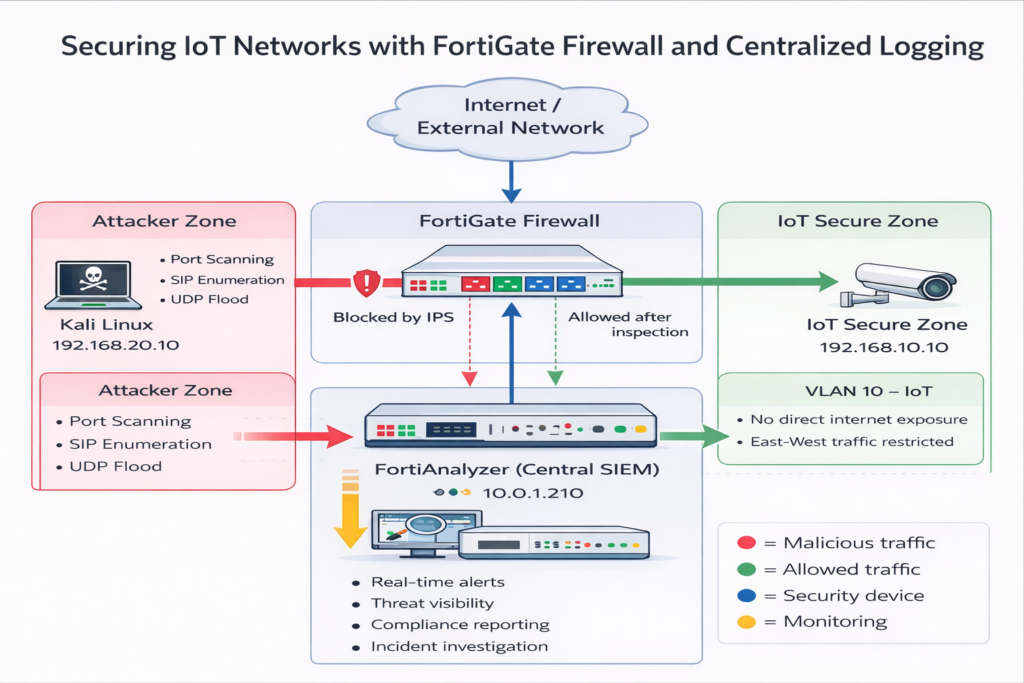
1. Next-Generation Firewall (NGFW)
Acts as the single enforcement point, inspecting all incoming and outgoing traffic using Deep Packet Inspection (DPI).
2. Centralized Logging & Analytics
Tools like FortiAnalyzer provide:
- Real-time monitoring
- Event correlation
- Full visibility across the network
3. Network Segmentation
The architecture divides the network into:
- Trusted Zone (IoT devices)
- Untrusted Zone (external threats)
- Management Zone (security controls)
This ensures:
Least-privilege access
Contained breaches
Better monitoring
What Makes Enterprise Security Different?
Most businesses think “we have a firewall = we are secure.”
That’s not true.
Basic Firewall vs Enterprise Security
| Feature | Basic Setup | Enterprise-Grade (AAA NetworkX Approach) |
| Traffic Inspection | Port-based | Deep Packet Inspection (DPI) |
| Threat Detection | Limited | Signature + Behavioural |
| Visibility | Minimal logs | Centralized analytics |
| Response | Manual | Automated blocking |
| Segmentation | None | Strict zone isolation |
The key difference is visibility + automation
Enterprise systems don’t just allow/block traffic; they understand behaviour and react in real time
Real-World Testing: How Attacks Were Stopped
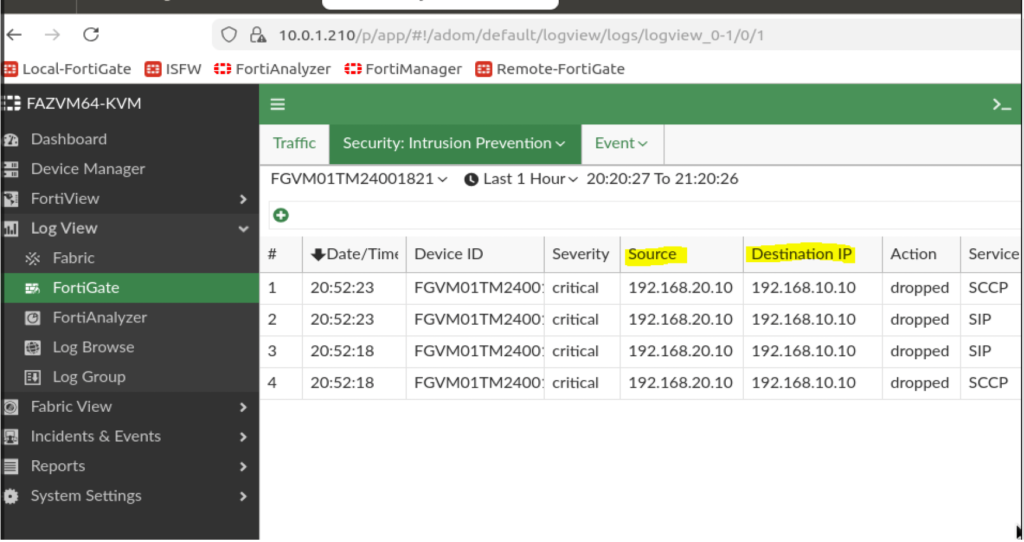
1. Advanced Reconnaissance Attacks
Attackers used aggressive scanning techniques to identify open ports.
Result:
- Threat detected instantly
- Escalation classified as critical
- Traffic automatically blocked
The system effectively “cloaked” the device from attackers
2. Protocol-Level Probing (SIP Attacks)
IoT cameras often rely on SIP (Session Initiation Protocol), making them vulnerable.
Result:
- Legitimate traffic allowed
- Suspicious activity logged and monitored
- Full visibility maintained
3. Denial-of-Service (DoS) Attacks
A high-volume UDP flood was launched to overwhelm the system.
Result:
- Anomaly-based detection triggered
- Malicious source blacklisted
- Device remained operational
This proves that behaviour-based security is critical for modern threats
Key Takeaways for Businesses
Visibility = Security
Without centralized logging, threats go unnoticed.
Behavior-Based Detection Wins
IoT traffic is predictable, making anomalies easier to detect.
Segmentation Prevents Breaches
One compromised device should NEVER expose your entire network.
What This Means for Your Business
If your organization uses:
- Smart cameras
- VoIP systems
- Cloud-connected devices
- Remote offices
You are already operating in an IoT edge environment
And likely:
Lack enterprise-grade protection
Have limited visibility
Are vulnerable to silent attacks
How AAA NetworkX Can Help
At AAA NetworkX, we design and deploy:
Fortinet-based firewall & IDPS solutions
Secure network segmentation architectures
Real-time monitoring & threat detection
IoT security hardening for businesses
Whether you’re a:
- Medical clinic
- Small business
- Enterprise with remote sites
We bring enterprise-level security to your edge network.
Get a Free Security Assessment?
If you’re unsure about your current security posture, we’ll help you identify risks and fix them fast.
At AAA NetworkX, we design and troubleshoot real-world network environments, including:
Network performance optimization
Site-to-site VPNs (WireGuard & IPsec)
Firewall and security configuration
About the Author
George Takyi Nti
Cybersecurity & Network Security Specialist
George specializes in designing and deploying enterprise-grade security architectures, with a focus on Intrusion Detection and Prevention Systems (IDPS), Fortinet solutions, and IoT infrastructure protection. His work centers on strengthening edge network security through advanced threat detection, network segmentation, and real-time monitoring.
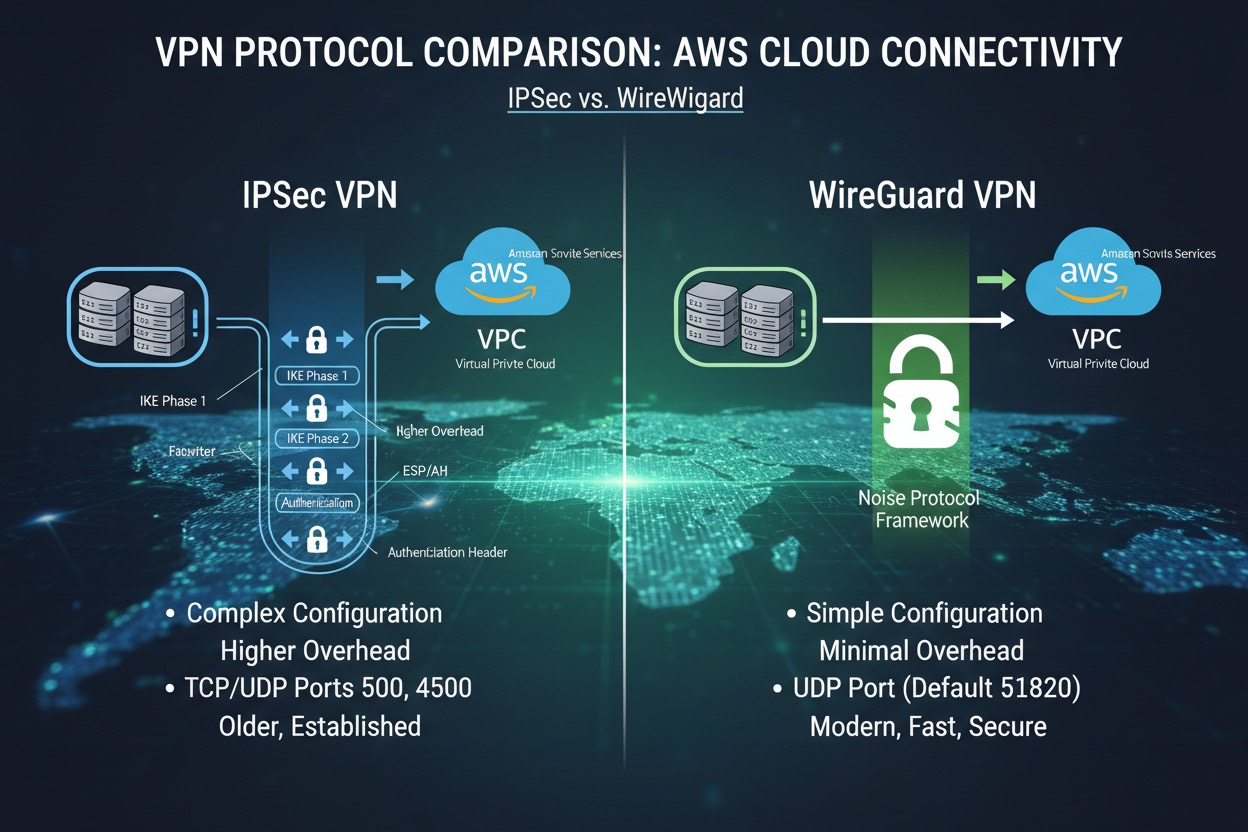
WireGuard vs IPsec: Why Your VPN Connects But Doesn’t Work
Most VPN issues aren’t configuration errors; they’re design problems.
During a real-world deployment between an on-prem network and AWS, we encountered a frustrating issue:
The VPN tunnel was fully established… but no traffic was passing.
At first glance, everything appeared correct. But as we dug deeper, it became clear that real-world networking behaves very differently from theory.
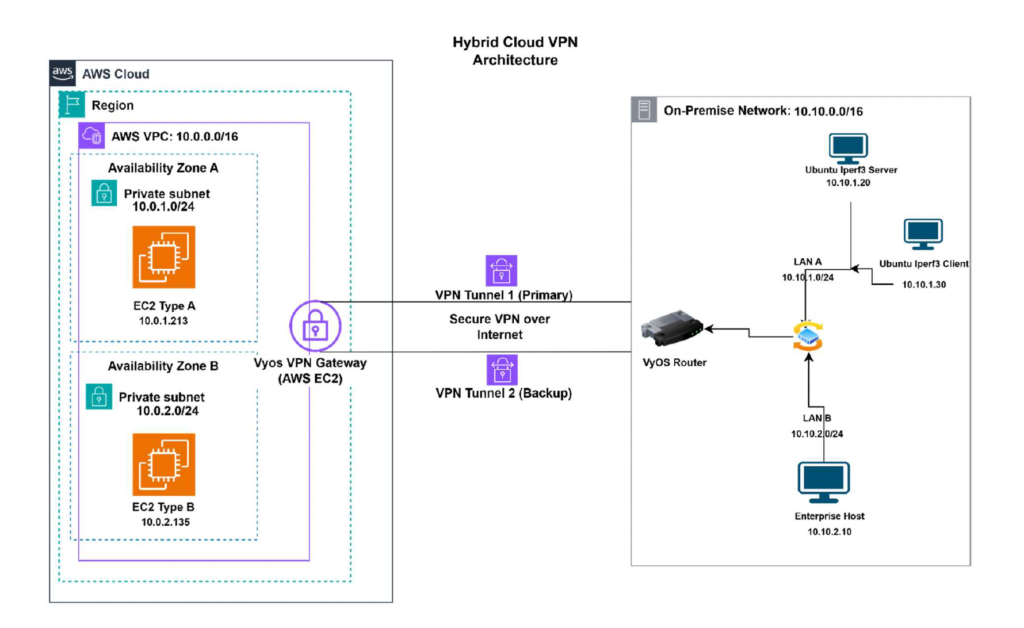
The Setup: Hybrid Cloud VPN
In this deployment :
- AWS VPC: 10.0.0.0/16
- On-prem network: 10.10.0.0/16
- VyOS routers on both ends
- EC2 instances across subnets
- Site-to-site VPN over the internet
The goal was simple: establish secure communication between cloud and on-prem environments.
The Problem: Tunnel Up, No Traffic
The VPN appeared connected, yet no traffic was passing between the networks.
This is a frequent and often misunderstood VPN problem.
“Connected” does NOT guarantee it’s functioning properly.
IPsec: Powerful but Complex
IPsec is the standard for enterprise VPNs and is widely supported across platforms.
However, it comes with complexity:
- Phase 1 (IKE) and Phase 2 configurations
- Encryption and hashing algorithms
- Tunnel policies and routing rules
- Firewall and security configurations
Even when everything appears correct, issues can still occur.
Where Things Break
In this case, the issue was caused by NAT (Network Address Translation) .
IPsec relies on protocols such as IKE and ESP, which are sensitive to NAT traversal. Without proper handling, traffic may be translated before reaching the VPN endpoint, breaking communication.
This leads to “working” tunnels that silently fail.
WireGuard: A Simpler Approach
WireGuard simplifies VPN deployment significantly.
Instead of complex multi-phase setups, it uses:
- Public and private keys
- Peer definitions
- Allowed IP ranges
That’s it.
Why It Works Better
WireGuard operates over a single UDP port, making it far more effective in NAT environments .
This results in:
- Faster setup
- Easier troubleshooting
- More consistent connectivity
Performance Comparison
Testing with iperf3 showed:
- WireGuard achieved higher throughput
- Lower latency
- Faster responsiveness
- IPsec provided stronger long-term stability
The differences weren’t extreme, but they were enough to highlight key trade-offs.
WireGuard vs IPsec: Quick Comparison
| Feature | WireGuard | IPsec |
|---|---|---|
| Setup | Simple | Complex |
| Performance | High | Moderate |
| NAT Handling | Better | Sensitive |
| Stability | Good | Strong |
| Usage | Growing | Standard |
What This Means for Your Business
If your VPN is poorly designed, you may experience:
- Intermittent connectivity issues
- Slow performance between office and cloud
- Increased troubleshooting time
- Hidden downtime
Choosing the right VPN, and configuring it correctly, can prevent these problems entirely.
Key Takeaways
- Network environment plays a major role in VPN performance
- NAT can break IPsec even when tunnels appear connected
- Simpler configurations reduce errors
- Real-world testing is critical
Need Help With VPN or Cloud Connectivity?
If your VPN is unreliable, slow, or just not working, we can help.
At AAA NetworkX, we design and troubleshoot real-world network environments, including:
Network performance optimization
Site-to-site VPNs (WireGuard & IPsec)
Firewall and security configuration
About the Author
Edberg Hammond is a network and cloud specialist at AAA NetworkX, specializing in hybrid cloud networking, VPN deployment, and secure infrastructure design.
He has hands-on experience solving real-world issues such as VPN tunnels that connect but fail to pass traffic, helping businesses avoid downtime and performance issues.
Based in Edmonton, Edberg works with organizations to design and troubleshoot reliable, scalable IT environments.
Cybersecurity for Small Businesses in Edmonton: How to Reduce Risk and Protect Operations
Cybersecurity for small businesses in Edmonton is crucial in today’s digital landscape. With the increasing number of cyber threats targeting local enterprises, it is essential for small business owners to implement effective security measures. Protecting sensitive data, customer information, and business operations from cyber attacks can help maintain trust and ensure long-term success. By investing in cybersecurity solutions tailored to the needs of small businesses in Edmonton, companies can safeguard their assets and stay ahead of potential risks.
For businesses in Edmonton, the impact of a cyber incident can be serious. Downtime, lost files, compromised email accounts, and reputational damage can all disrupt operations and create avoidable costs. A practical cybersecurity strategy helps reduce these risks and gives business owners more confidence in their systems.
Why Small Businesses Are Frequently Targeted
Many small businesses assume they are too small to attract cybercriminals. In reality, attackers often look for easier targets rather than larger ones. Businesses with weak passwords, outdated systems, unmonitored networks, or poorly secured remote access are more vulnerable to common threats.
Without the right protections in place, a single phishing email or compromised login can lead to data loss, unauthorized access, or extended downtime. For smaller organizations, even one security incident can have a major operational impact.
Common Cybersecurity Risks for Small Businesses
One of the most common threats is phishing. These attacks often arrive through email and are designed to look legitimate. An employee may click a link, open an attachment, or enter credentials into a fake login page without realizing it.
Weak password practices are another major issue. Reused passwords or simple login credentials make it easier for attackers to gain access to email, cloud platforms, and internal systems.
Many small businesses also rely on basic networking equipment that is not designed for business-grade protection. Without proper firewall configuration, monitoring, and access controls, threats can go undetected.
Backups are another weak point. Some businesses believe they are protected because backups exist, but if those backups are not isolated, monitored, and tested, they may not be usable when needed most.
What a Strong Small Business Cybersecurity Foundation Looks Like
A strong cybersecurity foundation begins with secure access. This includes using strong passwords, multi-factor authentication, and limiting access based on employee roles and responsibilities. Not every user should have access to every system.
Network protection is also essential. A properly configured business firewall helps control traffic, reduce exposure, and detect suspicious activity before it becomes a larger problem.
Endpoint protection helps secure laptops, desktops, and mobile devices used by staff. This is especially important for businesses with remote or hybrid work arrangements.
Regular patching and updates also play a critical role. Outdated operating systems, applications, and firmware can create vulnerabilities that attackers are quick to exploit.
Finally, businesses need reliable backup and recovery processes. Backups should be secure, monitored, and tested regularly so that recovery is possible if systems are disrupted.
Why Reactive IT Support Is Not Enough
Many small businesses only address cybersecurity after a problem appears. By that point, the damage may already be done. Recovering from a breach or ransomware incident is often far more expensive than putting the right protections in place early.
A proactive approach helps identify weaknesses before they affect operations. This includes monitoring systems, reviewing access controls, maintaining updates, and improving security over time as the business grows.
Cybersecurity should not be treated as a one-time fix. It is an ongoing part of maintaining a stable and reliable IT environment.
How AAA NetworkX Supports Small Business Security
AAA NetworkX helps small businesses build practical cybersecurity foundations that align with their daily operations. The goal is not unnecessary complexity. The goal is to reduce risk, improve visibility, and support business continuity. Learn more about our services.
This can include securing networks, improving access controls, strengthening endpoint protection, reviewing backups, and helping businesses move from reactive support to a more structured and proactive model.
For small businesses in Edmonton, this kind of support helps create a more secure and dependable IT environment without overengineering the solution.
Conclusion
Cybersecurity is no longer optional for small businesses. As digital systems become more central to day-to-day work, the risks associated with weak security continue to grow. A practical, well-managed cybersecurity strategy helps protect business data, reduce downtime, and support long-term stability.
If your small business needs help improving cybersecurity, AAA NetworkX can help. Contact AAA NetworkX today to learn how a stronger security foundation can protect your systems and support your operations.