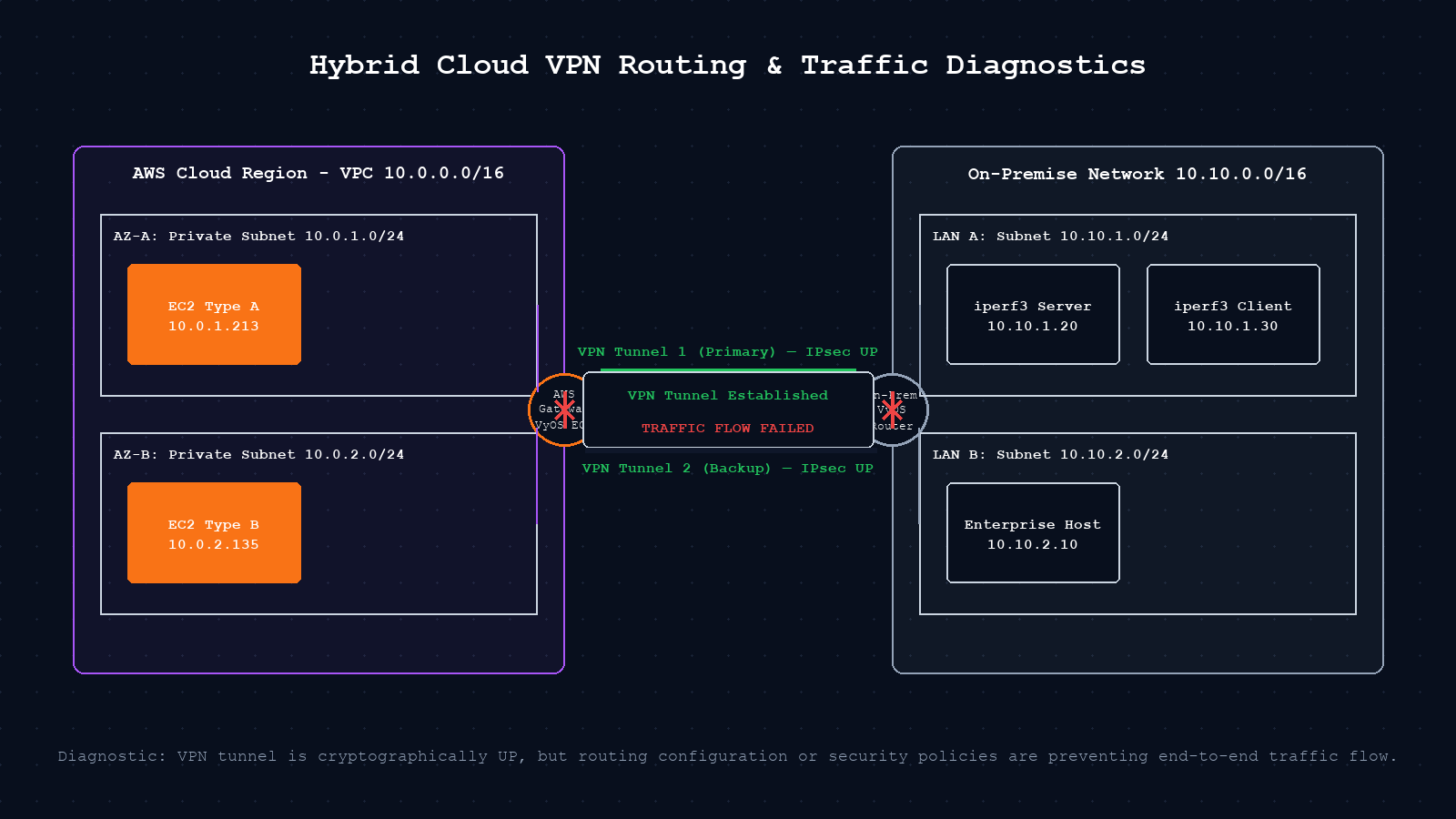
The tunnel is up. Both ends report Phase 1 established. The monitoring dashboard is green. And yet nothing is reaching the other side. If you have built a single hybrid cloud VPN, you have probably hit this scenario. It is one of the more frustrating problems in cloud networking because every surface-level signal says everything is fine. This post walks through the real reasons VPN tunnels report up while traffic fails, with the specific checks for an AWS hybrid environment.
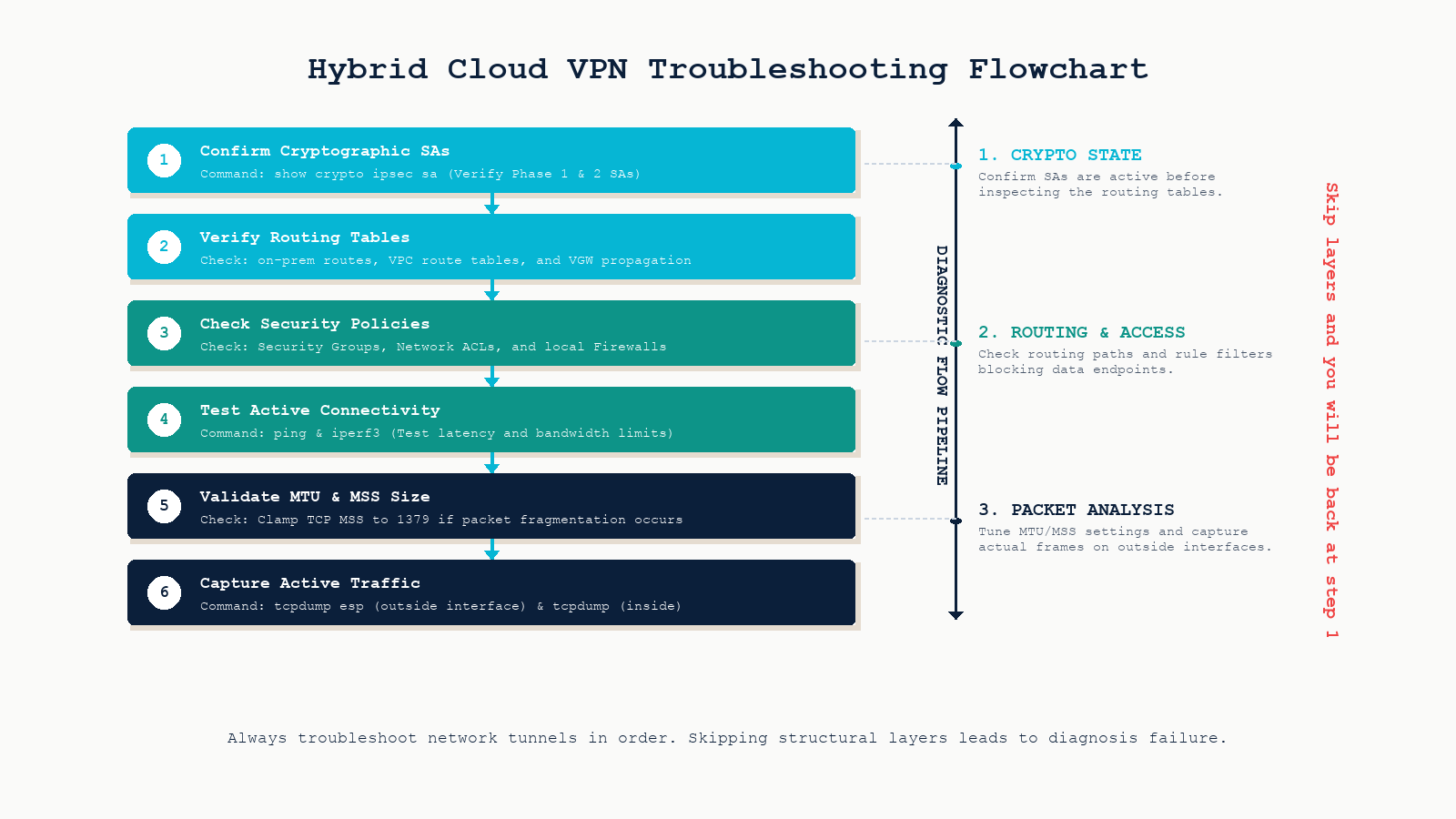
The short version. A tunnel reporting “up” only confirms that IKE Phase 1 negotiated successfully. It does not confirm Phase 2, route propagation, security group acceptance, or that the MTU survives end to end. The five things to check, in order: Phase 2 SA, routes both directions, security groups and NACLs, an actual end-to-end test with ping and iperf3, and finally MTU and MSS clamping. Skip a layer and you will be back at step 1 in two hours.
Tunnel up is not the same as traffic flowing
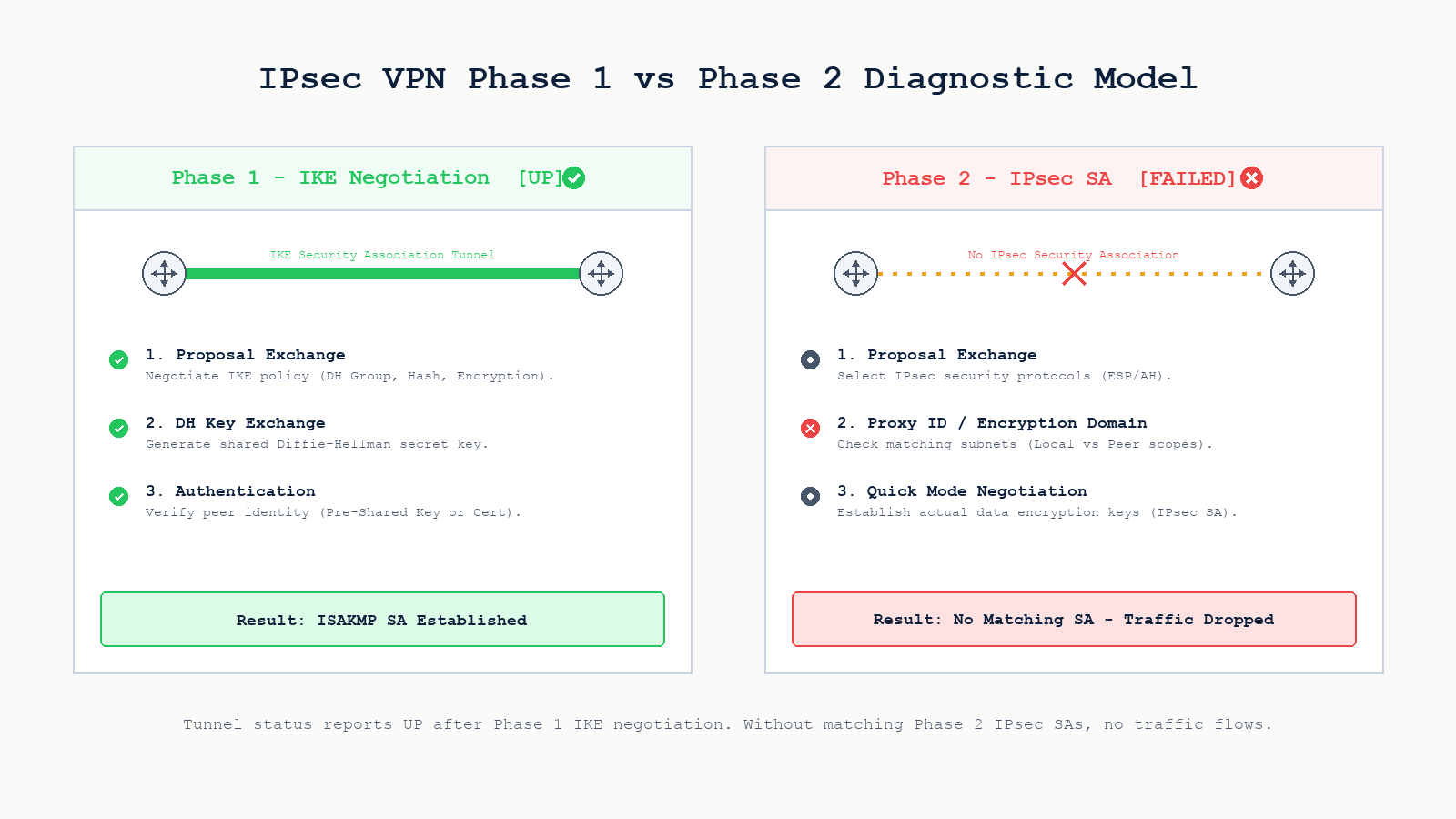
IPsec runs in two phases. Phase 1 (IKE) establishes a secure control channel between the two VPN endpoints. It authenticates peers (pre-shared key or certificate), negotiates encryption parameters for the control channel, and produces the ISAKMP security association. Most monitoring tools and dashboards consider the tunnel “up” as soon as Phase 1 completes.
Phase 2 (IPsec SA) is what actually carries user traffic. It negotiates the encryption domain (also called proxy IDs or traffic selectors), agrees on encryption and integrity algorithms for the data plane, and produces a pair of IPsec security associations (one per direction). If Phase 2 fails or is mismatched, the tunnel still looks up but no user traffic ever crosses it.
The most common Phase 2 failure on AWS site-to-site VPNs is a proxy ID mismatch. AWS accepts 0.0.0.0/0 on both sides by default with BGP, but if you have configured a static route policy-based VPN, the encryption domain on the on-prem side must exactly match the CIDR pair AWS expects. On a Cisco ASA or VyOS device, this means the crypto ACL or peer subnet definitions must mirror what is configured in the AWS Site-to-Site VPN connection.
Run these on the on-prem side to verify Phase 2 actually came up:
# Cisco IOS / IOS-XE
show crypto isakmp sa
show crypto ipsec sa peer <aws-public-ip>

# VyOS / Vyatta
show vpn ipsec sa
show vpn ipsec status

# strongSwan
ipsec statusall
swanctl --list-sas
Look at the byte counter on each SA. If encrypt increments but decrypt does not, traffic is leaving but nothing is coming back. That points at a return-path problem (routing, NAT, or security group on the AWS side), not at the tunnel itself.
NAT traversal silently breaks things
If the on-prem VPN endpoint sits behind a NAT device, IKE detects this during Phase 1 and switches to NAT-Traversal (NAT-T), which encapsulates the ESP packets inside UDP port 4500. Standard IKE uses UDP port 500, ESP itself is IP protocol 50 (no port). When NAT is in play, both ends must support NAT-T and the upstream NAT must permit UDP 4500 outbound and the corresponding return traffic.
Common symptoms. Phase 1 completes (UDP 500 is open). Phase 2 fails or comes up briefly then dies. show crypto ipsec sa shows the encapsulation as “UDP-Encaps”. Packet captures on the outside interface show UDP 4500 going out but no return. The NAT box upstream may be aggressively timing out the UDP session because IKE keepalives are not getting through.
The fix is usually a combination of opening UDP 500 and 4500 outbound on every device in the path, ensuring DPD or IKE keepalives are short enough (10 to 30 seconds typical) to keep the NAT session alive, and confirming both peers actually have NAT-T enabled. Modern protocols like WireGuard avoid most of this entirely because they only use a single UDP port and tolerate NAT more gracefully, but most enterprise hybrid clouds are still on IPsec.
Route propagation is the silent killer on AWS
A tunnel can be perfectly healthy and still pass zero traffic if the routes are not in place on both ends. On AWS site-to-site VPN with a Virtual Private Gateway (VGW) or Transit Gateway (TGW), there are three places routes have to be correct.
The on-prem route table. Your AWS CIDR (10.0.0.0/16 in the lab) must have a next hop pointing at the VPN endpoint. On a VyOS router that is typically a route via the tunnel interface or via the AWS public IP if policy-based.
The VPC route table. The on-prem CIDR (10.10.0.0/16) must have a route pointing at the VGW or TGW attachment. Without this, return traffic from the EC2 instance has no idea how to get back. The most common version of this mistake: someone enables BGP on the VPN connection but forgets to enable route propagation on the VPC route table. The routes are learned by the VGW but never installed in the subnet route table.
Check it from the AWS CLI:
# Verify VGW has learned the on-prem prefix via BGP
aws ec2 describe-vpn-connections \
  --vpn-connection-ids vpn-0123456789abcdef0 \
  --query 'VpnConnections[*].VgwTelemetry'

# Verify the route is propagated into the subnet route table
aws ec2 describe-route-tables \
  --route-table-ids rtb-0123456789abcdef0 \
  --query 'RouteTables[*].PropagatingVgws'
The Transit Gateway route table (if you are using TGW). TGW does not automatically share routes across attachments. The VPC attachment and the VPN attachment must both be associated with a route table that has the right propagations enabled. Static routes work too but get forgotten when new VPCs are added.
Overlapping CIDRs. If your on-prem network and any AWS VPC use overlapping ranges (common with 10.0.0.0/16 everywhere), one side will simply prefer its local route and never send traffic across the VPN. The fix is re-IPing one side, which nobody wants to do mid-project.
Security groups and NACLs are quiet
AWS security groups silently drop traffic that does not match an inbound rule. Unlike on-prem firewalls, they generate no syslog by default. A common scenario: the tunnel is up, routes are propagated, the on-prem host can reach the EC2 ENI, but the EC2 security group only allows SSH from the corporate office public IP, not from the on-prem RFC1918 range that now arrives via VPN.
Check both directions. Inbound on the EC2 security group must allow traffic from the on-prem CIDR. Outbound rules on most security groups are wide open by default, but custom ones can block return traffic. The NACL on the subnet is stateless, so it needs an explicit allow in both directions including the ephemeral port range (1024 to 65535) for the return packets.
On the on-prem side, make sure the local firewall is not stripping or blocking the unencrypted inner traffic after it has been decrypted by the VPN endpoint. This is especially common when the VPN terminates on a router separate from the perimeter firewall.
Test end-to-end with iperf3, not just ping
Ping is a great first test because it confirms reachability and prints round-trip latency. It is a terrible final test because most VPNs let ICMP through cleanly even when TCP is broken by MTU or MSS issues. Always finish with a real TCP throughput test.
# On the AWS EC2 instance (server)
iperf3 -s

# On the on-prem host (client)
iperf3 -c 10.0.1.213 -t 30 -P 4

# To check MTU and fragmentation issues
ping -M do -s 1372 10.0.1.213    # 1372 + 28 (ICMP/IP) = 1400 byte packet
mtr -n 10.0.1.213                 # path latency per hop
If ping works but iperf3 stalls after a few hundred KB, you have an MTU problem. The VPN encapsulation adds overhead (around 73 bytes for IPsec ESP with AES-GCM), so a 1500-byte packet from the host becomes a 1573-byte packet on the wire. If anything in the path silently drops oversized packets without ICMP, TCP stalls. The fix is MSS clamping on both VPN endpoints, typically to 1379 or 1380 for AWS site-to-site VPN.
Troubleshooting in order
When the tunnel is up but no traffic flows, walk the layers in order. Skipping ahead wastes hours.
Step 1. Confirm both Phase 1 AND Phase 2 SA exist with non-zero byte counters in both directions. If the decrypt counter is zero, the problem is on the return path.
Step 2. Verify routes both directions. Walk the on-prem route table for the AWS CIDR, the VPC route table for the on-prem CIDR (including BGP propagation), and TGW route tables if used.
Step 3. Check security groups and NACLs on the AWS side, plus any inner firewall on the on-prem side.
Step 4. Run an actual end-to-end test. Ping first, then iperf3 for throughput, then a real application connection.
Step 5. If small packets work and large packets fail, clamp MSS on both VPN endpoints.
Step 6. Capture on both sides if still stuck. tcpdump -i eth0 esp on the outside interface confirms encrypted traffic is flowing. tcpdump -i <inside> host <target> on both ends shows where the decrypted packet stops.
Key takeaways
- A tunnel reporting “up” only confirms Phase 1. Always verify Phase 2 SA before suspecting anything else.
- NAT-T problems present as flaky tunnels with frequent re-keying. Open UDP 4500 and tune keepalives.
- The single most common AWS VPN problem is missing route propagation on the VPC route table.
- Security groups drop silently. Both directions need explicit allow rules for the on-prem CIDR.
- Ping is not a sufficient end-to-end test. Use iperf3 to catch MTU issues that ICMP slips through.
- Walk the layers in order. Skipping ahead wastes more time than the methodical approach takes.
FAQ
Why is my AWS VPN tunnel up but I cannot ping my EC2 instance?
Three likely causes in order of frequency: missing route propagation on the VPC route table, the EC2 security group does not allow ICMP from your on-prem CIDR, or the NACL on the subnet is blocking the return traffic. Verify all three before suspecting the VPN itself.
Should I use BGP or static routes on AWS site-to-site VPN?
BGP. Static is fine for tiny deployments but fails open during failover and does not scale. BGP enables automatic failover between the two tunnels AWS gives you, supports route propagation into the VPC route table, and works correctly with Transit Gateway. The only reason to choose static is if the on-prem device cannot do BGP.
What MSS should I clamp to for AWS site-to-site VPN?
1379 bytes is the AWS-recommended value, accounting for the IPsec ESP overhead with AES-GCM. Set this on both the on-prem VPN endpoint and ideally on the EC2 instances themselves (or via TGW MSS clamping if supported). Test with iperf3 after clamping to confirm sustained throughput.
Is WireGuard a viable alternative to IPsec for hybrid cloud?
For point-to-point connectivity between a single on-prem site and a cloud VPC, yes. WireGuard’s simpler design and single UDP port make NAT and firewall traversal much cleaner. The catch is that AWS site-to-site VPN does not natively support WireGuard. You would terminate WireGuard on an EC2 instance, which means losing AWS-managed redundancy and BGP integration. For most enterprise hybrid deployments, IPsec via VGW or TGW remains the practical choice.
Related posts
Designing or troubleshooting hybrid cloud connectivity
Reliable hybrid cloud connectivity needs more than a green tunnel light. It needs proper Phase 2 verification, route propagation discipline, security group hygiene, and end-to-end testing as part of every change. Our cloud networking practice has designed and operated hybrid VPN and Direct Connect deployments across AWS, Azure, and OCI for organizations across Western Canada. If you are stuck on a hybrid VPN that should work and does not, we will help you find it.
Last verified May 2026 by the aaanetworkx cloud networking practice. Originally drafted by Edberg Hammond.